“I have 2 monitors, each with a DVI-D plug in them. If I want to run 2 monitors, do I split the DVI signal the same way I would split an HDMI signal, or get a converter cable from HDMI to DVI ?”
Answer This Question
1-3 of 3 Answers
If you want to run 2 monitors the GPU on the PC has 3 Display Ports, 1 HDMI, and 1 DVI. Personally I prefer Display Port 1.2 connections, but all you have to do is use one monitor with DVI and the other with Display Port or HDMI. a converter cable will only cause input lag.
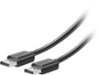
I would recommend:
Sorry, there was a problem. Please try again later.The only inputs on the monitors are dvi and vga. Looks like I need a new monitor
Sorry, there was a problem. Please try again later.Thank you for reaching out to us Jblueguy. When hooking up multiple displays, you will need 1 cable coming from the monitor and plugging it directly into the graphics card. If you have any further questions or concerns then please do not hesitate to give our tech support agents a call for any assistance; we're always happy to help. Tech support: (888)937-5582 -CyberpowerPC Support
Sorry, there was a problem. Please try again later.