“Is this Pc capable of 240Hz (I have a 240Hz monitor) and If so what cable would I need? DVI or HDMI? Or another type? Also what other cables will I need to purchase as this is my first PC.”
Answer This Question
1-3 of 3 Answers
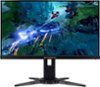
Most computer monitors don't go up to 240Hz because it is not really useful on a normal sized screen you would have as a monitor. So my point here is, are you sure you are using a computer monitor? if so try playing a game with it set to 240Hz on the screen you are using and then do the same game and all settings besides making it run at 120Hz or even less and you will notice you cant see a difference. If you are in fact using a flat screen or other TV style as a monitor you should be aware that there is a VERY BIG difference between a TV of any kind VS a actual computer monitor with the main issue being the screen or TV response rate which is measured in a value followed by "ms" that tells you how mast the image will actually appear on the screen. Computer monitors have MUCH MUCH faster response times. Even lower end monitors will out perform any TV screen in pretty much every aspect of performance. In any case though the answer is still going to be the same, you wont even be able to see a difference from 120Hz to 240Hz. The biggest noticeable change is going from 60Hz to 120Hz which is really only there to help a TV not have whats called ghosting where an image has a blur from fast moving images or of a fast moving object. This doesn't happen much if at all on a monitor due to how everything gets processed from the game software to the GPU and down whatever form of connection you have from the GPU to the screen in use. Yes this is the long version, but it doesn't make sense until it is broken down into blocks of information that fit together as they are described. I hope I helped you out or at least help someone else out with this information. I have added some recommended monitors for you to see the difference of high end monitors vs the specs you can find on whatever screen you currently are using.
I would recommend:
Sorry, there was a problem. Please try again later.Thanks for reaching out Mwilson34. This PC should be capable of running a 240Hz monitor. You will most likely need a DisplayPort cable or a cable that supports 240Hz. If you have any further questions or concerns then please do not hesitate to give our tech support agents a call for any assistance; we're always happy to help. Tech support: (888)937-5582 -CyberpowerPC Support
Sorry, there was a problem. Please try again later.Use a digital port or dvi cable for the best results. HDMI cant go to 240Hz.
Sorry, there was a problem. Please try again later.