A:AnswerHello, recommend performing the Audyssey setup. During set-up, the receiver will ask to select the speaker layout. Here you will want to select 2 subwoofers.
A:AnswerYes, with the Denon's zone 2 feature, you can run two zones independently. The Polk Audio Atrium 4 speakers will work perfectly fine. With HEOS you can control zone 2 via a smart device/smart phone.
A:AnswerHello, not sure what wireless speakers you are referring to. The Denon AVR-S750H is compatible with Denon HEOS speakers for streaming music throughput your home. Also compatible with Alexa/Google Assistance/Apple HomePod. You may be referring to a wireless surround kit with wireless amplifier that would be compatible with any surround receiver.
A:AnswerHello, the Denon AVR-S750H is compatible with Apple HomePod.
-Alexa / Google Voice Assistant / Apple HomePod Yes / Yes / Yes
Heos is another great option. Denon Heos speakers can be added for whole house music playback. The AVR-S750H has Heos built-in.
This will only be for music and cannot be used as wireless surround speakers.
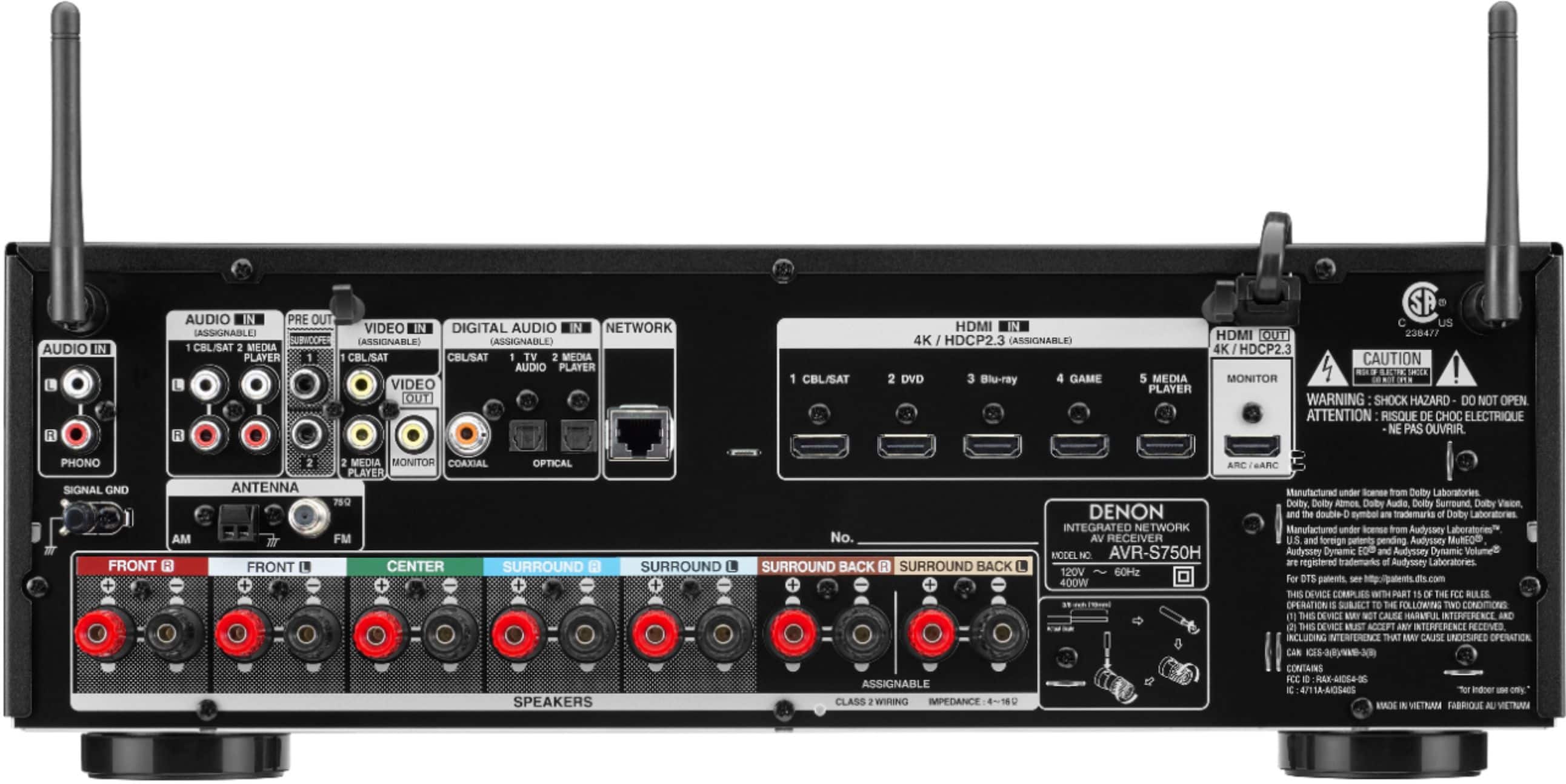
A:AnswerThe Denon provides Analog or Digital inputs allowing it to be compatible with many different devices. Check the Karaoke device to be sure it has either an optical out, digital coax, or analog audio output.
A:AnswerHello and thank you for your question. Yes, the Denon ARV-S750H has zone 2 ability. 5.1 surround sound system in the main zone and 2.0 in second zone using the surround back channels re assigned for zone 2 in settings. Watch a movie in the main zone and listen to music in the second. You can also listen to music in both zones playing the same or different source.
A:AnswerHello and thank you for your question. Yes, the Denon ARV-S750H has zone 2 ability. 5.1 surround sound system in the main zone and 2.0 in second zone. Watch a movie in the main zone and listen to music in the second. You can also listen to music in both zones playing the same or different source.
A:AnswerHello and thank you for your question. No app required for normal day to day use. Denon App will allow you to control the unit with your phone if you so choose to. The HEOS app is required to stream music via Wi-Fi. But you can always use Bluetooth to stream as well.
A:AnswerHello and thank you for your question., A firestick will allow you to stream video content. Wi-Fi in the Denon will allow you to stream music. The Denon alone does not stream video via Wi-Fi.
A:AnswerHello and thank you for your question. If the subwoofer is powered(built in amplifier) connect an RCA subwoofer cable to the Subwoofer Pre Out section located on the back of the receiver. Connect other end to the subwoofer LFE in. Please feel free to reach out to our customer support team with any further questions.
A:AnswerHello, the AVR-S750H will except Banana plugs or simply unscrew the binding post speaker terminal and insert bare wire. The Polk Audio speaker terminals are capable of the same as the receiver. 16 Gauge speaker wire will work just fine.
A:AnswerHello and thank you for your question. The max processing and amplification of the Denon AVR-S750H is 7 channels. If you want to expand music in other rooms wirelessly, you will need to add our HEOS speakers. It will not pair with the JBL.
A:AnswerHello and thank you for your question. Yes, a 5.1 system can be configured in the menu settings. This can also be done using the Audyssey auto setup.
A:AnswerHello and thank you for your question. Yes, zone 2 can be powered on or off by the remote or the unit it self. You can also select the same or different source then the main zone.