1-3 of 3 Answers
Contact Fitbit and they can tell you how to reset it and walk you through it. then they will wait to see if is working and then go from there.
Sorry, there was a problem. Please try again later.You have to tap and repeat the taping to bring up other information. You also can slide left several times to get additional information.
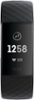
Sorry, there was a problem. Please try again later.My husband's did the same thing. I had to reset it and worked again. Here are the steps I took for restarting your tracker: 1. Plug the charging cable into the USB port on your computer or any UL-certified USB wall charger. 2. Clip the other end of the charging cable to the port on the back of the tracker. The pins on the charging cable must lock securely with the port. 3. Make sure the button on your tracker is aligned with the button opening on the charging cable. You’ll know the connection is secure when the tracker vibrates and you see a battery icon on your tracker’s display. 4. Press and hold the button on your tracker for 8 seconds. When you see a smile icon and the tracker vibrates, the tracker restarted. 5. Unplug your tracker from the charging cable.
Sorry, there was a problem. Please try again later.