“How do I force a shutdown? I don’t see a power button”
Answer This Question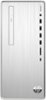
1-1 of 1 Answer
The power button on the desktop is the top button on the right hand side of this HP Pavilion Desktop. Or you can turn off the computer through Windows. The easiest way is to select the Windows button on the keyboard. It is to the left of the space bar. A menu will pop up. The power symbol will be on the bottom left. Click on the power icon and select shutdown.
Sorry, there was a problem. Please try again later.