A:AnswerThank you for considering JVC for your car audio needs! We would like to learn more about this specific compatibility issue, so please contact us at 1-800-252-5722 or email us at [email protected]. Thank you for choosing JVC—we look forward to helping you upgrade your car audio experience! Best regards, The JVC Customer Relations Team
A:AnswerThank you for considering JVC for your car audio needs! Yes, the JVC KW-M590BT can display the rear camera view even when the vehicle is not in reverse. This feature is accessible through the unit's camera settings. To enable this functionality: Access the Camera Settings: Press the [MENU] button on the unit to bring up the main menu. Navigate to Camera Setup: From the menu, select the 'Camera' option to enter the camera settings. Enable Rear Camera View: Within the camera settings, there should be an option labeled 'Rear Camera View' or similar. Set this option to 'ON' to allow manual activation of the rear camera view. Once enabled, you can manually view the rear camera feed by selecting the appropriate input or source on the head unit, even when the vehicle is not in reverse gear. You can also reach out to our team for assistance at 1-800-252-5722 or email us at [email protected]. Thank you for choosing JVC—we look forward to helping you upgrade your car audio experience! Best regards, The JVC Customer Relations Team
A:AnswerThank you for considering JVC for your car audio needs! No, the JVC KW-M590BT receiver does not support wireless Android Auto. To use Android Auto with this model, you need to connect your Android smartphone via a USB cable. You can also reach out to our team for assistance—we’re happy to verify compatibility or answer any questions. Please contact us at 1-800-252-5722 or email us at [email protected] with your vehicle’s make, model, and year, and we’ll guide you from there. Thank you for choosing JVC—we look forward to helping you upgrade your car audio experience! Best regards, The JVC Customer Relations Team
A:AnswerThank you for considering JVC for your car audio needs! Ensuring your product is compatible with your vehicle is essential, and we’re here to help. To check if the JVC KW-M590BT fits your car, we recommend using a fit guide, which provides detailed compatibility information. You can find that on the product pages on Bestbuy.com. We also recommend connecting with a Geek Squad install professional at your local Best Buy store. You can also reach out to our team for assistance—we’re happy to verify compatibility or answer any questions. Please contact us at 1-800-252-5722 or email us at [email protected] with your vehicle’s make, model, and year, and we’ll guide you from there. Thank you for choosing JVC—we look forward to helping you upgrade your car audio experience! Best regards, The JVC Customer Relations Team
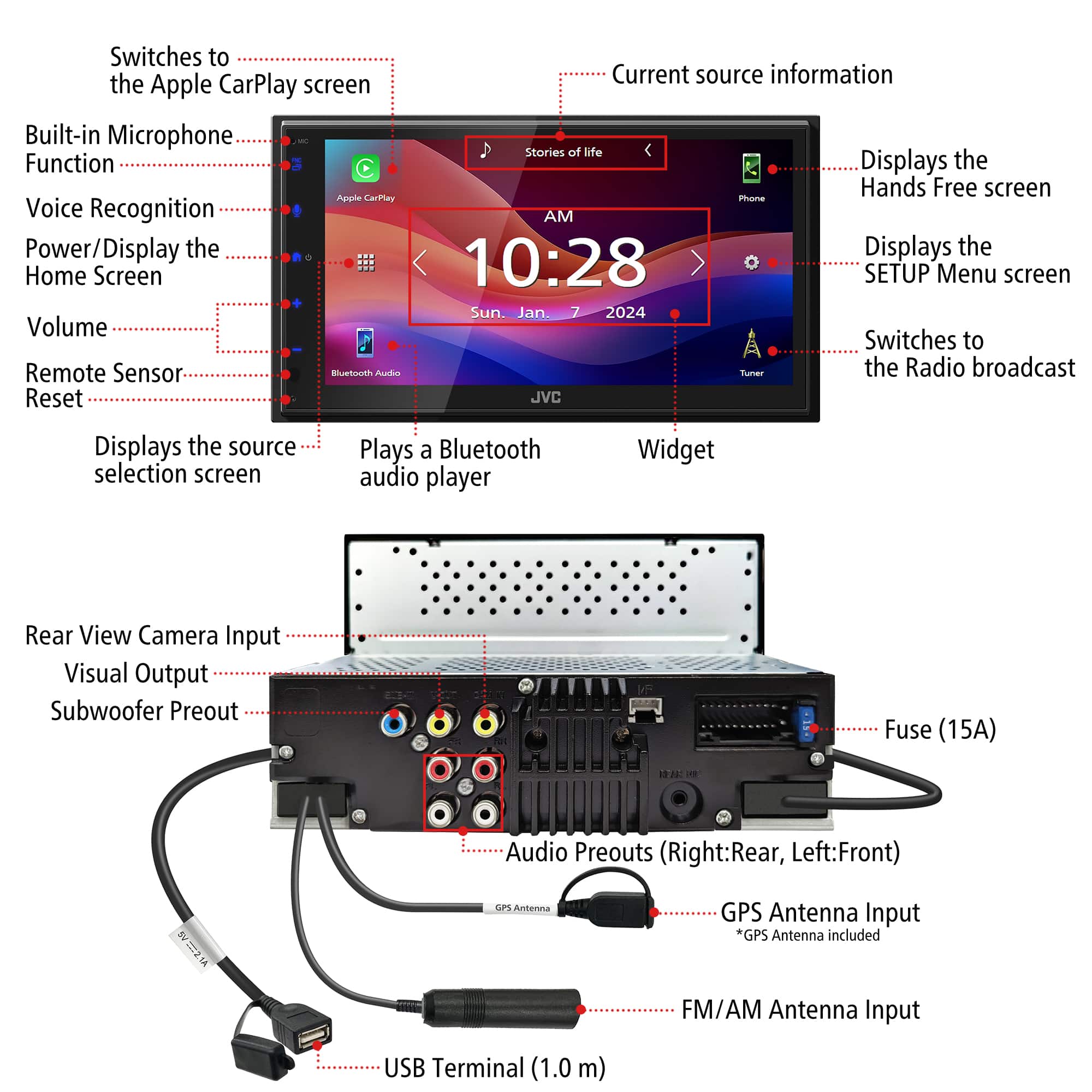
A:AnswerThank you for considering JVC for your car audio needs! The JVC KW-M590BT receiver does not include a backup camera by default. However, it features a dedicated rear camera input, allowing you to connect an optional backup camera of your choice, which are sold separately. For installation, we suggest you connect with a Geek Squad professional installer at your local Best Buy store to inquire about their install services. You can also reach out to our team for assistance—we’re happy to verify compatibility or answer any questions. Please contact us at 1-800-252-5722 or email us at [email protected] with your vehicle’s make, model, and year, and we’ll guide you from there. Thank you for choosing JVC—we look forward to helping you upgrade your car audio experience! Best regards, The JVC Customer Relations Team
A:AnswerThank you for considering JVC for your car audio needs! Yes, you can connect an Android smartphone to the JVC KW-M590BT receiver to listen to music, via Bluetooth. You can also reach out to our team for assistance—we’re happy to verify compatibility or answer any questions. Please contact us at 1-800-252-5722 or email us at [email protected] with your vehicle’s make, model, and year, and we’ll guide you from there. Thank you for choosing JVC—we look forward to helping you upgrade your car audio experience! Best regards, The JVC Customer Relations Team
A:AnswerThank you for considering JVC for your car audio needs! We suggest you reach out to Best Buy in regard to using their credit card for purchases. If you have any product-specific questions, please contact us at 1-800-252-5722 or email us at [email protected]. Thank you for choosing JVC—we look forward to helping you upgrade your car audio experience! Best regards, The JVC Customer Relations Team
A:AnswerThank you for considering JVC for your car audio needs! Ensuring your product is compatible with your vehicle is essential, and we’re here to help. To check if the JVC KW-M590BT fits your car, we recommend using a fit guide, which provides detailed compatibility information. You can find that on the product pages on Bestbuy.com. We also recommend connecting with a Geek Squad install professional at your local Best Buy store. You can also reach out to our team for assistance—we’re happy to verify compatibility or answer any questions. Please contact us at 1-800-252-5722 or email us at [email protected] with your vehicle’s make, model, and year, and we’ll guide you from there. Thank you for choosing JVC—we look forward to helping you upgrade your car audio experience! Best regards, The JVC Customer Relations Team
A:AnswerThank you for considering JVC for your car audio needs! The JVC KW-M590BT receiver does not come with a backup camera by default. However, it includes a rear camera input, allowing you to connect an optional backup camera of your choice, which are sold separately. You can also reach out to our team for assistance—we’re happy to verify compatibility or answer any questions. Please contact us at 1-800-252-5722 or email us at [email protected] and we’ll guide you from there. Thank you for choosing JVC—we look forward to helping you upgrade your car audio experience! Best regards, The JVC Customer Relations Team
A:AnswerThank you for reaching out to us, regarding the JVC KW-M590BT receiver. Best Buy owns the installation portion of this transaction, so you would have to discuss that with the Geek Squad professional installer or store manager. If you do have any product specific questions, you can also contact us at 1-800-252-5722 or email us at [email protected]. Thank you for choosing JVC—we’re here to ensure you’re fully satisfied with your product! Best regards, The JVC Customer Relations Team
A:AnswerThank you for considering JVC for your car audio needs! Yes, you can add a separate SiriusXM tuner to your JVC KW-M590BT receiver. This model is SiriusXM Ready, meaning it supports satellite radio when paired with the appropriate tuner module. You should connect with a Geek Squad installation professional at your local Best Buy, to determine any additional parts & labor that might be required for your specific vehicle. You can also reach out to our team for assistance—we’re happy to verify compatibility or answer any questions. Please contact us at 1-800-252-5722 or email us at [email protected] with your vehicle’s make, model, and year, and we’ll guide you from there. Thank you for choosing JVC—we look forward to helping you upgrade your car audio experience! Best regards, The JVC Customer Relations Team