A:Answer Hey Peter,
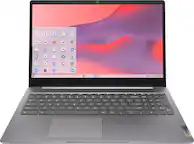
Since the seller hasn't listed the model / part number for this IdeaPad 3 Chromebook 15, we cannot verify the specifics of the port selection, but we can share that this series of device should feature 2x USB-A 3.2 ports, one USB-C 3.2 port that supports data transfer, Power Delivery 3.0, and DisplayPort 1.4, along with an HDMI 1.4 port, a headphone / microphone combo jack (3.5mm), and a microSD card slot.
Please feel free to reach out to us with any other questions!


![esc 1 2 3 4 5 6 7 8 9 0 - = backspace tab q w e r t y u i o p [ ] \ a s d f g h j k l ; ' enter shift z x c v b n m , . / shift 0 - = alt ctrl spacebar page up page down home end insert delete Lenovo](https://pisces.bbystatic.com/image2/BestBuy_US/images/products/33838ed4-31e4-464e-ac75-b3762c0b6b6e.jpg)
![Sure, here is the corrected and grouped text from the image:
**Top Row:**
- esc
- 1 2 3 4 5 6 7 8 9 0 -
- backspace
**Second Row:**
- tab
- q w e r t y u i o p
- [ ] \
**Third Row:**
- ctrl
- a s d f g h j k l ;
- enter
**Fourth Row:**
- shift
- z x c v b n m , . /
- shift
**Function Keys:**
- F1 F2 F3 F4 F5 F6 F7 F8 F9 F10 F11 F12
**Special Keys:**
- alt
- space
- alt
**Additional Keys:**
- delete
- insert
- page up
- page down
- home
- end
**Screen:**
- Google Chrome, Docs, Drive, Slides, Sheets, Meet, Photos, YouTube Music, YouTube TV, Chrome, Google, My stuff, Google TV, Google Chat, Explore, Maps, Photos, Camera, Camera, Settings, News, Tasks, Calendar, Files
**Bottom Right:**
- Lenovo](https://pisces.bbystatic.com/image2/BestBuy_US/images/products/191c1522-c3e4-45e5-a8d7-90ec3e575a0c.jpg)