“I have installed this on two different HDMI ports (monitor and TV) and I can't get any sound. Anyone have any guesses or ideas on how I can get sound? Thanks!”
Answer This Question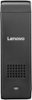
1-3 of 3 Answers
You can follow the link below to see some diagnostic tips to check your system. You should be able to get sound through your TV’s speakers, the Stick 300 does not have built in speakers. https://support.lenovo.com/us/en/products/Desktops-and-all-in-ones/300-Series/300-01iby/solutions/HT104471
Sorry, there was a problem. Please try again later.Go to control panel, sound settings and ensure the HDMI device is the default audio
Sorry, there was a problem. Please try again later.If your monitor or TV doesn't support audio over HDMI, you'll need to pair in bluetooth speakers or attach a USB audio device.
Sorry, there was a problem. Please try again later.