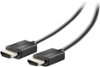
“How do I connect this to a tv? (Via hdmi) (also I have a humid to usb c but it doesn’t work, I am confused)”
Answer This Question
1-4 of 4 Answers
You should be able to directly connect the Lenovo Legion Tower 5 AMD Gaming Desktop to a TV via HDMI. Be sure to select as the video source on your TV screen, the HDMI port on the TV that you have the Legion Tower 5 connected to.
Sorry, there was a problem. Please try again later.There is an HDMI plug in the back of the pc that allows you to connect to a TV. It is located next to the Display Port. Once connected it should automatically go to the TV when HDMI source is selected on TV.
Sorry, there was a problem. Please try again later.You plug the hdmi wire from your TV to the back of your video card. You should have 3 DPi ports and 1 HDMI port on this graphics card (3060)
Sorry, there was a problem. Please try again later.If your tv has a hdmi connection buy a hdmi cable and connect the pc on the graphics card hdmi to the hdmi on the tv.
I would recommend:
Sorry, there was a problem. Please try again later.