






Black Friday is hereShop new DoorbustersShop now

Main Content

Questions & Answers

Your price for this item is $199.99
The comparable value price is $319.99
Page Showing 1-20 of 39 questions
  • QuestionDoes this tv work with spectrump app

    Asked by Anonymous.

    • Answer The Spectrum TV app is compatible with the webOS 25 TV Platform that the LG 43” Class UA7000 Series LED AI 4K UHD Smart webOS TV (2025), Model # 43UA7000PUB runs on, so the app can be downloaded and installed on the TV through the LG Content Store (App Store) feature found on the TV's home screen...^Ivan.

      Answered by LG Digital Customer Care

  • QuestionIs this Roku Stick Compatible? Sorry if I missed this in specs or earlier answers. The nickname is weird because I could not put anything else in--so value is what the site took. Felt I had to explain that. Thank you.

    Asked by value.

    • Answer There are multiple HDMI inputs so you can simply connect your Roku stick to one and designate that as your primary input that the TV always opens to

      Answered by BruceK

  • QuestionAre you able to mount TV to the wall ., I don't see any anchor points to fasten bracket..

    Asked by Echoandbear.

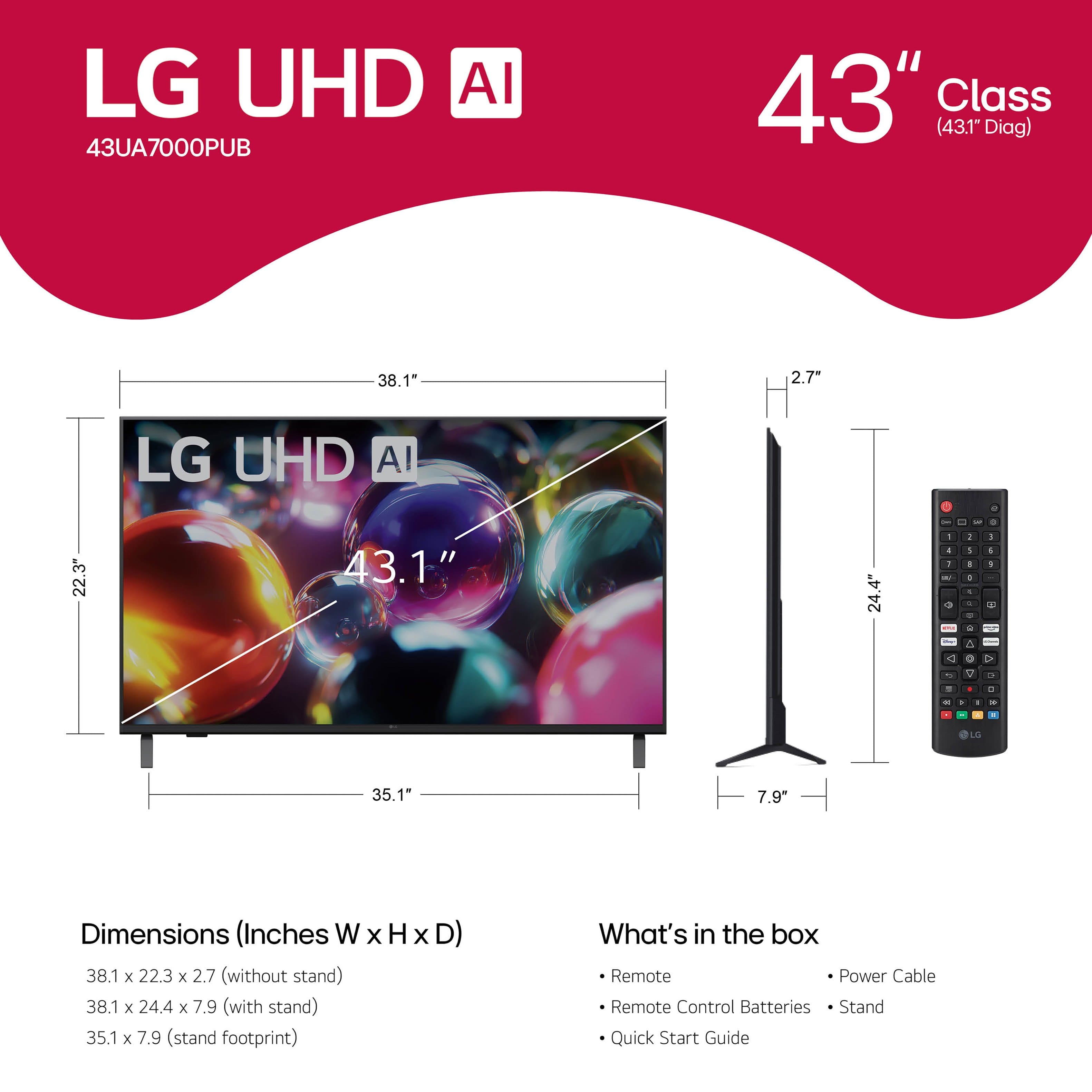
    • Answer Hello there. Thank you for sharing your inquiry about the LG 43-inch UA7000 Series 4K UHD Smart TV, Model #43UA7000PUB. We understand your inquiry about wall-mounting this unit. Yes, this TV is designed to be wall-mounted. The anchor points, or screw holes, are located on the back of the TV and comply with the VESA Mounting Standard of 200 x 200 mm. These holes may sometimes be covered by plastic plugs or caps when the TV is shipped. Please ensure the wall mount bracket you use is VESA-compatible with a 200 x 200 mm pattern. https://www.bestbuy.com/product/lg-43-class-ua7000-series-led-ai-4k-uhd-smart-webos-tv-2025/JJ8VPZW5KG If you have any further questions about the correct screw size or mounting procedure, please send us a private message on Social Media @LGUSSupport, and our team will be more than happy to assist you. —Renzo

      Answered by LG Digital Customer Care

  • QuestionCan I just plug and play to access internet

    Asked by E.

    • Answer Hello there. Thank you for sharing your inquiry with us regarding the LG 43-inch Class UA7000 Series LED AI 4K UHD Smart webOS TV, Model 43UA7000PUB. We understand your inquiry about accessing the internet with the TV. The 43UA7000PUB is a Smart TV running on webOS 25, which means it is designed to connect to the internet to utilize its full features, such as streaming apps and the full web browser. We confirm that this unit supports both Wi-Fi (Wi-Fi 5) and Ethernet connectivity. For the simplest access, connecting the TV to your home network via Wi-Fi is the closest to "plug and play." Once the TV is set up: We recommend that you first go to Settings > General > Network > Wi-Fi Connection. The TV will scan for available Wi-Fi networks; simply select your network name and enter your password to connect. This process is straightforward and allows immediate access to all smart features, including the built-in content partners like Netflix and YouTube, and the App Store. Your feedback is important, and we'd like to assist you further if you encounter any difficulties during the setup process. https://www.bestbuy.com/product/lg-43-class-ua7000-series-led-ai-4k-uhd-smart-webos-tv-2025/JJ8VPZW5KG If you have any further questions about its features or connectivity, please send us a private message on Social Media @LGUSSupport, and our team will be more than happy to assist you. —Renzo

      Answered by LG Digital Customer Care

  • QuestionIs the TV compatible with the Magic Remote?

    Asked by Amy.

    • Answer The LG 43” Class UA7000 Series LED AI 4K UHD Smart webOS TV (2025), Model # 43UA7000PUB, is compatible with the 2025 LG Magic Remote, Model # MR25GN, which has to be purchased separately...^Ivan.

      Answered by LG Digital Customer Care

  • QuestionHow many watts does this TV use?

    Asked by ThatGuy.

    • Answer The LG 43” Class UA7000 Series LED AI 4K UHD Smart webOS TV (2025), Model # 43UA7000PUB, has a Power Consumption of 88 W...^Ivan.

      Answered by LG Digital Customer Care

  • Questioncan i use is computer monitor

    Asked by Anonymous.

    • Answer Hello there. Thank you for reaching out to us. We understand your inquiry regarding using the 43UA7000PUB as a computer monitor. Yes, you can definitely use this TV as a computer monitor. It is equipped with 3 HDMI inputs, allowing you to easily connect your computer or laptop directly to the screen for a larger display. https://www.bestbuy.com/product/lg-43-class-ua7000-series-led-ai-4k-uhd-smart-webos-tv-2025/JJ8VPZW5KG If you have any further questions about its features, please send us a private message on Social Media @LGUSSupport, and our team will be more than happy to assist you. —Renzo

      Answered by LG Digital Customer Care

  • QuestionIs this compatible with Verizon internet? And Roku?

    Asked by Cindy.

    • Answer I can't answer for Verizon, but I would think it's compatible with many networks. It's definitely compatible with Roku, as that feature is built into the TV.

      Answered by NatalieC

  • QuestionWhat is the difference between the UA7000 and the UA77?

    Asked by Quigz.

    • Answer The LG UHD AI UA7000 4K Smart TV 2025 series is offered in 75", 55", 50" and 43" screen sizes and is sold through National Retailers like Best Buy, P.C. Richard & Son, Walmart, etc., it is made in Mexico, and it comes with a Limited Manufacturer's Warranty of One (1) year for parts and labor. The LG UHD AI UA77A 4K Smart TV 2025 series is offered in 86", 75", 65", 55" 50" and 43" screen sizes, and is made in Mexico, except for the 43" which is made in Indonesia. It is a Club piece that is sold at clubs like BJ's, and Target, but is also sold through Best Buy. It comes with a Limited Manufacturer's Warranty of three (3) year for Parts and Labor. Other than that, they have the same specifications and features...^Ivan.

      Answered by LG Digital Customer Care

  • QuestionIs it possible to loop a video from a usb stick on this tv?

    Asked by Hello.

    • Answer The Media Player for the 43” Class UA7000 Series LED AI 4K UHD Smart webOS TV (2025), Model # 43UA7000PUB, does not have looping function that you can select to loop videos from a connected USB stick...^Ivan.

      Answered by LG Digital Customer Care

  • QuestionDoes this model have voice activation?

    Asked by Augiedoggie.

    • Answer The LG 43” Class UA7000 Series LED AI 4K UHD Smart webOS TV (2025), Model # 43UA7000PUB, supports Intelligent Voice Recognition, but it comes with a standard remote control that does not support this function. You will need to purchase the LG Magic Remote, Model # MR25GA, which supports it and has a built-in microphone you can use to issue voice commands with...^Ivan.

      Answered by LG Digital Customer Care

  • Questionis tv compatible with spectrum boxes

    Asked by Thom.

    • Answer Hello there, Thom. Thank you for reaching out with your inquiry regarding the 43UA7000PUB TV. We understand your question about its compatibility with Spectrum boxes. The LG 43 Class UA7000 Series LED AI 4K UHD Smart webOS TV, model 43UA7000PUB, is designed to connect easily with external cable and set-top boxes, including those from Spectrum, using an HDMI cable. The TV has three HDMI inputs, which allow you to connect your Spectrum box and access your cable channels by selecting the corresponding HDMI input source on your TV. Basic Troubleshooting Step: To connect your Spectrum box to your TV, simply plug one end of an HDMI cable into the HDMI output port on your Spectrum box and the other end into any of the three HDMI input ports on the back of your LG 43UA7000PUB TV. Once connected, turn on both devices and use your LG TV remote's Input/Source button to select the correct HDMI port (e.g., HDMI 1, HDMI 2, or HDMI 3). https://www.bestbuy.com/product/lg-43-class-ua7000-series-led-ai-4k-uhd-smart-webos-tv-2025/JJ8VPZW5KG If you have any further questions about the setup process, or if you encounter any difficulties once connected, please send us a private message on Social Media @LGUSSupport, and our team will be more than happy to assist you. —Renzo

      Answered by LG Digital Customer Care

  • QuestionCan I plug my computer and get clear picture and sound

    Asked by AngelV.

    • Answer The LG 43” Class UA7000 Series LED AI 4K UHD Smart webOS TV (2025), Model # 43UA7000PUB, has a native 4K Ultra HD (3,840 x 2,160) resolution, and as with any other current 4K Ultra HD TV, regardless of bradn or manufacturer, you can connect a PC/Laptop and get a clear picture and sound...^Ivan.

      Answered by LG Digital Customer Care

  • QuestionCan you mount this model ((UA70) to a swivel base? Ifso, what brand of base?

    Asked by Ken.

    • Answer I use this stand from Amazon to get swivel and tilt https://www.amazon.com/dp/B0BVLN8R4R?ref=ppx_yo2ov_dt_b_fed_asin_title&th=1

      Answered by BruceK

  • QuestionIS THERE A DIFFERANT STAND THAT CAN BE USED?

    Asked by BILL.

    • Answer I used this stand from Amazon https://www.amazon.com/dp/B0BVLN8R4R?ref=ppx_yo2ov_dt_b_fed_asin_title&th=1 because the table we set the TV on isn't wide enough for the built in legs and this gave us swivel and tilt

      Answered by BruceK

  • QuestionDo I need Cable connection or can I use wifi exclusively?

    Asked by Bonsterly.

    • Answer You absolutely can use wifi. I do, and I don't have cable. Hopefully, this helps.

      Answered by NatalieC

  • QuestionDoes this tv has google apps installed?

    Asked by Laskar.

    • Answer The LG 43” Class UA7000 Series LED AI 4K UHD Smart webOS TV (2025), Model # 43UA7000PUB, runs on LG's webOS 25 TV Platform. It is not an Android TV which is an operating system developed by Google specifically for smart TVs that is optimized for television displays, providing a user-friendly interface that allows users to watch, play, and access various applications easily. You can only download and install apps that are compatible with the webOS 25 TV Operating System, and cannot download and install them from the Google Playstore.. YouTube is a Google app that is preinstalled on the TV and the YouTube TV app is compatible with the webOS 25 TV Operating System so it can be downloaded and installed on the TV. Netflix is not available on Google TV, but is preinstalled on the TV, and other apps that are available on Google TV such as Hulu, Apple TV, Sling TV, Fubo, Crackle, Peacock, Paramount +, just to name a few, can also be found on the TV...^Ivan.

      Answered by LG Digital Customer Care

  • QuestionHow many bluetooth headphones can be connected at once, and are most headphones compatible

    Asked by willy.

    • Answer Hello there, Willy. Thank you for sharing your inquiry about the LG 43UA7000PUB 4K Smart TV. We understand your questions regarding connecting multiple Bluetooth headphones and general compatibility. We are happy to confirm that this model, which operates on the webOS platform, is designed to connect audio output to two Bluetooth devices simultaneously. This feature is often found in the sound settings under an option like "Sound Out" or "Use Multiple Speakers," allowing you to select two separate Bluetooth headphones or a Bluetooth speaker and one set of headphones for simultaneous listening. Regarding compatibility, the 43UA7000PUB features Bluetooth v5.0 connectivity, which works well with most modern Bluetooth headphones and headsets. While the television should be compatible with most standard Bluetooth audio devices, we recommend using headphones that support the latest Bluetooth standards for the most stable connection and best audio quality. https://www.bestbuy.com/product/lg-43-class-ua7000-series-led-ai-4k-uhd-smart-webos-tv-2025/JJ8VPZW5KG If you encounter any issues while pairing your specific Bluetooth headphones, or if you would like us to walk you through the steps to enable the dual connection feature in the TV's settings, your feedback is important, and we'd like to assist you further. Please send us a private message on Social Media @LGUSSupport, and our team will be more than happy to assist you with the setup process. —Renzo

      Answered by LG Digital Customer Care

  • QuestionIs this a good TV model for gaming with the PS5?

    Asked by Subie.

    • Answer Hello there, Subie. Thank you for sharing your experience with us. We understand your inquiry about using the 43UA7000PUB 4K Smart TV for gaming with your PS5. The 43UA7000PUB offers several features that enhance the gaming experience with the PS5: 4K UHD Resolution: This TV supports 4K (3,840 x 2,160) resolution, allowing you to enjoy the sharp, detailed graphics that the PS5 is capable of producing. ALLM (Auto Low Latency Mode): This feature automatically switches the TV to its lowest latency mode when it detects a game console, which helps to reduce input lag for more responsive gameplay. VRR (Variable Refresh Rate) up to 60Hz: This TV supports VRR, which helps to minimize screen tearing and stuttering by matching the TV's refresh rate to the game's frame rate, up to its native 60Hz refresh rate. Game Optimizer: This dedicated menu allows you to quickly see and adjust your current gaming settings. HGiG Mode: This setting helps the TV display the HDR graphics of your PS5 with greater accuracy, ensuring the game's intended visuals are preserved. While this unit is a 60Hz Native TV and won't support 4K gaming at 120 frames per second, the inclusion of ALLM, VRR (up to 60Hz), and Game Optimizer makes it a great choice for enjoying a responsive and high-quality 4K gaming experience on your PS5. https://www.bestbuy.com/product/lg-43-class-ua7000-series-led-ai-4k-uhd-smart-webos-tv-2025/JJ8VPZW5KG We understand your inquiry about maximizing your console's performance. If you have any further questions about optimizing your settings for the PS5, please send us a private message on Social Media @LGUSSupport, and our team will be more than happy to assist you. —Renzo

      Answered by LG Digital Customer Care

  • QuestionCan I hook up a optical cable to this TV for my soundbar? Can I use Amazon firestick with this TV?

    Asked by Subie.

    • Answer Hi there, Subie. Thank you for sharing your experience with us. We understand your inquiry regarding the connectivity options for your 43UA7000PUB 4K Smart TV. Regarding your questions: Optical Cable: Yes, you can hook up an optical cable to this TV for your soundbar. The 43UA7000PUB is equipped with one SPDIF (Optical Digital Audio Out) port, which is perfect for connecting an external audio device like a soundbar. Amazon Firestick: Yes, you can use an Amazon Firestick with this TV. You can simply plug the Firestick into one of the TV's three HDMI Input ports. This will allow you to enjoy content from the Firestick. https://www.bestbuy.com/product/lg-43-class-ua7000-series-led-ai-4k-uhd-smart-webos-tv-2025/JJ8VPZW5KG We understand your inquiry about maximizing your entertainment setup. If you have any further questions about connecting your audio or streaming devices, please send us a private message on Social Media @LGUSSupport, and our team will be more than happy to assist you. —Renzo

      Answered by LG Digital Customer Care














