Main Content

Questions & Answers

$35.99
Save $10
The comparable value is $45.99
Deal ends tomorrow
Page Showing 81-100 of 1690 questions
  • QuestionDoes this model burn dual layer DVDs (8.5 gb discs)

    Asked by CaptainQuestion.

    • Answer The Slim Portable DVD Writer DVD Disc Playback & DVD M-DISC™ Support, Model # SP80NB80 will write to DVD+/-R DL discs...^IFV

      Answered by LG Digital Customer Care

  • Questionis this LG model USB 3.0 ??

    Asked by redfish.

    • Answer The USB port on the LG Slim Portable DVD Writer DVD Disc Playback & DVD M-DISC™ Support is USB 2.0 and it is 3.0 compatible.

      Answered by LG Digital Customer Care

  • Questiondoes it come with cords to hook up to the computer usb ports

    Asked by mjdd.

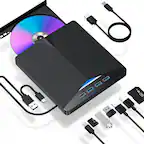
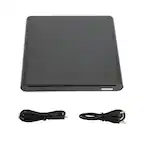
    • Answer Yes, it comes with an 18-inch USB cord

      Answered by HappyWifeHappyLife

  • QuestionIs this compatible with the Chromebook OS?

    Asked by Chuck.

    • Answer Yes it is. a cheap and easy alternative if your device does not have a disc drive.

      Answered by Jose

  • QuestionWill this drive play DVDs? (Especially DVDS with movies)

    Asked by lhansonz.

    • Answer Yes, plays any DVD format except BluRay & 4K.

      Answered by GOOZ2Furious

  • QuestionWill this run a MS Home Publishing CD so I can continue to use the publishing software with my new HP Pavilion laptop?

    Asked by Niecie.

    • Answer It will read your cd, as that's what it's for.

      Answered by JasonRoBear

  • QuestionIs this basically a DVD player for a laptop that doesn't have one in it? Will it work on a Lenova , ASUS laptop?

    Asked by karen.

    • Answer The LG - 8x External USB Double-Layer DVD±RW/CD-RW Drive - Black, MOdel # SP80NB80 is listed as being compatible with the Windows 10, Windows 8.1, Windows 8, Windows 7, Windows Vista, Windows XP, and Mac OS X (v.10.7.5 or higher) Operating Systems. It is designed for laptops or desktops that do not have a disc drive. ^CP

      Answered by LG Digital Customer Care

  • QuestionWill this read mp3

    Asked by Rthmpoet.

    • Answer Yes it''ll read MP3 discs.

      Answered by johnnyq21

  • QuestionWhat cable does it come with to connect to PC or Mac? Should I buy additional cable?

    Asked by Samuel.

    • Answer Comes with usb cable you would need a adapter for newer macs plenty of options there from Apple (high cost) to lower cost options.

      Answered by kman

  • QuestionIs a USB cable included with this drive?

    Asked by Curious67.

    • Answer Yes , USB cable included

      Answered by Sparrow

  • Questionwill this DVD player hook up to my main TV so i can watch my DVD movies?

    Asked by julio.

    • Answer Yes, it has instructions for using on a tv.

      Answered by Elle

  • QuestionWill it play a dvd movie?

    Asked by Vale.

    • Answer Yes, this drive will play DVD discs. You may however need to have DVD software on your PC.

      Answered by CommunityAnswer

  • QuestionJust purchased Dell Inspiron 17 7000 series laptop. No DVD or CD drive. Will this work for CD software downloads?

    Asked by jj.

    • Answer The SP80NB80 is a plug and play drive. Modern operating systems (Windows, Mac OS, etc.), are able to recognize these drives, and use "generic" drivers to control them. These generic drivers provide full functionality to the devices they serve. This drive is able to perform CD software downloads. ^CP

      Answered by LG Digital Customer Care

  • QuestionWill it play CD's

    Asked by Anonymous.

    • Answer Yes it will. All DVD drives will play CDs

      Answered by Mortal

  • QuestionWhat type of usb port does it use? and i have another question. can you use this for cds as well as dvds?

    Asked by EvelynRae.

    • Answer It uses a USB 2.0 and yes it works with cds and dvds.

      Answered by Trucker09

  • QuestionWill this work to plug into my Toyota Sienna?

    Asked by Anonymous.

    • Answer Hi there. Thank you for sharing your question with us. We understand your inquiry regarding whether the SP80NB80 Slim Portable DVD Writer will function when plugged into your Toyota Sienna. Based on the technical specifications of the SP80NB80, this device is specifically designed for compatibility with computer operating systems, including Windows 10, 8.1, 8, 7, Vista, XP, and Mac OS X. Because this model does not feature "TV Connectivity" or support for automotive infotainment systems, it will not be recognized as a media source when plugged into a vehicle's USB port. These external drives require the drivers and software found in a PC or Mac environment to properly read and play back data from a disc. https://www.bestbuy.com/product/lg-8x-external-usb-double-layer-dvdrw-cd-rw-drive-black/JXTZZLCVZK If you have any further questions about the features of your SP80NB80 or need assistance with other compatible setups, please contact us on [email protected], and our team will be more than happy to assist you further via private message. —Renzo

      Answered by LG Digital Customer Care

  • QuestionCan I copy my old pictures and movies from my old disc and save on my computer?

    Asked by Anonymous.

    • Answer Hello there! Yes, with the LG SP80NB80 Slim External DVD Drive, you can easily copy your old pictures and movies from your old disc and save them to your computer. Here’s how: Connect the Drive: Plug the external DVD drive into your computer using the USB connection. Insert Your Old Disc: Place the disc with your pictures and movies into the drive. Access Files: Your computer should recognize the disc, allowing you to browse its contents. Copy Files: Simply drag and drop your pictures and movies from the disc to a folder on your computer. The drive supports multiple formats, including CD-R, CD-RW, DVD-R, DVD-RW, and others, which means you can copy various types of data from your old discs. Just ensure you have compatible software on your computer to handle the files you're transferring. https://www.lg.com/us/burners-drives/lg-sp80nb80-slim-external-dvd-drive#pdp_specs Feel free to reach out if you need further assistance! —Renzo

      Answered by LG Digital Customer Care

  • QuestionIs this compatible with macOS Sequoia 15.1.1?

    Asked by Fluff.

    • Answer Hello, fluff. Thank you for your question. The SP80NB80 model is an external Blu-ray writer that is compatible with macOS, including macOS Sequoia 15.1.1. You should be able to use the drive to read and write Blu-ray discs, as long as you have the proper software installed to handle Blu-ray playback and writing. To ensure the best experience, make sure you have compatible media software like Mac Blu-ray Player or similar, as macOS doesn’t natively support Blu-ray playback. If you encounter any issues or need more details, feel free to send us a private message on Social Media @LGUSSupport, and we’ll be happy to assist you further. We appreciate your inquiry. ^Con

      Answered by LG Digital Customer Care

  • QuestionIs this compatible with Windows 11?

    Asked by CPCHulk.

    • Answer Yes. I connected it to an HP on Windows 11 and it works just fine.

      Answered by AlexiaB

  • QuestionI just purchased a new desk top window 11. Is this unit compatible with windows 11? Also, I need to load some program discs onto my new computer will this unit be able to do that and can I use it to back up files also.? Thank you

    Asked by KenChel.

    • Answer It can be used to burn CDs, DVDs, you can also use it to install programs through CDs or DVDs, you can also use it to save things on CDs or DVDs, such as files, photos, videos and more

      Answered by RubenR