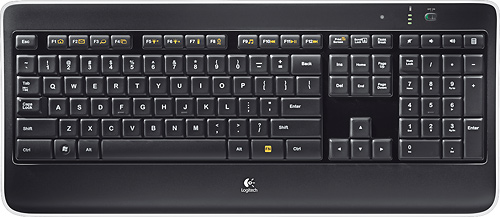
A:AnswerThere is a small green LED that lights up when Cap Lock is on. There is NO indicator for number lock, however. When Number Lock is off, it simply does nothing.
A:AnswerThe K800 uses a rechargeable battery. You simply plug in the universal micro-USB cable for three to six hours for up to 10 days of battery life.
A:AnswerIf you have other logitech devices with unifying receivers you can use that one. I have spares all since I use lots of these keyboards and the logitech trackball .
A:AnswerNot sure what you expect. I'd say as normal in size as an average PC keyboard. They're not tiny like some notebooks and not oversized for the visually/tactile impaired. I personally think the board has a nice touch and is easy to type on. I bought it to supplement a poorly laid-out laptop board prone to miss-strikes.
A:AnswerIf the keys on the keyboard don't light up click on the FN+F6 key = these keys increase keyboard light.
FN+F5 decrease keyboard light.
Others have already said to plug in the charge cord to make sure the keyboard is charged up.
A:AnswerCaps lock has an indicator light on it. Not so with the num lock. Ok, I recall NumLock from decades ago but not sure how it applies here. It has a dedicated 10 key pad. I see that there are additional (and duplicate) functions that are available on the 10 key pad but I don't use them. Great !! Now I am curious
A:AnswerI do not recommend this with a Mac, or at least with an iMac. The keyboard loses the wireless connection, for minutes or even many hours. Turning it on and off does no good. The wireless dongle uses up one of the precious USB ports as the documentation states that it must be plugged directly into the computer. The documentation also says it should be away from the monitor, which of course is impossible with an iMac.
I bought this because a website recommended it for Macs, but the connection dropping is a dealbreaker. Otherwise it is a nice keyboard.