“I have hand-mobility issues; control ,of fingers, etc. Specifically accuracy in selecting cells and executing edits accurately in Excel. Thumb seems best finger with conventional mouse. Looking for suggestions.”
Answer This Question
1-8 of 8 Answers
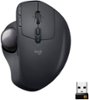
I think this mouse in particular is your best option. I personally have forearm issues and needed to switch to this mouse to save the ability to use my hands in the next several decades of my work life. I use this with excel everyday and I have not had an issue adapting to the change or getting frustrated with it not being accurate enough. There’s a learning curve, but you can learn to get really good at it. It has a button next to the trackball that puts it in precision mode, so if you needed to select the small space in between 2 letters in a cell formula, just hit that button and the cursor will move really slow and smooth relative to the speed of the ball. The software allows you to customize the cursor speed (and the speed of the precision mode) in addition.
Sorry, there was a problem. Please try again later.I am sorry that you have issues. I am not a Computer Wiz, but my experience with standard Mice & Trackballs are they make them to fit comfortably in the hand, so that thumb will always be a mile away from fingers. There are other type of corded mice that might work for you. This is a Trackball that fits on your index finger and you control pretty much everything else with your thumb. Some presentation devices might work for you also.
Sorry, there was a problem. Please try again later.I have used three different Logitech Trackballs over the past four or five years and they are excellent for control with your thumb. I highly recommend the MX Ergo Plus model, as it is sturdy and has some adjustment capability for the angle of the trackball.
I would recommend:
Sorry, there was a problem. Please try again later.I think you could try a trackball that is cheaper than this one to test your theory. I have similar issues and find a trackball to be the solution. It is funny to me how many people think they are old school, but they are releasing new ones like this one all the time.
Sorry, there was a problem. Please try again later.This is a very precise trackball - but it can be even more precise by activating precision mode (slower, more accurate pointer control, easily activated with ergonomic button right beside the ball)
Sorry, there was a problem. Please try again later.If you are right handed this mouse has the track ball set up for use with your right thumb. There is also a precision switch in which it allows you to move the on screen pointer with a finer movement.
Sorry, there was a problem. Please try again later.There is a button on the side to increase the resolution which should help with accuracy.
Sorry, there was a problem. Please try again later.This might help you out. I only say might because using a trackball style of mouse is quite a bit differently. I feel like they are more ergonomic although I’m not an expert in that area. I’ve used Logitech trackball mice for many years dating back to around 1995 or so and I purchased this one to replace my aging wireless Trackman model that was probably 4-5 years old and developed an issue with the left click button. Comparing this model to the previous wireless model (M570), it adds a few additional features such as side scrolling and a precision movement button which I’m hitting by accident more than deliberately. Aside from that it works about as good as what the previous model did, except when you move it quickly it has a little squeak to it...we’ve got two of these at my work and they both do the same squeak thing. Maybe over time that will go away although I just got used to not moving it too quickly and then it doesn’t squeak. Not sure on battery life yet...probably haven’t had it over 3 weeks yet. If you wanted to try out a trackball that’s wireless without the high cost this model is, I’d look for the previous Logitech Trackman model which is still a good mouse, although it doesn’t angle up to the 45-degree mark like this one does. I ended up putting mine at that angle only due to laying it flat it feels like it’s angled too differently for my taste compared to the older model.
Sorry, there was a problem. Please try again later.