Questions & Answers
- Model:
- 910-000806
- |
- SKU:
- 8987581
Highly rated by customers for: Ease of use, Ergonomics, Trackball
Page Showing 1-10 of 10 questions
Q: QuestionDOES IT THE BALL LIGHT UP ON THE WIRED MOUSE?
Asked by Gator.
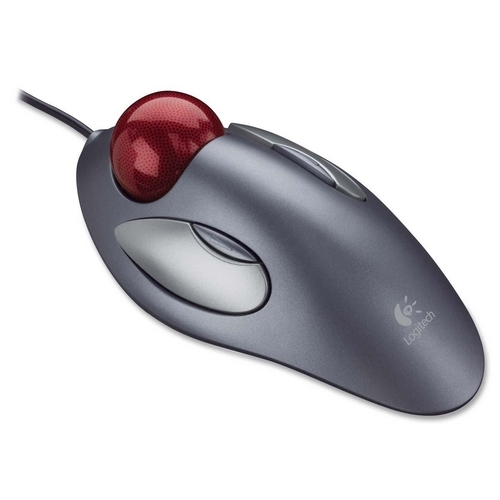
- A:Answer No, the ball on the Trackman mouse does not light up.
Answered by Logitech
Q: Questionlooking 4 logitechmarblemouse P/N 804360-1000 M/N T 8818
Asked by Anonymous.
- A:Answer Really enjoy the trackball, but make sure that it has a scrolling wheel on it or you end up losing a lot of functionality with programs.
Answered by DigDugg
Q: QuestionI love the trackball but the ball is so smooth the I have to wear one of those rubber fingertips to get a grip and get it to move. That is annoying. I tried using a nail file to scrape up the last one, but still no grip. Any suggestions? Thanks.
Asked by Anonymous.
- A:Answer I've used this trackball device for years. The ball pops out easily. Bring it to the washroom, lather up your hands with ordinary handsoap and wash the ball twice with the lather on your hands to remove the oils that invisibly accumulate on the ball. Also, remove the dust on the three points that the ball rests on. If you travel with the trackball, keep it in a ziplock bag inside your laptop case.
Answered by Charles
Q: QuestionBeside both the left/right clickers are 2 VERY SMALL clickers with a raised line/arrow on them (see picture). (NOTE: "clickers" are the buttons to the left/right of the marble.) What function do those left/right VERY SMALL clickers serve? Thanks.
Asked by finernfrogfur.
- A:Answer By default they mimic page-up and page-down. But we can set that using the driver Logitech adds.
Answered by ArtoisDuchamps
Q: Questioncompatible with my Dell / Windows ; is there sftw I have to download?
Asked by eM.
- A:Answer No: software is included in the package. For regular use you shouldn't need the software. I have a Dell latitude with Windows 10: it recognized the mouse immediately. The software helps set the extra mouse buttons to custom functions.
Answered by ArtoisDuchamps
Q: QuestionCan I use this mouse on my Mac laptop?
Asked by Curious.
- A:Answer Yes: if your Mac has a standard USB2 or 3 port.
Answered by ArtoisDuchamps
Q: QuestionDoes a wireless version of this model exist?
Asked by sasha.
- A:Answer Yes
Answered by Rainbow
Q: Questionis the driver for windows 11 included. !! will not recognize the one I have
Asked by photojim.
- A:Answer Sometimes a PC needs to be 'coaxed' to find and properly identify new hardware. If youre still having problems after several attempts, just install Logitech's mouse and keyboard app. It runs in the background and enables all the functions and settings for all 4 buttons, and offers more fine tuning options, too
Answered by Sunjammer
Q: QuestionWhat is the longest cable mouse available
Asked by Tyrob.
- A:Answer By longest cable mouse, do you mean the longest cord that is attached to the mouse?
Answered by lauriefpc
Page 1, Showing 1-10 of 10 questions
Most-viewed items
- $169.99$169.99The price was $269.99
- $329.99$329.99The price was $469.99
- $149.00$149.00The price was $399.00
- $159.99$159.99The price was $179.99
- $122.00$122.00The price was $129.99
- $449.99$449.99The price was $649.99
- $1,149.00$1,149.00The price was $1,299.00















