“how do i connect samsung sound bar hw-5550 to sony bravia kdl-55w900a I have time warner cable dvr”
Answer This Question
1-6 of 6 Answers
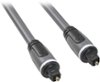
There are a couple of options that can be considered here. First thing you need to do is check to see what kind of audio connection your TV and sound bar has. If both have optical audio then the connection won't be difficult. But if the television has a coaxial audio cable then you've hit a snag. There is something you can buy on amazon to go from a coaxial input to an optical audio output. Another option would be connecting the optical audio cable from the sound bar to the digital cable box. I have a DVR time warner cable box and mine has an optical audio connection so I'm assuming that yours does as well. Hope this helps.
Sorry, there was a problem. Please try again later.An optical cable jsut plugs into the unit, but remember to pull off the protective plastic on each end or it will not work.
Sorry, there was a problem. Please try again later.If they both have optical inputs on the back of them, then you would simply just need to plug in one end to the Samsung sound bar, and the other to the Sony Bravia TV, and select the correct input (ie: HDMI 1) to use the soundbar.
Sorry, there was a problem. Please try again later.optical out on back of tv to optic in on sound bar, if those connections exist.
Sorry, there was a problem. Please try again later.Their are two optical input areas on the back of your devices. They are square looking. Take off the rubber caps from the ends of the cable and they only insert one way.
Sorry, there was a problem. Please try again later.Buy an Optical Cable and conect from t.v to sound bar... everything coming out of your tv will play on your sound bar.
I would recommend:
Sorry, there was a problem. Please try again later.