Ultimate Upgrade SaleEnds Sunday. Limited quantities. No rainchecks.Shop now

Main Content

Questions & Answers

$158.58
Save $21.41
The comparable value is $179.99
Page Showing 21-40 of 203 questions
  • QuestionCan I use an indoor antenna?

    Asked by David.

    • Answer Hi David, Yes, you can connect your indoor antenna via coax cable or HDMI. ~Samsung Advisor

      Answered by Samsung

  • QuestionCan a firestick or spectrum's Xumovstreaking box

    Asked by Jillybean.

    • Answer Hi Jillybean, You can connect a FireStick via HDMI or USB, and you can connect your cable box via HDMI. ~Samsung Advisor

      Answered by Samsung

  • QuestionIf my TV is connected to an antenna and NOT to the internet, can I update the software? If so, how?

    Asked by Louise.

    • Answer Hi Louise, You will need to manually update your Firmware. To do so, you can download the update on a USB drive and manually update your TV: 1. On Samsung's website (upper right corner), go to: Support > Manual & Software > Find your TV model, and click on the Firmware – Upgrade File. 2. When the file has finished downloading, locate it and then unzip it. There is normally one folder inside but there may be multiple files. 3. Copy or move all of the files that were included in the zip file to a USB flash drive, but do not place them inside any other folders. If you place the software folders inside a folder on the USB flash drive, the TV or monitor will not find them. 4. Connect the USB drive containing the software upgrade into a USB port on your device. 5. Using your device's remote, navigate to and select Settings, then select All Settings, and then select Support. Select Software Update, select Update Now, and then select Yes if prompted. Your device will search the USB drive for update files. Follow the on-screen instructions to install the updated software. Updates usually take a few minutes; please do not turn off the TV until the update is complete. When the update is finished, it will restart automatically. If you need additional support, Samsung is here to help. Please call us at 1-800-SAMSUNG, available daily from 8AM - 12AM EST. You can also chat with a LiveChat agent by clicking the ‘Support’ link on our website. ~ Samsung Advisor

      Answered by Samsung

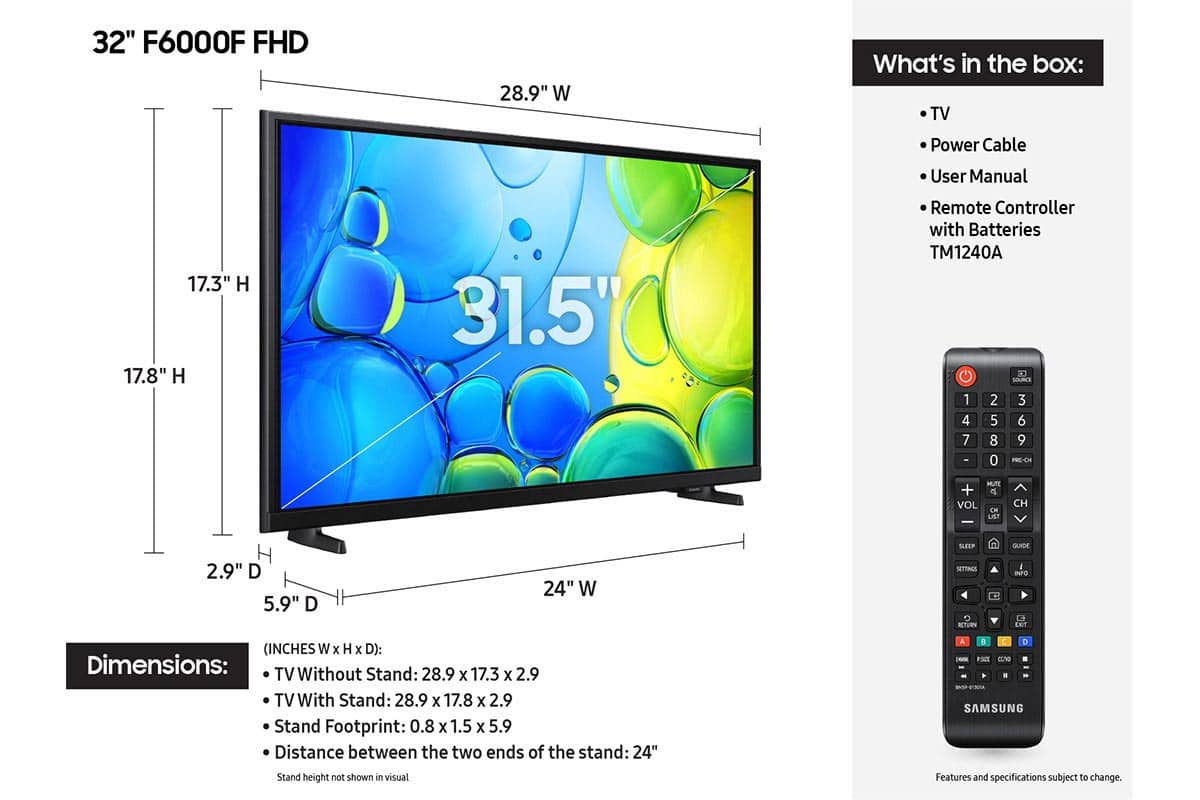
  • QuestionWhat is width between the 2 stand feet

    Asked by CC75.

    • Answer Hi CC75, The distance between the two feet is 24". ~Samsung Advisor

      Answered by Samsung

  • Questiondoes it have samsung plus

    Asked by Randy.

    • Answer Yes , it does.

      Answered by IrenevH

  • QuestionSamsung - 32" Class F6000F Series LED Full HD Smart Tizen TV (2025), what is the appropriate wall bracket for this television

    Asked by Tasha.

    • Answer Hi Tasha, You will need a wall mount compatible with a VESA Map of 200x200mm. ~Samsung Advisor

      Answered by Samsung

  • QuestionCan a dvd player be hooked up to this tv? I see no place to insert the plugs.

    Asked by mikee.

    • Answer Hi Mikee, You can connect your DVD player using an HDMI cable. If your DVD does not support HDMI, you’ll need an RCA to HDMI converter like this one: https://www.bestbuy.com/site/insignia-rca-to-hdmi-converter-black/6134312.p?skuId=6134312 ~Samsung Advisor

      Answered by Samsung

  • Question(1) is the remote lit for use in darkness? If not. can i get one that does light up. (2) what is the length of the power cord.

    Asked by Ram.

    • Answer Hi Ram, The remote is not backlit. You can use a universal third-party remote. The power cord is 5' long. ~Samsung Advisor

      Answered by Samsung

  • QuestionCan the DirectTV app be downloaded to the 32" Class F6000F series TV?

    Asked by Anonymous.

    • Answer Hi, Yes, the DIRECTV app is available on the F6000F TV. ~Samsung Advisor

      Answered by Samsung

  • QuestionIs amazon alexa built into tv ?

    Asked by aud.

    • Answer Hi Aud, The F6000F TV Works With Alexa, meaning you’ll need to connect a standalone Alexa device such as an Echo speaker, to control compatible smart home devices and some experiences on your TV. Here are the steps: 1. Download both the Amazon Alexa and Samsung SmartThings apps, if you don't already have them. Both are available for iOS or Android devices. 2. Make sure your Alexa device and TV are both connected to the same Wi-Fi network. 3. Your TV must be enabled within the SmartThings app. If not, make sure you are signed in with your Samsung account on the TV: Settings > All Settings > Samsung Account 4. Log in to the SmartThings app with the same Samsung account. Tap Devices, and if your TV isn’t already shown, tap + to add it to the app. 5. In the Alexa app, enable the SmartThings skill and sign into your Samsung account. This will automatically connect your Samsung TV to Alexa and let you use voice commands to control your television. If you need more help, we’re here. Give us a call at 1-800-SAMSUNG (8AM – 12AM EST, 7 days a week). You can also connect with a LiveChat agent through the Support link on our website. ~ Samsung Advisor

      Answered by Samsung

  • QuestionIs this TV satellite/cable compatible?

    Asked by Satellites.

    • Answer Hi, Yes, you can connect a cable box or satellite box. ~Samsung Advisor

      Answered by Samsung

  • QuestionDoes this tv/remote have voice command?

    Asked by Greg.

    • Answer Hi Greg, No, the F6000F does not offer Voice Command. Built-in voice assistants begin with our U8000F Series and above found here: https://www.bestbuy.com/site/samsung-43-class-crystal-uhd-u8000f-4k-smart-tv/6619439.p?skuId=6619439 ~Samsung Advisor

      Answered by Samsung

  • QuestionCan the Youtube TV app be downloaded on the F6000F series smart TV. Not the Youtube app, but the Youtube TV app..

    Asked by Mole.

    • Answer Hi Mole, Yes, the YouTube TV app is available for download on the F6000F TV. ~Samsung Advisor

      Answered by Samsung

  • QuestionI cannot find a sleep timer. Does this tv not have one? Its 32”, most people probably have this in a bedroom

    Asked by PBKY.

    • Answer Hi PBKY, To access the Sleep Timer, go to Home > (left directional button) > Settings > All Settings> General & Privacy System Manager > Time > Sleep Timer. ~Samsung Advisor

      Answered by Samsung

  • QuestionIs this model capable of Bluetoothing to a soundbar

    Asked by AlanSaginaw.

    • Answer Hi AlanT, Yes, the F6000F Series TV is Bluetooth-enabled and can connect to external soundbars via Bluetooth. ~Samsung Advisor

      Answered by Samsung

  • QuestionIs the Fox Nation App accessible from this TV?

    Asked by RichieB.

    • Answer RichieB - Yes, the Fox Nation app can be installed on the F6000F TV. ~ Samsung Specialist

      Answered by Samsung

  • Questioncan you turn the picture off and leave the sound on

    Asked by james.

    • Answer Hi James, Yes, to turn off the screen, go to Settings> General> Accessibility> Picture Off. ~Samsung Advisor

      Answered by Samsung

  • QuestionCan it be used outside in a covered patio

    Asked by ffjf.

    • Answer Hi ffjf, The F6000F TV is not intended for outdoor use. ~Samsung Advisor

      Answered by Samsung

  • QuestionIs there a stand available for this TV that attaches to the middle bottom/back so this could be set on a narrow surface?

    Asked by ShaX.

    • Answer Hi Eric, The F6000F comes with removable feet that connect to the bottom of the TV. You can connect it to an external mount that connects to the back of the TV. ~Samsung Advisor

      Answered by Samsung

  • QuestionCAN THE 32 " SAMSUNG TV BE USED ON A STAND OR TYPE OF CONSOLE. WHAT ASSEMBLY IF ANY REQUIRED

    Asked by PAM.

    • Answer Hi PAM, You can connect the F6000F TV via an external mount that connects to the back of the TV. It will need to have a 200x200mm VESA Map. It comes with removable feet that connect to the bottom of the TV. ~Samsung Advisor

      Answered by Samsung