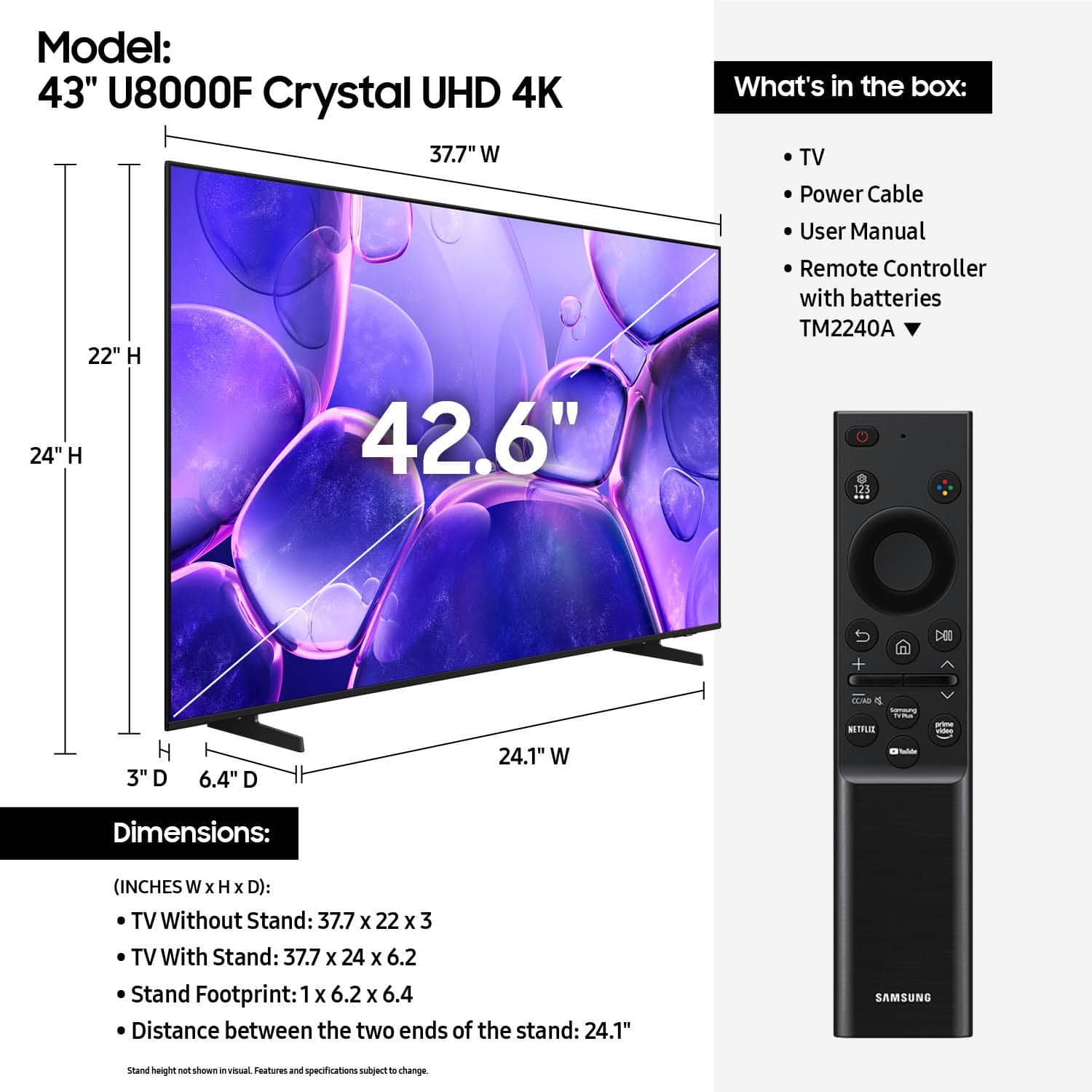
Questions & Answers
- Model:
- UN43U8000FFXZA
- |
- SKU:
- 6619439
Highly rated by customers for: Picture Quality, Setup Ease, Size
Page Showing 61-80 of 147 questions
Q: QuestionCan this tv play h.264 or h.265 movie files through the usb slot?
Asked by Frank.
- A:Answer Hi Frank, Yes, you can play video files such as H.264 and H.265 via USB. ~Samsung Advisor
Answered by Samsung
Q: Questionwhere do I plug in the cord on the TV so I then can plug into the outlet to turn the TV on?
Asked by play.
- A:Answer Hi Play, The power cable connects to the back of the TV. For more help, reference the image at the top of our Setup Guide: https://downloadcenter.samsung.com/content/EM/202503/20250301035319001/BN68-23209A-01_IG_U8000F%20Basic%20feet%2043-85inch_ZA_Eng_250225.0.pdf ~Samsung Advisor
Answered by Samsung
Q: QuestionCan you I add the Dish app on this tv?
Asked by GJ.
- A:Answer Hi GJ, The Dish app is not currently available on the Samsung U8000F. ~Samsung Advisor
Answered by Samsung
Q: QuestionIs Samsung Plus included ?
Asked by Anonymous.
- A:Answer Hi, Yes, Samsung TV Plus is included. ~Samsung Advisor
Answered by Samsung
Q: QuestionDoes hdmi cord come in box. Does this tv need hdmi cord?
Asked by Cady.
- A:Answer Hi Cady, The U8000F does not come with an HDMI cable. Whether you need an HDMI cable or not will depend on your specific setup needs. ~Samsung Advisor
Answered by Samsung
Q: QuestionDoes this tv need hdmi cord does it come w the cords.?
Asked by Cady.
- A:Answer No.
Answered by Cherie
Q: QuestionDoes the Tv synch with airpods?
Asked by JC.
- A:Answer Hi JC, Yes, the U8000F is Bluetooth-enabled and can connect to AirPods. ~Samsung Advisor
Answered by Samsung
Q: QuestionIs there a way to have both the TV speaker and a bluetooth headphone putting out sound at the same time? I want to wear a headphone because of my hearing loss but my wife wants to listen to the TV speaker at normal volume.
Asked by Anonymous.
- A:Answer Hi, Dual Bluetooth Audio allows you to connect multiple Bluetooth devices – for instance, you can pair 2 headsets to your TV simultaneously. You can even stream 2 different audio contents to each headset when using the Multi View feature. To set this up, go to: Home > left directional key > Settings > All Settings > Sound > Sound Output > Bluetooth Speaker List, then connect the devices you’d like to pair (one at a time). When selecting the second device, select Multi Connect. ~Samsung Advisor
Answered by Samsung
Q: QuestionCan I use a Samsung universal remote with this tv so I control a Sony blu ray player?
Asked by SusanC50.
- A:Answer You can use the remote that came with this set to control a Sony blue ray DVD player if you set it up. You just need to scroll down on the entry screen and select this option for the DVD player and follow the procedures.
Answered by Inspiron
Q: QuestionCan I get the Gotham sports app?
Asked by Smiley.
- A:Answer Hi Smiley, Yes, the Gotham Sports app is available for download on the U8000F TV. ~Samsung Advisor
Answered by Samsung
Q: QuestionCan I set up this TV to start up on YouTubeTV? Or must I travel thrugh 10 menus to get there??
Asked by TVhelp.
- A:Answer No & No. You can't start it on YouTubeTV, but the app is located and selectable on the startup screen.
Answered by Murph
Q: QuestionI like to listen to youtube videos while falling asleep. Can then screen brightness be dimmed to dark or almost dark?
Asked by Question.
- A:Answer Hi, Yes, if you’d like to listen to audio without the screen on, Auto Picture Off allows you to do just that. This feature keeps the sound playing while turning off the screen to help save energy. Pressing Volume or Power will not wake the screen, but any other button on the remote will. To activate Auto Picture Off: Home > left directional key > Settings > All Settings > General & Privacy > Accessibility > Auto Picture Off. ~ Samsung Advisor
Answered by Samsung
Q: QuestionCan I get the Rumble app on this smart TV?
Asked by Steve.
- A:Answer Hi Steve, Yes, the Rumble app is available via the built-in app store. ~Samsung Advisor
Answered by Samsung
Q: QuestionCan you download the Tennis Channel Plus app on this TV?
Asked by alex.
- A:Answer Hi Alex, Both the Tennis Channel and TennisTV are available on the U8000F. ~Samsung Advisor
Answered by Samsung
Q: QuestionAre the tv legs adjustable?
Asked by Curious.
- A:Answer Very easy to install the legs. Only one location for each leg.
Answered by Markw
Q: QuestionDoes it have a place for an optical cord for sound bar
Asked by Anonymous.
- A:Answer Hi, No, the U8000F does not offer an optical input. It does have 3 HDMI ports, 1 USB, and Bluetooth. ~Samsung Advisor
Answered by Samsung
Q: QuestionSound specs please
Asked by Doc.
- A:Answer Hi Doc, The U8000F TV has 20-Watt 2 Channel internal audio and OTS Lite (Object Tracking Sound Lite) to provide you with 3D surround sound that follows the movement on screen by using our incredible virtual top channel audio, putting you right in the middle of the action. ~ Samsung Advisor

Answered by Samsung
Q: QuestionDoes this tv have Blue Tooth?
Asked by Chuck.
- A:Answer Hi Chuck, Yes, the U8000F TV is Bluetooth-enabled. ~Samsung Advisor
Answered by Samsung
Q: QuestionDoes this tv get loud? I'm currently looking for a tv that easily gets loud at low volumes without having to increase the volume to 80 and still can barely hear it from the next room
Asked by Corneillus.
- A:Answer Hi Corneillus, The U8000F features 20-Watt 2 Channel internal audio and OTS Lite (Object Tracking Sound Lite) to provide you with 3D surround sound that follows the movement on screen by using our incredible virtual top channel audio, putting you right in the middle of the action. If you are looking for more enhancements, we recommend starting with our QN80F series which features AI-powered dialogue booster that uses advanced deep-learning technology to enhance voices and dialogue on screen. You can also add a Samsung Soundbar to your TV to enhance your audio experience. ~Samsung Advisor
Answered by Samsung
Q: QuestionDoes this tv have a manufacturers warranty
Asked by Anonymous.
- A:Answer Hi, The U8000F TV is backed with a limited 1-year Manufacturer’s Warranty when purchased brand-new from an authorized dealer. You can enter the model number to review the full warranty details here: https://www.samsung.com/us/support/legal/LGL10000312/#standard-limited-warranty ~Samsung Advisor
Answered by Samsung
Best-selling TVs
- Winter Sale Deal$329.99Your price for this item is $329.99

- $199.99Your price for this item is $199.99$349.99The comparable value for this item is $349.99

- Winter Sale Deal$449.99Your price for this item is $449.99
- Winter Sale Deal$79.99Your price for this item is $79.99
- $229.99Your price for this item is $229.99$299.99The comparable value for this item is $299.99
- Winter Sale Deal$329.99Your price for this item is $329.99
- $59.99Your price for this item is $59.99$79.99The comparable value for this item is $79.99
- Winter Sale Deal$899.99Your price for this item is $899.99
- $249.99Your price for this item is $249.99$379.99The comparable value for this item is $379.99
- $179.99Your price for this item is $179.99$299.99The comparable value for this item is $299.99
- Winter Sale Deal$1,399.99Your price for this item is $1,399.99
- Winter Sale Deal$139.99Your price for this item is $139.99
- Winter Sale Deal$249.99Your price for this item is $249.99
- $89.99Your price for this item is $89.99$129.99The comparable value for this item is $129.99
- Winter Sale Deal$109.99Your price for this item is $109.99
- $179.99Your price for this item is $179.99
- $199.99Your price for this item is $199.99
- $1,999.99Your price for this item is $1,999.99$3,699.99The comparable value for this item is $3,699.99
- Winter Sale Deal$399.99Your price for this item is $399.99
- $379.99Your price for this item is $379.99$449.99The comparable value for this item is $449.99