“I have very low sound unless turned all the way up. It was a pain to try and connect with directv. Might someone explain how to get better sound from the system? Same as Netflix I hate to pay this much only for movies to rent.”
Answer This Question
1-5 of 5 Answers
I had geek squad set up my sound bar & remote speakers. (not going to get good sound from the remotes if you put them on the floor. ) should be at least chair height when sitting. Make sure blue lights are on & not blinking. There is a remote control that comes with the set that the geek squad used to make the sound come out just right. You should not have to turn the sound up too high. If you do not want to go through Geek squad, you can also call Samsung for technical assistance. Your best bet, for great sound is to make an appointment with Geek squad to come to your house. I also recommend getting the insurance from Geek squad if you purchased the system from Best Buy.. This sound system works great but needs in my opinion, a pro to set up correctly.
Sorry, there was a problem. Please try again later.I turned the TV sound off altogether and just used the remote for the sound bar where you "push" the volume bar upwards to increase the sound. I noticed if you have it on "pause" for a while, it automatically shuts itself off. I presume a "safety" feature. Hope that helps.
Sorry, there was a problem. Please try again later.In my SONY XBR 850C there is a Digital Audio out volume and it was set to "Max" when I accessed it. I don't know if this setting affects only the TV speakers, or only the external audio speakers. Set your TV to Max and test it. Also, you may need to tweak a similar setting in your BD player, depending on what your audio/video source is.
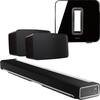
Sorry, there was a problem. Please try again later.It is not possible. I had the Geek Squad set up my new system two weeks ago and even on the highest setting it sounds nothing like it did in store. I feel like I get the same sound from my 27" iMac, do yourself a favor and just get the Sonos bar, and sub woofer I know the price is crazy but so is the price for this bar at least with Sonos you'll get what you pay for. The only reason I'm suggesting this other bar is because these are the only two to choose from at this price range that are competitive. And I'm just watching chick flicks lol
I would recommend:
Sorry, there was a problem. Please try again later.You may adjust each speakers output volume using the "Level" button. The channels are abbreviated FL for front left and so forth. I have increased the output of the Center Channel to Max for increased Dialogue volume, increased the left and right channels +2, Atmos Upward Channels to Max, and Surround channels to include Atmos Upward to Max. I lowered the setting on the Subwoofer as well it was over powering sound quality. Also on DirectTV receiver go to Menu, Setting, then Audio. Select Dolby Digital and Turn On. To get the Full Experience from this system purchase 4K BluRay Movie with Dolby Atmos. It will let you know on back of the movie. The BEST audio movie I have seen so far is Pacific Rim. Also depending on which device you use as your BluRay player you way need to adjust Audio settings. I use Xbox One and under all settings go to BluRay and Enable the receiver to Decode Audio. This will enable Dolby Atmos for movies that offer it. Movies that do not you have to Disable the feature. Hope this helps.
Sorry, there was a problem. Please try again later.