Deals Worth GiftingShop now

Skip to content
Gift Ideas
Main Content

Questions & Answers

Page Showing 141-160 of 184 questions
  • QuestionWill this TV be brand new or used

    Asked by Anonymous.

    • Answer Hi, The DU6900 TV is new unless specified by the website. ~Samsung Advisor

      Answered by Samsung

  • QuestionCould I control this device by voice using alexa?

    Asked by Anir.

    • Answer Hi Anir, Yes, you could control the DU6900 TV with an external Alexa device. ~Samsung Advisor

      Answered by Samsung

  • QuestionDoes the remote have numbers and light up?

    Asked by TM.

    • Answer Hi TM, No, the remote does not have a number keypad and is not backlit. ~Samsung Advisor

      Answered by Samsung

  • QuestionIs this TV easy to mirror with an Apple laptop?

    Asked by Gerry.

    • Answer Hi Gerry, Yes, connecting your Apple laptop to the DU6900 TV via Airplay should be fairly easy, but this, of course, depends on the user. To enable Apple Airplay, go to: Source > Connection Guide > Smartphone > Apple AirPlay. ~Samsung Advisor

      Answered by Samsung

  • QuestionWhat is wireless TV on?

    Asked by Dee.

    • Answer Hi Dee, By connecting your TV to your Samsung Account, you can turn on your TV via the SmartThings app on your mobile device. ~Samsung Advisor

      Answered by Samsung

  • Questionis including the wall mount?

    Asked by cherry.

    • Answer Hi Cherry, No, you will need to purchase a wall mount separately. ~Samsung Advisor

      Answered by Samsung

  • QuestionDoes this have the GameHub?

    Asked by GamePassGamer.

    • Answer Hi, Yes, the DU6900 TV includes Samsung Gaming Hub. ~Samsung Advisor

      Answered by Samsung

  • QuestionDoes this samsung tv has you tube

    Asked by shabba501rankininthahouse.

    • Answer Hi shabba501rankininthahouse, Yes, the YouTube app is pre-installed on the DU6900 TV. ~Samsung Advisor

      Answered by Samsung

  • QuestionIs this tv roku compatible?

    Asked by Salingshot.

    • Answer Hi, Yes, you can connect your ROKU device via HDMI or USB. ~Samsung Advisor

      Answered by Samsung

  • QuestionCan I hook up a dvr to this tv for my cable and internet

    Asked by Karen.

    • Answer Hi Karen, Yes, you can connect your DVR via HDMI cable. ~Samsung Advisor

      Answered by Samsung

  • QuestionDoes this model come with pre programmed streaming channels???

    Asked by Streamer.

    • Answer Hi Streamer, Yes, the DU6900 TV comes with the Samsung TV Plus app, which offers you hundreds of free channels. ~Samsung Advisor

      Answered by Samsung

  • QuestionI just purchased a Samsung TV and when I go to shut it off it turns back on without pressing the on off button on the remote. What is the issue?

    Asked by JoeR.

    • Answer Hi Jruss, It’s unfortunate to hear your DU6900 TV is turning on by itself. Please try a few troubleshooting steps that may help solve the issue: 1. Unplug the TV from the wall outlet or surge protector and leave it unplugged for 30 seconds. 2. Check the power cord to see if there is any visible damage. 3. Plug the TV power cord back into the wall outlet. If you were using a surge protector, bypass it for now and use a wall outlet. 4. Try to update the software. In some cases, a software update can correct the problem. There is a risk, however. If the TV turns off during the software update, it could damage the TV. Updates can take up to 30 minutes depending on network speed, so if the TV is not turning off too frequently, try updating the software. 5. Disable the Power On with Mobile option. TVs that can connect to SmartThings can be turned on using compatible devices, sometimes automatically. However, if abnormal "power on" signals are sent through the wireless network, they will trigger this function and make the TV turn on. If you do not want this function, navigate to Menu > Settings > All Settings > Connection > Network > Expert Settings > Power On with Mobile, and turn the setting off. If the TV continues to turn on by itself, please call us at 1-800-SAMSUNG, 8AM - 12AM EST, 7 days a week. ~Samsung Advisor
      Answered by Samsung

  • Questiondoes this tv have built in satellite decoder?

    Asked by BillF.

    • Answer Hi BillF, So that we can better understand and assist with this, please reach out to Samsung Support at 1-800-SAMSUNG, 8 AM – 12 AM EST, 7 days a week, or Chat with us on Samsung.com: https://www.samsung.com/us/support/contact/ ~ Samsung Advisor

      Answered by Samsung

  • QuestionDoes this TV come with a full screen or does it have a border?

    Asked by Anonymous.

    • Answer Hi, Please know that HD channels will have black bars on either side of the screen when displaying upscaled SD (4:3) content. Black bars will appear at the top and bottom of the screen when watching movies with aspect ratios different from your TV. You can adjust the picture size options on your external device or set the TV to full screen. Go to: Home > Settings > All Settings> Picture > Picture Size Settings > Picture Size. ~Samsung Advisor

      Answered by Samsung

  • QuestionCan a dvd player be used on this TV?

    Asked by Anonymous.

    • Answer Hi, You can connect a DVD Player via HMDI cable. ~Samsung Advisor

      Answered by Samsung

  • QuestionIs this TV Energy saver?? If so, what $ amount??

    Asked by Anonymous.

    • Answer Yes! The tv has energy saver of 75 % amount

      Answered by AshleeC

  • QuestionCan you get the Spectrum App on this TV?

    Asked by Spectrum.

    • Answer Yes

      Answered by SandraH

  • QuestionWhat is the height of the base

    Asked by Sanman.

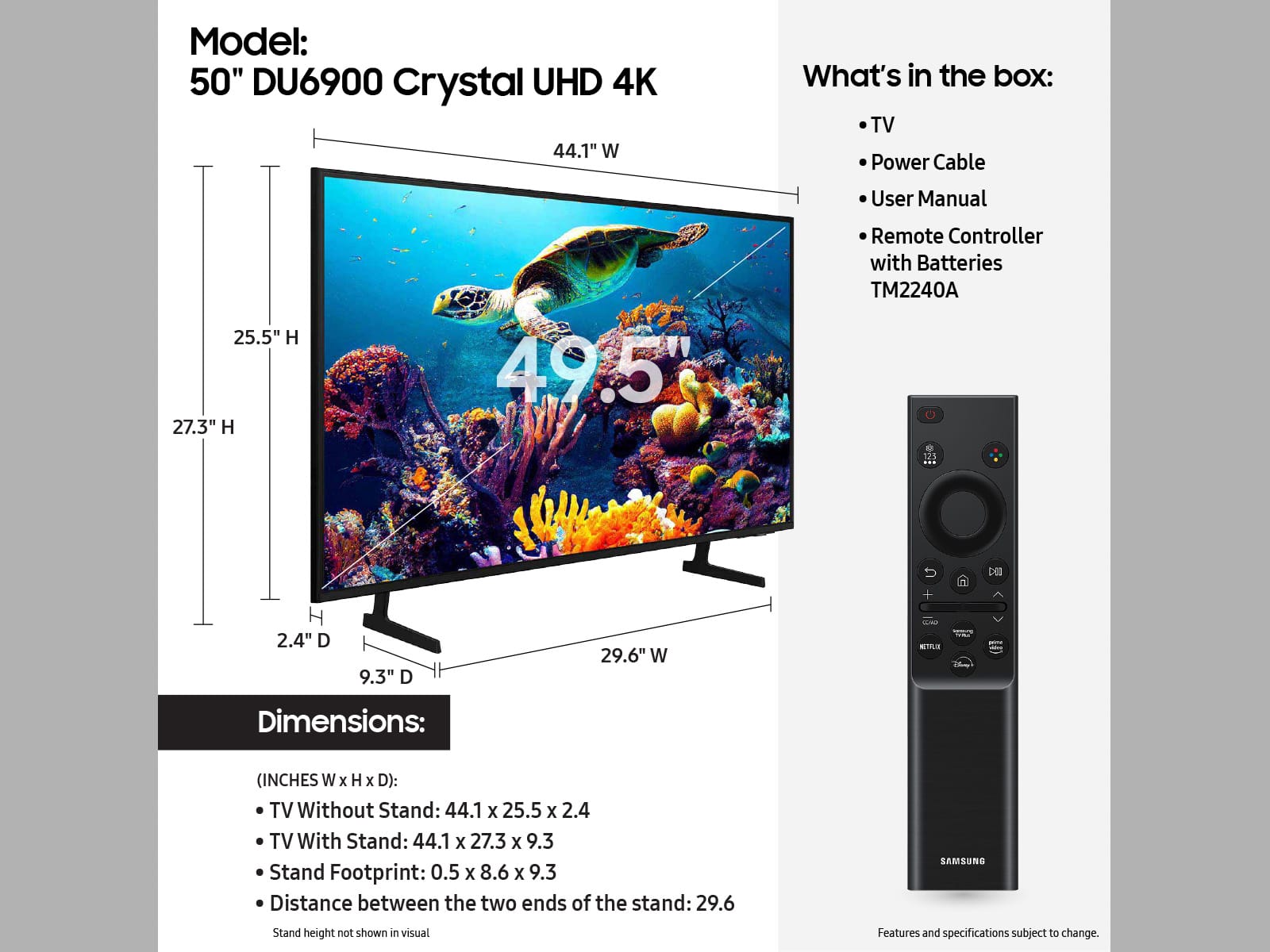
    • Answer Hi Sanman, The 50" DU6900 TV stand is 8.6" in height. ~Samsung Advisor

      Answered by Samsung

  • QuestionDoes this TV have the Multi view capability?

    Asked by Robby.

    • Answer Hi Robby, No, the DU6900 TV does not offer Multi-View. The feature is included in our TVs, starting with the DU8000 TV and above. ~Samsung Advisor

      Answered by Samsung

  • QuestionDoes the remote for this model have an input button?

    Asked by ninalila.

    • Answer Hi ninalila, No, the remote does not have an input button. ~Samsung Advisor
      Answered by Samsung