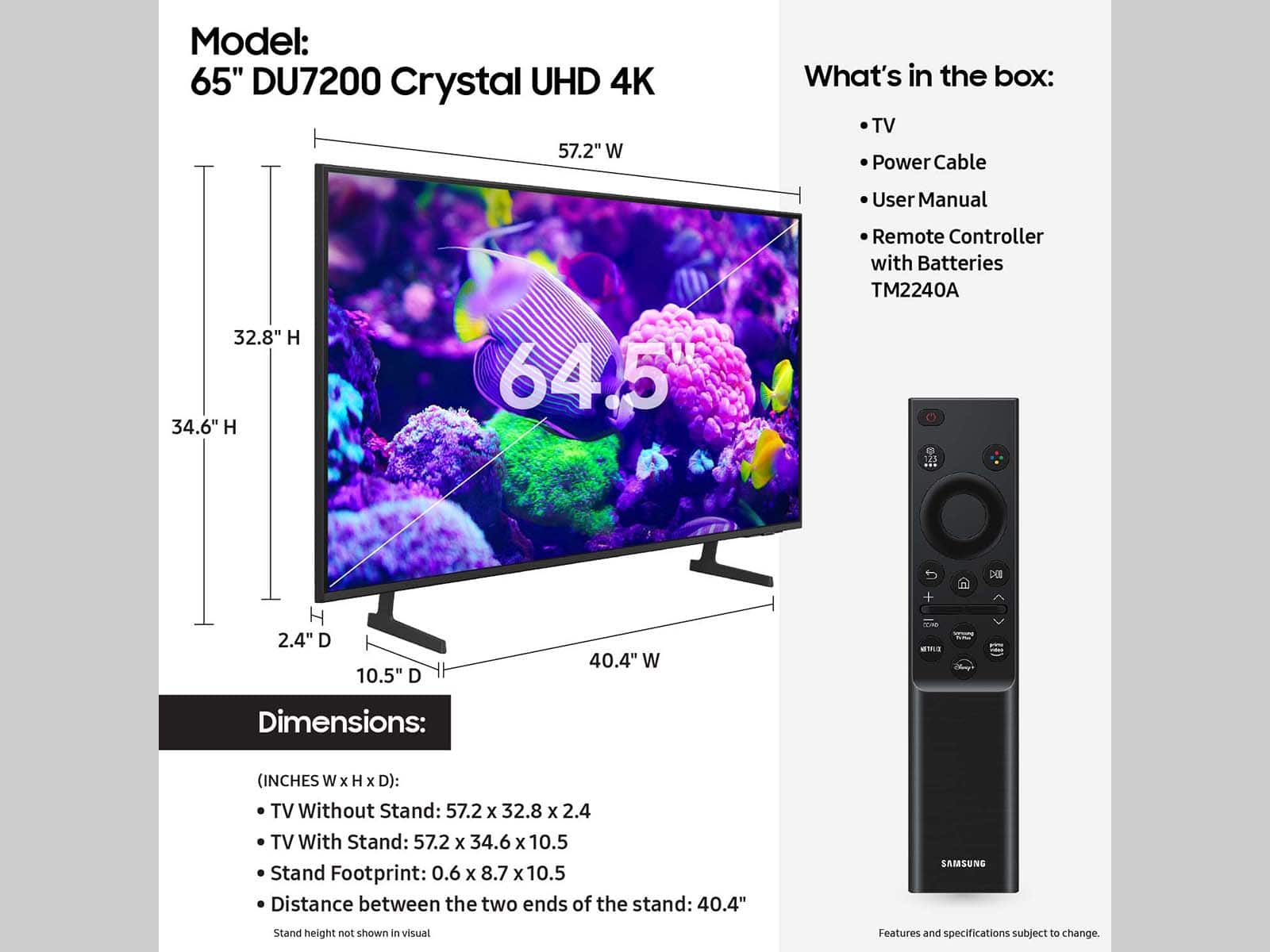
A:AnswerI was able to use the same mount I used for the previous one. It has 4 mounting holes in the back that bolts thread into, you just may have to use some spacers as mine was a universal mount.
A:AnswerHi Rafa,
Yes, you will need an RCA to HDMI converter like this one: https://www.bestbuy.com/site/insignia-rca-to-hdmi-converter-black/6134312.p?skuId=6134312
~Samsung Advisor
A:AnswerHI JamesD,
The 65" DU7200 TV requires a VESA Map of 400 x 300mm. Most 55" Samsung TVs require 200x200mm, which means it will depend on your mounting system.
~Samsung Advisor
A:AnswerHi Dennis,
You can use a Comcast remote to control the DU7200 TV; depending on the type of remote you are utilizing (eg. Xfinity X1), it may require additional programming steps. You can find programming instructions on your cable provider's website or contact them directly.
~Samsung Advisor
A:AnswerHi NavyVet,
Please go to the Search bar on the left side of your Home screen. Home> scroll left> Search> Type in Fubo app and scroll down to the Fubo app listed.
Regarding voice function, please know the DU7200 TV does not offer this feature.
If you need more help, Samsung is here for you! Please call us at 1-800-SAMSUNG, 8 AM - 12 AM EST, seven days a week. Our LiveChat agents are also available by clicking on the ‘Support’ link on our website.
~ Samsung Advisor
A:AnswerHi Lois,
To help resolve the issue with the DIRECTV app, I recommend running a cold reboot on your TV. There are two ways to do this:
1) Using the Remote: For most people, the easiest way is to hold down the Power button on the Samsung TV remote until the TV turns off and then on again. This should take about 5 seconds.
2) Using the Plug: If you do not have the remote, unplug your TV from the wall outlet or surge protector, leave it unplugged for 30 seconds, and then plug it back in.
Next, I recommend ensuring the DIRECTV app is up to date by going to “Apps” on your Smart TV and selecting “Settings” from the top right corner. Next, select the DIRECTV app and select "Update," if available. If the issue persists or if there is no Update available, we will try deleting and reinstalling the DIRECTV app. To do so, navigate to “Apps” on your Smart TV and select “Settings” from the top right corner. Next, select the app. Finally, select Delete, and select Delete again to confirm.
Then we will reinstall the app by returning to “Apps” on your Smart TV and selecting “Settings” from the top right corner. Click on “DIRECTV” and then select “Reinstall.”
Also, please ensure you are running the latest Firmware update. Go to Settings> Support> Software Update.
~Samsung Advisor