“Can this be installed into a desk top, and if so how difficult is it to transfer from my old SSD to the new one?”
Answer This Question
1-5 of 5 Answers
It comes with software. it is easy. HOWEVER, make sure you can access your BIOS, and rearrange the boot order. If you don't, you might brick your PC like I did and spend several days trying to figure out what went wrong.
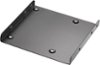
Sorry, there was a problem. Please try again later.Yes, it can be installed in a desktop. What they do NOT tell you is: 1: you will need a SSD mount to put it in the hard drive slot. 2: you will need a special cable to attach to the SSD with a USB connection on the other end to connect to the USB port on your desktop. 3: the data migration software that comes with it did not work for mine. I had to purchase another software package to get it to work. ( I tried the software that came with it 5 times. It would not boot up 5 times).
I would recommend:
Sorry, there was a problem. Please try again later.Download free software. Macrium Reflect free. You can make a back up of your entire hard drive to external hard drive, ( make sure external drive size is larger than the original), create a CD or DVD startup disk thru Macrium. Use the CD to start your computer and it will walk you thru restoring. I have used Macrium for 15 yrs. Works flawlessly.
Sorry, there was a problem. Please try again later.If your desktop can accommodate the smaller form factor (2.5") or you have a 3.5" adapter which is pretty cheap, and if your desktop has a free SATA cable to connect to, you can. You will get full performance from a desktop that supports SATA III and performance up to the limit of the connection if it's SATA II or slower. Either way, much faster than a spinning drive. Transfer difficulty depends on OS. Lots of YouTube videos available about this.
Sorry, there was a problem. Please try again later.Installed mine in a desk top and let the geek squad install the operating system and transfer files. from my old ssd. Issues I had where 1 I was told they could just transfer between hard drives without the desk top which was wrong and I had to go back a second time with the desk top 2, They didn't assign a drive letter to my backup hard drive and again I had to go back.. 3. I wasn't told they can't transfer programs which I could have moved to the backup hard drive they only transfer files.
Sorry, there was a problem. Please try again later.