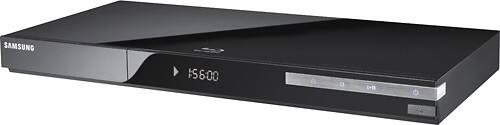
A:AnswerSince the 2010 Samsung internet enabled devices (like the BD-C5500) do not offer a traditional browsing experience, do not offer the ability to save unofficial content and collects all of its internet information through Applications that go through Samsung's servers, the chance of getting malicious content is very low.
-MrSamsung
A:AnswerSamsung's internet capable devices (including the BD-C5500) will offer subscription based services like Netflix, Vudu and Hulu Plus (Hulu Plus is available on select 3D BD players and Internet@TV TVs); however, access to regular broadcast material, as provided by your cable or satellite provider, may not be accessible. That said, I would suggest contacting your service provider for further information on their own services.
-MrSamsung
A:AnswerThe HT-C5500 will play Region A for Blu-Ray discs, and Region 1 for DVDs.
Some commercial discs and DVD discs purchased outside your region may not be playable with this product. When these discs are played, either "No Disc" or "Please check the regional code of the disc" will be displayed.
--HDTech
A:AnswerThe BD-C5500 can access the Samsung Apps store, and select a wide variety of Apps.
At this time, Hulu Plus is only available on the BD-C6900 and the BD-C7900.
--HDTech
A:AnswerThe BD-C5500C can access a very wide variety of Samsung Apps through the Internet@TV feature.
At this time, Hulu Plus is only available on the BD-C6900 and BD-C7900.
--HDTech
A:Answer.AVI is a supported video file format.
The complete list of supported file formats, audio codecs and resolutions are available in the manual, which can be downloaded from the support site at Samsung.com.
--HDTech
A:AnswerThe Blu-Ray player does support AVI and mp3 files with specific formats, such as on CD and by using a thumb-drive device.
A complete list of supported formats are available in the manual, which can be downloaded from the Support side of the Samsung.com website prior to purchase.
--HDTech
A:AnswerHulu Plus is only available on the BD-P6900 and BD-P7900 models.
However, there are a wide range of Samsung Apps available for use on the BD-C5500 including CinemaNow, Blockbuster, YouTube, Netflix, Vudu, and other Apps as well.
--HDTech
A:AnswerWhile the interface can vary from model to model, these changes and options are, and can be, determined by the widget owner, in this case, Netflix has the option of updating their widget.
--HDTech
A:AnswerYes, connecting directly to the many modems allows Internet options as well as connecting to an access point, or router.
If you'd like to connect wirelessly, the Samsung WIS09ABGN LinkStick is the compatible device.
--HDTech
A:AnswerIf you purchase the unit within the US, it will only have support for All Region and Region 1 DVDs ("All Region" DVDs refers to DVDs that are marked as region 0 or "Region All". This does not mean the player can play every regions’ DVDs), Region "A" Blu-Rays and US voltages.
-MrSamsung
A:AnswerMLB.TV is only available on the BD-C6900, the BD-C7900 and the BD-C8000 Blu-ray players for the 2010 Samsung Blu-ray lineup.
At the time of this posting, I'm not aware of MLB TV being available on any other models
Thanks for your interest in Samsung products.
--HDTech
A:AnswerYES AND MANY MORE THRU YOUR DEFAULT MEDIA PLAYER WHEN CLICK ON APPLICATIONS,THEN ARROW DOWN TO MEDIA PLAYER AND IF YOU HAVE A PLAYLIST OR HOWEVER YOU HAVE IT SET UP ON YOUR MEDIA PLAYER,IT WILL APPEAR ON TV SCREEN THAT WAY.AND I JUST CLICK ON MY DOCUMENTS AND IT BREAKS IT OUT IN MY PHOTOES,VIDEOS OR MY MUSIC. I CLICK ON 1 OF THEM AND EVERYTHING I HAVE IN THOSE FILES BREAKS OUT AND YOU GOT A NEAT LITTLE LIST OF ITEMS YOU CAN CLICK ON AND IT LOADS UP AND THEN YOU WATCH AND LISTEN TO THEM OVER YOUR TV SYSTEM AND IF YOU HAVE ANY PROBLEMS CALL UP SONY SUPPORT AND THEY WILL BE HAPPY TO WALK YOU THRU IT.
A:AnswerThank you for the question. Unfortunately, this question would be best asked of a dedicated Best Buy representative. Please click on the customer service link for more details.
-MrSamsung