Questions & Answers
- Model:
- STDT8000100
- |
- SKU:
- 2240085
Highly rated by customers for: Storage Capacity, Reliability, Ease of use
Page Showing 1-12 of 12 questions
Q: Questioncompatible on 2.0 usb connections?Say if i want to use this unit on my laptop that has the 2.0 usb ports and the seagate hardrive is usb 3.0 will this work? if so does it come with a 2.0 to 3.0 cable? And this hard drive is it 8TB total for storage? Also whats the difference between the usb 2.0 and usb 3.0? What is special about a usb 3.0 connection?
Asked by Anonymous.
- A:Answer With transfer rates up to 4.8 Gbits/s, USB 3.0 is 10 times faster than USB 2.0 that has a transfer rate of 480Mbits/s. However, USB 3.0 is backward compatible with USB 2.0 if your PC only has the USB 2.0 port. I was in your position and opted for adding a four port USB 3.0 PCIe card in a vacant PCI-E Express slot to take advantage of the faster USB 3.0 transfer rates. It comes with a USB 3.0 cable that also works with your USB 2.0 port if you want to stay with that. Format the drive when you install it to get rid of the Seagate storage console software and you will have the full 8tb capacity which you can back up to a second one, if your smart, using Carbon Copy.
Answered by Hrabenwolf
Q: QuestionSSD or Not?One reviewer says this is an SSD. Another says it is not. The specs do not specify. Is this an SSD or not?
Asked by panoman53.
- A:Answer Not There is no commercial 8 TB drives to my knowledge
Answered by Refref
Q: QuestionCompatible with window 10 ?
Asked by Moe.
- A:Answer Yes, this is compatible with Windows 10.
Answered by CommunityAnswer
Q: QuestionIs this 8T External USB Drive also compatible with old common Windows XP 32-bit version which uses MBR disk recognition detection system?
Asked by GaryLA.
- A:Answer I'm guessing at this but I don't see why it can't be used on Windows xp I don't install software on my computer with this hard drive and it still works I say yes but if it doesn't work you can always return it
Answered by Batman
Q: Questionis this device compatible with windows XP?
Asked by Anonymous.
- A:Answer Yes, this device is compatible with Windows XP.
Answered by CommunityAnswer
Q: QuestionHas anyone had any issues using this particular drive w/ an XBone?Need a new external HD as I'm running low on space on my internal and current external system. No movies, pictures, or music, just games.
Asked by Rob.
- A:Answer Prolly a bit late but this works perfect with Xbox one.
Answered by Spy510
Q: QuestionWhat is the manufacture warranty on this device?
Asked by Anonymous.
- A:Answer Forget the warranty. Before or right after it will die. I've had 3 of them die and all my backups...LOST
Answered by BrickCollector
Q: QuestionHow do I get a replacement power supply? Seagate and Best Buy don't have them and I can't find the exact replacement online.
Asked by Rick.
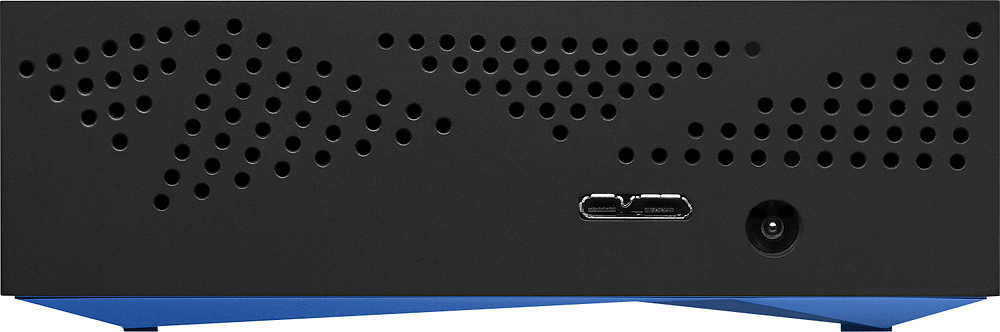
- A:Answer Original power supply is 12v DC, 1.5 A, positive tip. Plug diameter appears to be 7/32". Find a power supply online [or Radio Shack] that comes with multiple tip sizes. You can change the tip polarity by changing how the tip is connected to the power supply. Caution: reverse tip polarity will likely kill your drive ! Use a volt meter if you are unsure of tip polarity.
I would recommend:
Answered by Chris
Q: QuestionDoes this need to be plugged into an outlet like other External hard drives?
Asked by Vawds.
- A:Answer Yes
Answered by le3333
Q: QuestionCompatable with Mac?
Asked by Huskerfan58.
- A:Answer Yes - the drive is fully mac compatible. You can easily reformat the drive to HFS using your OS-X disk utility, or install the (provided) NTFS for MAC software to use the drive as delivered with the formatted NTFS partition. Incidentally, the NTFS for Mac software is a great addition to provide your MAC full compatibility with NTFS (most windows based drive filing system) formatted external hard drives.
Answered by demusn
Q: QuestionWhat is the actual transfer rate in megabytes per sec? (220, 600, 4800 etc..)
Asked by Cal92410.
- A:Answer Alright, two answer, one has more details taken into account than the other. Simple Answer: The hard drive should operate at up to 190MB/s under ideal situations (I'd guess closer to 160MB/s on most computers#. This is based on the spec sheet for Seagate's 8TB Archive HDD #ST8000AS0002# which is the actual HDD inside this unit. Technical Answer: It depends partly on your computer, people using older USB 3.0 ports or running Windows 7 #which don't support UASP, or USB Attached SCSI Protocol# will lose about 15-25MB/s off the top speed of the drive. Additionally, the 8TB Archive drive does not respond well to continuous writes since it uses a technique called SMR and may slow down significantly after a certain amount of sustained writing. #This will likely only be an issue during initial backups, video recording, or similar workloads, but I haven't actually used one myself to know where the limits are exactly)
Answered by Mason
Page 1, Showing 1-12 of 12 questions
Most-viewed items
- $949.00$949.00The price was $1,099.00
- $329.99$329.99The price was $469.99
- $149.00$149.00The price was $399.00
- $159.99$159.99The price was $179.99
- $1,149.00$1,149.00The price was $1,299.00
- $449.99$449.99The price was $649.99