“How do you fast forward? I am listening to my recordings on the digi recorder and cannot work out how to fast forward or go to a specific section of the recording. This makes transcription very difficult! Can you help?”
Answer This Question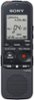
1-5 of 5 Answers
have to hold the fast forward button in. you can mark a area you want with the T-Mark button right below the fast forward button
Sorry, there was a problem. Please try again later.Hi Fiona, You can press and hold the fast forward button > >| during playback. -Anthony
Sorry, there was a problem. Please try again later.It is okay
Sorry, there was a problem. Please try again later.I actually also was stuck trying to figure this one out. I couldn't figure it out, however, you can transfer the sound clip to a laptop in order to open the file in other audio/video players that would allow for this feature. Other sound recorders allow playback speed control by another brand, though I cannot recall which company does it it.
Sorry, there was a problem. Please try again later.To fast forward I hold down both the play button and the double arrow forward button at the same time.
Sorry, there was a problem. Please try again later.