“Where do I go to find my own phone number? I knew It when I first got the phone, now I can't find it anywhere.”
Answer This Question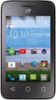
1-1 of 1 Answer
Press your Settings icon, scroll down the list until you see "About Phone" and press it. Then you another list, press "Status" and you will see "My Phone number".
Sorry, there was a problem. Please try again later.