“I have a seagate free agent go flex external hard drive. Can I transfer files on it to the Wd my cloud”
Answer This Question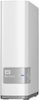
1-5 of 5 Answers
Not familiar with your Seagate unit but once your My Cloud is setup you can drag and drop files from any hard drive to the My Cloud
Sorry, there was a problem. Please try again later.yes you can, this WD my cloud appears in your network section in the file explorer.
Sorry, there was a problem. Please try again later.As long as you can connect to the cloud, of course
Sorry, there was a problem. Please try again later.Yes. Just plug it into the USB port on back of the nas and the drive should pop up as new drive in network drive list. Then just drag and drop into specific location of your choice on nas drive. Note: need to have a user name and share folder already setup on the nas. Other option is to login to the nas drive from you computer. Attach the external drive to your computer by usb and then drag and drop to nas drive same way as above. This may be quite slow though.
Sorry, there was a problem. Please try again later.Absolutely.
Sorry, there was a problem. Please try again later.