Customer Ratings & Reviews





- Model:
- CX3402CVA-I5128GR
- SKU:
- 6609087
Rating by feature
- Battery Life
Rating 4.7 out of 5 stars
- Speed
Rating 4.8 out of 5 stars
- Display
Rating 4.8 out of 5 stars
Customers are saying
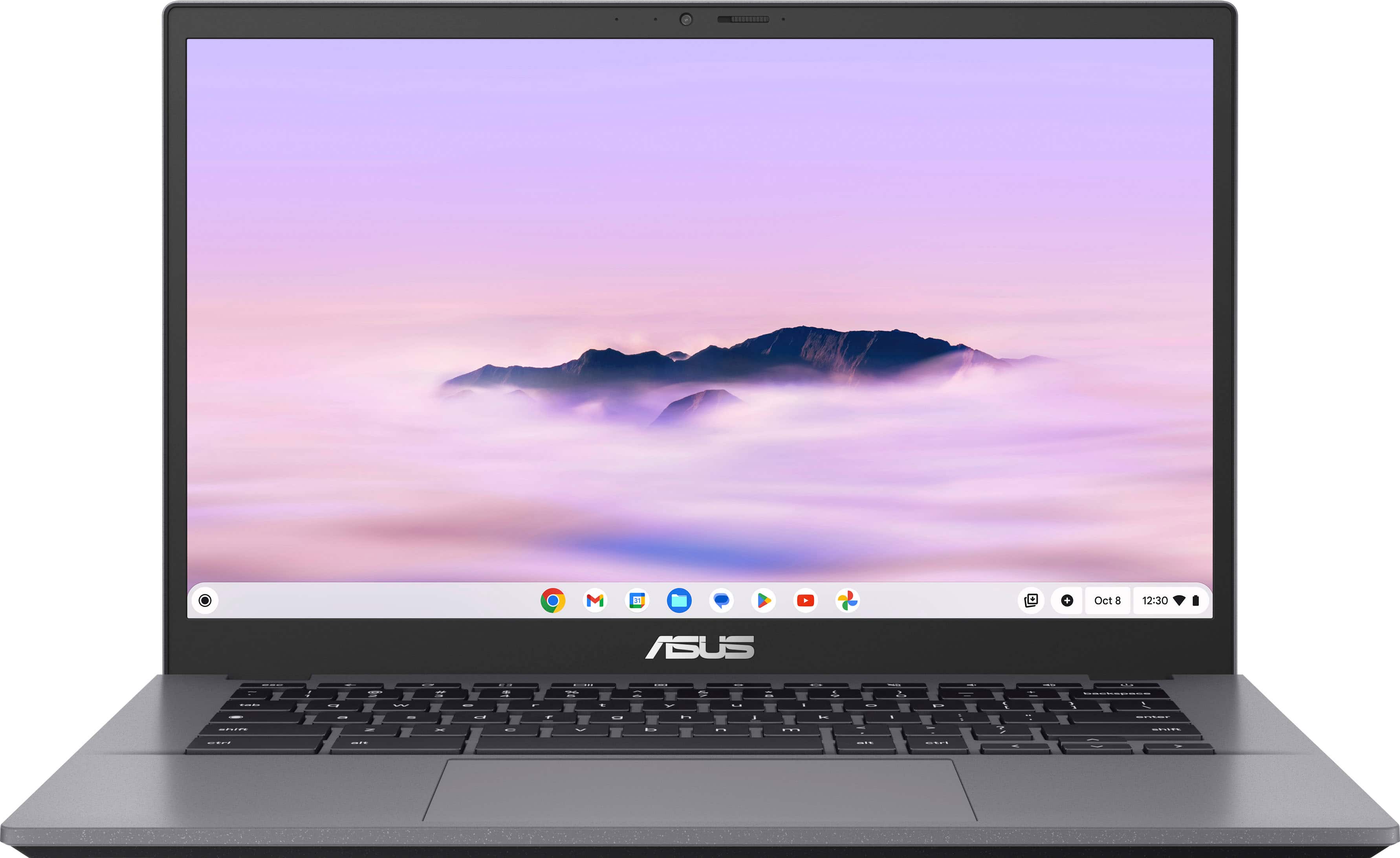
Customers frequently mention the impressive build quality and snappy processor speed of the CX34 14" FHD Chromebook Plus Laptop. Many appreciate the good battery life and portability, as well as the variety of ports available. The light weight, strong connectivity, and touchscreen are also highlighted as positive features.
This summary was generated by AI based on customer reviews.
- Pros mentioned:Battery life, Build quality, Port count

a Chromebook for Grown Ups (and work and play)
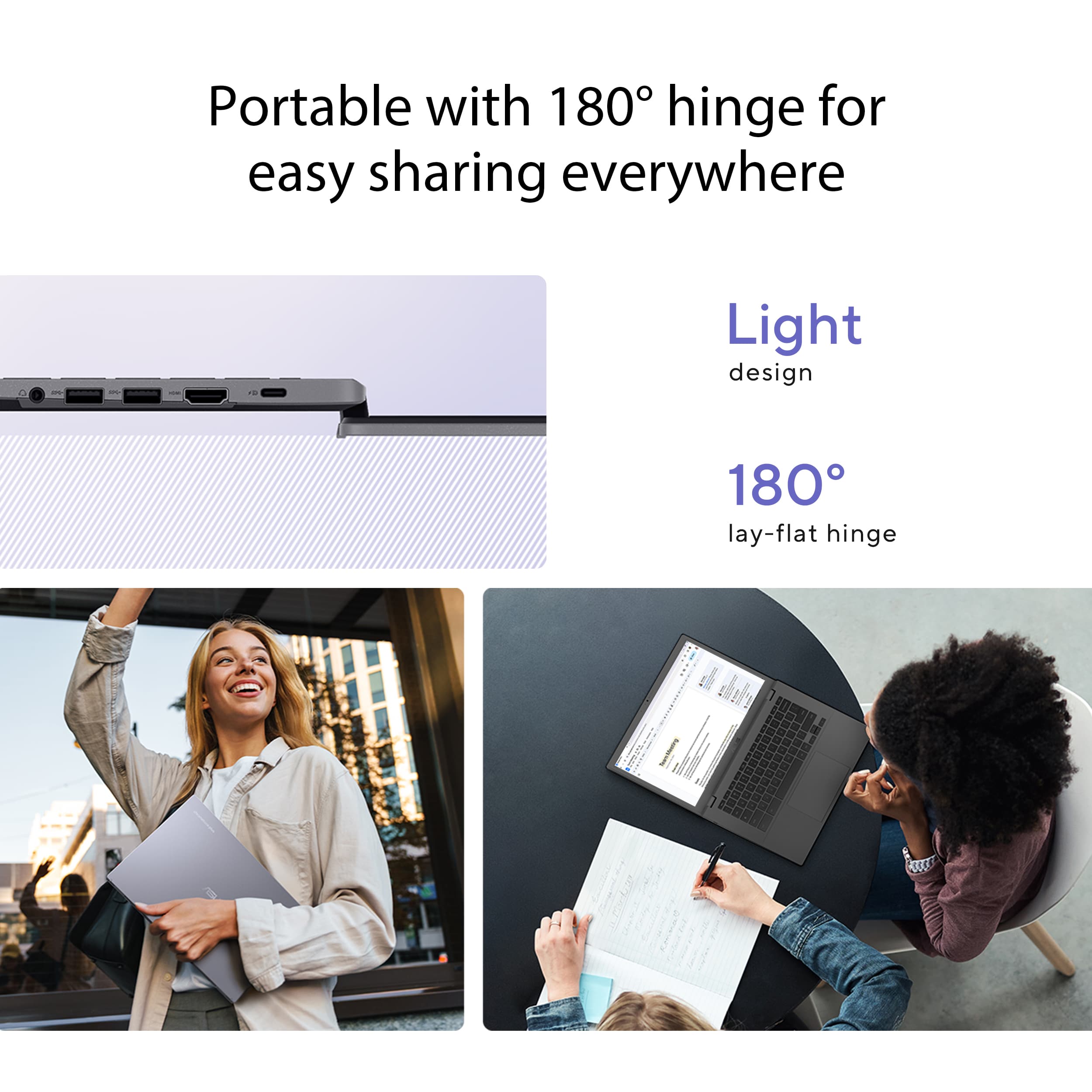
|Posted .This reviewer received promo considerations or sweepstakes entry for writing a review.I’ve owned a few Chromebooks. The first I ever bought was for my kid in middle school. It was an ASUS too and I found it to be good value but never really thought of them as a serious laptop for work. The ASUS Chromebook Plus with Intel i5 has changed my view. It looks like a serious business laptop - in dark greys and using Gemini on it (bonus 12 months of Gemini Advanced is included!) I am sold that a Chromebook can be used for serious tasks. First - in the box. ASUS Chromebook CX34 14” USB C Power Adapter Out of the box, the immediate observation is the ASUS CX34 looks premium. It feels solid and well made. There’s also no gloss surfaces. Even the touch screen is matte - so no fingerprint marks. Showing it to a friend, their immediate comment was “it looks like a real laptop”, which if you have used Chromebooks before you understand. You get plenty of ports (2x USB C/Display Port Combo, 1 Left/1 Right), 2 x USB A (both on the right) a headphone jack, and a full side HDMI port. The full size HDMI is a nice surprise given the USB C Display Port support - but nice given in a meeting or conference room, you’re more likely to find a HDMI cable these days. There’s also a camera, with an included privacy on/off shield (clearly marked orange when closed). There’s no microSD or SD card slot - so there’s no ability to expand the memory outside of a USB drive. More on that later. Setup was easy, power on - sign into WiFi and connect your Google account. There was a quick software update and then I was able to hit the play store. I installed Office 365 (needed for work) and then to put the ASUS CX34 through same gaming paces, Roblox and StarDew Valley. I also used Google Docs (for personal, like writing the draft of this review) and started to play with Gemini. Interesting, Zoom and Acrobat and Apple Music was preinstalled. The good news - this laptop is GREAT for productivity and light gaming. The only thing I will note on gaming is while most Android games are a small footprint, the absence of a microSD expansion may bothersome (it’s not a deal breaker, just don’t fill it with games!). That said, for gaming and work - this is where you get the benefit of a proper Intel i5 processor. The ASUS CX34 is the fastest Chromebook I have ever used as a result. The sound is good, enough for light games and more than good enough for a zoom calls (although I paired my Pixel Buds to the Bluetooth). The 14” screen is great clear and bright, and the touchpad responsive but it did seem to pick up accidental touches, more of a Chrome OS issue than ASUS. What stands out is that the CX34 has a real touchscreen - I wish it could open to a tablet form factor, but that said, the touchscreen is responsive and found myself using it more than I expected. Again, I wish the CX34 could be used like a tablet, but it only opens maximum flat. I also let my kid play Roblox and there were no complaints, except for when I had to pry the ASUS CX34 back from him haha! The downside, if there is one, and the reason I am giving it 4 stars is while the CX34 runs whisper quiet it does get warm on your lap on the right side - I am guessing this is where the i5 CPU is located. It’s not hot, but warm enough that I was surprised. The only last thing to think about is battery life. I used the CX34 all Memorial Day weekend, including impromptu. Despite a “real” processor, I was able to use all day from a full charge. This was not doing a day of Zoom calls, more browsing, videos, music and games while on WiFi. So more like medium use with frequent breaks. I am keen to see how the CX34 stacks up on a work day. Overall, love the ASUS CX34. I plan to use it every day. If you’re after a Chromebook that is for “grown ups” that is perfect for business and occasional gaming. The Intel i5 make the ASUS CX34 a great choice. If it was able to go full tablet mode, I’d give it a 5/5.
I would recommend this to a friend Very good chrome book.
||Posted . Owned for 3 weeks when reviewed.This reviewer received promo considerations or sweepstakes entry for writing a review.It works out very well for what we use it for. Very fast operation.
I would recommend this to a friendASUS Laptop
||Posted . Owned for 2 weeks when reviewed.This reviewer received promo considerations or sweepstakes entry for writing a review.It’s a really good laptop for school, it fits perfect in my bag(Vans) it’s lightweight and holds a good charge for a while .
I would recommend this to a friendGood to start with
||Posted . Owned for 1 month when reviewed.This reviewer received promo considerations or sweepstakes entry for writing a review.Good for student and youth to start having a laptop for homework.
I would recommend this to a friendGood computer for school use
||Posted . Owned for 2 months when reviewed.This reviewer received promo considerations or sweepstakes entry for writing a review.Good to buy for school use. Working great and my son loves it
I would recommend this to a friendChromebook plus
||Posted . Owned for 3 weeks when reviewed.This reviewer received promo considerations or sweepstakes entry for writing a review.This item has worked great. We changed from a Windows computer to a Chromebook plus.
I would recommend this to a friendDont know what this is!
||Posted . Owned for 3 weeks when reviewed.This reviewer received promo considerations or sweepstakes entry for writing a review.So far this is very easy to use. Set up not too complicted, might have missed something though, i am not real good with computers.
I would recommend this to a friendGood as it should
||Posted .This reviewer received promo considerations or sweepstakes entry for writing a review.It’s good and does exactly what it should. No issues. Clean.
I would recommend this to a friendChromebook A+
||Posted .This reviewer received promo considerations or sweepstakes entry for writing a review.Great Chromebook. The size is perfect for taking everywhere
I would recommend this to a friendPerfect Tool for Web Dev Jobs
||Posted . Owned for 3 weeks when reviewed.This reviewer received promo considerations or sweepstakes entry for writing a review.able to review web design work and keep up to date. perfect tool
I would recommend this to a friendHome Laptop
||Posted . Owned for 1 week when reviewed.This reviewer received promo considerations or sweepstakes entry for writing a review.Extremely nice computer for price. The salesman was very knowledgeable and directed me in the right direction.
I would recommend this to a friendNice for school
||Posted . Owned for 1 month when reviewed.This reviewer received promo considerations or sweepstakes entry for writing a review.Nice Chromebook for my daughter for school and at a good price point.
I would recommend this to a friendAmazing
||Posted . Owned for 1 week when reviewed.This reviewer received promo considerations or sweepstakes entry for writing a review.Amazing for gaming and personal use my kids love it when
I would recommend this to a friend- Pros mentioned:Battery life, Build quality, Port count
Nice premium Chromebook
|Posted .This reviewer received promo considerations or sweepstakes entry for writing a review.I have had a few Chromebooks over the years, they have always seemed like a good idea at the time, but them I missed just having a regular solid Windows laptop. Most of them seemed cheaply made, and felt like a flimsy piece of plastic in your hands. This Asus Chromebook definitely doesn’t fit that mold. Out of the box it has a nice solid feel to it. It definitely feels like a premium and well-built product. The case is a cool looking gray color. Seems a little lighter than most things that are what they calla “space gray” color. The back of the laptop has a textured surface making it easier to hold and move around without fearing that it will slip out of your hands. The screen is not glossy, which means you won’t have to deal with any reflections, even outdoors or in bright rooms. It is a FHD 1920x1080 screen, so no 4K. Speaking of the screen it can be opened so it lays completely flat, something a lot of laptops cant do unless its one of those ones that folds completely over to be used as a tablet (which this one cannot do). The screen on this laptop is also a touchscreen, so you don’t even have to use the touchpad if you don’t want to, you can just touch the screen, and since it’s a matte screen, you don’t have to worry about fingerprints. One thing that is a real bummer, and I can’t believe that every single laptop made today doesn’t have, is a backlit keyboard. For this being billed as a “chromebook plus” I would expect it to have a backlit keyboard, and this one does not. Any manufacturer making laptops or Chromebooks in this day and age should have backlit keyboards standard. As far as connectivity goes, you get 2x USB C Display Port Combo ports, 2 USB-A ports, a full size HDMI, and a headphone jack. One other thing that would have been nice to have is an SD or Micro SD card slot for adding more storage space. But you can always get a small thumb drive to add more storage if needed. I haven’t opened it up yet to see if the internal storage can be upgraded or not. Under the hood you have the Intel Core i5 processor paired with 8GB of memory which is plenty for this machine and what you will do with it. The 128GB SSD is a little small, but for most people it will probably be OK. It also has a small webcam which I think looks great and will work perfectly for business meetings and video chatting. I also like that it has a sliding cover to completely block the camera when not in use. That’s all the specs, so now we can get into the performance. This thing starts up fast, I mean really fast! From the time you press the power button to the time where you can enter your password to log in is about 4-5 seconds. The Chrome OS operating system is designed mainly for productivity, and mostly using a lot of Googles apps (Docs, Photos, Sheets, Slides, Forms, Gmail, Chrome browser, etc…) So, if you use a lot of those programs, this will be a perfect fit for you. If you are used to using a lot of Windows based programs, this will probably not be the best choice for you. You can also easily use streaming apps like Netflix or Hulu and things like that. You can even do some light gaming on this as well. Any games that you can download from the Google play store can be played on here. Just note, you do have the storage space limitation, so you won’t be able to install a ton of them. The sound quality for videos and gaming and things is OK. Its not mind blowing, but it will get the job done. You will probably be better off pairing a nice set of Bluetooth earbuds though to get the best sound quality. The laptop also comes with Google’s AI software called Gemini. It is a great help with productivity tasks and just making your life easier. I am a photographer and I sell stock photos and I have often used AI to write descriptions of the pictures that I take before posting them online to sell. It’s a great tool and has saved me a TON of time! Overall, if you are into the Google ecosystem, this Chromebook is a no brainer, it has great specs and will be everything you need for most users. I wish it had a backlit keyboard, and maybe the function of folding completely to be used as a tablet as well. But other than that, this is a solid and well-built machine with excellent battery life. I am easily able to use this all day without having to put it on the charger.
I would recommend this to a friend - Pros mentioned:Battery life, Build quality, Portability
ASUS does it again, but now in a Chromebook!
|Posted .This reviewer received promo considerations or sweepstakes entry for writing a review.I have stayed away from Chromebooks because I honestly don’t see them as proper laptops, but this ASUS CX34 Chromebook Plus has made me be more open to owning a Chromebook. I have used this one for a little over a week now, and I’m digging it so far. I have previously owned an ASUS gaming PC and so this is why I decided to give this one a try. Here are the things I like and one I wish were a little better. I like the screen size. It’s a 14-inch FHD display and it's enough to provide a sharp and bright image. I wish it was a little more high definition, but for the price it’s good. It’s not a touchscreen, but honestly I don’t need a laptop to be a touchscreen. I also like that I can make the screen go all the way back, but honestly I don’t see myself using this feature a lot. I’m not sure who does to be honest. I mainly use it for browsing, typing, streaming, and Google Docs. It does all that perfectly. One thing I really like because I was skeptical about Chromebooks is that it actually feels fast and responsive. From the moment I turn it on to when I start using it, I don’t really experience any lag. I’m not too savvy on the latest processors but it seems like the Intel Core i5 gets the job done without a problem. As far as the build quality, I find it to feel very high quality. The mousepad is responsive and feels as if it was on a premium laptop. The keys are fine. I do wish the font on them looked a little different. It’s something minor but I think a different font would make it look even more premium. It’s the little things sometimes. That said, it feels premium from the moment you hold it. It's also slim so it fits just right on my documents holder. Another cool feature which I am completely new to is the Google AI tools. I can’t really comment a lot on this because I am still learning and exploring, but I do use other AI software and so I’m looking forward to learning this one to help me be more productive and efficient. Battery life has been good. I have not traveled with this Chromebook yet, but I have streamed YouTube for a few hours and it still had battery left so no complaints. It meets my needs. The only thing I really wish was better was the 128GB size. I need at least 256GB so think about this. If you plan on storing files or other stuff, the hard drive can get full quickly. Overall, if you’ve been skeptical about using a Chromebook it might be time to start considering them because they are getting better and better. I like ASUS and so this is why I gave this one a try. I can honestly say it has exceeded my expectations.
I would recommend this to a friend - Pros mentioned:Build quality, Port count, Processor speed
Great Chromebook with speed to handle most tasks
|Posted .This reviewer received promo considerations or sweepstakes entry for writing a review.The ASUS CX34 14" FHD Chromebook Plus Laptop is a good device with Google AI, an Intel Core i5 processor, 8GB or RAM, and a 128GB SSD Drive. It comes well packaged with the laptop itself USB-C charger. The charger has a very long cable and it’s a lot thicker than most other cables. The USB-C charging cable is 6 1/2 feet long, which is plenty to reach most plug outlets with no problem. The side profile of the Chromebook is a straight design. However, they painted the side of the Chromebook to make it look like a tapered wedge design. It has a slim design despite it having USB A and an HDMI port. The total number of ports are two USB-C ports, with one on each side. Two USB A ports, an HDMI port, and a Headphone jack. The keys on the keyboard have a good tactile feel with good key travel. The keyboard is easy to type on, but only in well lit environments because the keys are not backlit. The trackpad is rather large and works well. It comes with a touchscreen that works well. The keyboard has shortcut keys for screen brightness. I wish the screen could get a bit brighter at its highest setting. When the screen is opened up, the bottom of the screen protrudes down below the Chromebook. This creates a slightly raised keyboard, which is good for ergonomics when typing on a flat surface. However, the bottom of the screen digs into your leg when trying to use it on your lap. The speakers sound OK. They’re clear but they are definitely lacking bass.The i5 processor makes the Chromebook quick at most tasks, however the fans do come on quite often. Overall, it’s a good Chromebook which I hope to get good use from.
I would recommend this to a friend - Pros mentioned:Battery life, Build quality, Portability
Solid Chromebook: Great Battery, Dim Screen
|Posted .This reviewer received promo considerations or sweepstakes entry for writing a review.Solid Chrombook. Feels substantial in the hands, not cheap and plasticy. The screen is probably the only underwhelming feature of this laptop to me. I love that it is a touch screen, and the resolution is okay at 1920x1080, but the screen brightness at 250 nits is a little on the low side for me. Using the CX34 in a regular-lit room (with the blinds open), the screen gets a little washed out. Streaming HD titles from Netflix or Prime was slightly disappointing, as the lack of brightness led to not being able to enjoy HD streams as much as I would have liked to. That being said, the i5 is snappy, the battery life is excellent (I've had the CX34 for over a week and still haven't had to charge it), and it is very portable. The keyboard is excellent. Good feel on the keystrokes, travel is perfect, and the mousepad is responsive. Would have liked a backlit keyboard. I know this is extra cost, but we are getting into the range where backlit keyboards are available and I would have liked to of seen one. Other than the bit of streaming I attempted, I use the CX34 mostly for school and to check email/do light web browsing. It excels at doing so, as well as it's integrating into Google's suite of office apps. I am very pleased with it and would recommend it to anyone needing a portable Chromebook with great battery life and a good processor.
I would recommend this to a friend - Pros mentioned:Battery life, Build quality, Port count
Imperfect Chromebook - Awesome Google Integration
|Posted .This reviewer received promo considerations or sweepstakes entry for writing a review.As a Chromebook user for many years across many models, it has been interesting working with a Chromebook receiving Google’s “Plus” signifier. Basically, Plus Chromebooks must meet an elevated baseline of hardware specifications and software features. My model has an Intel Core i5 (above minimum standard), 8 gb ram (minimum standard), 128 gb ssd (minimum standard), 1080p webcam (minimum standard), and full HD display (mine is a touchscreen display). My initial experiences with this Chromebook suggest that the “Plus” designation is likely for market segmentation rather than to promote an immediately superior Chromebook. Don’t get me wrong….this is a FINE machine in a market that includes poor performing laptops - but processing power aside, the other specifications have been more of a minimum industry standard for a while now. Physically, this Chromebook feels well built and truly solid. It sports an acceptable battery - moderate charging speed (USB-C - included) with a single work day of continual use. It is very well stocked with ports - HDMI out, two USB-A, two USB-C (one doubles for charging), and a 3.5 mm audio jack. But I have some gripes. While never claiming to be a 2-in-1 laptop, I was surprised that this was not a 2-in-1 laptop - my screen is a touchscreen but the display does not fold back to mimic a tablet. The graphics with the anti-glare screen are dull and sound is even more dull. My experience with Chromebooks dating back four years would suggest that Asus could have addressed all of these gripes without associating “Plus” designation to price (strictly my observation!). And, admittedly, Chromebooks of a certain size are probably never used as tablets and I have never used for its truly stellar graphics. I have also been plagued by an ongoing problem with the alignment of the keyboard with the width of the laptop. As an old touch-typist guy who expects the keys to be where my hands land, I keep making tons of typing mistakes on this keyboard - it feels weirdly right-shifted for some reason. The typing feel and response are great, but I feel like the keyboard has some mystical age discrimination. So yeah….I’m gripe-y. But Google’s “Plus” designation for their Google-centric Chromebooks also requires specific feature-rich software implementation. I think this boils down to an advertisement for Google’s feature-rich software and that’s a total feature and not a bug. This Chromebook has Google’s AI in every nook and cranny possible and it’s beautiful. Their Gemini was the last thing I looked at (I’m hating on YOU Microsoft Copilot). So I get it now - their 13 page response to my question about a car problem sold me on AI in general and, specifically, on THEIR AI. This diminutive Chromebook provides writing assistance in documents, reading comprehension, real-time Google translate, access to Google’s amazing smart photo editing (already a fan here - I have owned a Google Pixel since their initial release). There are also perks for people who video conference that I can’t validate. But as a late adopter of AI into my life, I could not ask for a more intuitive assistant. The AI that this Chromebook provides is the seamless AI integration into realities that university professors have feared (alas, I'm including that as a "Plus"). While Asus might be dropping a mid Chromebook overall here, the implementation of all things Google is without flaw.
I would recommend this to a friend - Pros mentioned:Battery life, Build quality, Processor speed
Outstanding Performance and Display Quality
|Posted .This reviewer received promo considerations or sweepstakes entry for writing a review.This Asus Chromebook/laptop is very well equipped. First, it has a powerful Intel Core i5 CPU, Intel UHD graphics, 128GB storage and 8GB memory. And a generous number of ports- 2 USB A 3.2 Gen1 ports, 2 USB C Power/DisplayPort/Combo ports, 1 HDMI port, and a headphone jack. The display is FHD 1920 x 1080 anti-glare touchscreen, and the forward-facing camera is also 1080p, with a microphone array. It comes loaded with the standard google type apps - Chrome, Calendar, Gmail, Google Meet, Play Store, Messages and Photos. This particular Chromebook also has YouTube and Gemini. During setup, if you sync it with your existing Android profile you can automatically pull in your apps and games. Gemini is a great information source tool that I use often as an educational source. For example, if you're wondering what a USB Type C DisplayPort/Combo port is, ask Gemini, you'll get a detailed explanation about the different types of ports and what they do. Working with files on this Chromebook is easy. I have Excel files stored on a NAS (home network attached storage). I was able to connect to my NAS, pull up an Excel file and have the option of opening it with Google Sheets or Microsoft 365, then saving it to cloud storage. Also, most popular apps are available to download through the Play Store. I use mostly Zoom Workspace for meetings, and I was able to add it from the app store. Other common apps like Discord, TikTok, etc., and games are available. As far as working on this Chromebook, the Chrome OS (operating system) is very fast. There's no lag in starting up or opening apps, it's like instantaneous, you can move fast. I play Clash of Clans on an android tablet, and it loads faster on this Chromebook than my tablet and plays flawlessly. You can also download and play popular Windows or Xbox computer games designed for the Chrome OS. Battery life is very good; I spent four hours surfing on it and playing games and it still didn't need to be recharged The touchscreen anti-glare display on this Chromebook is also very high performing. It has deep, rich color and clarity. In both gaming and streaming videos and movies or just looking at photos the picture quality is outstanding. The Audio quality is acceptable. If there is one thing lacking on this Chromebook, for me it's the absence of a backlit keyboard. With all the other high-quality components in this Chromebook, they should have included a backlighted keyboard. Gemini says Chrome OS supports backlit keyboards; it's up to the manufacturer whether they want to include it. Asus missed on this point. Overall if you're looking for a high-performance touchscreen Chromebook with an outstanding display, this one fills the bill. Other than my complaint about no backlit keyboard, Asus made this Chromebook top-notch. You get what you pay for, and in this Chromebook, you get performance.
I would recommend this to a friend - Pros mentioned:Battery life, Build quality, Portability
Portable Performance
|Posted .This reviewer received promo considerations or sweepstakes entry for writing a review.The Asus CX34 14" Chromebook Plus Laptop has redfined my expectations in the Chromebook space. The specs are excellent and the performance is even better on this device. It is a dream for media consumption, with seemingly unlimited battery life while streaming movies and my favorite TV shows. The screen is beautiful and large enough to enjoy, while still being portable and lightweight. Productivity on this laptop is also a breeze, and I have no issues multi-tasking work meetings while updating spreadsheets or updating tickets. The keyboard is excellent and the overall build quality of this Chromebook is impressive to say the least. The sound quality is good enough to enjoy films and even stream music in my office, with no distortion and even some bass! My kids have also enjoyed using this device for some light school work and studying, as well as playing some games from the Play Store. Setup was a breeze and I was up and running in minutes, even importing all my Google data from my other devices. Overall the Asus CX34 is an excellent entry into the market and I recommend it without reservation.
I would recommend this to a friend