Customer Ratings & Reviews




- Model:
- CP315-1H-P8QY
- SKU:
- 6294312
Rating by feature
- Battery Life
Rating 4.5 out of 5 stars
- Speed
Rating 4.3 out of 5 stars
- Display
Rating 4.3 out of 5 stars
Customers are saying
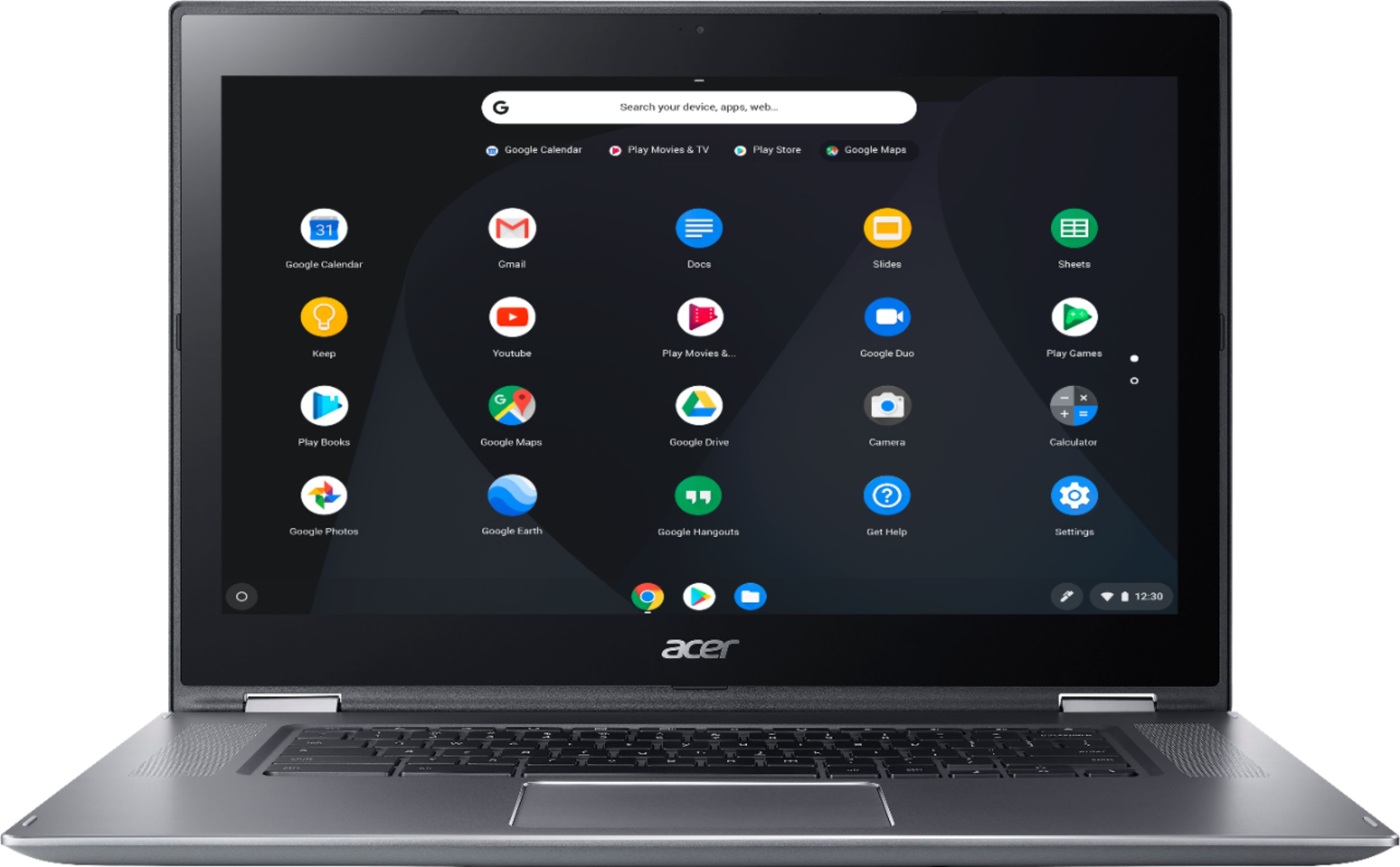
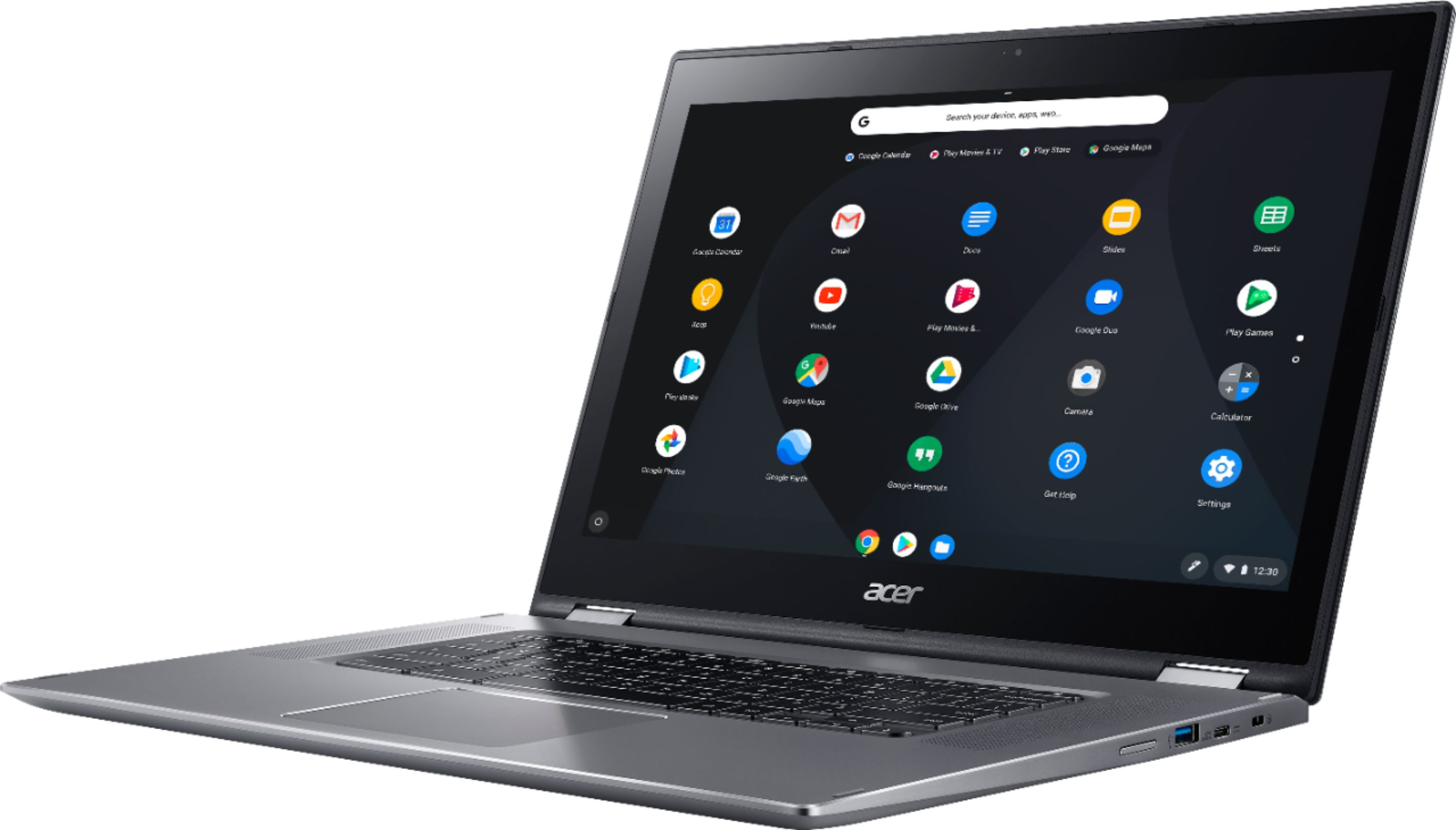
Customers admire the Spin 15 Chromebook's large screen size, ease of use, and impressive battery life. Many appreciate its touchscreen functionality and consider it a great value for the price. Positive feedback also highlights its lightweight design and decent speakers. A minor drawback mentioned by some users is the limited storage capacity.
This summary was generated by AI based on customer reviews.
- Pros mentioned:Screen size
Great for College
||Posted . Owned for 3 weeks when reviewed.This reviewer received promo considerations or sweepstakes entry for writing a review.I have had this for almost a month, and this is just fantastic. It looks classy and worth $700 when in fact I got this with a student deal of $399, plus $49 of Microsoft office for one year. I bought this at the City of Industry Best Buy because it's always out of stock at Fresno and Clovis. Good thing I listened to my gut when I was visiting my Aunt in LA. It's great for homework and streaming stuff online. Service: I also really like the service of the saleslady (Alexandra I think, a fellow college student) who tested this out for me and helped me compare which is the best, long-lasting laptop, perfect for my Biology major. She was so helpful and friendly and asked all my questions. It also helps to research your product beforehand. Backlit Keyboard: This won out because, not only does it have a Backlit keyboard (so handy especially when you're in your dorm and you don't want to disturb your sleeping roomie with a lamp on) but it's big enough for you to enjoy streaming video, e.g. YouTube, Amazon etc. My only gripe (which isn't really) is there's no caps lock key, home, end key. I've been using Microsoft all my life, so it takes getting used to, like most new things. Can always look up Google for Chromebook keyboard shortcuts, it is pretty easy. Storage and ports: You could connect a USB or make use of Google's Cloud which helps me a lot in organizing and storing files for easy access to a public computer on campus, and in case you forget your thumb drive. It's complete with HDMI port so you can connect this to a projector if you need to. I haven't tested out the Bluetooth for printing out papers, but I did test this laptop to connect to my Google Pixel3a phone as hotspot. I'm thinking about buying a printer sometime soon, but only when there's A REALLY GOOD DEAL (Black Friday?) Hint hint, Best Buy. I'm up for deals especially as good as this one. Trackpad: The trackpad is a breeze. Very intuitive. You could always adjust the settings to edit/add more shortcuts. I was thinking of buying a mouse as well, part of the bundle, but seeing how impressive this is, there's no need to. Schoolwork: I haven't been using Microsoft Office as much as Google Docs, but it's nice to have backup if you don't have internet. I utilize "Keep Notes" and "Calendar" a lot, reminding me of my activies ahead. Audio and Screen: Wonderful. Screen is big enough to enjoy streaming movies and shows. You don't have to crane your neck, move forward or squint, especially for a product at this price range. I'm happy with 1080 HD. OS: Sometimes it does "blink" or slow up, specifically if I get a lot of notifications from my email. I'll just have to adjust the frequency of those notifs, so no big deal on that. It gets updates just like an Android phone. Physical: so lightweight, I've been carrying this in a backpack around on campus, walking 10 minutes to and fro most days, and it doesn't feel heavy at all. Also because the backpack I bought that came with this is excellent and padded (Next review). It's also sturdy and you feel that when you open up your screen, it won't break. The top of the Chromebook is very durable and won't scratch at all, in fact it's quite scratchproof. Nice criss-cross texture to it too. Overall, just take care of it, and it'll take care of you :) As a Bio Student, this is perfect for me and all my theses, projects and essays.
I would recommend this to a friend - Pros mentioned:Screen size, Touchscreen
Pretty good Chromebook with "thick" bezels
||Posted . Owned for 1 month when reviewed.This reviewer received promo considerations or sweepstakes entry for writing a review.I'm pretty happy with the purchase of this product. It is on the heavy size compared to other Chromebooks on the market. The screen is a nice size, the chrome OS is blazing fast but I thought about returning it more than once. The thing that bothers me a little are the really thick bezels on this computer. I think Acer needs to work on their design a little bit, the screen looks like something from the 2000's. Otherwise, the computer does it job very well, loud speakers, great keyboard and pad. Would I recommend it? Sure. Is it for everyone ? No. It depends on your needs. Better replacement from that Win "Sur..." from 2015 for sure.
I would recommend this to a friend - Pros mentioned:Screen size, Touchscreen
I recommend this product
||Posted . Owned for 3 weeks when reviewed.This reviewer received promo considerations or sweepstakes entry for writing a review.$345. Totally satisfied with the price. Backlit keyboard and a crystal clear touchscreen. 15.6 inch screen great for watching TV(YouTube TV). Not very portable though, it's huge and heavy. Also you can fold it all the way back and set it up like a tent. Or a tablet. This product gets 5*'s from me
I would recommend this to a friend A big Chromebook with a small price
||Posted . Owned for 1 week when reviewed.This reviewer received promo considerations or sweepstakes entry for writing a review.I finally grew tired of waiting forever for Windows to load, and made the jump to Chromebook. Yes, there are to limitations. But there Is almost nothing you can't do with this machine. Through Chrome Apps and browser extensions, you can almost always find an alternative to common Windows programs. If your computing needs involve mainly web surfing, email, shopping, YouTube, browser games, online documents through either Google Drive or Office Online, then I very highly recommend this Chromebook. Its 15" screen is clear and sharp. It boots in seconds. It handles the online game Elvenar with ease, a graphic intense game that cripples my Windows system that has a Pentium CPU in the same class as the processor inside this Chromebook. This Chromebook runs circles around my Windows PC, You can fold this Chromebook in half and use it as a tablet. But at 5 pounds, it is not meant to be a handheld device. But it works great in tablet mode in your lap. This is not like your smart phone, though, as the screen doesn't rotate to portrait mode. But using the Chromebook in tablet in your mode is really convenient for gaming, or surfing, or emailing with the touch screen. The virtual keyboard works great. It even has voice input which I just used to write this sentence. In summary, if you are looking to buy a Chromebook, but are hesitant, give this machine a closer look. I love mine.
I would recommend this to a friend- Pros mentioned:Battery life, Speed
Best Chromebook you can afford!
||Posted .This reviewer received promo considerations or sweepstakes entry for writing a review.I looked up the reviews and bought one for my mom. It was so good i had to buy one for myself! Great laptop, AMAZING BATTERY LIFE. Great Sound, beautiful display, works fast, NO COMPLAINTS! We need more things made this nicely!
I would recommend this to a friend Nice school laptop
||Posted . Owned for 2 weeks when reviewed.This reviewer received promo considerations or sweepstakes entry for writing a review.Bought this for my kid. We did not need the touchscreen, but thought why not. Good price from BB. Had an issue with display when we switched it on first, had lines. Then I looked up internet before returning it. Someone recommended updating to latest chrome (which was not the case when I started it up). Once the system is working, there are no issues yet.
I would recommend this to a friend
Winner winner! Like a desktop, only thinner!
|Posted .This reviewer received promo considerations or sweepstakes entry for writing a review.I am a 30 year veteran of the computer industry, I worked on computers back when screens showed only one color (green or amber). Or they didn’t have a screen at all, and instead printed everything on a teletype widebody dot matrix printer. I worked for a couple of companies that designed the first thin and light computers. Of course back than that designation was completely different than what we have today. The technology advancements are nothing short of incredible, if only our transportation system and energy sector advanced at the same rate! I could spend time making comparisons for the technology in the Acer CP315 and compare it to the laptop computers I worked on 20 years ago. But that would be laughable and pointless. Instead I’ll tell you my impressions of this computer, what I think it’s good for and whether I recommend it. Hardware Very impressive build quality! I would not have expected this level of fit and finish at this price point. It’s really incredible that Acer can manufacture a system this solidly built, with quality components and keep the price point so low! A true testament to engineers, and their constant pursuit of building high quality products efficiently and cost-effectively. The body and chassis are stiff and feel well put together. It feels like a single unit, which is impressive. I really like the texture materials, and the high-end look and feel. Outstanding! The screen quality is quite good. The resolution is excellent, and the backlit screen is very evenly lit and accurate. Edge to edge the light emission appears quite evenly distributed. Fonts look crisp and not-blurry at all even at the highest supported resolution. Very, very nice! Off angle viewing is also surprisingly good! Far better than I expected it to be. That’s good and bad depending on what you will use this for, if you don’t want people next to you seeing what you are typing - well, this screen won’t help you any because it displays well even at extreme angles. Having said that there is a fair amount of glare on the screen, which I attribute to the touch screen capabilities. What’s that you say? Touchscreen? Yep! Not only is the panel crisp and clear but also doubles as a touchscreen display. More on that shortly… Color reproduction is also very good, and very minimal artifacting even while watching fast moving videos. The keyboard is shockingly good! The debounce is good, the travel length of the keys just right! Really good, and not at all like the terrible ‘chiclet’ style keys of the past. I can type on this keyboard and not get frustrated. It doesn’t have much feedback in terms of sound, but that’s not unusual. I like the old-fashioned clickity click mechanical keyboards - I’m kind of spoiled that way. My first PC was an IBM XT with an 8088 process and a keyboard that weighed more than the entire Acer CP315 with adapter! Ha! As far as laptop keyboards go, this one is excellent. And for bonus points it’s backlit! Good job ACER! Built-in storage is a mere 32GB… I say that jokingly because my first notebook computer had a 100mb hard drive! It was puny and slow, by today’s standards. But back then it was state of the art. What can I say, I guess I’m old… The 32GB of flash memory in the CP315 is all you need, honestly. If you feel you need more, go ahead and add it. Acer was kind enough to provide a MicroSD card slot and USB 3.0 ports. Knock yourself out if you really want to pile in more memory. But it’s not worth it in my estimation. This is a networked Internet device, that uses as part of its architecture Google’s online services and storage. The whole idea of this system is to separate out the processing part from the storage part. Storage is online, is plentiful and can be accessed anywhere in the world so long as you can access the Internet. Well maybe not in China and North Korea where it would likely be blocked. Add Iran to that too.. Hah! You can save your work locally, for those times that you won’t have access to the Internet (on an airplane for instance). But memory is cheap, if you are running low - go buy some more… The battery life in this machine is awfully impressive! It’s rated at 14 hours, and while I haven’t reproduced that - it wouldn’t surprise me if that’s a real number. I’ve used the CP315 for 8 hour straight on battery only and it still had battery life left. YRMV. There aren’t any moving parts in this system, Acer did a great job optimizing energy consumption. This is the laptop I’ll bring with me on extended trips. The power adapter is also lightweight, small and features a long cable. Nice!~ The touchpad is… Ummm… A touchpad. I was never a big fan, and I’m still not. I liked the old trackballs of the old laptops. They just don’t exist anymore. You have to buy external ones and plug them in. The touchpad on this computer is ginormous! There is plenty of surface area to get very detailed movements on. I should like it, but I just don’t care for any touchpads. The other thing I don’t like about this particular touchpad is that there are no buttons. Zero. Not two, now one. Instead the button(s) are under the touchpad so you have to train yourself to click and double click in place on the touchpad. If you’ve used Apple notebooks, this will make perfect sense to you. But I’m an old fashioned mouse guy, and I haven’t got comfortable with it yet. Having said that the touchpad combines a number of capabilities and functions all in one. One finger press, one finger drag, two finger press, two finger drag… Ugh… Read the manual is all I can say… The CP315 is the contortionist amongst other normal laptops. It has an ingenious hinge design that not only holds the screen stable at most every angle I tried, it also allows the user to flip the screen completely backwards. The end result is that the laptop transforms into a tablet computer. I personally don’t have much use for that, but I’m sure lots of people do. The feature is there if you want it. When you convert it to a tablet the keyboard and touchpad are disabled so you don’t accidently type things on the screen. In tablet mode you will use the touchscreen to navigate and type - it’s like a big smartphone in this mode. I recommend getting a stylus to use if this mode is important to you. It is really cool, and a nice added bonus for those people that will appreciate it. The speakers sound very and are very loud for the size and depth of this laptop. No complaints at all! Of course most people have Bluetooth speakers, and headphones. I tried both and they both connected quickly and worked flawlessly. I tried the built-in webcam and microphone only long enough to verify they work. They work… I haven’t used them in practice, but I’m sure given everything else with this machine they’ll work equally well. So that’s a review of the hardware, of the major functions. Oh the wifi works great! No problems at all, fast solid connection. Never lost connection, very stable. No ethernet connection of course, this notebook is too thin. If for some reason you must be hard wired, you can use a USB style connector. I won’t review the software on this computer because Acer didn’t design it, they integrated it. This runs the Chrome OS, and uses Apps instead of full fledged software applications. This operates a lot like Microsoft Windows, but it’s not. It takes a little getting use to. But if you have an Android phone, you probably already know how to use this. So who is this computer meant for? In my opinion it’s perfect for the user who wants to browse the Internet, to watch videos online, to correspond via email and to use the wide assortment of Google Chrome Apps. You get access to Google’s excellent office productivity apps. I wouldn’t use this to write a thesis or my memoirs, but in a pinch it can double as a work computer. But this is not a gaming computer, nor is it meant to be. It has enough power to do what I mentioned but not anything requiring lots of processing power. If you are a power user and want to play video games or edit large videos - this isn’t for you. But if you are looking for a stable and well-built laptop that will keep going on battery power all day long - this is a winner - and you better believe I recommend it. It’s a bargain!
I would recommend this to a friend"Spinning" its way into my heart.
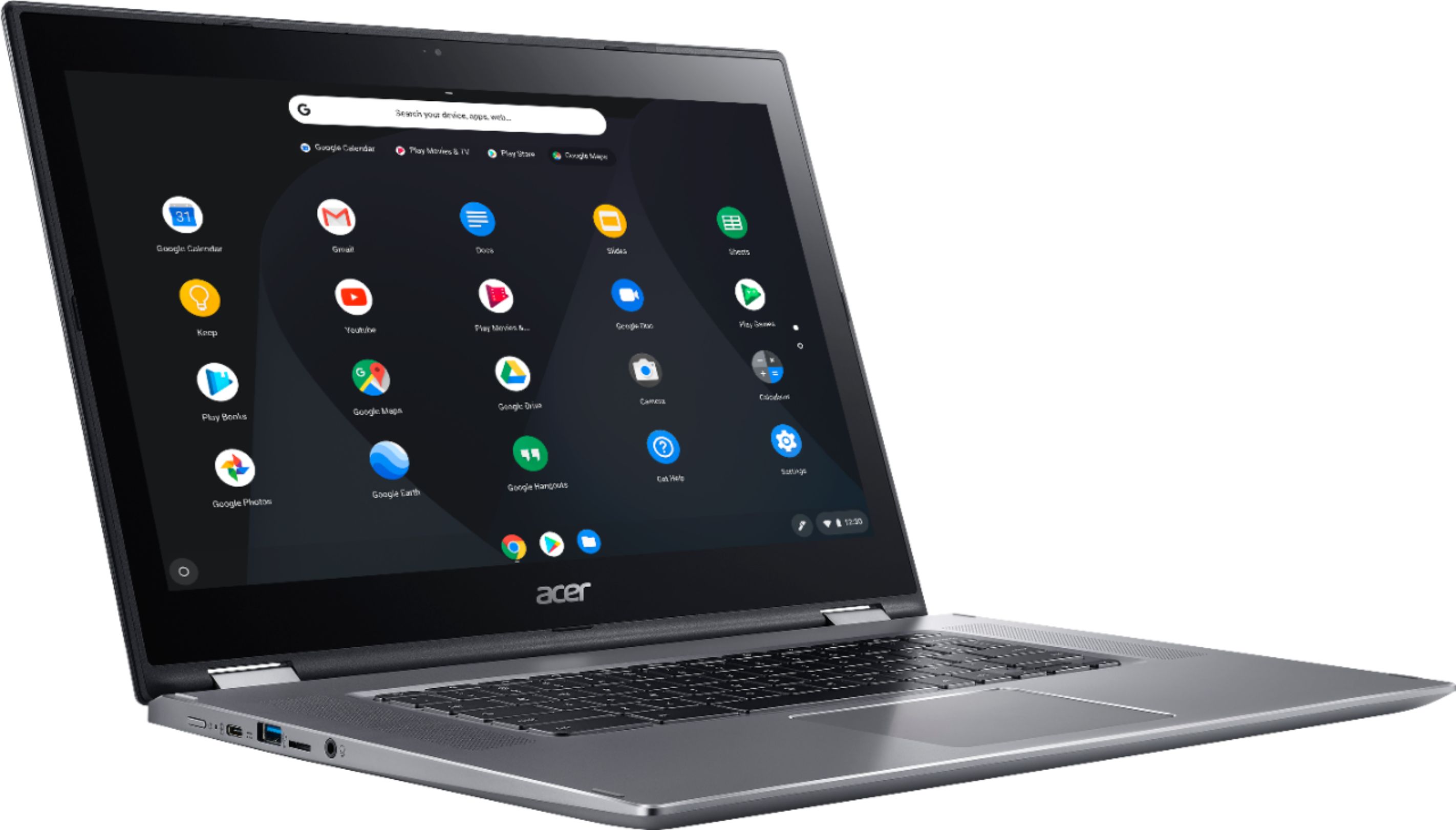
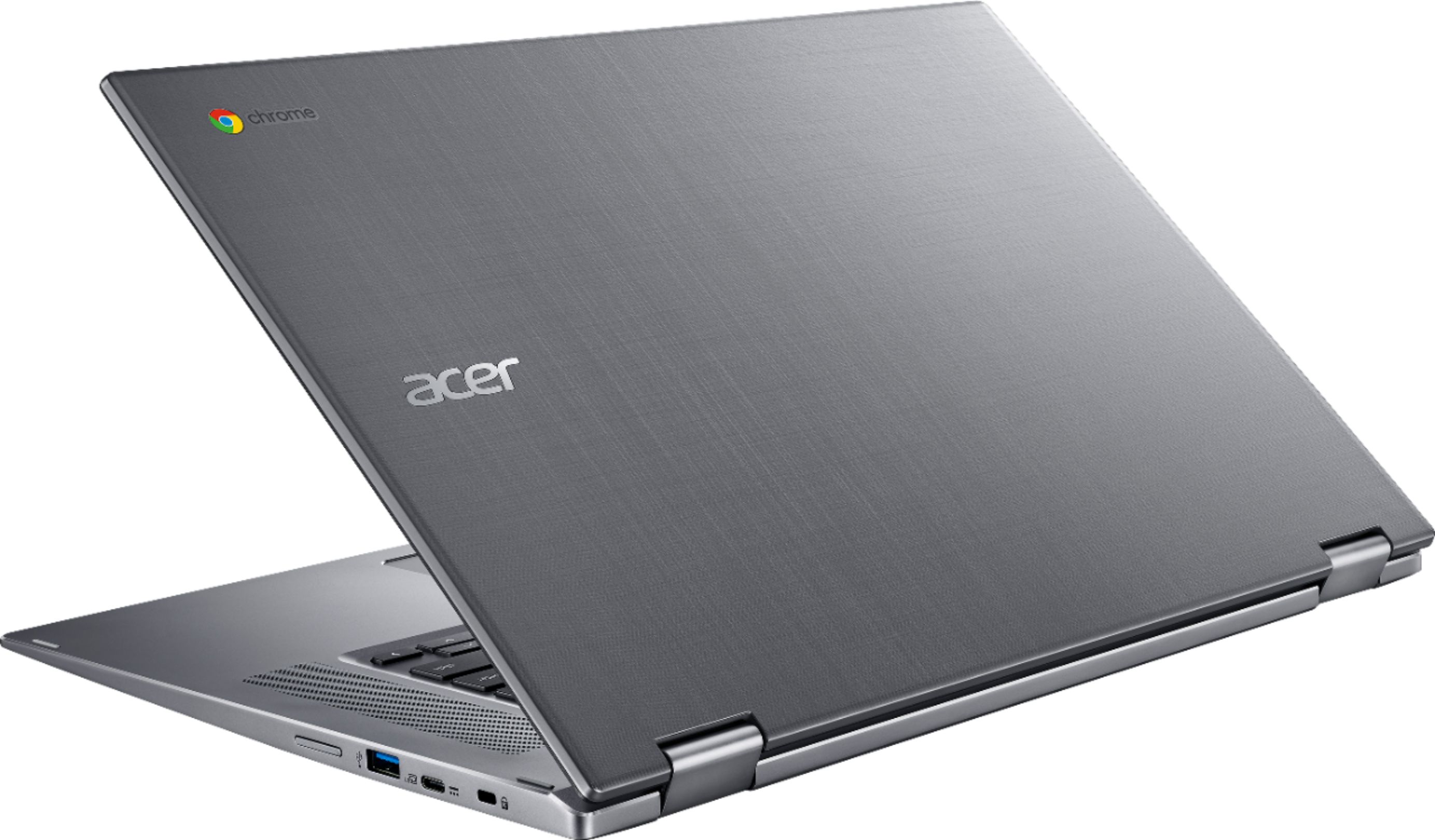
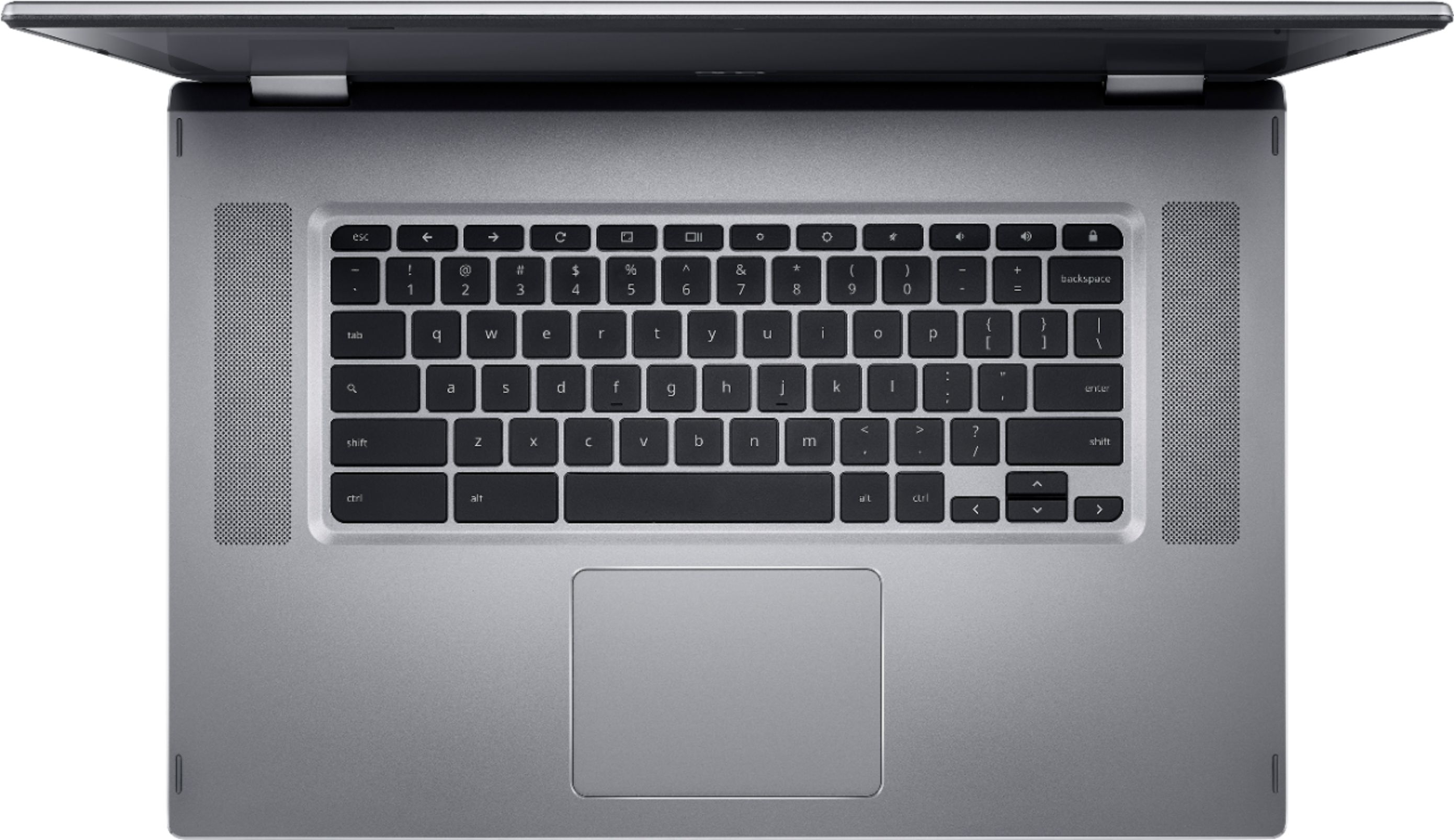
|Posted .This reviewer received promo considerations or sweepstakes entry for writing a review.It's been an amazing year for Chromebooks especially since they added the Google play store. I was using an Acer Chromebook 15 from last year as my device but this one is much improved plus the "Spin" feature makes it even more useful than last years model with the same performance which still feels good use. Design: The design is great with the aluminum well-constructed throughout the top and surrounding the keyboard. Almost the same as last year with a textured top. There is a nice silver trim that just gives off the illusion of luxury. Everything about the laptop feels nice even the bottom of the laptop which is plastic but better than last year model. Chromebook Spin 15 somewhat lightweight, it feels heavier than a basic Chromebook 15 from Acer. I can still pick this up with one hand and place it down but not as easy as before. The design also allows for the Spin feature to work which lets you put the Chromebook in Tablet mode. Screen: The screen is great to look at for a Chromebook. it's a 1080p IPS Muti-Touch panel and nothing looks ugly on this screen. Having the touchscreen allows you to use the Google play apps that are available. I am able to multitask with more than one screen open at once. The screen gets really bright when you turn up the brightness and gets low enough not to disturb anyone next to you. YouTube Netflix and Hulu all look amazing on the vibrant screen. Games look awesome like Asphalt 8 as well. Sound: The speakers are placed on each side of the keyboard and the speakers are LOUD. There are not tiny small speakers at all and they sound way more fuller than anything on a tablet. Youtube at its loudest is a treat to hear but listening to music on Google Play Music, Pandora, Spotify, and Apple Music sounds loud and clear. There isn't a lot of bass in the speakers but they do get loud enough for people to enjoy. When the speakers on this laptop aren't enough, When connected through Bluetooth you can use any wireless speakers you have. Don't have Bluetooth? Well just use the headphone jack on the side of the laptop. But the speakers are amazing on the laptop itself though. There is one problem, in presentation mode, the speakers will be muffed laying down. I wish Acer would have put 2 more speakers on the bottom of the Chromebook Spin. Performance: Intel Pentium makes this Laptop hum though many task and great for a Chromebook like this.This laptop cuts through whatever Chromebooks do. Acer Chromebook also never overheats at all. I had multiple tabs in chrome open while using some Android apps. It opens up a whole new mind of mindset getting used to having an OS so smooth with Google Play store. Other apps like Netflix, Youtube, Hulu, Amazon, and Pluto TV all was here working just fine with the respective apps. If you doing basic task this is the product to own! Battery Life: THE STAR OF THE SHOW AGAIN. I have never ever witness battery life in a laptop EVER such as this! I was getting INSANE standby time but using it all day was great. there was never a time I was worried about the battery dying out. The Acer Chromebook 15 last so long before needed another charge. Certainly the first laptop I can confidently walk out the door and be safe about it lasting all day. Keyboard: The keyboard works well with a nice travel between them. They are pretty satisfying to click even as I type this review in the dark The keys are backlit. They are bright enough to get work done at later hours of the night. There are some annoyances that I personally don't like about it as with the last year model. One is the long "search" on the left is still there. I nearly hit the key every time near the "a" on the keyboard, It's not as bad as it was on the last year model but its still annoying. I can't fault it because I think this is just a Chromebook thing. Another problem I have with the keyboard is that there are two icons that are "gears" one is a big one and one is a small one, you control the brightness with these keys and they feel mislabeled and nothing that could resemble brightness. Something I wish Google would change but this doesn't take points of Acer's efforts. Chromebook 15 Spin biggest feature is well the "Spin" the ablity to turn it into many standing modes and even laptop. This makes it closer to an Android tablet too albeit being thick. Laptop Mode: Standard mode you and most likely other people will use. Nothing special here, This mode makes it look like a basic laptop. Tablet Mode: This is a mixed bag, There are things to love about tablet mode as you can use the device as a tablet for the tons of apps on the Google play store. Some people found it strange to hold in tablet mode and I'm here to report that it is depending on what you do. If you browsing around on the browser or using it to play Spotify then it's very good to use. The basic task is great for the tablet mode but gaming is a different story due to button placement of each game onscreen. If one of the things you use android is gaming spear yourself the trouble and get a BT controller. You will quickly realize that the tablet mode is not very easy to hold for long periods of time. The keys on the keyboard deactivate in this mode so you are not hitting buttons by accident. Tent Mode: This makes the laptop pop up into tent mode so you can watch or play your Media, Music, or even play some old school games in a "Nintendo Switch" fashion. I use this mode more then I thought I would, It's nice to just pop it up and watch Hulu like an HDTV. Presentation Mode: Same like tent mode this pretty much make your screen more accessible. Allows easy touch for the screen and showcasing what you have on screen to friends/ family/co-workers. I like this mode as well but there are some drawbacks with sound as the speakers lay flat against the table blocking them. I/O ports and others: 2 USB-C ports for charging on each side of the laptop, 2 USB 3.0, MicroSD card slot, and headphone jack all work fine. if you need ports its funny enough here on this Chromebook 15. all the same ports from Chromebook 15. There is a webcam and the quality is ok, It's there if you need it but that is about it. MIMO Wireless is supported so superfast Wifi is here. My final word is I love it, I love everything about it because it feels like the hardware with the software is unmatched. If you have the basic Chromebook 15 don't feel compelled to upgrade but for newcomers this is perfect. The build is phenomenal, the OS is fluid with the performance as always. For my basic internet needs, this is the best product to use, because Acer did an outstanding job. I had no shortcomings from using the device and would recommend this to my family, friends, and students. Good job Acer.
I would recommend this to a friendBacklight keyboard, good specs, nice Chromebook
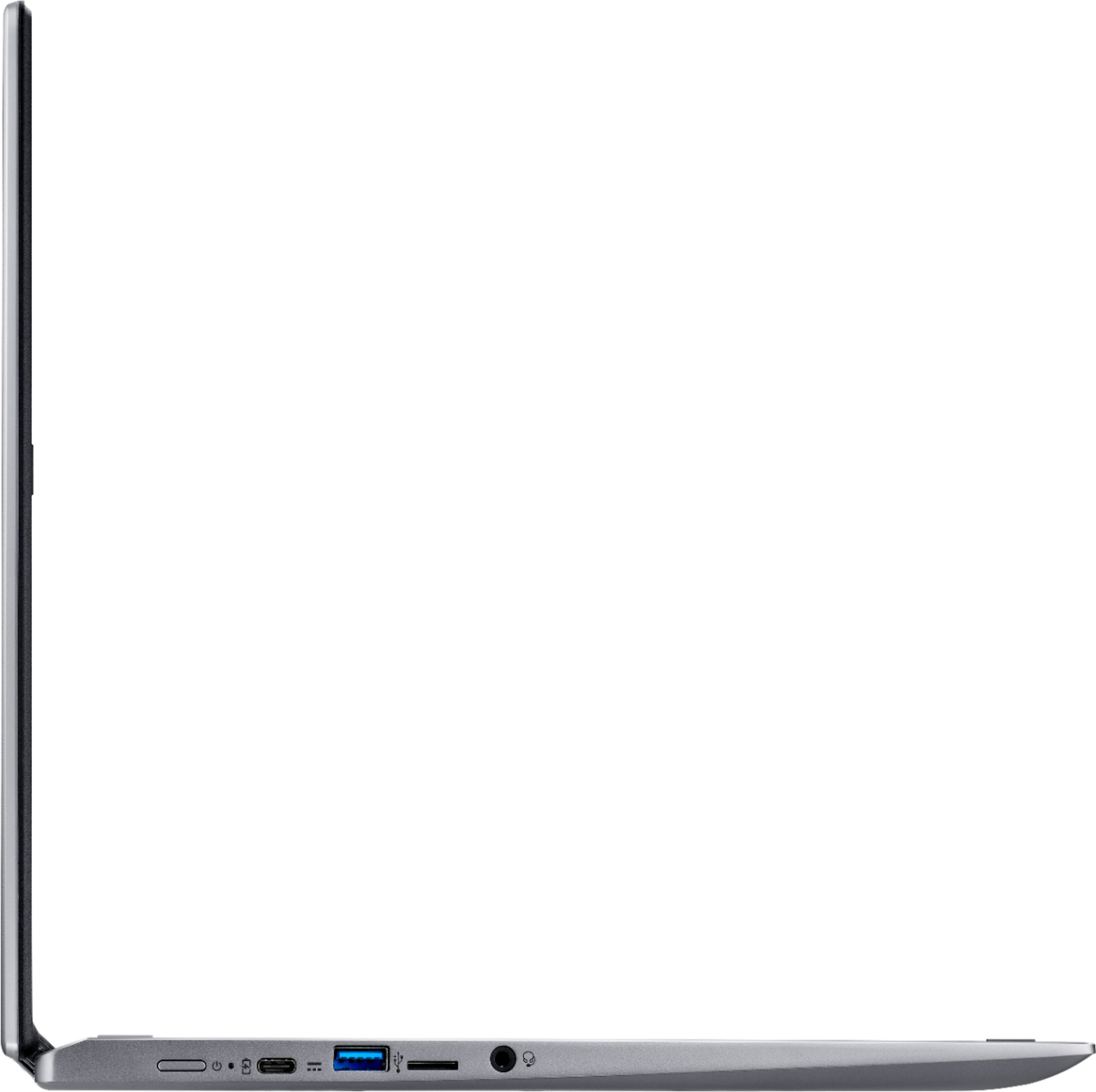
|Posted .This reviewer received promo considerations or sweepstakes entry for writing a review.The Acer Spin 15 Chromebook is not very portable, it’s a very large device to lug around and will barely fit in my backpack that is meant for up to 15” laptops. It is also pretty heavy for a Chromebook at 4.85 lbs. It does have an Intel Pentium processor with 4GB of RAM and a 32GB eMMC flash memory. The screen is fantastic though. It is a full HD screen (1920x1080) and is bright and the viewing angle is really good. There is a very welcome headphone jack, two USB 3.0 Type A ports (one on each side), 2 USB 3.1 Type C ports (one on each side), Built in wide angle 1280x720 webcam, microSD slot, backlit keyboard, stereo speakers (located next to the keyboard). The speakers sound a lot better than most due to their placement. They face up and you can actually hear them when watching a movie. Battery life is rated at 13 hours and I believe I will get close to that with moderate use, but of course if watching a movie, expect that time to do down dramatically. During normal usage of typing a report and web viewing, it seems to be responsive and fast. I have had no issues with speed or battery life while doing that. I did try a few graphic intensive games and it did struggle a little. I suspect due to the 4GB shared memory. Using this as a tablet is a bit cumbersome and bulky due to its large size. Watching a movie in Tent mode is not great with the sound since the speakers are now facing away from you while positioned that way. Using BT headphones or wired ones fixes that issue though. In summary, I think this is a fine tablet for a student who needs to do school work at home, but for a power user or someone who likes to take your device with you, you may want to look elsewhere. I have uploaded a photo of the Acer Spin 15 next to my wife's Samsung ChromeBook plus (12.2") for comparison.
I would recommend this to a friend- Pros mentioned:Ease of use, Screen size
Best bang for the buck
||Posted . Owned for 2 months when reviewed.This reviewer received promo considerations or sweepstakes entry for writing a review.I switched to a chromebook several years ago. When my parents needed a newer computer, I bought this for them. It's perfect for the elderly. 1. No need for antivirus software. 2. Easier to use. 3. Logon with gmail user name and password. 4. Big speakers. 5. Huge screen. 6. Too big and heavy for me, but much better for people with poor eyesight and hearing. 7. Touch screen. 8. Keys are crisp to the touch. 9. Big touchpad 10. Much cheaper The only negative is Google will not support older devices (6 1/2 years). But hey, you will probably want a new one after that much time.
I would recommend this to a friend One Big Chromebook!
|Posted .This reviewer received promo considerations or sweepstakes entry for writing a review.I recently received my new Acer Spin 15" Touch Screen Chromebook and the first thing that stands out is the size. Most people, including myself, probably think of more portable devices when thinking Chromebook...but the 15.6" screen on the Acer Spin is a bonus. This Chromebook can now replace many of those old 15" laptops that are being used for online, email, google apps, etc. The full HD backlit LED display is impressive with bright and accurate colors and great viewing angles. The 180 degree hinge is also a plus for watching movies. The touch screen feature works perfectly and surprisingly there is not too much in terms of fingerprints and smudges building up on the display. The Spin also comes with a full-size backlit keyboard and two impressive speakers mounted upwards. The key feedback is a little lighter than I'm use to, but still provides decent feedback, and the backlighting does its job during those late-night web surfing sessions in the dark! The speakers are crisp and loud, but do lack a bit of bass...but that's not a surprise coming from a laptop configuration. The Spin is also loaded up with USB, USB-C ports and SD card readers on both sides of the unit for easy access and setup on a desktop area. Lastly, the build quality is pretty impressive for a sub $400 machine. Acer uses aluminum for the top sheet this year and it really looks and feels great. I was a bit concerned with "sparkly silver" as the color, but it's certain to impress most users. Overall, it feels very solidly built with no flex in the machine or keyboard. Pros: - Large 15.6" display - Multitude of ports and readers - Great Speakers - Overall Build Quality Cons: - Would have been nice to make the 180º hinge a full 360º - Little bit of an edge on the lower case, but this is kind of a nitpick Overall, the Acer Spin 15 Chromebook is a great alternative to a 15" laptop, it's packed full of features, performs well and is built with quality in mind. I would certainly recommend this machine for anyone looking for a full-size Chromebook.
I would recommend this to a friend- Pros mentioned:Battery life, Ease of use, Touchscreen
Chromebook is the way to go!
||Posted .This reviewer received promo considerations or sweepstakes entry for writing a review.I was looking for something to replace an older (Microsoft 7) laptop. In the store, after looking at the products within my price range, I settled on this Chromebook. It has the feature that lets you turn the screen all the way around. This basically turns it into a very large tablet. Not a huge selling point for me, but kinda cool. What I like best is the ability to type like a laptop but within a tablet or Android phone environment. This makes it easy to use and all my devices link together, so what I do on one device shows up on the other. And, with all the apps available, I can use MS Office products, email, Google docs, etc., to do so much more than just a tablet. There's a usb slot to add a mouse, which for me is easier to use than a touchpad. The speakers sound great. The battery lasts a long time. It's light and thin. It has a webcam for video chats. And, at the price it is, I won't feel as bad when it comes time to get rid of it as I did the laptop!
I would recommend this to a friend - Pros mentioned:Battery life, Ease of use, Touchscreen
Great laptop for my middle school student!
||Posted .This reviewer received promo considerations or sweepstakes entry for writing a review.Pros: Easy to set up. Looks nice. Lightweight. A little tricky figuring out how to add child's school account, but it is possible. Now my middle school child can easily use for school & personal. Love the backlit keyboard! Love the touchscreen features, along with the 2 in 1 (being able to use as tablet, tent, or laptop is great!). Great battery life! Child told me the other day how much he loves his computer. I love being able to control both my child's computer & phone with Google's parental controls which is seamless with the Chromebook & Android phone! Cons: No caps lock key is frustrating. Chromebook does not work with our Brother printer. Didn't realize Chromebook is so picky on which printers it will allow connection/use with. Be aware when purchasing & be prepared to buy a new printer! Very frustrating. Child has to print everything through phone, which defeats purpose of having computer. I wish this would have been disclosed more clearly in description.
I would recommend this to a friend Great performance for everyday use
|Posted .This reviewer received promo considerations or sweepstakes entry for writing a review.Coming from a 5 year old Acer C710 Chromebook this Acer Spin 15 is a big leap forward! The Spin 15's bigger and better HD screen with touch is a major upgrade over the C710s 11" non touch non HD screen. Reading emails and watching movies/videos is a lot more enjoyable thanks to the HD screen. Touch input works well especially with Android apps/games. Speakers are o.k. when in laptop mode but kind of useless in tablet or tent mode. I use headphones instead. The Spin 15 runs Chrome OS smoothly with no hang ups while playing a Play movie and multiple Chrome tabs running. I had one issue while watching a movie having Closed Caption on caused the screen to flicker. Mostly around the edges about an inch and a half on the bottom and about a half an inch on all other sides. Not sure if it is a Play Movie app issue or not? The bigger 15.6 screen is a big difference from the 11" and thus makes for a bigger heavier package but I wanted the bigger screen. Also there is about a half inch of bezel on either side of the screen and about an inch top and bottom. Not sure why but seems that the Spin 15 could have been in a slightly smaller package then it is. But is in a nice package with a brushed aluminum look on the cover and a nice chromed beveled edge around the keyboard area. The keyboard is compfortable to use. The backlight is a nice add on but I haven't found anyway to control its settings but not a deal breaker You get 2 USB 3 plugs, 2 micro USB 3 plugs, a headphone/microphone plug amd a micro sd slot. There is a volume control button on the right side as well. Battery life has been good so far getting around 5 hours of mixed use and still having around 30% battery left. If you are looking to upgrade to a newer Chromebook especially from older Chromebooks that are no longer supported like the C710. With the added ability to run Androud Play store apps/games and having a convertible touch screen will definitely improve your Chromebook experience for the better!
I would recommend this to a friend- Pros mentioned:Battery life, Ease of use, Screen size
Great Upgrade
||Posted . Owned for 3 weeks when reviewed.This reviewer received promo considerations or sweepstakes entry for writing a review.I bought this for my 9 year old to be able to do her school work and virtual dance classes. It is big enough to see really good on when watching videos or taking live classes but it is still small enough for her to carry around and carry in a bag. The charge lasts all day. She was already use to using a chromebook at school so it was easy for her to navigate. I really like how it folds into a tablet or can stand up folded for when she is cooking and reading a recipe. I also like how everything saves to google drive automatically.
I would recommend this to a friend - Pros mentioned:Battery life, Screen size, Touchscreen
My first chromebook, won't be the last!
||Posted . Owned for 3 weeks when reviewed.This reviewer received promo considerations or sweepstakes entry for writing a review.COVID-19 made me an instant teletherapist. My old computer was over 8 years old and never going to hack it. I searched ( quickly) for a reasonably priced laptop that would be 1. quiet 2. Large screen (preferably touch screen for ease of use) 3. Fast 4. Easy to use. I picked the Acer spin Chromebook. It is my first chromebook and there is a learning curve for downloading, making documents from a typical windows computer. That being said I feel as though I've figure most everything out that I need. Pros: The keyboard is responsive and I can type quickly and accurately, but it's nothing fancy. SO QUIET! Like i forget it's on quiet. Battery life has been great although when I'm doing therapy I obviously have it plugged in. Camera is great. Screen is HUGE, bright, easy to read from and the ability to turn it into a tablet is nice ( although it is a HUGE tablet then). I don't use the tablet feature often but I do use the touch screen for my kids school work, or educational apps. It seems like during this quarentine we can't have enough "devices". There are tons of apps but even if the apps aren't great (I'm looking at you zoom) the chrome extensions are easy and functional. Cons: The mouse isn't my favorite and I can't get used to it but I had read similar reviews and bought myself a $10 wireless mouse and have been happy with that hack. Maybe this is just a sign I'm old..... Overall this was a great laptop, with a ton of features you probably don't need ( turning it into a tablet) but for the price, screen size, battery life, and overall ease of use, you can't go wrong with this purchase!
I would recommend this to a friend - Pros mentioned:Battery life, Ease of use, Speed
Great for my needs
||Posted .This reviewer received promo considerations or sweepstakes entry for writing a review.I m not very computer savvy . Just browse web and play a few games. This thing is fast and user friendly. Was also pleased to find it had a lit keyboard as well. Battery lasts quite a long time. 1st of this brand that I've had and am very pleased with performance.
I would recommend this to a friend - Pros mentioned:Battery life, Screen size, Speed
Fast!
||Posted . Owned for 1 month when reviewed.This reviewer received promo considerations or sweepstakes entry for writing a review.Love this chromebook. It’s fast, has a beautiful screen, and I can actually hear the sounds on this computer. The battery life is phenomenal. It is a tad heavy but I only use it in the house. The price for this model was very competitive. Great buy!
I would recommend this to a friend - Pros mentioned:Ease of use, Screen size, Speed
Nice Unit
||Posted . Owned for 4 months when reviewed.This reviewer received promo considerations or sweepstakes entry for writing a review.Purchased this for my son who is off to college. I love the price on Chromebook's... so much better than having to purchase anything with Windows OS $$$. Great quality, runs fast, super simple, and easy. Really nice features and large size.
I would recommend this to a friend - Pros mentioned:Speed, Touchscreen
Good value
||Posted .This reviewer received promo considerations or sweepstakes entry for writing a review.I've had this Acer Spin 15 Chromebook for about a month. It performs as advertised. The reviews that stated that this unit is large and heavy were not mistaken. This machine is huge compared to other laptops I have owned over the years. It is not very portable in my opinion; certainly not compared to an iPad for example. Being Google Chrome based (instead of what I call PC/Microsoft based or Apple-based) it has taken some getting used to. I don't find it easy to use like an iPad tablet for example. It's touchscreen does work very well. It is plenty fast for my needs. It has an excellent display. It is particularly excellent for viewing Netflix or Disney+ or YouTube, or browsing the internet or reading emails. While I do like it I find that I use my iPad more just due to the size and weight of this Acer Chromebook.
No, I would not recommend this to a friend