Customer Ratings & Reviews







- Model:
- CX5403CMA-U516256
- SKU:
- 6609089
Rating by feature
- Battery Life
Rating 4.7 out of 5 stars
- Speed
Rating 4.9 out of 5 stars
- Display
Rating 4.8 out of 5 stars
Customers are saying
Customers highly value the ExpertBook CX54 Chromebook, particularly its superb build quality and powerful processor. The long battery life and ample port selection, including Thunderbolt 4, are also appreciated. Its bright screen, light weight, sufficient memory, and portability contribute to a positive user experience.
This summary was generated by AI based on customer reviews.
Chromebook
||Posted . Owned for 3 weeks when reviewed.This reviewer received promo considerations or sweepstakes entry for writing a review.This is an excellent Chromebook for general everyday use.
I would recommend this to a friendNice computer but...
||Posted . Owned for less than 1 week when reviewed.This reviewer received promo considerations or sweepstakes entry for writing a review.Nice computer, but the screen was too small and speakers not loud enough so I returned it and got the Acer 516 GE instead. Very happy with it.
No, I would not recommend this to a friendBrand response from ASUS Answers
Posted .Dear Michael,
Thank you for sharing your comments regarding the ASUS ExpertBook CX5403CMA Chromebook Plus Laptop. We understand that it didn't meet your full expectations, and we sincerely apologize for that as we do understand your concerns. Our top priority is providing our customers with high-quality products, and we'll forward your feedback to our team for review.
We stand behind our products and continuously strive to improve our products and processes to achieve customer service excellence. If you require any further assistance, please email us at [email protected] and include the case number "N2506002061-0001" as a reference. We will do our best to resolve your case quickly. Your feedback is very important to us and enables us to improve our support channels. Thank you for choosing ASUS.
Best Regards,
Chantae
ASUS Customer Loyalty US Support
Would not buy again
||Posted . Owned for 2 weeks when reviewed.This reviewer received promo considerations or sweepstakes entry for writing a review.Short battery life. Design makes it uncomfortable to use as a laptop. Protrusions where screen and keyboard join hurts and leaves marks on your legs.
No, I would not recommend this to a friendBrand response from ASUS Answers
Posted .Dear Valued Customer,
Thank you for your comment.
We certainly understand your disappointment and inconvenience this may have caused if you are experiencing short battery life and difficulty using the Chromebook. The battery life on this Chromebook is approximately 10 hours of light to medium workload. To improve or prolong the battery charge life, try to do battery calibration manually. To start with, drain it completely then charge it fully without using it. Once fully charged, use the laptop without the AC adapter connected, and let the battery drain completely again. Repeat the charging process thereafter. Also, please verify if the unit is running with the most current system update and third-party battery draining applications are not running if not in used.
Chromebook operates, or works just like any other laptop, it comes with a web or cloud base OS that is fast, secure, and easy to use and is becoming a popular choice for young and old users alike because of these features. Internet security or antivirus software is integrated, no need to purchase the software or application separately. Besides being a low-cost and lightweight laptop, it supports thousands of popular computing applications, both in Chrome and Android, and Linux applications as well. Since it is a web base OS it does require a Google or Gmail account and an internet connection to use or operate it properly. If this is your first experience with a Chromebook, I recommend using the HELP file incorporated within the OS. To access HELP, please click your profile picture on the Notification Bar, located on the lower right-hand corner of the home screen then click the question mark icon or widget. For more help, please visit Google Support webpage at: https://www.google.com/chromebook/howto/.
Should you need further assistance, please email me at [email protected] and I will be more than glad to help. Or you are most welcome to call Product Support Hotline at: 1(888) 678-3688. Also, you can chat with an ASUS live support agent from the link: https://www.asus.com/us/support/article/1135/.
Thank you for choosing an ASUS product.
Regards,
Rodel
ASUS Customer Loyalty
- Pros mentioned:Build quality, Port count

Incredibly Happy with this Chromebook
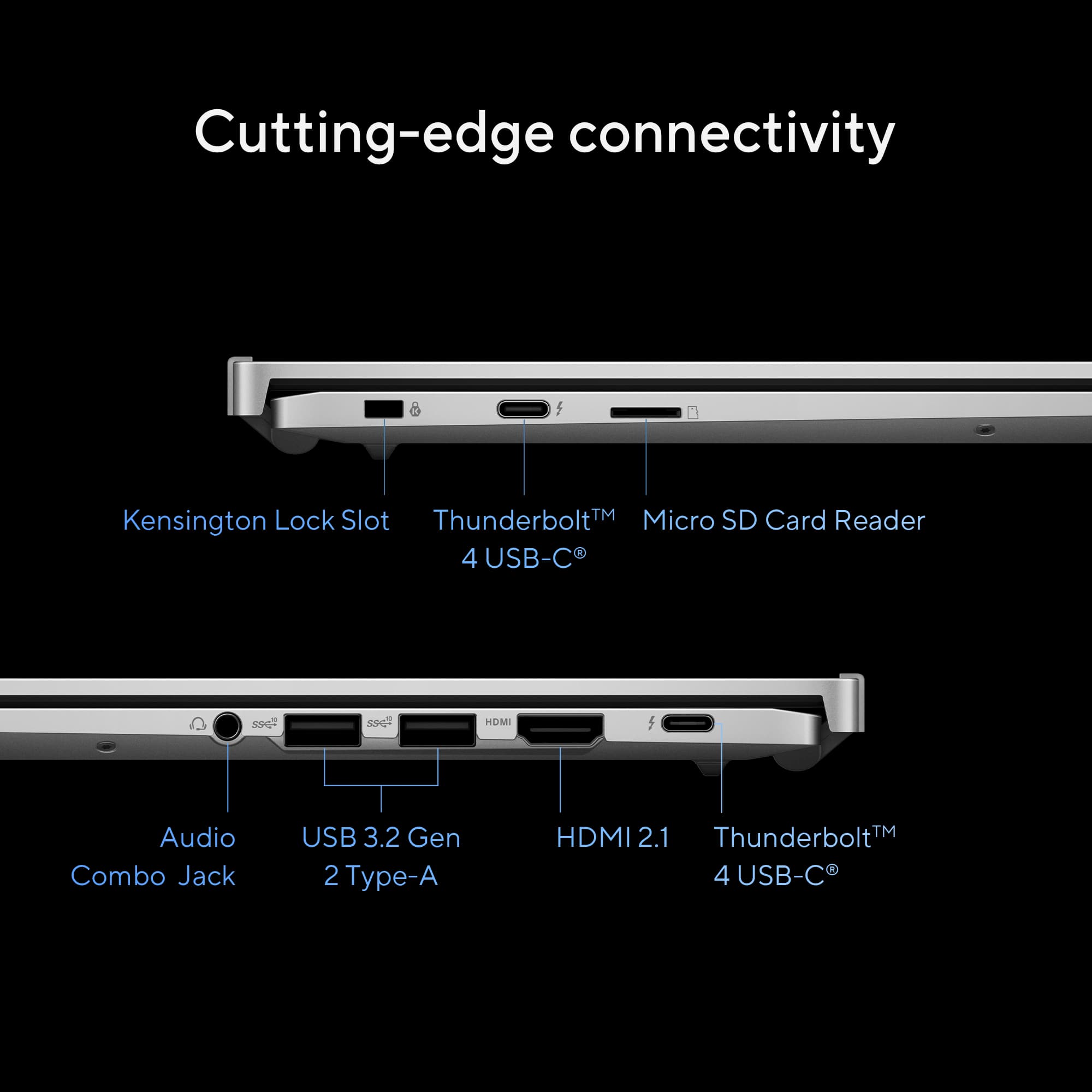
|Posted .This reviewer received promo considerations or sweepstakes entry for writing a review.I have been a Windows user for over 40 years, but I have found that most of my computing is done on my Android smartphone, so this Chromebook looked interesting. The experience with this Chromebook has been excellent; it is responsive and intuitive. When I first turned it on, it asked if I had an Android phone, and it then connected to my phone and brought many of my settings over. It then asked about the type of computing that I perform and suggested other programs that I might find helpful. Within a short time, I was computing. The layout and features are very similar to Windows, and in many ways better, more intuitive. There is an Explorer app that teaches you how to use a Chromebook so that you can learn all the features and functionality. Gemini, the built-in AI capability, is also helpful in answering questions. Media streams fast and is very vibrant on the 14-inch touchscreen display. I have a Thunderbolt 4 dock with two external monitors attached, and this Chromebook automatically was able to use them both at 3840 x 2160 resolution. The dock also has a keyboard, mouse, microphone, and Ethernet attached; they all were recognized and usable. The Chromebook is thin and lightweight, and it has two USB-C Thunderbolt ports, one on each side: two USB-A ports, an HDMI port, an SD card reader, and a headphone jack. The functionality is extensive; I have not found anything that I could not do, and I am just getting started in the Chromebook world. Indeed, a great deal of design has made this computer capable and easy to use. I am very pleased with the experience.
I would recommend this to a friend - Pros mentioned:Battery life, Build quality
Tablet Fee, Laptop Performance
|Posted .This reviewer received promo considerations or sweepstakes entry for writing a review.I'm going to be honest. This is my first Chromebook. I have always steered away from Chromebooks because well...they always seems to be more of a feint attempt to lure budget minded laptop buyers into an inferior product. I will boldly recant my opinion. I WAS WRONG. And this Asus ExpertBook has opened my eyes to the feel and convenience of a Chromebook. That being said, this is on the upper end of the Chromebook offerings so your mileage may vary, but I will no longer down talk Chromebooks after this experience. When I first starting using this Asus ExpertBook, it gave me Surface vibes. However the more and more I have used it, this Chromebook has distanced itself from the aforementioned platform as it feels like it has less compromises and a much better flow. This may be due to the fact that these Chromebooks closely resemble the function of our handheld devices, even having access to Google Play. This ExpertBook will feel really at home to Android Users with the touch screen and apps that are native to these phones such as Google Play and Google Messages. So if you are an Android user, this computer will fit right in and pair well with your phone. If you are a member of the Apple ecosystem, don't feel discouraged. There are similarities to your devices as well and even my significant other, who is an avid Apple user, felt at home when she used it for a couple days. The only downsides I really could find were that the keyboard layout is a little different...as in no delete key which has been replaced with a two key shortcut. But this will just take some getting used to. Also, this computer is a powerhouse for normal entertainment and studious use, however I would not expect it to be a dedicated Gaming PC. But then again, that is not what this laptop is intended for. The biggest upside...the battery life. HOLY COW. One charge has lasted me about a week of normal used. And I still don't need to charge it. I am only going to charge it because I feel as if I am neglecting it for not plugging it for so long. Ultimately, this Asus ExpertBook is a solid choice for anyone looking to have productivity and entertainment on the go, especially if you like the phone feel of this computer. This computer would be a perfect travel companion on trips, in airplanes, or college. I would recommend this device to anyone in the market!
I would recommend this to a friend - Pros mentioned:Battery life, Build quality
Fun, sturdy laptop for productivity on the go
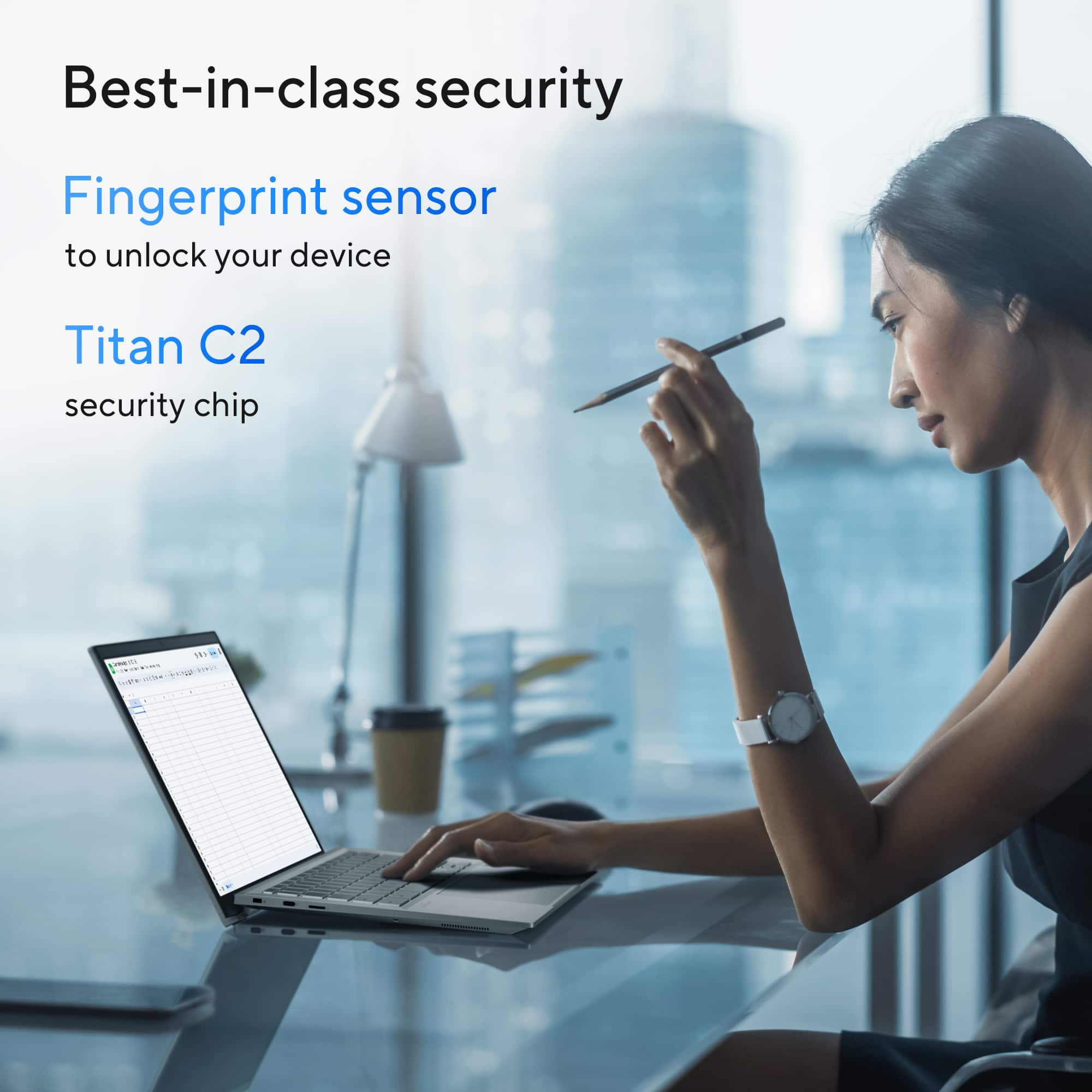
|Posted .This reviewer received promo considerations or sweepstakes entry for writing a review.Working on the go shouldn't have a steep drop-off from your productivity at an office or your home setup. With a sleek, sturdy build, a smooth and vivid touchscreen, and feature-filled apps preloaded or a quick download away, the Asus ExpertBook CX54 Chromebook Plus laptop is a great choice for productivity on the move. I really enjoy my experience with this Chromebook. The big, beautiful 14" touchscreen displays rich colors and smooth, fast transitions. The matte-textured clam shell can be opened flat to a full 180 degrees, and interestingly, the top half pushes the bottom half up ever so slightly on flat surfaces to lift the laptop and give the machine adequate airflow on its underside. There are rubberized edge pieces that protect it from scratches - a neat little design quirk with the added bonus of functionality that I like. The keys click very responsively, though they feel a little hollow and don't feel as tight as I would like them to be. They are big though and have a backlit display that activate on touch or can be customized. Meanwhile, the touchpad is large, sensitive, and precise. There is a fingerprint sensor for added security as well. Finally, its battery life is extremely long, while charging time is astoundingly short - a perfect combination for the commuter in you. This ExpertBook connects you with everything you need to work from anywhere: from video editing software, to business apps, to design or animation, not to mention all things Google. The ExpertBook CX54 has everything you need to connect your productivity from office to home and everywhere inbetween.
I would recommend this to a friend - Pros mentioned:Build quality, Port count
Very Nice Chromebook
|Posted .This reviewer received promo considerations or sweepstakes entry for writing a review.In that past, I never considered using a Chromebook as my main computing device because there were too many apps that required downloading to an OS like Windows or Mac. Fast forward to today and it’s a different world. The number of apps nowadays that are web native or have web access means a Chromebook is a very viable alternative to “real” computers. The ASUS ExpertBook CX54 will have you reconsidering whether you really need a Mac or Windows machine. PROs - Google is currently offering their Google One AI Premium plan free for one year with the purchase of this Chromebook Plus. Normally, it costs $19.99/month, so that’s a really nice perk. - The feel and touch of the keyboard is a pleasure to type on. It feels smooth with good reach and travel. - Fingerprint ID is convenient. It can be used to unlock the Chromebook when waking to up from Sleep. But I have not been able to figure out how to use it to unlock my 3rd party password manager (not Chrome’s built-in one). - It’s responsive and there’s no sense that this is anything less than a full powered Windows or Mac laptop. - The hinge on the display is designed such that when you open it, the keyboard angles upwards slightly like a typical separate desktop keyboard. Most laptops keep their keyboard flat. - Enough ports for most people: 2 USB-C (Thunderbolt 4), 1 HDMI, 2 USB-A. There’s also a micro SD slot though it would have made more sense for a regular SD slot since it’s easy to get an adapter for a micro SD card to be inserted into a regular SD slot. - Touchscreen is a nice add. I’m primarily a touchpad user but it’s nice to occasionally be able to scroll pages by physically swiping. - Privacy shutter on the camera. - 1080p camera is adequate for meetings. - Smooth screen with 120Hz refresh rate. CONs - The sound from the speakers is tinny, despite the design by harman/kardon. While it’s ok for meetings, you’ll certainly want to use headphones or external speakers if you’re listening to music or watching a movie. - Battery life is less than advertised - I can only get through a few (single digits, not the 10 hours shown on the specs) hours worth of use before I need to plug it in. - Keyboard brightness is strange. The letters are legible when the keyboard backlight is turned off in a bright room or turned up considerably in a dim one. If the backlight is turned up just a little, the keys become illegible. This is a bigger problem in slightly dim rooms where you might want some backlight, but not so much as to drain the battery faster. Overall this is a nicely built and solid Chromebook Plus that will adeptly handle everyday office and school work. There are a few quirks like the poor sound, keyboard backlight, micro SD card slot, etc., that make me keep it from giving 5 stars. But overall, I recommend it.
I would recommend this to a friend - Pros mentioned:Build quality
Great Chromebook!
|Posted .This reviewer received promo considerations or sweepstakes entry for writing a review.This is not my first Chromebook or Android product, but it is the first "premium" Chromebook that I have owned. There is a noticeable difference between this device and the low cost, basic options. Nothing against those, they have their niche and are built for basic tasks. But this ExpertBook is a premium build quality, all metal chassis with a beautiful 2K screen that is a touchscreen. It has 2 USB A ports, 2 USB C ports, an HDMI out, a headphone jack (rare these days), and a slot for a micro SD card. Nice big touchpad and a fingerprint sensor that is located just below the keyboard. Setup is very easy if you're coming from another Android product. All I had to do was scan the QR code with my Pixel 9 ProXL and it mostly took care of itself, bringing in my preferred settings and syncing apps. If this is your first Android, it will require more, but having done the process in the past, it walks you through each step and it's relatively straightforward. Much easier than setting up a PC. One of my early frustrations with this unit was that the keyboard was so dimly lit that you couldn't read the keys. Simple enough fix, just go into Settings -> Device -> Keyboard and slide the backlight brightness to your desired level. Personally, I wish it had just come at max brightness, but it's not a big deal and easy to correct. At max brightness, the backlighting looks great and makes everything easy to see. No issues with performance, but I'm also not pushing this thing with heavy gaming or anything crazy. Movies look great on the screen with vivid colors and no noticeable backlight bleed on the edges. Note for Google, get us a Google TV app for Chromebooks. The app is for mobile devices and going to full screen requires selecting a re-sizeable box, which then prompts that it may cause issues. I want to be able to just click on a button to go full screen like a Chrome window or anything else. It shouldn't be hard to watch a movie in full screen. My only real complaint is also mixed with a feature I like. When you open the screen, the way it's designed is that the bottom of the screen lifts the keyboard up slightly from the back, so it's at a slight angle. There are rubber feet to keep it stable. When you're using this at a desk or on a table, this is a great feature from an ergonomic standpoint. However, when using it on your lap, it's not super comfortable. So I have mixed feelings on the way this was designed. It makes sense, and it doesn't make sense. It's a paradox. Overall, this is a great Chromebook that could replace a PC depending on your needs. It'll do anything you need it to do (unless you're a hardcore gamer or power user needing heavy computing power). Aside from the way it sits on your lap, I really have no complaints. I would recommend it!
I would recommend this to a friend - Pros mentioned:Build quality
ASUS Chromebook is awesome
|Posted .This reviewer received promo considerations or sweepstakes entry for writing a review.ASUS Chromebook is awesome. Very impressed with every detail to this laptop. Packaging. Put into a medium box with alot of packaging around it. Nice insert box which securely held the device in place. Comes with charger which is very handy. Setup: Easy easy easy. No hacker no errors just worked from beginning to end. Covered all basis OS is simple yet powerful. Everything you click on is very precise and the interface is easy to use. Uses Google play store for apps. I downloaded the usual apps and also some other cool apps and all work as expected. Very fast downloading the apps and quick installs. Very impressed how fast the machine is, and the performance of the graphic cards. The screen itself is very durable. The casing is very sharp looks great durable and light. I would recommend this machine to anybody who needs a laptop that can carry out every day day-to-day task and for Netflix and other entertainment apps the video quality is very nice. Pleasantly surprised at how professional and elegant this machine is at the same time.
- Pros mentioned:Battery life
Great laptop
|Posted .This reviewer received promo considerations or sweepstakes entry for writing a review.I have never used a Chromebook before and I have enjoyed my experience with this laptop. My perceived thought of Chromebooks were that they were cheap and only worked on the web. I have experience with other Operating systems. Specs: Intel Core Ultra 5 16GB Memory 256GB SSD 2560X1600 Display (2K) 500 nits IPS 120HZ display backlit keyboard This is a Chromebook Plus so that means it has to hit certain specs like min 1080P Display, 1080P Camera, 8GB Memory, Intel Core 3 ( Or AMD Ryzen series 5 I believe) and I think 128GB SSD as min specs. This is a very premium device and as such I did knock a star down because while the device is premium I do think the speakers need to be a tad louder for the price of this Chromebook. Otherwise this device is great for every day tasks and very light gaming. You can install Steam and I have installed older games on it and runs fine. It runs on Linux so games would have to be compatible on Linux to run on this. Also could run apps and Games on the Google play store but compatibly might run into issues since they are android apps so might not run full screen. Running this for productivity is great for Internet browsing and word documents. They keyboard is great to type on. Other bright side of using Chromebook on specs you'll see on Windows laptops is I have experienced better battery life on this as well.
I would recommend this to a friend - Pros mentioned:Build quality
Amazing "Laptop" w/Fantastic Keyboard
Posted .This reviewer received promo considerations or sweepstakes entry for writing a review.This is my first Chromebook and I'm glad I got this because I'm really impressed! This Chromebook retails for $829.00 but it was on sale for Memorial Day 2025 for $679.00 and I had $170.00 in rewards certificates. Below are what I find amazing about this product, * Price * Size * Display (surprisingly no backlight bleed - only IPS glow but under normal settings, these are not even visible unless you use a camera. Also, the uniformity is great which is normally a hit and miss when it comes to IPS displays) * Chrome OS * Keyboard (the keyboard is amazing) * Build quality is just superb The cons I'd say are, * Backlit keyboard isn't bright enough or I probably just haven't found a way to increase the brightness * Speakers could be better but they're sufficient * The display hinge can be a nuisance at times when placed on the lap
I would recommend this to a friend - Pros mentioned:Processor speed
Great machine
Posted .This reviewer received promo considerations or sweepstakes entry for writing a review.This Chromebook is exactly what my son needed for school! It is faster and more agile than the school issued Chromebooks.
I would recommend this to a friend - Pros mentioned:Build quality
Why bother paying this much for such weakness?
|Posted .This reviewer received promo considerations or sweepstakes entry for writing a review.Asus Chromebook Review This is my first Chromebook, and I'm not impressed. I really wanted to like this machine and figure the mediocrity of Chromebooks was gone by now and that these were to be serious machines. This now replaces my Samsung ARM laptop as my least favorite computer ever. And after packing this away for a few days, I am even less impressed with this. It seems that Chromebooks are the low rent appliances because nothing about them is intuitive for a new person. Positive Observations - Quick installation. I set it up with my Android Phone (Oneplus 12) and the Android/Chrome items mostly installed very quickly and without much need to provide input. Just scanned a QRcode with my phone and most of the work took care of itself. - Construction. All metal save for the keys and trackpad. - Screen. Vibrant colors and touch sensitive. - Prior experience with ASUS. Used to be my goto brand. Negative Observations - Keyboard is supposed to be backlit and for the life of me I could never find a way to turn the backlighting on so I could read the keys. Awful dark grey letters against a not much contrasting key colors. This is a deal breaker right now as eacNoh time I use the machine, the more I dislike it. This says it auto adjusts to low light. Mine did nothing. Even worse I could not see the keys at all - even typing on a key to try to wake up the key lights. Horrible product. - Processor. Middling performance. Again, the more I used it, the more I didn't like it. Windows machines with Intel 5 chip seem much more responsive. - Came with about 20% battery charge. Cheap attribute to start ownership. - RAM consumption. This has 16 gigs of ram and shortly after installing whatever could be added from my phone, it was consuming 12 gigsw of ram with one chrome window/tab open. I cannot fathom how mediocre this machine would be with 8 gigs of ram. - Sound. Don't buy this if you expecting great sound. Very average performance here. - This has Google's AI which turns me off. I don't use AI ever and hope I can find a way to uninstall this AI like I have done on my Windows machines. Overall observation. This laptop seems only good if it were to be paired with my phone on a trip where I could settle for limited use and google apps. Thankfully I have a Microsoft 365 account and I can use those online. For the money, I'd rather have a Windows laptop or a MacBook Air base model. I don't see the point of such a limited laptop at this price point except for those who don't expect or need much in the way of a laptop. I'm torn - I like my Amazon tablet that is nearly the same size that I upgraded to Android. Seems as responsive and easier to use for less money.
No, I would not recommend this to a friendBrand response from ASUS Answers
Posted .Dear Laserwizard,
Thank you for sharing your comments regarding the ASUS ExpertBook CX5403CMA Chromebook. We understand that it didn't meet your full expectations, and we sincerely apologize for that as we do understand your concerns. Your feedback is greatly appreciated and will be passed to our Product Team for review.
We stand behind our products and continuously strive to improve our products and processes to achieve customer service excellence. If you require any further assistance, please email us at [email protected] and include the case number "N2506000458-0001" as a reference. We will do our best to resolve your case quickly. Your feedback is very important to us and enables us to improve our support channels. Thank you for choosing ASUS.
Best Regards,
Chantae
ASUS Customer Loyalty US Support