Customer Ratings & Reviews














- Model:
- G835LX-XS97
- SKU:
- 10148500
Rating by feature
- Battery Life
Rating 3.8 out of 5 stars
- Speed
Rating 4.7 out of 5 stars
- Display
Rating 4.7 out of 5 stars
Customers are saying
Customers are delighted by the ROG Strix SCAR 18's astonishing overall performance. Users find the processor speed to be fast and the setup process easy.
This summary was generated by AI based on customer reviews.
- Pros mentioned:PerformanceCons mentioned:Heat dissipation
Fast and bright, highly recommend
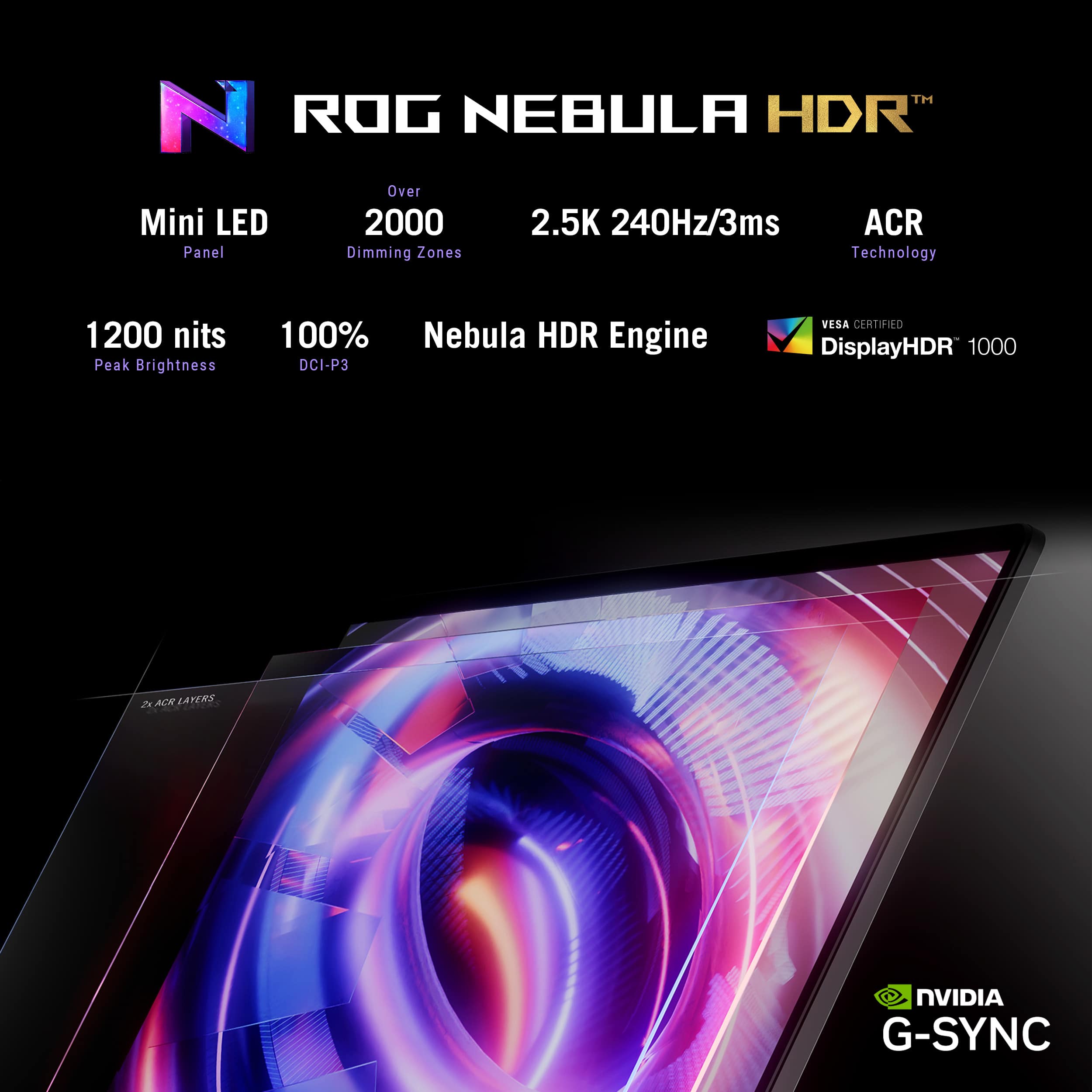
||Posted . Owned for 2 weeks when reviewed.This reviewer received promo considerations or sweepstakes entry for writing a review.Very powerful gaming laptop with an excellent display ASUS ROG Strix SCAR with Core i9 and RTX 5090 is an extremely fast gaming laptop. All games I’ve tested run smoothly on ultra or near-max settings. Performance is excellent and very stable. The display is a major upgrade compared to the regular Strix. With up to 1200 nits brightness, it’s noticeably brighter and much more comfortable to use. On the regular Strix (around 600 nits), brightness always felt a bit lacking — here it’s more than enough. Keyboard is also better than on the regular Strix. The SCAR has non-transparent keycaps, which makes them much easier to read, especially at night with the backlight on. The transparent keys on the regular Strix were harder to see in dark conditions. The laptop feels well balanced for its class and not too heavy. A big plus is how easy it is to maintain — the bottom panel opens easily, making RAM and SSD upgrades simple. Cons: the black plastic корпус shows fingerprints very easily. The regular Strix I had before came in a gray color, and fingerprints were barely noticeable, which was more practical. The laptop also gets hot under heavy gaming load, and the speakers are just average — MacBook has noticeably better sound. Another thing missing is a fingerprint reader; adding one would make this laptop close to perfect. Overall, an excellent gaming laptop for the price — extremely powerful, with a very bright display and improved keyboard. Very happy with the purchase.
I would recommend this to a friend - Pros mentioned:Build quality, Processor speed
Its so amazming
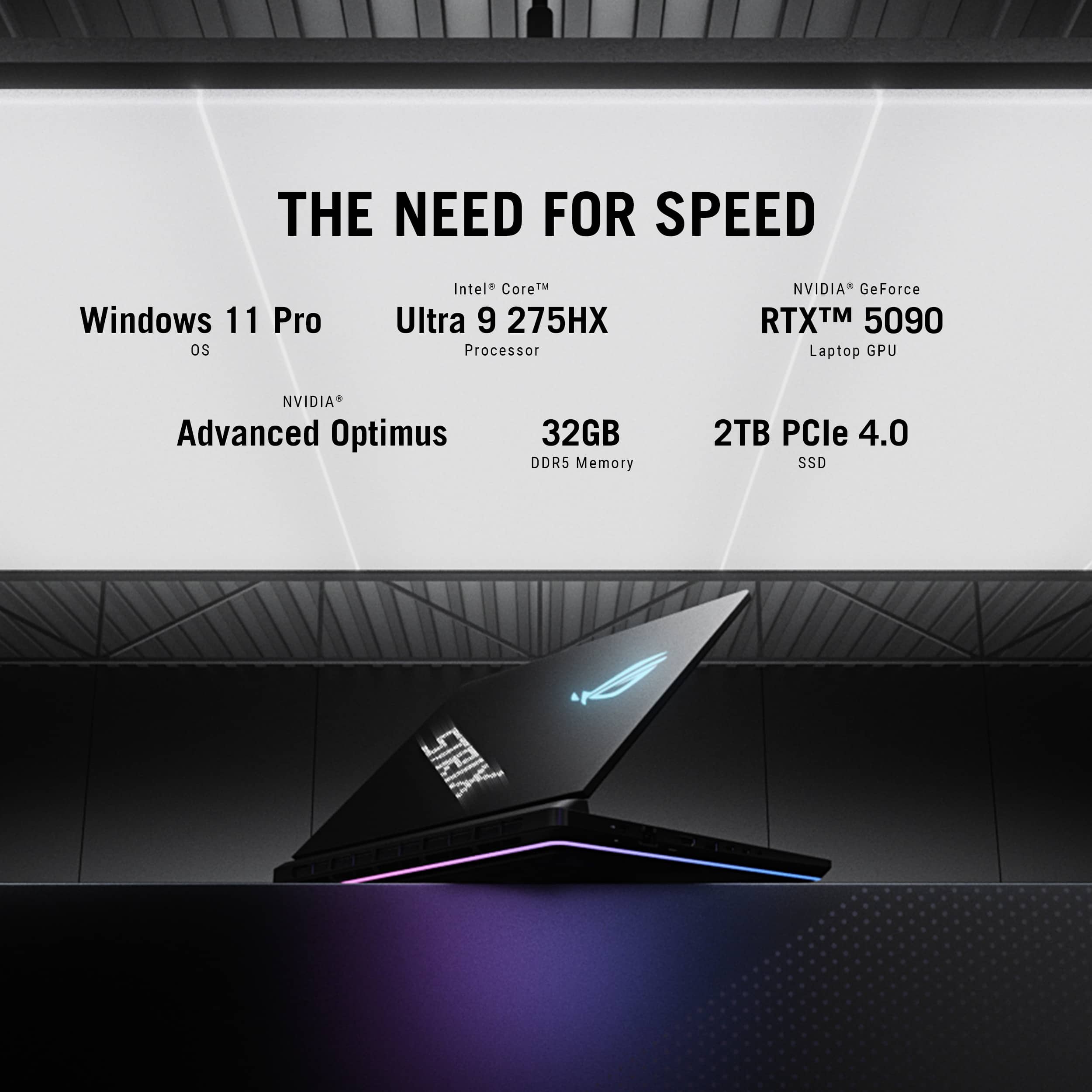
||Posted . Owned for less than 1 week when reviewed.This reviewer received promo considerations or sweepstakes entry for writing a review.This laptop is an absolute monster in the best way possible. With an RTX 5090, Intel Core i9, 32GB of RAM, and a 240Hz 2.5K display, it crushes everything from high-end gaming to heavy editing like it’s nothing. It’s fast, powerful, and looks like it came straight out of a sci-fi movie. I’m obsessed. And honestly? I regret it—regret not buying it sooner. This thing’s a game-changer, literally.
I would recommend this to a friend Very powerful laptop; expensive, but worth it
||Posted . Owned for 1 month when reviewed.This reviewer received promo considerations or sweepstakes entry for writing a review.The 2025 Scar 18 is a beast of a laptop. I'm lucky enough to have a fully functioning unit. The 5090 isn't a huge leap over the 4090; worthy upgrade over the 4080. It's very efficient and the MFG (multi frame gen) is what really sells it. Is it worth the extra $1000+; over the 5080, probably not, to most people. But if you want the best... The mini-led screen is amazing. My screen is flawless,first time in a while I haven't received a screen with light bleed, or bad haloing. The speakers are okay, they require a lot of EQ, Dolby and other apps are definitely required. The overall build quality is great. I'm happy with my purchase thus far. Asus laptops tend to improve over time with BIOS updates. So, there's that.
I would recommend this to a friendPowerful hardware ruined by instability
||Posted . Owned for 1 month when reviewed.This reviewer received promo considerations or sweepstakes entry for writing a review.I purchased the ASUS ROG Strix SCAR 18 (RTX 5090 + Intel Core Ultra 9 275HX) a few months ago, expecting a premium, high-end gaming laptop. Unfortunately, it has turned into one of the most frustrating experiences I’ve ever had with a $5,000 machine. In the past few days, the system started to crash randomly with multiple Blue Screens of Death (BSODs), including: SYSTEM_THREAD_EXCEPTION_NOT_HANDLED (dxgmms2.sys) KERNEL_MODE_HEAP_CORRUPTION IRQL_NOT_LESS_OR_EQUAL DPC_WATCHDOG_VIOLATION KERNEL_SECURITY_CHECK_FAILURE I’ve performed several clean Windows installations, including from an official ISO, updated the BIOS (v327), reinstalled all official ASUS and NVIDIA drivers, used DDU to ensure a clean GPU driver environment, reset the Embedded Controller, and tested RAM, SSD, and thermals — everything checks out fine. Despite that, the errors continue. The issue clearly originates from the RTX 5090 GPU, specifically the dxgmms2.sys (DirectX Graphics Memory Management System) driver failing under load. Games like For Honor or Battlefield crash frequently with GPU driver errors, and sometimes the system completely reboots. What’s most disappointing is that this is a $5000 laptop that can’t remain stable for more than a few days at a time For a laptop in this price range, I expected reliability, not constant blue screens and instability. The ROG Strix SCAR 18 has incredible performance potential, but in practice, it’s completely unreliable. Until ASUS releases a proper fix or firmware update, I cannot recommend this model to anyone.
No, I would not recommend this to a friendBrand response from ASUS Answers
Posted .Dear StevenC,
Thank you for your comment.
We do understand your disappointment with this laptop and the inconvenience this may have caused if you are experiencing stability issues, or random system crash with BSOD. The system errors can either be a software or a hardware issue. If you did run a Cloud Recovery, installed all drivers, applications and BIOS updates posted at: https://rog.asus.com/us/laptops/rog-strix/rog-strix-scar-18-2025/helpdesk_download/ and installed all Windows updates, and the problem persisted, we recommend you send the product in for service to determine if this is a hardware issue so this may be resolved immediately. An RMA number is required to send it in for service. For RMA details, please go to: https://www.asus.com/us/support/article/818/.
If you need more information or further assistance with the warranty for the product, please email me at [email protected] and I would be more than happy to help. Or, you are most welcome to call Product Support Hotline at: 1(888) 678-3688. Also, you can chat with an ASUS live support agent from the link: https://www.asus.com/us/support/article/1135/.
Thank you for choosing an ASUS product.
Regards,
Rodel
ASUS Customer Loyalty
- Pros mentioned:Build quality
From Strix scar 18 4090 to 5090 Strix 2025
||Posted . Owned for less than 1 week when reviewed.This reviewer received promo considerations or sweepstakes entry for writing a review.I purchase the strix scar 4090 last year and its a beautiful laptop as well but This laptop 5090 is a bit more powerful with 24gb dedicated video you can max everything on ray tracing and with dlss 4 another level i play it on my asus rog swift 4k monitor over 240 to 200fps max graphics and DLAA 170fps with ray tracing depends on the game. And the dysplay is beautiful on the laptop with the nebula hdr the 4090 dont get me wrong is stilll fire but the 5090 more powerful.
I would recommend this to a friend Best computer for gaming hands down
||Posted . Owned for 2 weeks when reviewed.This reviewer received promo considerations or sweepstakes entry for writing a review.Computer is amazing and very fast. The screen and graohics card make the computer a must have gor any gaming enthusiast.
I would recommend this to a friend- Cons mentioned:Heat dissipation
It's pretty much worthless
||Posted . Owned for 2 weeks when reviewed.This reviewer received promo considerations or sweepstakes entry for writing a review.Can't play games or do heavy editing without overheating and getting a black screen, then automatically restarting. It's pretty much worthless.
No, I would not recommend this to a friendBrand response from ASUS Answers
Posted .Dear Josh,
Thank you for sharing your experience with the ASUS G835LX gaming laptop. We sincerely apologize for the overheating, black screen, and automatic restart issues you’ve encountered, and for the inconvenience this has caused. What you've experienced was not intentional or representative of our brand.
To address the problems you described, we recommend updating the BIOS. Before starting the update, please back up any important data, as the process may reset your current settings, applications, or files. Ensure that the device remains plugged in throughout the update, and avoid closing the lid until the procedure is complete. Detailed instructions are available in the FAQ guide linked below.
If the issue persists after completing the update, we recommend contacting our support team directly at https://www.asus.com/us/support/callus/ so we can assist further with advanced diagnostics or warranty service.
We stand behind our products and we continuously strive to improve our products and processes to achieve customer service excellence. For more information, send us an email at [email protected] and provide the case number "N2505005998-0011" for reference. We’ll do our best to provide a quick resolution to your case. Your feedback is important as it helps with improvements to ASUS Support channels. Thank you for choosing ASUS.
Best Regards,
Chantae
ASUS Customer Loyalty US Support
How to update BIOS in Windows - https://www.asus.com/support/faq/1008276/
- Pros mentioned:Performance
Amazing!!!
||Posted . Owned for 2 weeks when reviewed.This reviewer received promo considerations or sweepstakes entry for writing a review.That’s the most amazing gaming laptop, I’d buy again if I have to
I would recommend this to a friend - Pros mentioned:Performance
Love it
||Posted . Owned for 2 months when reviewed.This reviewer received promo considerations or sweepstakes entry for writing a review.Worth the money ,no problems at all, can not say what the support is like never had to use it,runs what ever i throw at it
I would recommend this to a friend Problematic
||Posted . Owned for less than 1 week when reviewed.This reviewer received promo considerations or sweepstakes entry for writing a review.Has general gpu/ cpu problem, connection problem with monitors. The laptop feels like its unfinished and needs to be refined before selling it.
No, I would not recommend this to a friendBrand response from ASUS Answers
Posted .Dear Reviewer6,
We sincerely apologize for the issues you're experiencing with the Gaming Laptop and for the inconvenience this may have caused you. This is not the kind of quality to expect from our products and it's not the norm. To troubleshoot the external display connection issue described, we recommend following the steps in the FAQ below. Should the issue persist, please contact our support team at https://www.asus.com/us/support/CallUs to further investigate the problem or assist with repairing the device.
We stand behind our products and continuously strive to improve our products and processes to achieve customer service excellence. For more information, email us at [email protected] and include the case number "N2505005998-0003" as a reference. We will do our best to resolve your case quickly. Your feedback is very important to us and enables us to improve our support channels. Thank you for choosing ASUS.
Best Regards,
Chantae
ASUS Customer Loyalty US Support
[Windows 11/10] Troubleshooting - External Display Connection Issues - https://www.asus.com/support/faq/1047158/
- Pros mentioned:Build quality, Performance, Processor speed
ASUS ROG Strix SCAR 18 - A Powerhouse
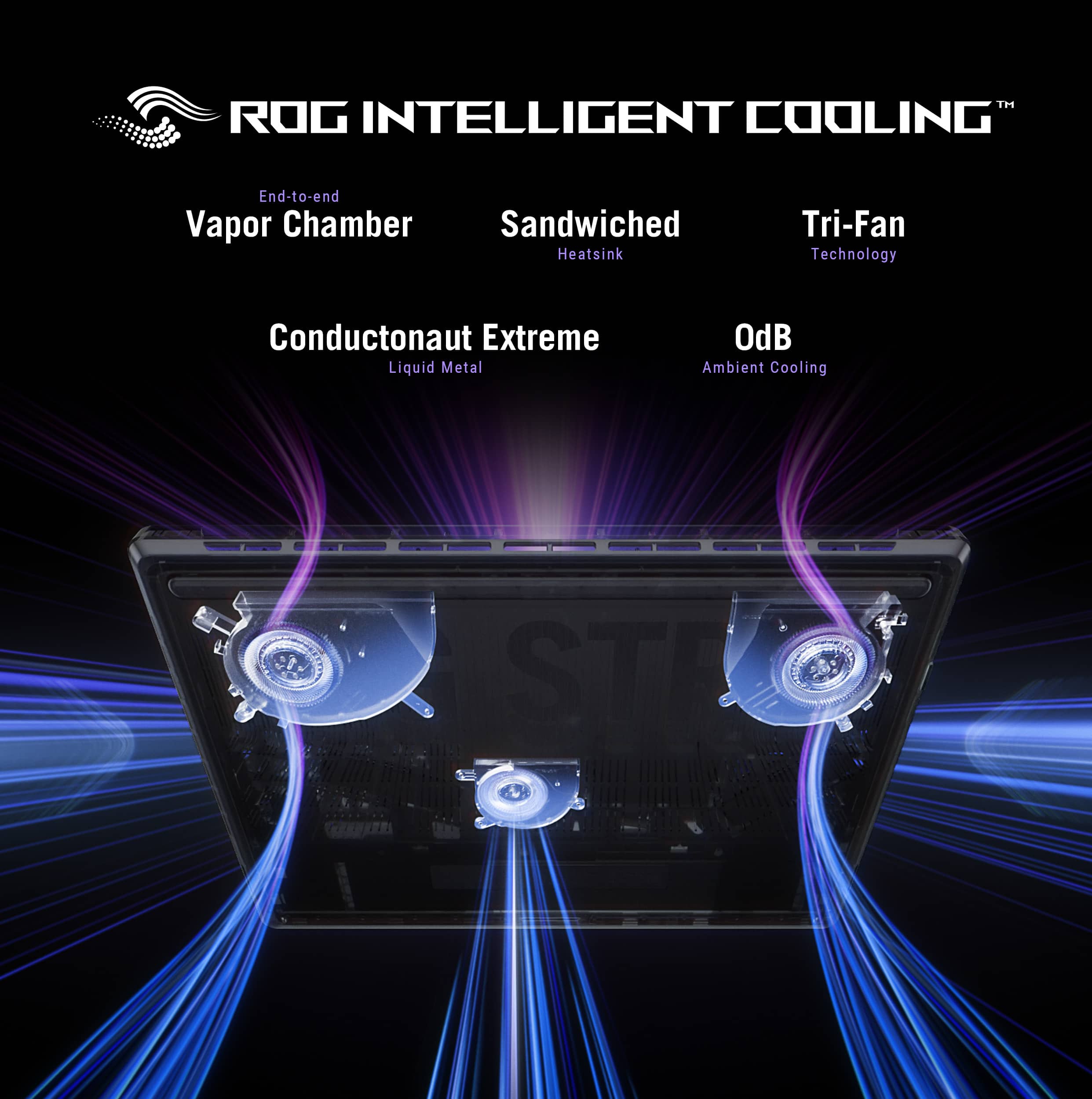
||Posted .This reviewer received promo considerations or sweepstakes entry for writing a review.The ASUS ROG Strix SCAR 18 sets a new benchmark for elite gaming laptops in 2025. Armed with the latest cutting-edge hardware and a commanding design, this machine is clearly built with no compromises. After extended testing across high-performance gaming and productivity scenarios, I can confidently say this is one of the most formidable portable systems available today. Performance: Desktop-Class Firepower in a Portable Form The inclusion of the Intel Core Ultra 9 HX processor and NVIDIA GeForce RTX 5090 GPU makes this laptop a powerhouse. Whether you’re pushing triple-A titles at ultra settings, streaming, or editing 8K video, the system performs with impressive thermal stability and zero throttling. Games like Cyberpunk 2077, Flight Simulator, and Hogwarts Legacy run effortlessly at 2.5K resolution with ray tracing maxed out—thanks to the 5090’s generational leap in ray tracing and AI frame generation. Display: A Feast for the Eyes The 18" 2.5K QHD+ display running at 240Hz is a dream come true for competitive gamers. Color accuracy is top-tier, and the refresh rate ensures ultra-smooth performance with no ghosting or tearing. The immersive screen size strikes a perfect balance between desktop-grade immersion and portable convenience, ideal for both gaming and creative work. Memory & Storage: No Compromises With 32GB of DDR5 RAM and a 2TB NVMe SSD, multitasking is frictionless and load times are virtually nonexistent. The configuration is ideal for power users, offering more than enough headroom for modern and future software demands. Storage-heavy gamers and creators will appreciate the fast and generous drive space. Design & Build: Aggressive Yet Refined True to the ROG Strix DNA, the SCAR 18 exudes a high-end, performance-focused aesthetic. The build quality is solid, with premium materials and intelligent cooling zones that manage heat exceptionally well under load. The RGB lighting is customizable and tastefully integrated. Despite its large footprint, it remains surprisingly sleek for an 18-inch performance laptop. Other Highlights: Advanced Cooling System with liquid metal on CPU and triple fan layout Comprehensive I/O, including Thunderbolt 4, HDMI 2.1, and multiple USB-A/C ports ROG software suite for performance tuning and personalization Final Verdict: The ASUS ROG Strix SCAR 18 is a flagship gaming laptop that confidently blurs the line between desktop and mobile performance. It’s clearly designed for gamers, content creators, and power users who demand top-tier specs and future-ready performance. At its price point, it offers exceptional value when compared to similarly specced competitors. Highly recommended for anyone unwilling to compromise.
I would recommend this to a friend - Cons mentioned:Heat dissipation
Disappointed at the price range
||Posted .This reviewer received promo considerations or sweepstakes entry for writing a review.I have to say I have mixed reviews about this laptop. I also want to state up front that I did return the laptop and I also want to state that all drivers, bios, Armory Crate were updated upon receiving the product and before putting it through its paces. I sound system of this product is pretty bad in my opinion. The speakers it comes with are the worst have heard on any top tier gaming laptop I have used. It was all highs. There are no mid or low freqs. When you are playing games where there are multiple layers of sounds going on all at once, the speakers this system has can not handle it and it is just a horrendous, jumbled sounding mess. You cannot differentiate anything. Some sound effects could not even be heard as the low freq range they used could not be produced by the speakers. It sounded to me like they put in a set of tweeters and not speakers that could handle a wider range. Switching to headphones did not help. The issue was the exact opposite where the sound was primarily low s and the sound was muffled and muted. I tried three separate headphones I own and it was the same with all three of them. I had to download a third party program to tune the sound to something that I considered to be acceptable. Unfortunately, no amount of tuning was able to help with the laptops speakers. I spent several hours trying to get it to a point where it was natural sounding but it just sounded shrill, compressed, high-pitched. Overall, I really dislike the sound of the speakers. The speakers in my 10-year old laptop sounds numerous times better. The speakers are more natural sounding cover a wider freq range and playing games, watching movies or playing music is quite a pleasant experience. This is not the case with the Asus. I could not enjoy using the Asus with the speakers. I had an ongoing issue with getting the system to release external hard drives and USB drives. I was being told that the drives were being used even though I had nothing open at them time. Some research indicated that this may be Armory Crate or MyAsus accessing the drives in the background. The speakers where really only audible if the system volume and the game volume were at max settings. When I put headphones on I had to go back into the game audio setting and turn all volume settings down to about 15-20% to keep my ears from being blasted. It was quite irritating to have to keep adjusting the volume to account for whether I was using the laptop speakers or headphones. Last thing about the sound. Adjusting the volume from 0-50 seemed pretty normal and linear. Once I got to 50 the volume did not really increase until I got to 90-100. This was for both system volume and adjusting volume with game setting. When launching a game the system would lock up for 5-10 seconds. I would get the windows "ping" sound and then the game would launch. The same thing would happen when I exited the game. The game would close and shortly after the system would freeze for 5-10 seconds. I would then hear the windows "ping" sound and would be to once again use the computer. The GPU temps stay pretty cool, staying between mid-50 to mid-60 in all the games I played at high settings. The CPU on the other hand always seemed to run higher than I would expect . Most the time the CPU temp would get into stay in the upper 70s and low 80s. There were times where it got as high as 95. Even in a game like wow where on my 10-year old laptop with the setting set at 5/10 the CPU would stay usually in the 60s. Using the exact same setting on the Asus and capping frames at 60 to match the old laptops max frames, the Asus CPU temps would get in to 80s at times. Framerates were not bad for a laptop, Usually in Diablo 4 at max settings I got 150+, Black Desert online was 100+ at remastered. WoW all depended on what I was doing. I a major city or in a raid I was anywhere from 60-90 fps. Flying in the open world I could get 200+ fps but I did get in the mid-20 fps when doing something like an outdoor boss where there could be 30+ others participating at the same time and this is once again with WoW setting at 5/10 of the settings slider. I could have probably gotten higher results in some of these games if I messed around with DLSS and MFG settings. The monitor looked great but coming from my 10-year old laptop with a GTX980M, 60hz monitor this was to be expected. The keyboard was acceptable to me. I prefer a much more tactile feeling when I press and release a key. This keyboard has a much softer touch than I am used to and is probably something that someone who is into e-sports or competitive gaming would appreciate more. The build quality is what I expect from a gaming laptop. It was sturdy and solid in construction. I do like the easy access bottom. MUCH more convenient than having to remove 12+ screws to add an SSD or change update memory. If my only concern about a gaming laptop was how many fps I was getting or how good a game looked, I would have been happy with this laptop. It ran all the game I played on it quite smoothly (with the exception I mentioned above). But when paying a premium price I have to look at other issues like CPU and GPU temps, sound quality, any sort of quirks when using the laptop outside of gaming, etc. At this price I need something that I feel confident is going to last me for several years and with the short time I had used this laptop and was not sure that I was going to get that.
No, I would not recommend this to a friendBrand response from ASUS Answers
Posted .Dear BigAinMT,
Thank you for sharing your comments regarding the ASUS ROG Strix SCAR 18 Gaming Laptop. We understand that it didn't meet your full expectations, and we sincerely apologize for that as we do understand your concerns. Our top priority is providing our customers with high-quality products, and we'll forward your feedback to our team for review.
We stand behind our products and continuously strive to improve our products and processes to achieve customer service excellence. If you require any further assistance, please email us at [email protected] and include the case number "N2505020495-0001" as a reference. We will do our best to resolve your case quickly. Your feedback is very important to us and enables us to improve our support channels. Thank you for choosing ASUS.
Best Regards,
Chantae
ASUS Customer Loyalty US Support
Great so far!
||Posted .This reviewer received promo considerations or sweepstakes entry for writing a review.The speed and power of this laptop is undeniable. I swapped the factory 32GB 5600 RAM for 64GB 5600 and swapped the initial 2TB SSD for two 8TB SSDs and love the computer. The fan can get pretty loud, but, the laptop doesn’t get too hot. Be sure to not have the screen backed up against anything to allow proper airflow. Had an issue with the screen getting extremely hot while about 6” from a wall. One weird problem I’ve only recently started having is the screen will go totally grey with three blue lines. Happened with one game and only when I click something in game, so I’m not sure if it’s the laptop or the software. Battery won’t last more than a few hours, but, only tried that out once when the charger came unplugged without me knowing. The charging case is pretty big and gets really hot, but, no issues so far. Overall, very happy with this computer and am very glad to have my first laptop dedicated to gaming and fun!
I would recommend this to a friend- Pros mentioned:Build qualityCons mentioned:Heat dissipation
Rog strix scar 5090
||Posted . Owned for 6 months when reviewed.This reviewer received promo considerations or sweepstakes entry for writing a review.The processor is extremely hot, and the stock cooling system can't cope, nor does external cooling, apparently due to the internal design. The graphics card, on the other hand, is twice as cool as the processor. As a result, at maximum settings, we see throttling, freezes, and performance drops due to the processor. Overall, the build is impressive, but completely unplayable due to lag.
No, I would not recommend this to a friendBrand response from ASUS Answers
Posted .Dear MaksymC,
Thank you for sharing your experience with the ASUS G835LX Gaming Laptop. We sincerely apologize for the inconvenience you have encountered with processor overheating, throttling, and performance drops. We understand how disruptive this can be to your gaming experience. Your feedback is very important to us, and we will ensure it is passed along to our product team for further review.
To help improve performance, we recommend following the steps outlined in our FAQ guide linked below. If the issue continues, please contact our support team at https://www.asus.com/us/support/CallUs so we can assist you further or arrange repair service if necessary.
We stand behind our products and continuously strive to improve our products and processes to achieve customer service excellence. For more information, email us at [email protected] and include the case number "N2505020495-0002" as a reference. We will do our best to resolve your case quickly. Your feedback is very important to us and enables us to improve our support channels. Thank you for choosing ASUS.
Best Regards,
Chantae
ASUS Customer Loyalty US Support
[Windows 11/10] Troubleshooting - Overheating and Fan issues - https://www.asus.com/support/faq/1015064/
[Windows 11/10] Troubleshooting - Resolving System Error Messages or Unresponsiveness (Freeze/Black Screen/White Screen during usage) - https://www.asus.com/support/faq/1038855/
- Pros mentioned:Performance
A great buy if you don't mind the size and weight!
||Posted . Owned for 1 week when reviewed.This reviewer received promo considerations or sweepstakes entry for writing a review.I'm coming from a 16" Macbook Pro and I was concerned about purchasing this laptop because I've never owned a laptop this large before, but I wanted the extra screen size for when I'm not docked because I'm a developer. The laptop is everything you expect; large, heavy, fast, beautiful, controversial. Taking this thing to Starbucks is going to get you some attention from the size alone, but then there is also the AniMe and huge ROG icon on the lid. I'm in my 40s and like to game, but these are a bit much for me, but oddly at the same time I don't really mind them. You can disable all the effects. The performance is absolutely astonishing. You will not be disappointed at all with it. There is nothing more to say here - Asus did a great job with it! I want to reiterate to anyone considering this laptop, it is large and it is HEAVY. I don't travel much with my laptops, but I do use them around the house a lot, so that's why the "portability" is welcomed. That said, despite it being heavy, I don't mind "lapping" it. It stays pretty cool and the weight distribution doesn't make it too awkward. If you have the money to spare, you won't be disappointed with this machine!
I would recommend this to a friend - Cons mentioned:Heat dissipation
Asus Rog strix 18"
||Posted .This reviewer received promo considerations or sweepstakes entry for writing a review.Everyting about this laptop is great except for the battery life. It doesn't last long. It overheats & turn off
No, I would not recommend this to a friend - Pros mentioned:Performance
Open it was in great condition
||Posted . Owned for 1 month when reviewed.This reviewer received promo considerations or sweepstakes entry for writing a review.The performance of this laptop is incredible. 4 stars because they changed to a proprietary charging port. Only 100w USBC charging.
I would recommend this to a friend - Pros mentioned:Performance
Rog strix
||Posted .This reviewer received promo considerations or sweepstakes entry for writing a review.In my opinion, a great gaming laptop. Runs all sorts of heavy new games, lag is non existent, and the graphics are absolutely beautiful. Is it worth 5,000... maybe not that much, but if you are looking for a great laptop, highly recomend. The only issues ive found is not with the laptop necessarily, but with windows 11, the way they have their new programs set up is .... interesting to say the least. But otherwise highly recommend
I would recommend this to a friend - Pros mentioned:Build quality, Performance
Best Gaming Laptop I've owned.
||Posted .This reviewer received promo considerations or sweepstakes entry for writing a review.It is an absolute beast. Gaming laptops aren't known for being quiet, but this is much quiter than my previous laptop. It runs everything on max settings all day long with ease. The screen is great too, and is just a step below an Oled.
I would recommend this to a friend DO IT!!!!!!!
||Posted . Owned for 3 weeks when reviewed.This reviewer received promo considerations or sweepstakes entry for writing a review.This is the best laptop I’ve ever owned—by a wide margin. From performance to build quality, everything about it feels premium and intentional. It runs every game I throw at it effortlessly, stays responsive under heavy workloads, and still feels fast and smooth no matter what I’m doing. It completely exceeded my expectations. What surprised me most is how solid and refined it feels day-to-day. The screen is incredible, the keyboard feels great, and the overall experience just makes you want to use it. It doesn’t feel like just another device—it feels like something special. It’s easily my most prized piece of tech right now, and I’d buy it again without hesitation. If you’re considering a high-end gaming laptop and wondering whether it’s worth the investment, this one absolutely is. PS If I see one more review about battery life I’m gonna lose it. It obviously isn’t a laptop meant to be used off of its power supply.
I would recommend this to a friend