Customer Ratings & Reviews

- Model:
- 111811
- SKU:
- 6612612
to a friend
- Pros mentioned:Air quality, App, FilterCons mentioned:Size

Clean and quiet
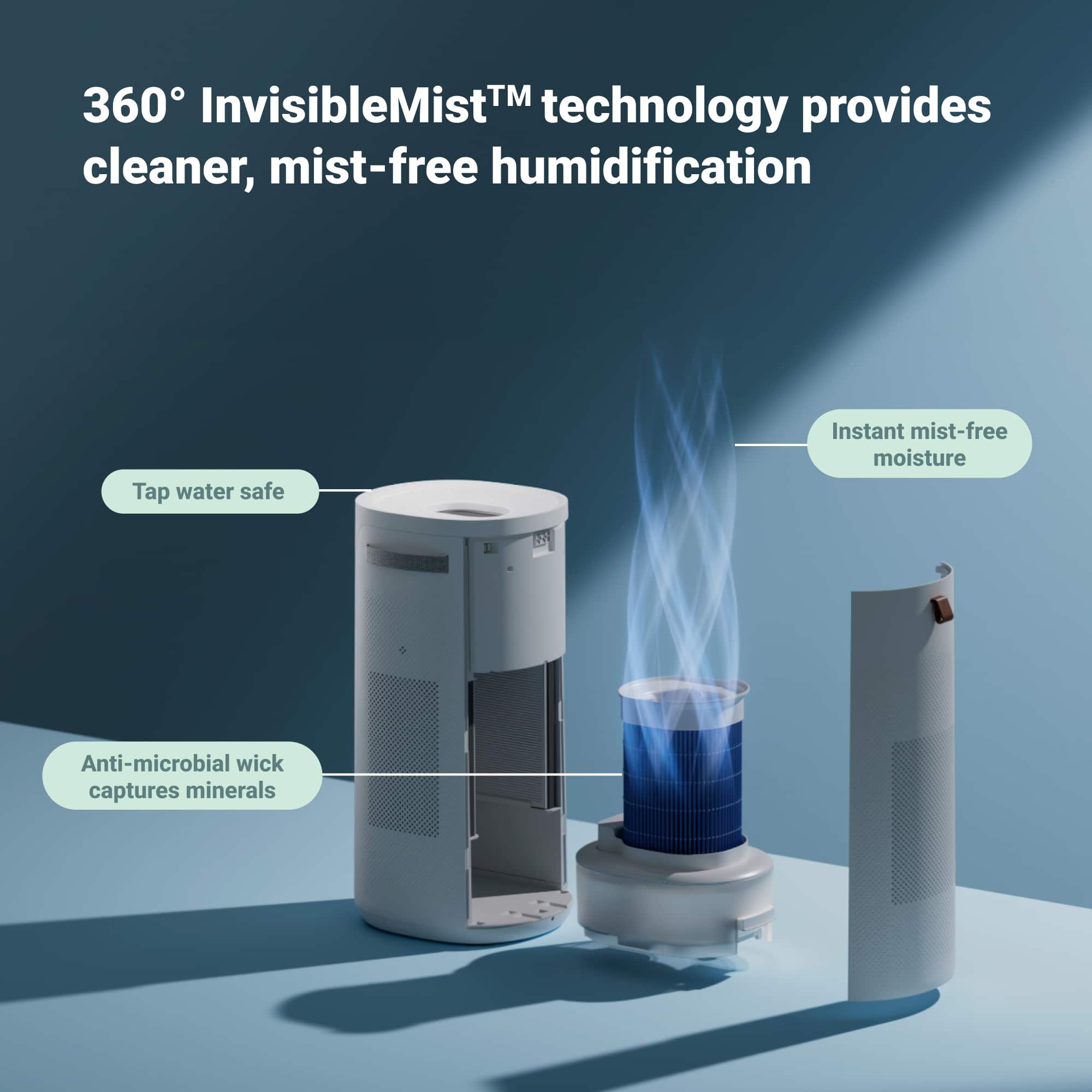
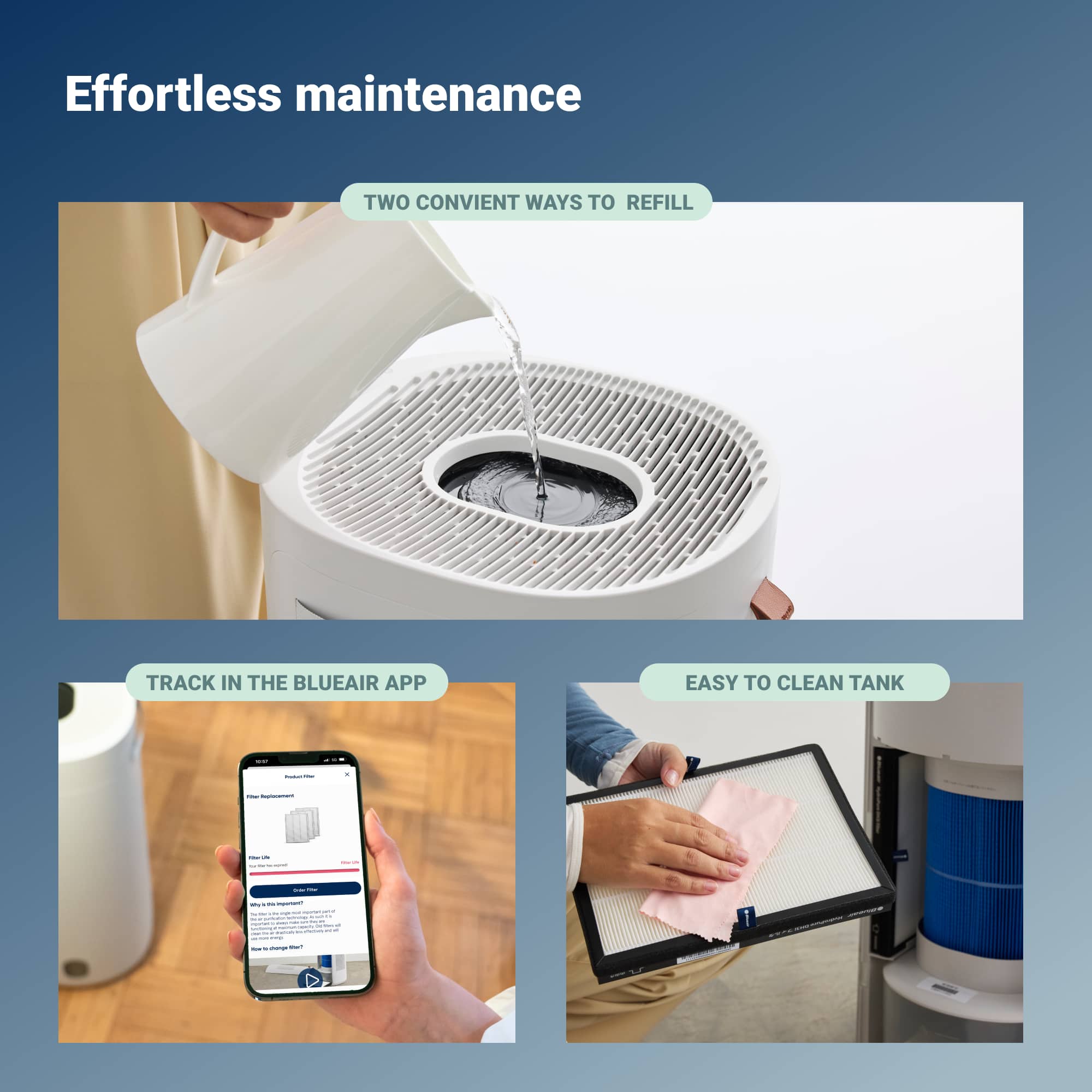
|Posted .This reviewer received promo considerations or sweepstakes entry for writing a review.The two in one air cleaner and humidifier is huge! But it is very quiet and very efficient in cleaning air in a room. It has built-in handles on both side for easy carrying and moving. The method it uses to humidify the air is uniquely different compare to all other humidifiers, it is using a pump to pump water to a wick filter and the dry air flowing through the wick filter get humidified and carry with it the tiny water vapor. This way, only the pure water gets delivered to the room. As air cleaner, it uses three air filters to clean the air. One at the back and two on both sides. It was able to clean air in my room very quickly. It has built in sensor located at the left side to measure air particulate and a humidity sensor located on the right side to measure humidity. Since it has integrated controls on the machine, you don't have to use the Blueair mobile app to control the machine. But using mobile app has additional features and functions like personalized humidity levels, water level notification, scheduling, outside air quality, filter life, history data etc. Filling water is very easy, you can pour from the top or you can open the back cover and slide out the water tank and pour water in that way. As a humidifier, it is not so great if you set the fan mode to auto because it will incorrectly sense the humidity of the room due to low air flow. See picture attached. I have to set it to manual fan mode. In manual fan mode, it will not stop even when the humidity already reached the user set level. Also all the filters only rated for 6 months, it becomes expensive replacing the filters. I buy because of the unique humidify method.
I would recommend this to a friend - Pros mentioned:Filter, Humidifier
Convenient, Simple & Effective
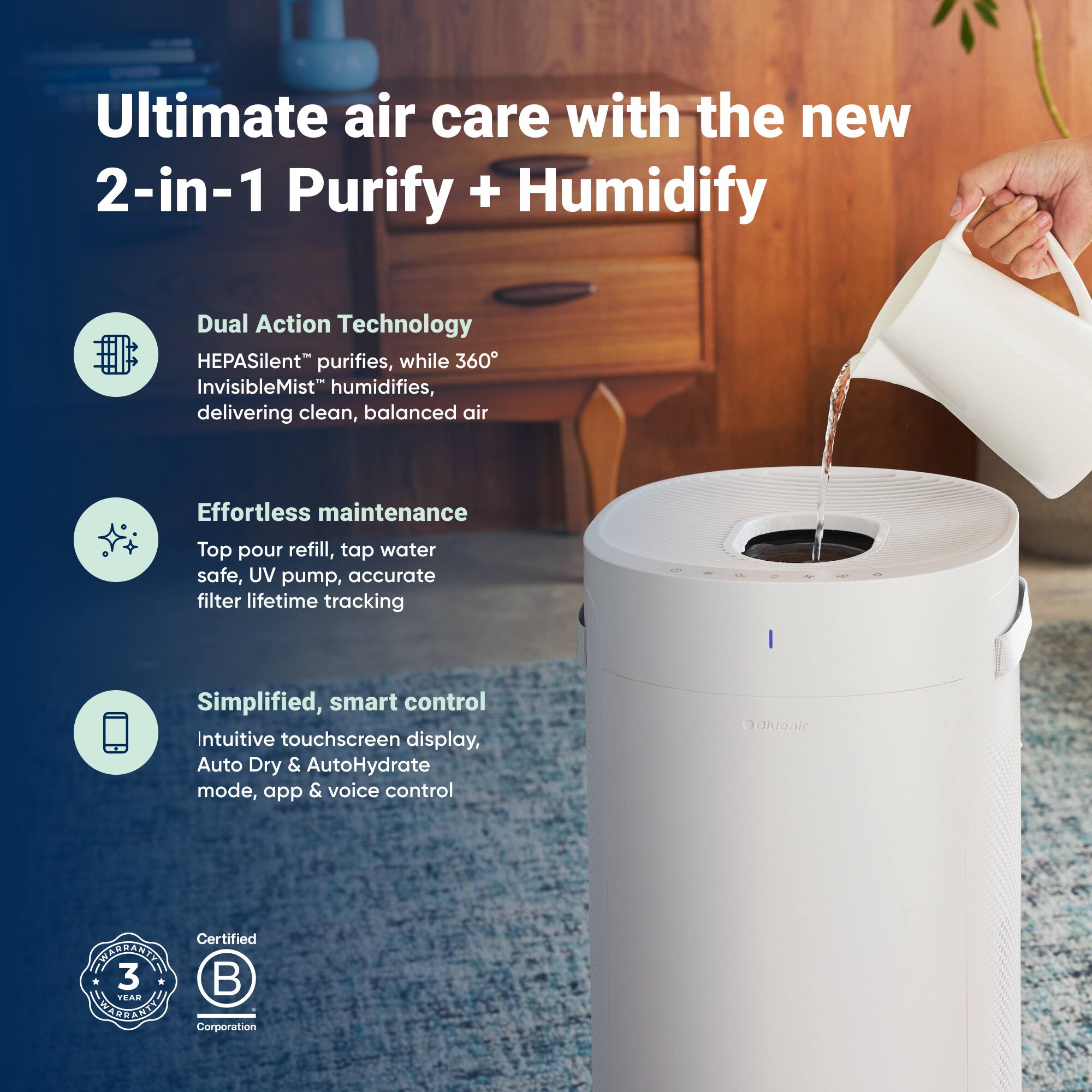
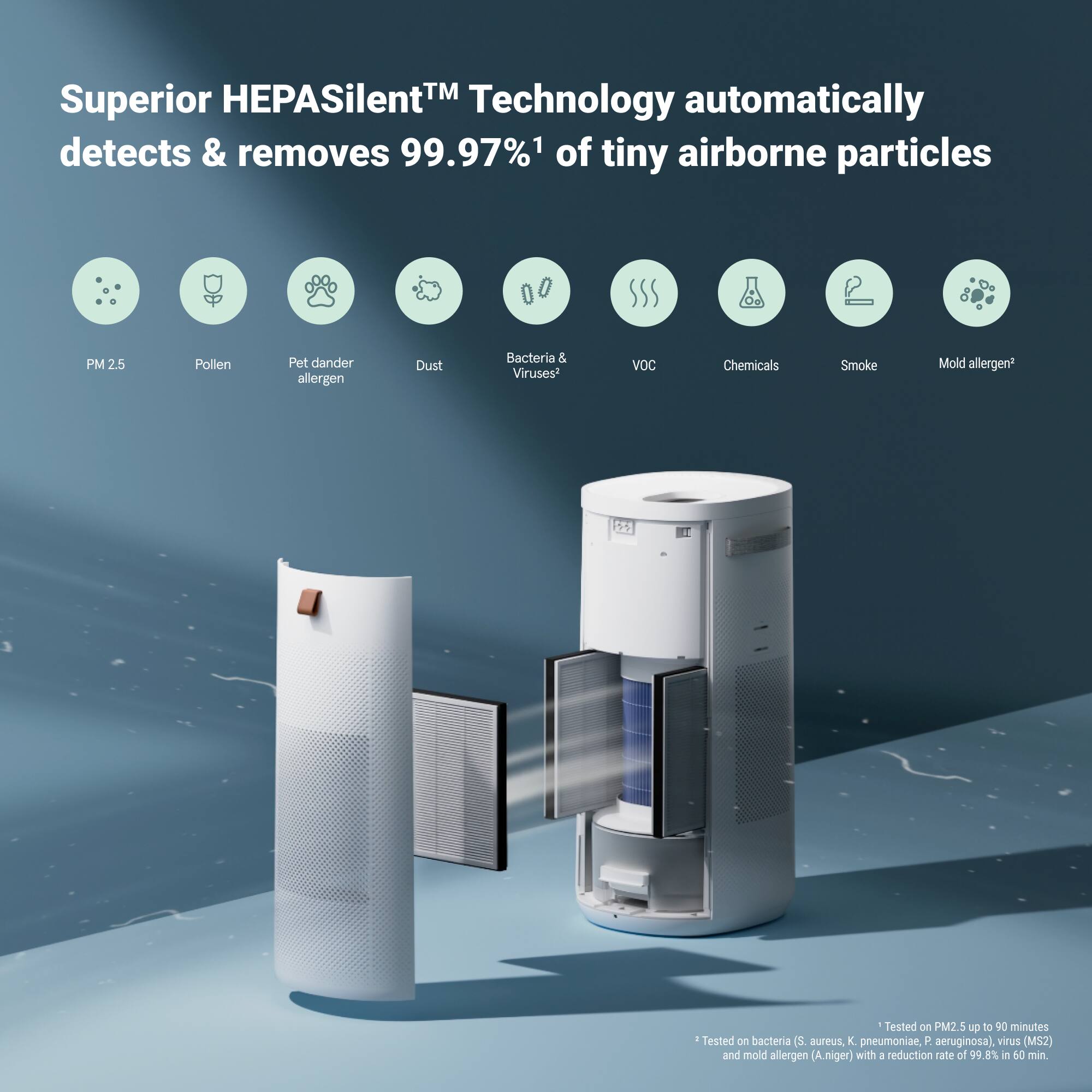
|Posted .This reviewer received promo considerations or sweepstakes entry for writing a review.📦 UNBOXING: Inside the box, you’ll get the 2-in-1 air purifier and some documentation. Overall, it was packaged well for shipping so you won’t have to worry about damage during transit. 💪 BUILD: Out of the box, the Blueair 2-in-1 Purify + Humidify Air Purifier feels lightweight thanks to a plastic build, which makes it easy to move across rooms and different floors of your home. Additionally, there are fabric handles on the side so that it’s easy to carry it. On the top of the humidifier is the fan exhaust, display and capacitive controls. The display can get plenty bright but can also be dimmed quite low. The controls include the on/off toggle, an LED brightness control, a sleep timer, a metrics toggle, a fan speed control, an automatic mode, and a humidifier toggle. In the front, you’ll see a window that shows the amount of water left in the water reservoir which can also be accessed via the rear back panel. When you remove the back panel, you’ll also find 3 filters (one of which is installed in the back panel) and the wick filter. 🛠️ SETUP: Setup is overall quite simple. You’ll want to remove the rear back panel and remove the protective plastic from the filters before you start. Then you’ll want to fill the water reservoir which can either be done by pouring water over the display (which was strange to me, but it’s certainly convenient), or by removing the reservoir via the rear back panel. There is a max water level line on the rear of the reservoir, but filling it up to this line does not show a “full” reservoir from the front window of the unit, so it’s likely a conservative recommendation so that you don’t overfill and cause spills when moving the unit from room to room. Afterwards, you can either start using it via the built-in controls, or set it up via the smartphone app over Wi-Fi. Note that this unit must connect using 2.4GHz Wi-Fi. Setting it up via the app was very easy thanks to the guided process. 🎛️ CONTROLS: The capacitive controls are pretty typical compared to other options on the market. There are no “increase” or “decrease” buttons for any of the functions, so you’ll have to press any given button a number of times to rotate through the option you want. Thankfully, the options are not overly plentiful, so it’s not too annoying. One thing I dislike is that while the display is backlit, the capacitive controls are not. So it’s fairly likely that you will fumble to use the controls in the dark. You can use the smartphone app under this circumstance, but it seems like a pretty strange omission. Even so, I especially like that I can quickly set a timer to have it run for a number of hours, control the fan speed, and toggle the humidifier function with ease. 💿 APP: The smartphone app exposes all the features of the Blueair 2-in-1 Purify + Humidify Air Purifier along with some additional features like a historical graph of the PM 2.5 pollution levels and Humidity levels, the ability to view the filter life and set schedules for different configurations. I especially like that I can configure schedules so that I can use the humidifier at certain parts of the day, and use just the air purifier at other times of the day. I also like the ability to use the fan as white noise during the night, so it’s nice to be able to have it on a routine schedule so that all I really need to do is fill the water reservoir for the humidifier and change out the filters from time to time. I also like that there is an indication on the display and app when the water reservoir is low, and that I get push notifications so I can be proactive about filling the reservoir. 🧐 CONCLUSION: After using it for about 2 weeks in my bedroom, I feel that it keeps my room at an appropriate level of humidity and keeps my air clean from pollutants. I especially like that I can set it on a schedule using the app so that I can mostly set it and forget other than when I need to refill the water reservoir or replace the filters. And because refilling the water reservoir can be done by pouring water over the display, it makes the system very convenient since I don’t have to do any disassembly.
I would recommend this to a friend - Pros mentioned:Filter, Humidifier, Noise levelCons mentioned:Size
A tad large but in charge
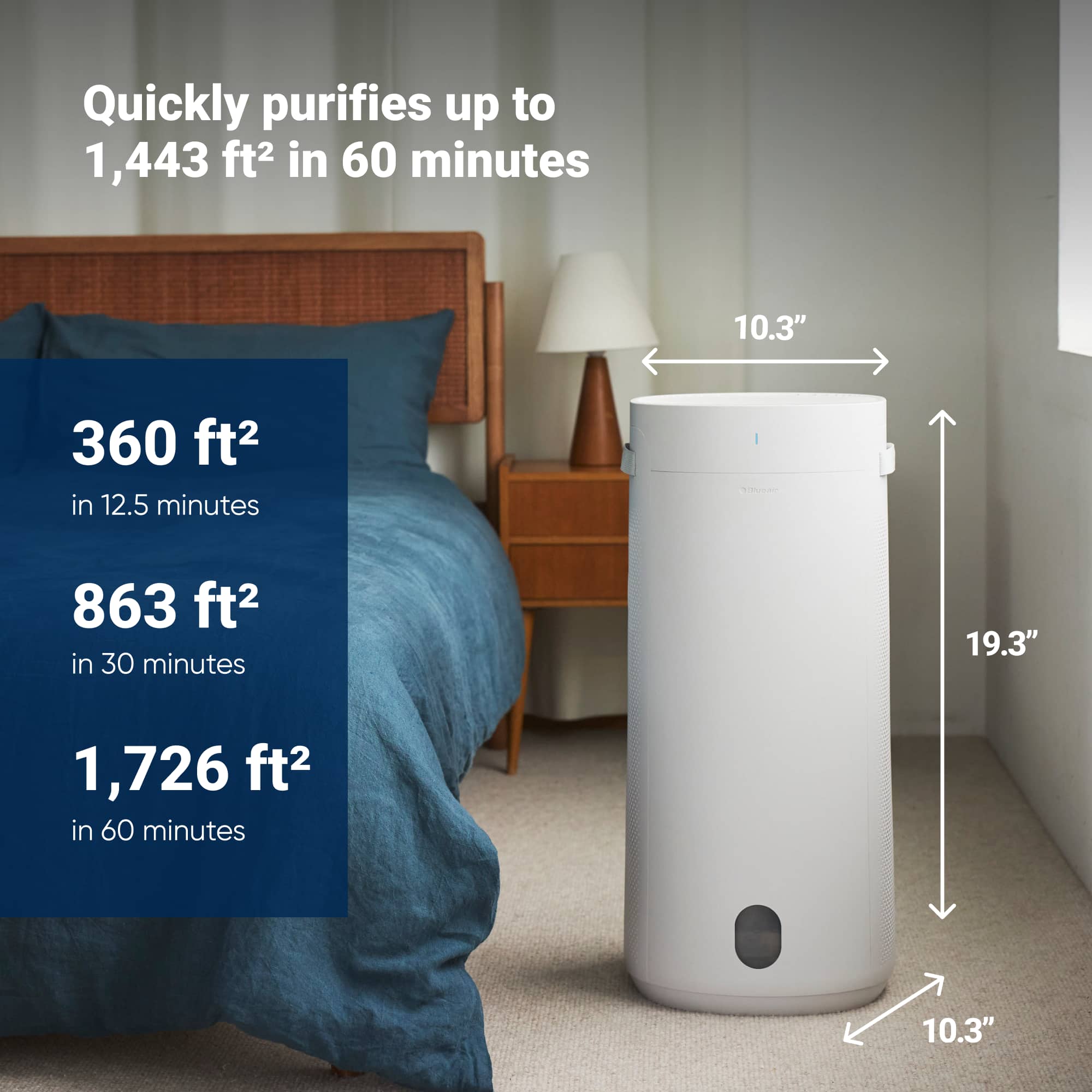
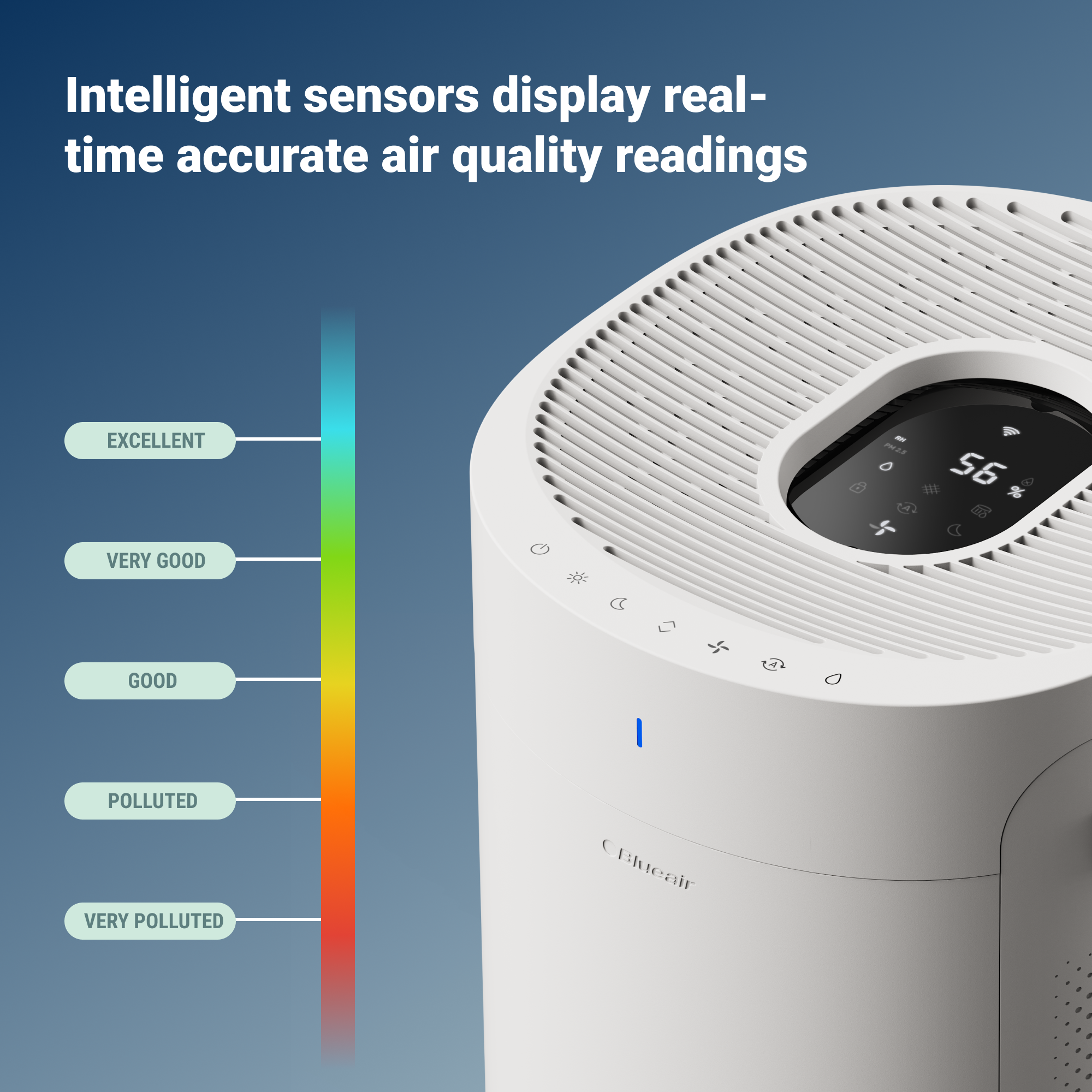
|Posted .This reviewer received promo considerations or sweepstakes entry for writing a review.My initial reaction after unboxing the unit was it was much larger than I had anticipated. But its oval shape (26 inches tall x 12 inches deep x 13.4 inches wide and weighing 20 lbs dry) isn’t cumbersome. The built-in straps on each side for carrying around certainly help but not really tabletop size, I think. Unpacking was easy enough, but each filter (2 side purifying and one “wick”) must be untaped and removed from plastic. Once that was all done, setup using android app was easy enough – creating an account, setting up Wi-Fi etc. The app is easy to navigate and walks you through setting up machine and Wi-Fi connection. Once completed the apps initial screen shows humidity level, filter and wick percentages left. If you tap that screen, it opens the entire app where you have access to settings as well has history and can set up a schedule if you want. The unit is extremely quiet, and I notice sounds, especially at night. I mostly used low setting with humidity set to 50%. I live in a very dry area and must refill the water reservoir (holding about 3 liters) several times a day, so a larger reservoir would be nice. You have 2 options to refill - pour water into the top center of machine (Over the led display or take back of unit off sliding out reservoir and “wick filter”. The 1st option runs counter to everything I was taught from my electrician father – water and electricity don’t mix – but it seems to work fine and hopefully stays sealed. The display indicates Wi-Fi, water level, humidification mode, display lock, relative humidity %, night mode, auto mode and fan speed – but is not touchscreen enabled. There is a small but easily seen indicator (AQI) light on front of machine and colors that indicate air quality - blue = excellent, green = good, yellow = moderate, orange = polluted and red = very polluted. The light also blinks if the reservoir is out of water. Manual controls for On/Standby, Brightness, Night Mode, Information toggle, Manual fan speed, Auto Mode and Humidification on/off are top/front of unit. These function well but are not backlite so can’t see when dark. I mention this as I got up early one morning and noticed the flashing light indicating no water and had trouble finding button to turn off with no light. As far as air cleaning is concerned it seems to be working well. The maximum room size is 360 sq ft. Humidity seems much better. The unit has an auto-dry feature which I think helps dry out the wick as to stop any mold etc. from growing. It runs when the unit is out of water or fan speed is set to 0. You can override this in app. The manual states the expected life span of the purifying filters is 6 – 9 months and wick 6 months. 3-year warranty which is nice I am disappointed that the power cord is not detachable from unit and has power brick at plugin. This could make it a tad difficult to “run” cord under/through furniture. Also, power bricks have been known to go out – which would require replacing entire machine. Overall, a nice and quiet unit that seems to really make a difference on humidity in the room. I definitely recommend.
I would recommend this to a friend - Pros mentioned:App, HumidifierCons mentioned:Size
Good combo purifier and humidifier
|Posted .This reviewer received promo considerations or sweepstakes entry for writing a review.I had the need to have more control over the humidity in my house. It became a bigger priority since we welcomed a little one. I did a lot of research trying to find a purifier that would also humidify. Then this Blueair became available and it appeared to have what I was looking for. I have other Blueair purifiers, so it was good to know that I can use the same app to use this. The first thing that I noticed was the size. It’s a big product but it is not an eyesore for me. I wouldn’t want to put it in a small room but it worked at the location I wanted. Getting this Blueair purifier plus humidifier installed setup was as easy as taking it out of the box and removing the plastic wrapping from the filters. Add in the water, plug in the Blueair and connect using the app. After pairing with the Blueair you can use the app to control different settings to get the most comfortable experience. There is also the option of using the onboard controls. When it’s time to fill up with water, I can fill it up by pouring the water over the lcd screen. So far I went 3 days using the humidification on before I needed to refill. The tank takes a gallon of water. I chose to use distilled water to prevent mold and help with the longevity of the unit. This is also very quiet when running. If you need to use high speed it may get a little bit louder but not annoying. I think the filters are reusable after cleaning them. That would save me some money and I will read up on it to verify. I’m liking this combo purifier plus humidifier and I have no issues. I’m feeling a difference in the humidity and I can visualize the reading on the Blueair. I would definitely like to see a smaller version of this Blueair combo. The unit is quiet and easy to use. I like this refill process and being able to control the settings using my phone. Although it’s good to have the filters, I think it’s too many to keep up with and to deal with the cost.
I would recommend this to a friend - Pros mentioned:Air quality, Noise levelCons mentioned:Size
Silent but very effective at both tasks
|Posted .This reviewer received promo considerations or sweepstakes entry for writing a review.It’s hard to determine which surprised me more about this unit; how quiet it is or how much of a difference it would make in my environment. My first impression was that it was big. Having only experienced it through images, I was a little taken aback when it was delivered. How was I going to be able to have this in my living room and still enjoy watching TV? And would it really make that much of a difference? Opening the box, I was impressed with the packaging design. Little things like that make a difference; especially when you’re purchasing a technical or health product (and I’d argue this is both). You want to see that some thought went into engineering and for me, package design is the first hints of a good design/engineering team. Physically, the assembly was straightforward enough that I didn’t even need to look at the manual (which is well written). The humidifier wick and the filters are easy to install and seemed reasonably priced for replacements; something that’s important but often overlooked when selecting this type of device. I was most interested in getting the Blueair connected to my smart home and again, the forethought put into the flow was evident. I was able to get connected on the first attempt – and quickly. You can access all the setup and features from the app, including all the controls on the device’s panel. Although Blueair does not offer an open API, there are third party integrations for smart speakers like Alexa and Google Home although it wasn’t clear in the app if this unit was supported. Since I didn’t need to control it with my voice, I never bothered to test them out. However, there are also integrations available for smart home platforms like Homekit, Homebridge and my preference, Home Assistant. I was able to integrate the Blueair purifier into Home Assistant easily and was able to use it to both control it and monitor the sensors. So, after setting the unit up and configuring the settings, I sat in the room and waited for the jet engine sound when the unit kicked in… and it never happened. I actually had to go over to the unit to make sure it was on. Even when my forced air heating kicked in and caused the humidifier to compensate, it was still just a gentle breeze sound. Very impressive. Knowing this, I could get on with seeing if it actually worked and made any appreciable difference. I have to say, I didn’t really have high expectations, but within a few days I noticed I was breathing much easier. I’ve always had sinus issues, and it gets worse in the winter when we spend more time indoors and, in my case, with forced air heating. I’m not going to exaggerate and say this has fixed all my problems, but it’s only been a couple of days and I *do* notice a difference. Long term, I feel like it’s only going to get better. I’m already looking into a smaller unit for my office.
I would recommend this to a friend - Pros mentioned:Noise levelCons mentioned:Size
Nicest Blueair Device that I’ve Used
|Posted .This reviewer received promo considerations or sweepstakes entry for writing a review.About the Blueair DH3i The Blueair DH3i is a home air purifier and humidifier designed for a room up to 301 square feet. It utilizes 3 HEPA air filters to clean the air around it. There’s a water tank, pre-filter, and a wick filter that make up the humidifier components. The Blueair app allows you to see more information about its status and to control its settings. Size & Appearance This is a large air filter. It’s tall at 26 inches and has a width and depth of 13.4 x 12 inches. It also weighs around 20 lbs. The air filter has a clean looking design. There’s a nice digital control panel on the top and a light on the front to use as an air quality indicator. This is definitely best used as a floor-standing unit. It’s big enough that there are straps on the side so that you can move it. This was a good design as I have to move it to fill the water tank. Once filled I have to move it back into place. The handles give me good control to not splash the water around inside the device. Setting Up Setting the air filter up was fairly easy. Everything was ready out of the box. Important item – Make sure that you remove the 3 HEPA air filters and take the plastic off. The filters were a little difficult to get out (mainly the one on the removable back panel). Plug it in and connect it to the app. The app can be found in the App Store or on Google Play. I already had the app installed on my phone since I own two other Blueair air purifiers. Connection to the app worked flawlessly. It does want you to connect to a 2.4 GHz signal. My Eero 6e Pro had no issues connecting. Instructions – It does have user manuals in the box (English and French). The instructions are generally good, and that’s all I used to set it up. They did have a few flaws though. There’s a Product Map section where they label the components with letters and they use a legend to indicate the name of the components. My Product Map was flawed as there were no letters in the legend, so I was having to guess what each part was. I only had letters on the picture portion. As an alternate to the paper manuals, there is a QR code to scan. This may be worth trying if you are interested. App Controls The app gives you the option to control the filter settings through your Wi-Fi. You can control things such as: *Brightness of LED lights * Fan speed * Turning the Humidifier on/off * Name the Air Filter (handy if you have more than one Blueair product) It uses your location to provide information on the air outdoors to give you an understanding of your external environment. You can use the Indoor screen to see the PM level, and it gives a general condition description such as Polluted, Moderate, Excellent, etc. It does allow you to track multiple Blueair products, so you can buy multiples and name them differently. Touch Controls Touch controls allow you to adjust the air purifier without needing the app. The buttons are on the top of the unit. You can control things such as: *Brightness of LED lights (using Night mode) * Fan speed (Auto, Night, 1, 2, & 3) * Humidifier on/off * Toggle the info between the PM quantity and the Relative Humidity percentage Maintenance This is the most concerning item for me with this product. There are 3 HEPA air filters, a pre-filter for the humidifier, and a wick filter. That’s a lot of parts to replace every so often. It does say that you can brush off one side of the HEPA filters. I imagine that would help the longevity, but eventually you are going to have to buy new ones. Also, the maintenance for the humidifier per the owner’s manual says to clean the humidifier components once a week. I don’t know too many people who have that kind of time on their hands, but I do understand the need to consistently clean something that can potentially mold. You have to clean the tank, replace the wick filter every 6 months, and clean / replace the pre-filter. Instructions are unclear about how often to replace the pre-filter. Another maintenance item (not a filter) is that there’s an air quality sensor located on the back of the unit. You have to take the cover off and clean it as well. Air Flow This is a large air purifier, and it moves a lot of air. At higher settings, it can be loud. On the night setting it’s pretty quiet. The instructions say not to place anything within 4 inches of any side. This allows the air to be brought in without obstruction. I did notice that the instruction manual says it’s for a room size of 301 square feet, where as the Best Buy website says 360 square feet. Humidifier At the bottom of the unit there’s a water tank that you will need to fill (probably often depending on the conditions of the room). I get 2-5 days of use between fills so far and that’s winter in a southeastern state. You have to remove the back panel, slide out the tank and wick filter, remove the wick filter, and then fill the tank. It’s not a hard process, but I do have to move the whole air filter to get to the back side and then place it back after it’s full. Now, there is another option when it comes to filling the humidifier. The instructions actually call this the “preferred option”. It involves turning it off first (very important) and dumping the water directly on the digital control panel face. Now, as someone who has owned a tremendous amount of electronics, this seems like a terrible idea. I can’t bring myself to do that. Even if it works flawlessly, you’re still going to have some scaling or streaking on your display that you’ll have to clean off. Personally, I’m going to stick with pulling out the tank on the back. Air Freshness Our house has pretty good air quality to begin with, so it’s hard to tell how good of a job this is doing. We use a lot of single air filters in different rooms as well as us changing the main furnace filters four times a year, so it may be harder for me to notice a change in freshness for this one room. When I started using the DH3i it always showed a PM number of 0. I was concerned that something was wrong with the purifier. Then, one night, we had a component on our stove go bad and the house smelled like burning plastic. The DH3i immediately could sense that from a different room, and began scrubbing out our air pollutant. If on auto-mode it will automatically increase the fan speed to process the pollutants quicker. I watched the PM numbers drop. This gave me more comfort with the device, knowing that it was monitoring the air and correcting the issue. Overall, I do recommend this product and am giving it 4 stars. I think that it looks nice and works well. The app is nice and you do have control directly on the top of the purifier. The digital display is appealing and you can control the lights independently of the fan speed. My biggest concern for this product is the maintenance. A once a week cleaning seems like a lot, and the numerous filters could add up in cost.
I would recommend this to a friend - Pros mentioned:Air quality, Noise level
Perfect For Bedrooms
|Posted .This reviewer received promo considerations or sweepstakes entry for writing a review.I have always been a fan of Blueair Air Purifiers, so I was excited to test their new line of purifier/humidifiers. For the last two weeks, I've been testing the new Blueair 2-in-1 Purify + Humidify with HEPASilent and InvisibleMist. Overall, I think it is an excellent product that is well-built, easy to use, and whisper-quiet. Unboxing and setting up the Blueair was simple. I just had to remove a few pieces of tape, open the unit, unwrap each of the filters, fill the tank with water, and connect to Wi-Fi with the Blueair app. Once connected to Wi-Fi, I was able to see some fantastic statistics. I could see the outdoor air quality based on my zip code, indoor air quality (up to PM2.5), humidity level, and room temperature. As well as that, I was able to control all the features of the Blueair, such as the four levels of fan speed and automatic settings. I could set my preferred humidity levels and see a histogram of the humidity and air quality fluctuations. When it comes to performance, this 2-in-1 is amazing. I primarily use it in my bedroom, and it is virtually inaudible. It is by far the quietest and best-performing combo air purifier and humidifier I have ever used. Waking up in the morning without dry sinuses is the best feeling in the world, and it is all thanks to this wonderful product. The only drawback is that the controls on top of the unit are a little slow to respond. However that will probably be fixed in a firmware update. I love this Blueair 2-in-1, and I am certain that you will too. I highly recommend it.
I would recommend this to a friend - Pros mentioned:Air quality, Humidifier
Excellent Humidifier and Purifier!!!
|Posted .This reviewer received promo considerations or sweepstakes entry for writing a review.The Blueair 2-in-1 Purifier and Humidifier has been a game changer for our home. Everyone in my family suffers from allergies, and we tend to get really sick when the weather changes. However, I've noticed significant improvements in our seasonal allergies recently. This combination of a humidifier and purifier has greatly relieved those unpleasant symptoms. With the humidifier on, I feel less stuffy, and my eyes don't water as much. The air quality feels amazing. Additionally, my home was previously owned by a smoker, and I would occasionally notice the lingering smell of smoke. Since I started using the purifier, I haven’t detected that smell at all. The setup was super easy, and downloading the app is a must. From the app, you can manage the settings and keep track of the humidity levels inside your home. It also lets you know when it's time to replace the filters. Refilling the humidifier is simple; you can easily add water from the top without needing to take it apart, although you can do so if you prefer. The invisible mist technology is another great feature. Personally, I like to see the mist, as it helps me relax. Overall, this is a great machine that serves two functions and covers about 1,700 square feet according to the manual, which is perfect since my home is about 1,000 square feet.This is a machine that is worthy of investment.
I would recommend this to a friend - Pros mentioned:Air quality, Noise level
A nicely designed humidifier/air purifier
|Posted .This reviewer received promo considerations or sweepstakes entry for writing a review.A little background: I recently moved from Florida to Tennessee, and a couple of years later to Arizona. While I knew that the humidity was much lower here in Phoenix, I had no idea how problematic the lower humidity was going to be. In talking to friends and family, I found that all of them had humidifiers in their homes. Waking up multiple times at night feeling parched and with extremely dry sinuses, I realized that I needed to do something. I started by buying a single room humidifier for my bedroom. I’m happy with my bedroom now, with it sitting humidity-wise at around 40%. It runs from 8pm to 7am seven days a week. I decided to look for a more robust humidifier for my kitchen and family room, which is where the BlueAir DH3i unit now sits. The manufacturer says that this unit is well suited for a 300 sq/ft area, which is perfect for my open concept kitchen/family room. The DH3i unit is substantially larger than the smaller model in my master bedroom. This Blue Air model is 26” tall, 12” around the top and 13.6” at the bottom. It’s not especially heavy at 13.8lbs but does get noticeably heavier when the water tank is at capacity. But even then, it’s not difficult to move around. Finding a good location for the unit was an exercise. You don’t want to place it where people will run into it, nor do you want to place it where moister might collect. I tried a number of spots before settling near one of the walls. Oh, and since hard water isn’t great for humidifiers in general, you may want to opt in for distilled water if your water quality isn’t all that great. The back of the unit has a removable panel that gives you access to the water tank, as well as access to all the filters. The first time I filled the tank up, I did so by removing the back panel and pulling the water tank entirely out. The filter called a Wick sits on top of the water tank, so both tank and Wick will slide out together. Once the tank and Wick are out, lift to detach the Wick and its housing and directly pour the water into the water. Reverse those steps to return the tank and Wick to the unit and then close the rear panel. That’s easy enough to do. Or you can simply pour the water into the unit from the top without removing the back panel or removing the tank/Wick. I suspect this will require further explanation. Note the pictures I attached to this review. One photo is of the top of the unit where you can see a digital display in the middle. The photo also shows Icons on the top front that can be pressed to activate system functions while the slits on the top allow for upward air flow. To refill the water tank without removing the back panel, pause the unit, then add water to the tank by pouring water directly onto the digital display. This essentially routes water from the top and down into the water tank. To keep you from overflowing the water tank, I glance at the bottom front of the unit (see second photo) to see if enough water has been provided. The instructions say that the digital display on top of the unit has a small water-droplet icon that appears with a Red “X” to indicate that the tank is full. Unfortunately, I’ve never seen that icon illuminate – even when I overfilled the tank. The second photo shows the front of the unit. Note a colored light on the top that shows as blue. This light reflects the air quality where the unit is located – in my case, my family room. The color blue is the highest, or cleanest, air quality. If the air quality inside the house gets worse over time, the color of the light will change accordingly. The worst air quality is shown as Red. On the front - but at the bottom of the unit - is a small window that provides a view into the water tank and lets you see how much water is still available. I have a problem seeing the water level when I look in the window, so I have to use a flashlight to better illuminate the water tank. Returning to the removable rear panel, removing it gives you access to three Particle filters that filter incoming air. The Wick filter, which sits over the water tank, is also accessible here. The Wick filter should be replaced every 6 months, while the Particle filters should be replaced every 9 months. This DH3i unit also has a scheduler feature that’s found in the phone app that lets you automate when the system turns on and off. From a noise perspective, and other than when I originally turned it on and it was working overtime to get the humidity between 40%-50%, I rarely ever hear this system working. I regularly place a hand over the top of the unit to see if it is still pushing out air. And yep, it always is. I like this unit. It is quiet, attractive and easy to use, and thus far has done a stellar job filtering the air and stabilizing the humidity. I do have to refill a good portion of the water tank on a daily basis, but this was expected. As such, I’m giving this Purifier/Humidifier a well-deserved 5-star rating.
I would recommend this to a friend - Pros mentioned:HumidifierCons mentioned:Size
Big Purifier + Humidifier with Simple Smart Design
|Posted .This reviewer received promo considerations or sweepstakes entry for writing a review.This winter reminded me how I needed to get a humidifier for the bedroom to combat the dryness and discomfort the cold weather causes. We recently moved and the new bedroom has higher ceilings that make the current air purifier much less efficient at lower speeds, so that needed to be replaced as well. We’ve been mainly using Blueair purifiers without any issues the last few years, so when I found out that there was a 2-in-1 Purifier and Humidifier, I had to pick it up. Pros: - Smart features that make it easier to use. - Built for humidifying. - High Air Flow. Cons: - Large size. - Multiple Filters are an added expense. - May need to refill the humidifier multiple times per day. Setup: The BlueAir 2-in-1 Purify + Humidify Air Purifier is a BIG air purifier. Standing at 26in with an oval base of about 11in by 12.5in, about the size of a tall laundry basket. It will take up a good size spot in the room and need open space around it to allow for good air circulation. This worked great for us as the new bedroom was much bigger than our old and only filled with what we’ve previously had so it’s still feeling a bit empty. This has 4 filters that will need to be replaced every 6-9 months, this is an additional ongoing cost to keep in mind. With 3 HEPA filters for intake on the sides and a central anti-microbial filter (blue cylinder) to help keep the circulated air clean. Each filter will need to have the plastic cover removed before turning on. Once that is done, reassemble and fill with water. Then turn it on! Software: The Blueair App is easy and straightforward as apps go. Setting up a new device using the guided walk through is simple. Once setup the app will tell you the remaining life of your filters in a “%” which makes it easy to order replacements in time. For the Humidifier, the app lets you know when the water tank needs to be filled, which can be daily or more depending on your target humidity setting. My favorite smart feature in the app is the ability to set “My Schedules” which are basically pre-set settings based on times of day. Using one for when we sleep, the purifier will automatically set the speed to 1, turn the display light off, and enable the humidifier. This helped simplify using the device down to a nightly routine of just filling the humidifier before going to bed and a weekly cleaning of the accumulated dust. And in the morning, after the schedule, the settings return to pre-schedule settings or a custom setting if you want. Humidifier: Being able to fill the humidifier from the top is a huge time saver, but I still feel weird about it as often water splashes out onto the fan. I often still fill it by simply taking the back panel off, tank out, and over to the bathroom sink. Being built for using tap water really simplifies the refill process, most humidifiers I’ve used in the past required distilled water only which was an added trip to the store and cost. Initially, I left the target humidity at the initial setting of 50%, but I found this left the room a little too chilled. I lowered the target humidity down to 40% and that fixed the chilled feeling. Additionally, I adjusted the settings to not run the humidifier during the day, only during the night schedule. This helped reduce the number of times I needed to refill the humidifier, from 2 times per day down to just before bed. This worked better for us, as we are not in the bedroom during the daytime so there was little benefit to humidifying the room all day verse just at night. Room Feeling: After an hour of the Purify + Humidify running on auto fan speed, with a room target humidity of 50%, which was the default, I noticed the air was crisper and cooler. I could noticeably feel that breathing was a bit easier. As mentioned earlier, I ended up lowering the target humidity down to 40% and set it for only at night to reduce the number of times to refill the humidifier. Even on the lowest speed, the room feels noticeably cleaner. On the highest fan speed, the fan noise is quite noticeable specially if it is at night when you’re trying to sleep. I tried to use the auto-fan speed at night but found it would speed up enough in the middle of the night to wake me up, I’m a light sleeper so any new noise at night wakes me up. Using the “My Schedules” to set the speed to 1 fixed that during the sleeping hours and switches the fan speed back to Auto during daytime. Conclusion: Blueair is always a great choice for air purifiers, they are usually simple and easy to maintain. The 2-in-1 Purify + Humidify is no exception, adding a humidifier to the simple design is a huge plus. There’s not too much to this one except to breath easier. This is a much-needed addition to our new bedroom.
I would recommend this to a friend - Pros mentioned:Filter, Humidifier
Initialization Requires Patience But Then A Joy
|Posted .This reviewer received promo considerations or sweepstakes entry for writing a review.I’m no stranger to Blueair. The 211i Max has been purifying my home for about a year and a half. It wasn’t totally sold on its efficacy for some time after first power on. It seemed more of a home accessory rather than an air purifier, aesthetically blending into the room, but rarely louder than a whisper. Was it working? Then the 2023 Canadian forest fires blew heavy smoke down the U.S. east coast and my 211i Max’s fan went into overdrive. From that point forward I was a believer. But the proof was gray color it turned the filter – and that’s over and above what my HVAC filter collected. Wow. So, when I recently had the opportunity to try out Blueair’s 2-in-1 Purify + Humidify I was “yes, please and thank you.” Perhaps I was too excited, but also uninitiated about humidifiers (any brand), because I’ve learned they require more attention than a plain old purifier. I doubt I’m alone here, so I write this with newbies, like me, in mind so you have an idea of what to expect when you open the box. But if you are just looking for a “bottom line,” this model, in my home, runs silent beautifully. It has raised the humidity in my main floor this winter from about 27% to the 35% I set as my preferred level and done so, like my 211i purifier, without me ever realizing it’s on. If there one thing I don’t love about the 2-in-1 Purify + Humidify it’s that it’s all plastic putty color and lacks the “living room” aesthetic of Blueair’s purifiers. SETUP EXPERIENCE On opening the box, I expected to find the 2-in-1 Purify + Humidify and a separate package of filters. Instead, all the filters were pre-installed. Awesome I thought – plug and play. Nope. You need to remove the filters to remove the protective wrap on them. A bit of a let down, but I’m glad I skimmed the manual or I wouldn’t have known. Oddly there is no mention of water in the manual’s setup section. Instead, instructions on how to add water are many pages back in the maintenance section. Weird for a product whose chief feature is humidification. Coming into this product clueless, I found adding the initial water awkward. The instructions outline two ways to fill the water tank – pour water into the top, where it will flow into the tank, or pour directly into the tank. Either way, the user is cautioned to not fill above the “max” line on the tank. That’s fine, except if you opt for the easy way, pouring water into the top you’d have to be a member of Cirque Du Soleil see the “max” line when filling. There is water level icon on the control panel either. So, not wanting a pool of water on my hardwood floor, I opted to fill directly in the tank. This is a clumsy, supremely annoying, but accurate process. but if you follow what I did, you don’t need to do this. When filling the tank I noted how many cups I was pouring into it since I didn’t see anything in the manual clearly noting this amount. (It’s about 7 cups). Next, I filled an inside water can with 7 cups of water and marked it. That point forward I just fill to this level and pour into the top. I wonder why Blueair doesn’t pack in pre-marked watering can to enhance the user experience. Starting off frustrated on a high-end product is not the way to introduce customers to your brand. Now you’re ready to go. Connect the 2-in-1 Purify + Humidify to the Blueair app (more on this later) and start purifying and humidifying. The app lets you set a target humidity level. I chose 35%. At the time the 2-in-1 Purify + Humidify reported the room was at 25% and my thermostat, one floor up, confirmed, reporting 23%. This is the point the 2-in-1 Purify + Humidify fan goes “all in” to reach its target. It settles down once accomplished. In my instance, it took hours long until the humidity touched mid 30% so maybe do this before leaving home for a while. My HVAC thermostat (one level up) indicated humidity increased 5% too. So, while the 2-in-1 Purify + Humidify can cover a lot of area, it’s more effective with horizontal space than vertical. But the lesson here is don’t freak out when the fans are a Mach 6 for hours after you first turn the unit on. In my experience this is one time only to get humidity to your preferred level. Once it reaches this level it maintains it whisper quiet. The other set up pain is that in raising humidity 5%+ it, obviously uses a lot of water. In the first 24 hours I had to fill the tank twice – once at first set up and then again about 12 hour later. Fortunately, the 2nd time I just had to pour water into the top. Just as the fan tamps down once it reaches its target so does water use. To summarize, setup is a pain but it’s not the daily norm of this product. THOUGHTS AFTER A COUPLE WEEKS USE The purifier part of this unit seems to be as effective as my 211i MAX. That unit sat where the 2-in-1 Purify + Humidify now sits. (I moved the 211i MAX to the master bedroom). The air smells as clean with the 2-in-1 Purify + Humidify doing the purifying as it was when the 211i MAX had that job. As noted, the 2-in-1 Purify + Humidify, after it reached my target humidity, calmed down. I typically get a “water refill” notification every 4 to 5 days. I do not delay refilling because I don’t want the humidity level to drop too much, just to avoid it going full bore again. Water refilling can be a pain because the instructions advise turning the unit off to avoid the fans pushing water back out. But I’ve found refilling when the fan is at 0 or 1 works fine. But to be sure, Blueair doesn’t advise it. This is my first humidifier I’m not yet convinced I need one. No one in the house has dry skin or respiratory issues. We do have some antique wood furniture, but it’s never shown to be drying out. But, just like when I installed the 211i, I feel I still need more time and weather seasons to give a final verdict on my own need for it. But worst case, I end up using it as a purifier only, in excellent Blueair fashion. The humidifier can be turned off, by the way, if you later decide you don’t want it on or need it on. It’s not a “all functions on” or “all off” product. What I did immediately notice was how much cooler my main floor (where the 2-in-1 Purify + Humidify lives) now feels. Maybe this will be amazing in the summer, but it’s winter now so I’m not thrilled with my main floor being touch chillier now. For clarification, the actual temperature is the same. The cooling sensation is perceived because of the extra water vapor being dispersed. ON SCREEN AND APP FUNCTIONALITY The 2-in-1 Purify + Humidify offers two ways to view current room conditions and, to some extent, change settings. The top of the unit has a large LED screen with an array of touch control buttons. Mode (Auto, Night, Manual), fan speed, air quality, relative humidity, as well as view maintenance needs can be set here. The app (iOS and Android) offers more granular options for humidity target and enabling schedules. Schedules are particularly useful if you set up your unit in a bedroom. It allows you to instruct the unit to go into “night mode” at a prescribed time nightly and then switch back to “auto” mode during the day. The app also offers performance information, including a rolling graph of the humidity level. Generally, if you want to change a setting the app is the easiest place to do it. The app is also a quick way to order or subscribe to filter replacements. MAINTENANCE REQUIREMENTS The three filters in the 2-in-1 Purify + Humidify, like most HVAC systems, must be replaced when dirty. Blueair suggests every nine months but my experience with the 211i MAX is to eyeball before replacing. I inspect the filter on the 211i when the app nags to change the filter. If I’ve found the filter isn’t that dirty, even in the deep crevices, I reset the filter timer and check back in in a few months. In the 18 months I’ve owned that unit I’ve only felt compelled to change the filter once. Of course, that’s the 211i MAX and my home, so your experience might differ with the 2-in-1 Purify + Humidify in your home. It also contrary to Blueair’s advice. But I’m comfortable delaying and saving money. The humidifier has a wicking filter, and the water tank has one too. I imagine these will need to be changed on time since they are consistently wet or moist. Given all of this, be sure to calculate this annual-ish maintenance cost into your buying decision. These filters are not inexpensive.
I would recommend this to a friend - Pros mentioned:Noise levelCons mentioned:Size
Great combo air purifier and humidifier
|Posted .This reviewer received promo considerations or sweepstakes entry for writing a review.For the longest time I have had both air purifiers and humidifiers running in my house for various purposes. The air purifiers especially can be large items and take up significant floor space. If you have a smaller house, this can become a problem. I was pleasantly surprised to come across this duo unit that would handle both capabilities. Upon opening the box you quickly realize this is a tall unit. Not so much a wide unit but tall and skiny. It has a compartment in the back that pops up and you have to make sure you take the plastic off of all THREE filters. Kind of crazy there is 3 but I guess they all serve a purpose. 1 in the back and 1 on each side. Keep this in mind if you buy this as replacing filters can quickly add up. Once you get the filters unwrapped and take all the packaging pieces off the water reservoir you are good for initial setup. You do have the option to fill the water reservoir at this time before reassembling the back piece, but you can also just pour water in through the top using the waterproof display option, which is a crazy design. But it does work! Once you plug this in, download the Blueair app and it should auto connect. It’s helpful to read the manual that comes with it, but you can also use the app. The combo tower itself has touch free buttons on the top that are pretty good and sensitive. Sometimes I found myself needing to push certain buttons a 2nd time before it would register my touch. It’s hard to find exactly what the happy medium is between too gentle and too hard of a touch on the buttons. But they do work as they should. The fan speed has 4 speeds. All are pretty calm except for 4 which is the max. Can sound similar to a loud fan in a hanger or something. I keep this on 3. This also has a separate button for the humidifier. So you can choose to just run one or the other if you want. You don’t have to run both. Just seems if you don’t want to run both then maybe invest in one or the other? I’m sure there is specific situations where you only want clean air or humidification. Overall this is a great item. Serves its purpose well and runs quiet. Only nitpick I have is the water reservoir is a bit tiny. Overall this is a large unit but the water reservoir is tiny. If you fill this up and run it during the night while you sleep, expect to have to fill it every 2 days. It does have the feature tho I mentioned earlier where you can just pour water in through the top and it flows down and refills the reservoir. Pretty cool feature.
I would recommend this to a friend - Pros mentioned:Filter, Noise level
Blueair is clean air!
|Posted .This reviewer received promo considerations or sweepstakes entry for writing a review.The first thing you will notice upon delivery of the Blueair - 2-in-1 Purify + Humidify Air Purifier with HEPASilent and InvisibleMist Technology is its size. Taking it out of the well-packed box, its size is impressive. This unit is clearly designed to purify and humidify large volumes of air, making it suitable for a large room, apartment, or even a small house. The initial set-up was simple, just remove a few strips of shipping tape and remove the plastic film covering the filters, and plug it in. Unlike a lot of air purifiers that use cylindrical filters, it uses three small “furnace-style” air filters for trapping particulates in the air, as well as a large cylindrical filter that moistens the air from a tank of tap water in the lower unit. What impresses me most about the Blueair - 2-in-1 Purify + Humidify Air Purifier is how solid and quiet it is. At lower speeds, the fan is barely audible and even when using the higher fan speeds, it is smooth and vibration-free. It certainly feels up to the task of running in the background to improve the air quality of our home. I will use the humidifier sparingly as our Mediterranean climate is temperate, but there are times when the north winds blow that the humidity can get quite low. So, for those times, I will add water and utilize the humidifier feature. Water can easily be added by either removing the tank and filling from the kitchen sink, or you can pour water directly into the top of the unit. Honestly, it feels a little weird pouring water into the top an electrical device like that. Even though it was designed to refill that way, I think I will stick to the tank removal refill method! The unit will also automatically dry the water filter so that you won’t have to worry about musty air after use. Like so many smart devices these days, there is an option to interact with the purifier via a wi-fi connection to your smartphone. While using a smartphone app is not a requirement, the option does provide access to useful information such as filter life, a detailed graphical log of air quality and/or humidity measurements, and you can even program the air purifier to run on a custom schedule. Having a large great room, I am really excited to own the Blueair - 2-in-1 Purify + Humidify Air Purifier. Tucked away and operating quietly in a corner, it will be the perfect complement our HVAC system to ensure clean fresh air and help eliminate dust and odors in our home.
I would recommend this to a friend - Pros mentioned:Air quality, Filter
High quality device to improve air quality
|Posted .This reviewer received promo considerations or sweepstakes entry for writing a review.We decided to buy this new Blueair purifier/humidifier after looking at some options online and placing our order. When the box arrived, we thought we may have gotten the wrong item delivered. We thought we were getting a tabletop unit that was fairly small and could be placed on top of a dresser. Instead, the Blueair 2-in-1 was much larger, and resembled a small water heater! After adjusting to the difference from our expectations, we were ready to get started. The first thing you have to do is to open up the unit, take out the multiple filters, and remove the plastic from the filters. As I did that, I was struck by how well constructed this thing is. If you’ve ever had a humidifier, you’ll be familiar with the paper wicking filters used to draw water out of a tank. This has one of those, but it’s taller than most, and there’s a plastic frame to hold it in place. Below the filter is the water tank, with clear plastic window for seeing the water level. You can fill the tank by putting it under a faucet, or the recommended method for filling, which I’ll get to later. I filled the tank for the initial time and put the filters back in place. In addition to the water filter, there are 3 other filters for purifying the air, and these are rated to last for up to 9 months. With the unit put back together, I used the attached handles to carry it to its designated place. The handles feel solid, and were easily able to support the weight of the unit plus water. Even full of water, the unit wasn’t overly heavy. The control panel features 7 touch-sensitive buttons for operating the unit. After briefly familiarizing myself with the control icons, it was easy to use them to operate the unit, but the smartphone app provides an easier and more customizable way to operate the unit. Pairing the unit with the app was easy, and it even shows you the outdoor air quality as well, which is a nice touch. There are lots of features available, and when using the automatic mode, you can choose the humidity level you want to target. The unit is rated for a space of up to 300 square feet, so it’s not going to handle a large open floor plan space, and that led us to choose our bedroom for its main placement. After all, we spend a lot of time in there, and good air quality while sleeping is important. The top of the unit features a grid for allowing the air to get out, with a center interface panel. This panel shows things like humidity level and fan speed, as well as indicators for auto mode, night mode, humidification mode, and filter expiry indicators. The brightness of the panel is completely customizable, making it comfortably bright in any ambient light. The panel has a neat trick, however: it is waterproof and doubles as an alternate way to refill the humidifier water level! The first time I did this, I had to overcome my reluctance to pour water onto an electronic display, but it is actually more convenient than taking it all apart to take out the tank for filling. The fan is super quiet at lower levels, and I barely knew it was on when in use. In our bedroom, it was able to reach our desired humidity level quickly. Just to test it out, I also ran it in a room that was technically too big for it, but it did a good job of humidifying and cleaning the air even in the larger space, it just took a while. When the tank runs out of water, or if humidification is turned off, the unit goes into auto-dry. Auto-dry quickly dries out the wicking water filter when it’s not in use. This is a great feature which should prevent the growth of mold and mildew on a filter that is constantly damp. With older humidifiers, we had to add small amounts of chemicals to achieve the same result. I’ll be keeping an ey on this to see how well it works over time. So, does it work? This is a very well-built unit with thoughtful features and the quality is evident throughout. But what really matters is how it improves the air quality in my home. Here’s where it gets difficult to determine. In our home, the air quality indicator always says that we have excellent air quality. Cooking is the main time when the quality dips, but the unit handles that pretty quickly. I’m not sure we can rely on the indicator light to determine our overall air quality. That’s not necessarily a bad thing, as air purifiers are meant to quietly do their job night and day, running constantly, so I may end up using the Blueair in that way. We’ve used it every day for the last week and a half, and while I’m very happy overall with the build, ease of use, and integration with the app, it’ll take time to really tell how well it impacts our air quality. We need to use it over multiple seasons to really put it through its paces, but I have confidence that it will perform well. From what I can tell on the Blueair website, a 3-pack of air filters costs $50 and the water filter costs $25. This is what you can expect to spend every 9 months, and there are discounts available for subscriptions. Based on our experience so far, we’re pleased with the Blueair 2-in-1 air purifier/humidifier and look forward to many years of improved air quality in our home.
I would recommend this to a friend - Cons mentioned:Size
Great filtration power-It's big, there's no hiding
|Posted .This reviewer received promo considerations or sweepstakes entry for writing a review.Great filtration power-It's big, there's no hiding it. Blueair has so far been one of the best air filtration systems I've had the chance to use. Not only are their functionalities on point to do what they're designed to do, and quite frankly, efficiently. They typically feature an aesthetic that can blend in, or look stylish, in the environment. This unit, being the biggest one of all, doesn't do it as well but still looks pretty neat in the corner of a room somewhere. Initial setup Setting it up was pretty straightforward. But I did find a few issues during that step. There's a lack of any markings on the box to indicate an up or down side. The biggest takeaway from this is that the power brick is wedged behind the wedged fiberboard in a way that it doesn't come out without removing the material itself. I just happened to begin opening the box from that side, meaning that the brick was immediately visible. While I don't believe tugging out the filter tower from the opposite side and yanking out the cord and brick from behind the wedged material would cause damage or deterioration to the cable, it's probably a safer option to retrieve it with a more gentler approach. The second issue came from the instruction manual. For some odd reason, there is a section of incomplete information. It comes from the diagram indicating all the individual parts to the filter. On 1 page, the legends just aren't there. You have the legends in the lower section with a description of what it is but no matching legend in the diagram. Only the French manual arrived complete. Operation Getting past the minor inconvenience of having to wing/figure out what is what, operation is simple. Grab the Blueair app, or not. While it does unlock some added features like granular customizations and maintenance alerts, it's fully usable without the app. Fill the reservoir with water and find a cozy place for your new filter. I find the top water fill method through the display screen a bit concerning and prefer the rear door so I can walk the reservoir over to the bathroom to fill. Afterwards, just power on and choose a speed. The fastest speed makes quite a bit of noise for those that might be bothered by such. Adjusting the levels of humility is a simple click of a button. Using the auto setting sounds like a good option, but be aware that in this mode, the speeds can adjust to high. This may not be ideal if someone may be sleeping or absolute silence is needed. In this situation, the app's custom routines are a big help so you can use 2 modes and have it switch between them automatically. Key takeaways Pros: - Easy operation. - Efficient purification + humidifying. Cons: - Large - 4 Filters add a routine expense.
I would recommend this to a friend - Cons mentioned:Size
Combo solution for dry winters- not for Kitchens
|Posted .This reviewer received promo considerations or sweepstakes entry for writing a review.I have been a customer of Blue air for the past 8 years. I have 3 other purifiers from Blue air and I can't be happier. Recently I needed to add a humidifier in our living room/ kitchen space and found this new combo purifier and invisible mist humidifier and I was intrigued. I have a Blue air 211 Max that has been amazing for capturing smells, cooking smells and clearing a space of 800 square feet and keeping it that way for years. It is rated for pm1, 2.5 and 10. I set it on auto and forget it. it blended in with our furniture and was silent unless there is a strong smell or if something is burning in the oven. with this new Blueair 2 in 1 i decided to take the older one to the master bedroom and put the new one in the living room and I am mostly satisfied with some issues ill get to. Build quality: great and reliable and thoughtful. App interface and ease of connection: this is by far the easiest Blueair device to connect to the app. filtering system: this device is only rated for pm2.5 and not for anything else. the difference between it and the 211 Max in very noticeable. it doesn't get triggered to start working the same wa the 211 did. it is a bit louder (maybe because the fan in this one is smaller). Filers: this has 1 wick filter and 3 hepa filters and a tiny sponge filter that sits on the water pump. replacing them takes a couple minutes and the wick filter is washable. Filling it with water: you can do it by one of 2 ways: either you open the back of the purifier and pull the tank where the wick filer sits on, separate it and fill in the sink, or per the instructions of the manual you turn the machine off, unplug it and pour water over the screen on top which will trickle down to the tank. I poured water on it while the machine was running once by mistake and found that there are no issues with it so I kept doing it that way. Accuracy of the humidity in the room: I found that the accuracy was off after running the machine for a few days. the humidity at the sensor level in the machine might be correct but it is not correct for the room. I placed 2 humidity meters 3 feet away from the humidifier and left them there for a week so I can get a correct reading and humidity was off all through out the week. the humidity in the room is much less than what is showing on the screen or what the app is saying. I have attached pictures of the humidity meters and the screen to show the difference. overall, I am satisfied with the combo purify and Humidify as I need it in the dry winter weather. I might be putting it in the bedroom comes summer and just use it as a purifier and get my 211 max back to the living room. considering everything and for the price, I think this is a good solution, I wish the water tank was bigger because it requires daily or every other day filling in dry weather. and the filters could be bigger for maximum filtration. but i see why they kept them like this because 2 of the filters could be significantly bigger but then you will be dealing with 3 different kinds of filters to replace instead of 2 (hepa and wick).
I would recommend this to a friend Great at Monitoring Air Quality and Room Humidity
|Posted .This reviewer received promo considerations or sweepstakes entry for writing a review.Blueair produces some of the best particle air purifiers on the market and I have wanted to monitor this for a while now. Since I did not know the air quality in my home, I wanted to see what this unit could detect, in terms of air quality and humidity, and if it could be improved. The setup was pretty easy with a lot of warnings to remove the plastic from the filters before using. The app was very informative and included local air quality stats. The fan sound was very quiet if used on the lower settings, but was more audible on the higher settings. However, I have owned other room humidifiers which were much louder. I was impressed that Blueair allowed the water reserve to be filled without removing the tank as my previous humidifiers required. This unit is meant for a 360 square feet space so it was perfect for my bedroom. The humidity levels in my house were close to comfortable levels, so I was not able to test how quickly the humidifier was able to get the air to a comfortable level. Since the humidity levels and air quality in my bedroom showed excellent and ideal, I moved the unit to the largest area of the house to monitor air quality. For the duration of ownership, the air quality in my house has remained excellent. I would doubt the air quality, but I noticed small changes throughout the day and the local area has also had excellent air quality. I am curious on how well this unit will keep the air quality excellent during the summer and fall months ahead. I have been pretty impressed with this unit so far. It is pretty quiet, unless using the highest fan speed, and gives me assurance that my family is breathing unpolluted air. I was also impressed with all the information given on the app. As this time, I will recommend this air purifier and humidifier since it seems to do a great job at monitoring the air quality and the humidifier seemed to work well.
I would recommend this to a friendGreat as a purifier not as a humidifier
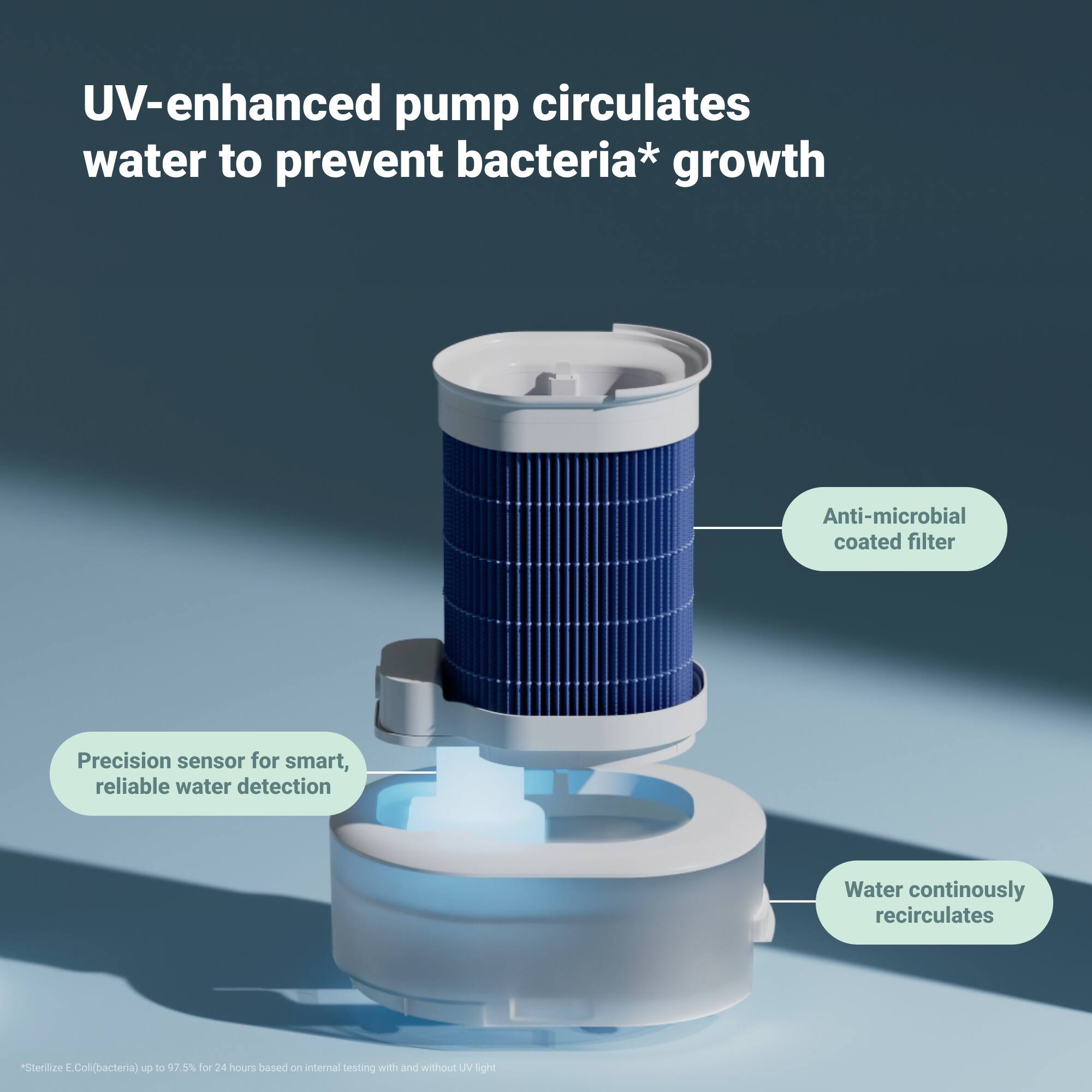
|Posted .This reviewer received promo considerations or sweepstakes entry for writing a review.Using the Blueair 2-in-1 humidifier has been great except for a one drawback. This really should be considered a 1.5-in-1 device. While the purifier may work great for cleaning the air I’m not sure about the humidifier portion of the device, yet. Air Purification This device does a great job with filtering the air when it detects a decrease in the indoor air quality. I have this device in the same location as my previous purifier and have noticed the Blueair 2-in-1 does appear to automatically turn on to clean the air more frequently than the previous device. Both devices were set to auto and while the prior one did come on at times this one may be more sensitive and come on frequently. The filters are easy to access and clean and change when the time comes. Humidification This is where the questions arise. I do appreciate the fact this is a mist-free humidifier, but I feel that the water reservoir is too small and requires more frequent refills than my other humidifiers in the home. This may be due to a large wicking filter the device uses to humidify. The water reservoir does circulate and there is a UV to help with keeping the water sanitary so that is another plus compared to other humidifiers I’ve used. Cleaning As mentioned the filters are quickly and easily accessible as well is the water reservoir. All parts are easy to clean so maintenance is not overly difficult. Design The style is ascetically pleasing and build quality is very good. The display is nice but the orientation of it is a little bit frustrating because it sits flat and recessed on top of the device, but it is waterproof and this allows you to refill the water reservoir by pouring water directly into the device without taking it apart. I utilize the app to control the features when necessary to interaction with the onboard buttons or display have been minimal.
I would recommend this to a friendPurifier/humidifier in one!
|Posted .This reviewer received promo considerations or sweepstakes entry for writing a review.I am in the market for a good quality air purifier since my current one just stopped working. We also use humidifiers all year round due to living in a state that’s really dry. Thanks to cold winters and dry summer heat! I had this crazy wish that I hope I could find a appliance that can do purify and humidify our home. Lo and behold, there is one! Hence the reason I chose this brand/model over the others. Out of the box, everything looks simple. However, when I go look at the user manual, I was quite overwhelmed by all the parts. Not just the part - that I needed to know which ones which - but also the number of filters that are preinstalled in this unit, which I appreciated very much. And I am aware that, in order to purify better, a unit needs more than one filter. But I can only imagine the cost when it’s time to replace these filters. For me, that’s one of the downsides. My current one only had 1 filter and replacing that every 3 or so months cost me around $40. Not sure how much the 3 air purifier filters cost on this one. Aside from that, there is also a filter for the humidifier part. Another downside for me is the maintenance/cleaning the humidifier needs. I wished this would have been a low maintenance unit though. Other than these points, I think the air purifier/humidier works well. It runs really quietly in our living room, if not because of it’s size, I wouldn’t even notice we have this at home. The humidity in our room has been kept constant and so far, no sniffles from allergies. So I think it’s doing its job.
I would recommend this to a friend- Pros mentioned:Humidifier
Nice!
||Posted . Owned for 3 weeks when reviewed.This reviewer received promo considerations or sweepstakes entry for writing a review.Was looking for a two way unit that does both humidify and purify so as to reduce the clutter in my house. Works great. The app will give you notifications as to when the water is low. The only minor issue is that you can only do one at a time, not both.
I would recommend this to a friend