Customer Ratings & Reviews





- Model:
- DEC27250-7192WHT-PUS
- SKU:
- 6622702
Rating by feature
- Value
Rating 4.7 out of 5 stars
- Quality
Rating 4.8 out of 5 stars
- Ease of Use
Rating 4.8 out of 5 stars
Customers are saying
Customers regard the 27" 2K Touchscreen All-in-One as a high-performing device suitable for daily tasks, with users consistently praising its overall performance and speed. The screen quality receives positive feedback for its clarity, and the all-in-one is also appreciated for its ease of use and quick setup. Furthermore, customers find its design sleek and connectivity to be a strong suit.
This summary was generated by AI based on customer reviews.
Computer
||Posted . Owned for 1 month when reviewed.This reviewer received promo considerations or sweepstakes entry for writing a review.Fabulous computer, one that will last a lifetime!
I would recommend this to a friend- Pros mentioned:Overall performance, Screen size, Touchscreen functionality

A Perfect All-in-One for Home or Office
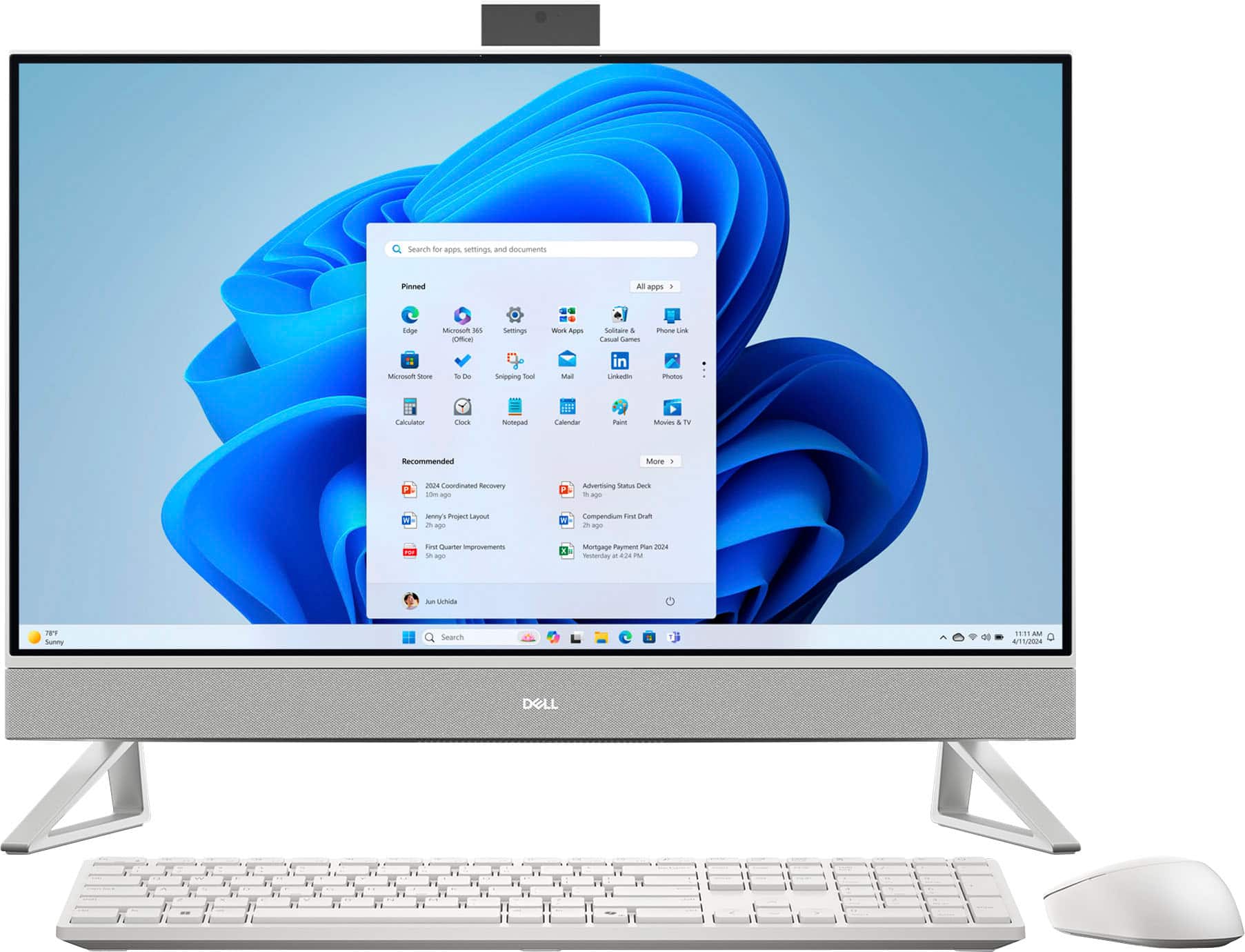
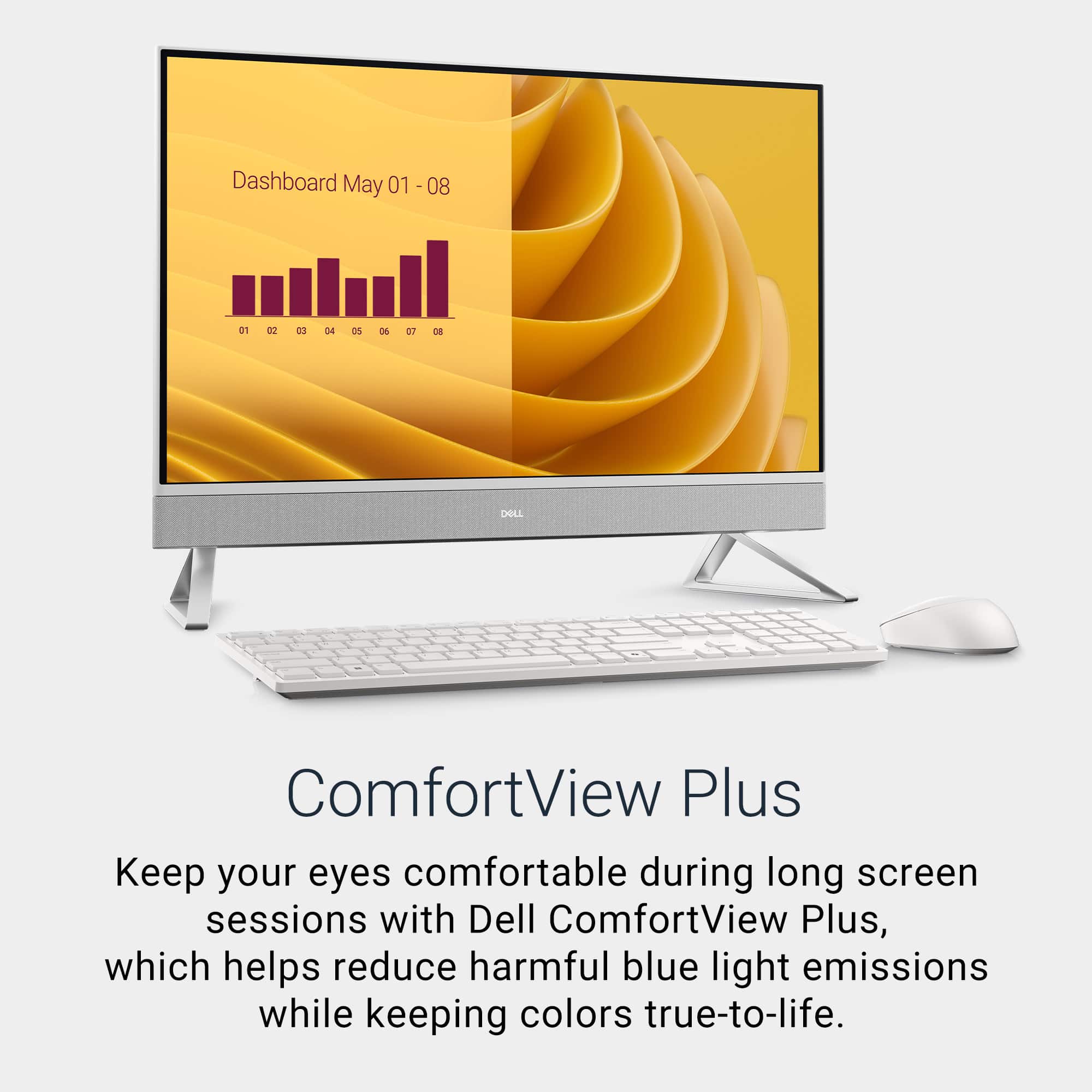
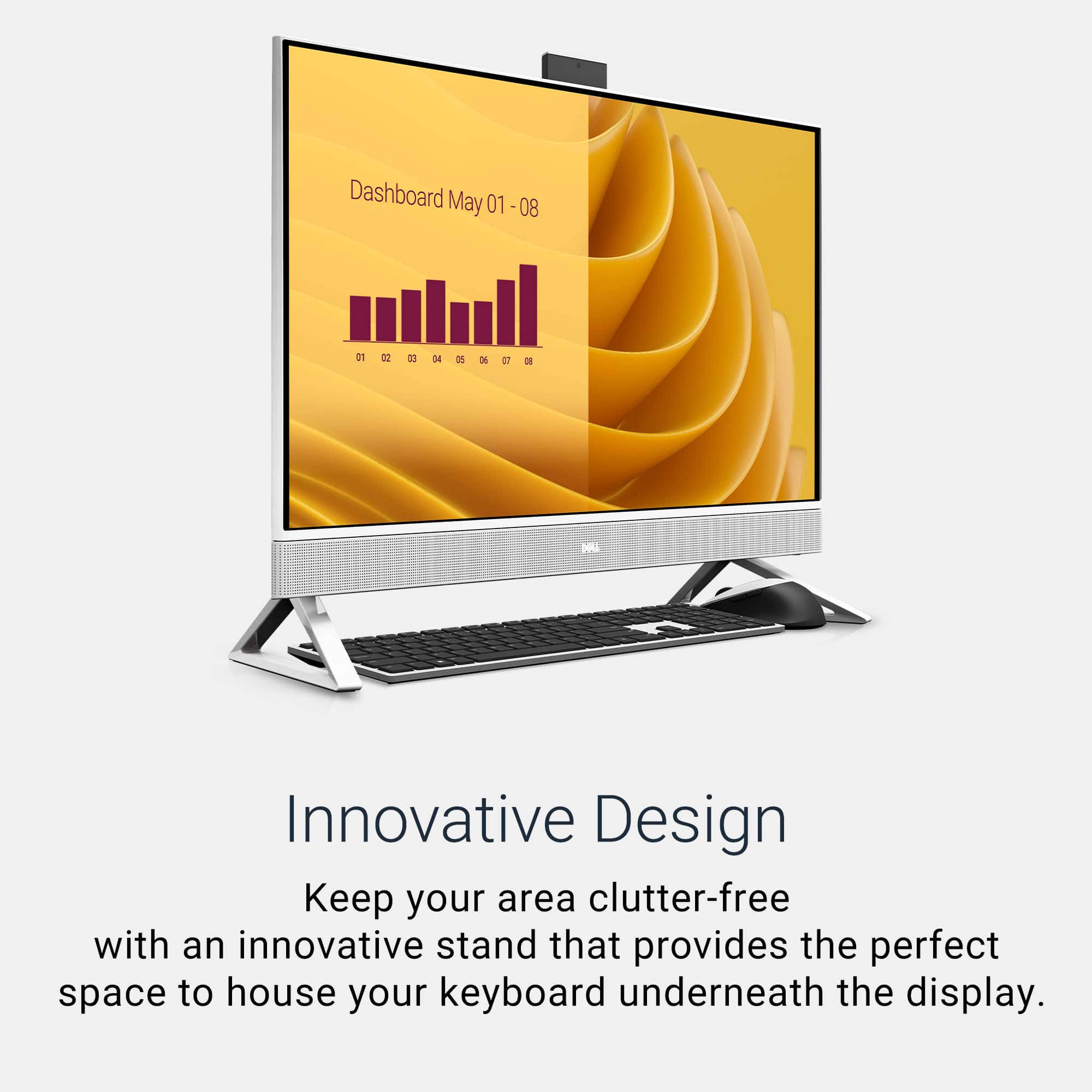
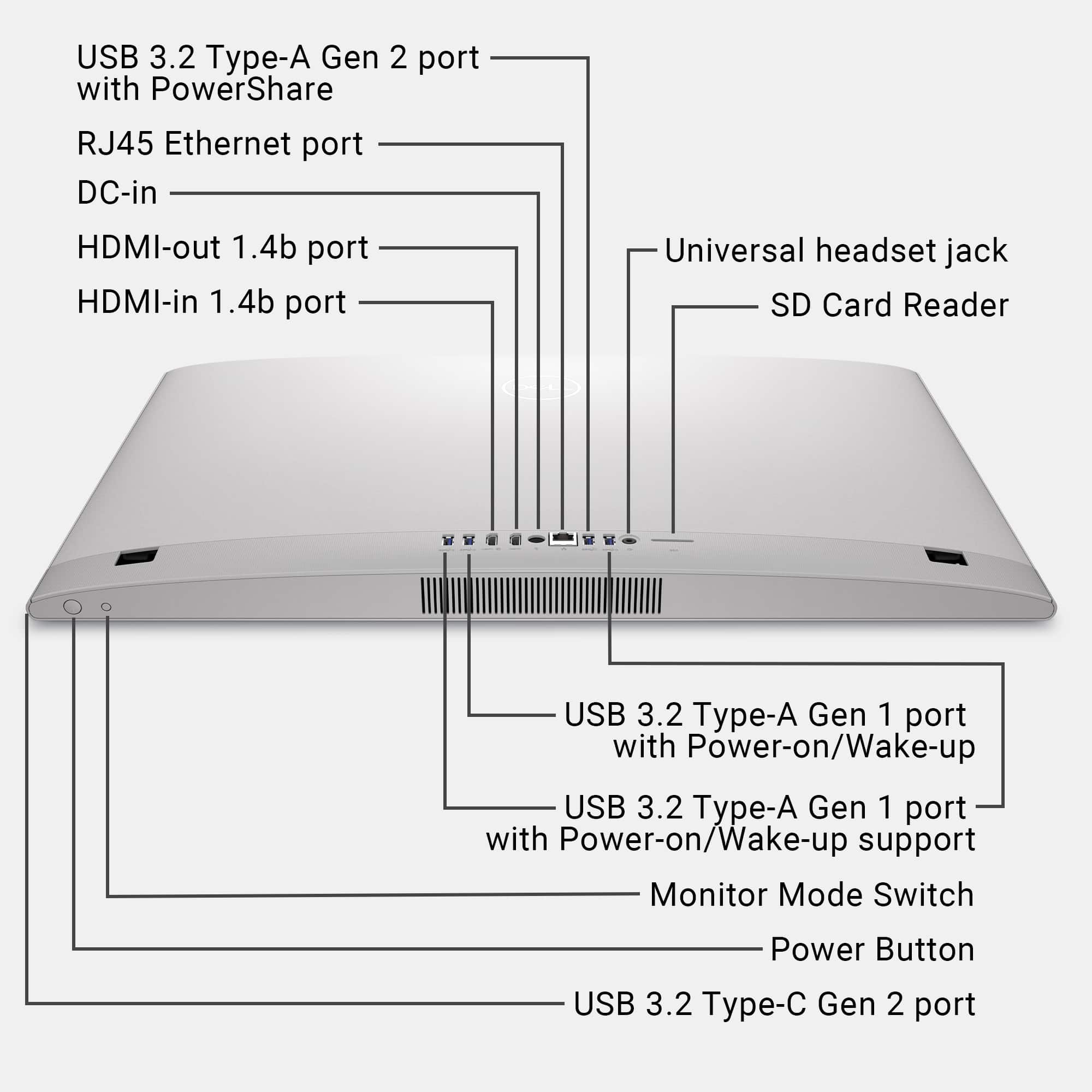
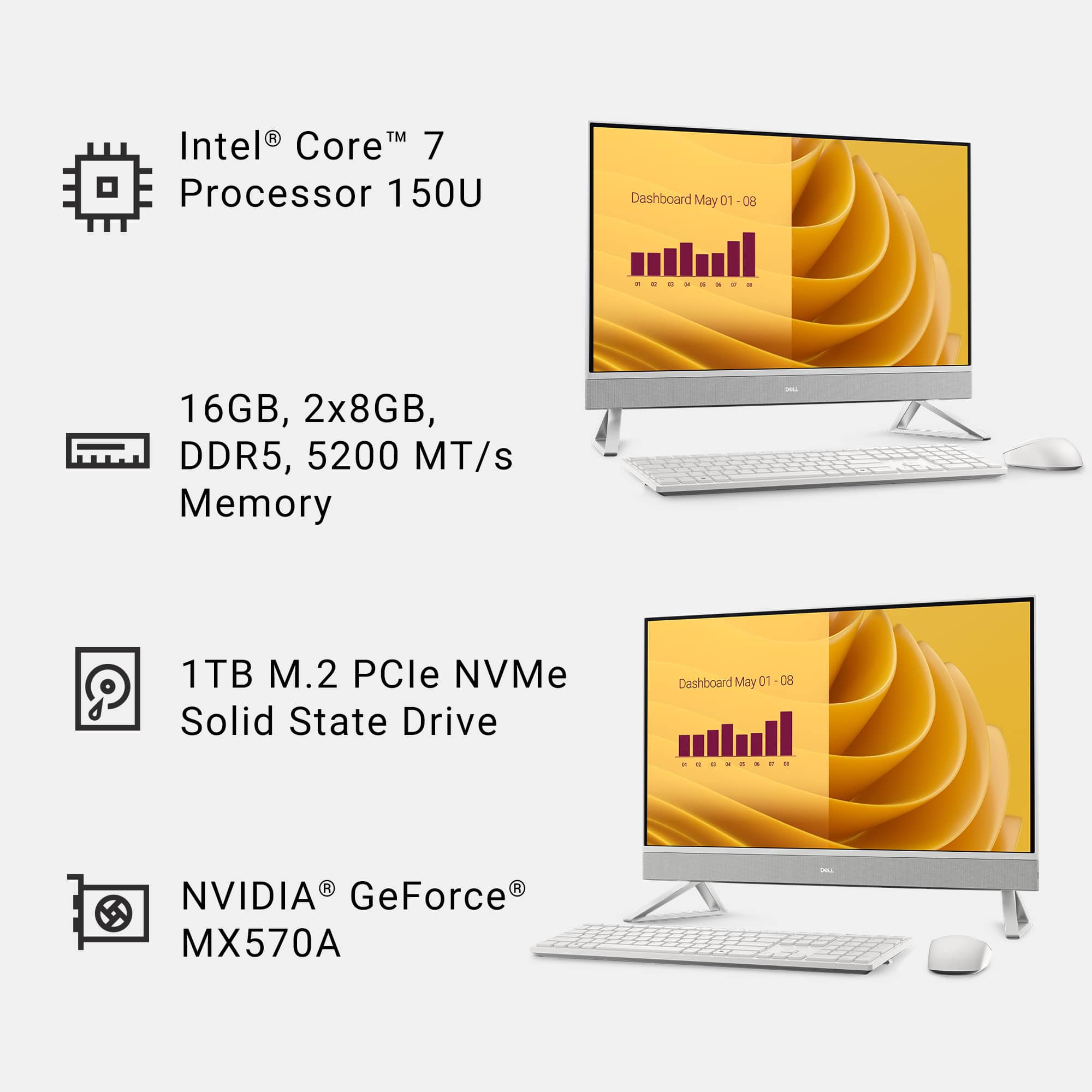
|Posted .This reviewer received promo considerations or sweepstakes entry for writing a review.This Dell all-in-one is beyond beauty. It is very well put together all in one Desktop. Despite being 27 inches it comes in a quite large box mostly for protection. The device itself is not really extremely heavy for being an all-in-one. It is equipped with an Intel 7 series CPU at 1.8GHZ, 16GB ram, Nvidia MX5070 2GB GPU and 1TB SSD. Setting it up is extremely simple. All you need to do is attach the two stands that easily snapped into place, plug the power supply, connect the USB receiver that's inside the mouse, use your Microsoft account and that's about it. Do not force the stands into the latch, if it doesn't go in it because it's on the wrong side, word of experience. The device is a full blown computer in a simple monitor. The keyboard is full size and includes number pads. Keys are very responsive, soft and very quiet. The wireless mouse has an ergonomic round design and is also responsive. Although it does not have back and forth buttons which I constantly use, it is just a plain simple mouse with right and left click and scroll wheel. Both peripherals are white to match the desktop. They are wireless and work on AA and AAA batteries. The screen resolution is 1080p and runs at 99.65hz max. The images on the screen are quite beautiful. Colors are vivid, bright, and sharp, so much so it almost resembles an OLED. The touchscreen is highly responsive, and it includes low blue light hardware to reduce eye strain during extended use. The integrated speakers deliver impressive sound, loud, clear, and spatially immersive, which was a pleasant surprise. Connectivity is another strong point. The rear panel offers four USB-A 3.2 ports, one USB-C, an HDMI input and output, an Ethernet port, and an SD card reader. Conveniently, the USB-C port is also placed on the right edge of the screen, making it easily accessible without fumbling underneath the unit. Performance is smooth and responsive. Everyday tasks such as browsing and working in Office apps are quick and seamless. Watching content like Youtube and Netflix on that screen is phenomenal. I tried gaming on it, and it was ok. I tried with one of my fav shooters COD. It was playable at 60hz but would not recommend online gaming. The Campaign was fine. However, this system could handles less graphically demanding games quite well. This desktop is not VESA mount compatible meaning it cannot be wall mounted by default. I’m pretty sure there are some workarounds in the aftermarket world. Overall, this Dell All-in-One is the kind of computer setup that suits the whole family, it delivers an excellent balance of performance, design, and usability. It's perfect for everyday use, media consumption, and productivity tasks. One of its standout features is the space-saving design. With no clutter of wires and an all-in-one layout, your desk stays clean and organized. The wireless keyboard and mouse can be neatly tucked under the screen when not in use, freeing up even more workspace. While it's not built for high-end gaming, it more than holds its own as a sleek, capable desktop solution. In the box you get the all-in-one desktop, keyboard, mouse, power supply, batteries, warranty card and manuals.
I would recommend this to a friend - Pros mentioned:Overall performance, Screen size, Speed
Perfect for the kitchen or small office
|Posted .This reviewer received promo considerations or sweepstakes entry for writing a review.For years, we’ve had an all-in-one PC on our kitchen countertop, serving as the focal point for keeping appointment schedules, occasional emails, and searching recipes, etc. Our previous all-in-one was typical of most basic systems of this design, limited by a small screen, crippled by skimpy memory and limited storage with small and slow hard drives. The Dell 27" FHD Touch-Screen All-in-One fixes all that with a fast Core 7 Intel processor, plenty of fast 5200 MT/s memory, large and fast SSD drives, Nvidia graphics, and a beautiful 27-inch screen. I tend to view these all-in-ones as laptops on a stand and often trimmed in white and designed to blend in well in most kitchen settings, although it can just as easily also find a home as a compact home office PC with bigger screen and full-sized keyboard, as compared to a laptop. The Dell is no doubt a fast PC thanks to higher end components for its size and footprint. Installation was a breeze using the Windows Home version to bring across all the settings, bookmarks, etc. from our old kitchen all-in-one. Dell’s SupportAssist software is a welcome addition to Windows Update, quickly updating the system with the latest drivers, software, and firmware from Dell, specifically for this computer. One issue I noted during setup and may not be the case for everyone, but the display adapter defaulted to an onboard Intel display adapter for some reason, which I then had to disable to get the Nvidia adapter to take over. In terms of speed of operation, this is a fast PC for most household tasks, and I found it very responsive overall. Microsoft Office 365 programs like Outlook, Word, Excel, and PowerPoint load instantly, and Microsoft’s Edge browser performs similarly. Obviously the EC27250 All-in-One is not geared for gamers as the Nvidia graphics processor comes with only 2GB of dedicated graphics memory and is a design best suited for mobile computing. While it can run all modern games, I doubt that’s the target audience of this PC anyway. The screen is bright with vivid color, and the glossy screen makes the display look sharp and contrasty with FHD 1920 x 1080-pixel resolution. 27” displays are certainly capable of QHD 2K resolution, and it would have been nice to see that feature included. I did identify a couple of weak areas that I believe could be improved. I found the sound to be weak, with almost non-existent bass and an overall harsh sound with increased volume. Of course that could be remedied with external speakers, but then that defeats the idea of minimizing countertop space with an all-in-one design. Also as another minor point, the keyboard and mouse felt somewhat lightweight and plasticky compared to a third-party keyboard and mouse I brought over from my previous all-in-one to replace them. I’m sure they are fine for everyday use, but just my personal preference. To summarize, I think this is an excellent computer, especially given by the audience for whom I believe Dell designed this system. As an all-in-one, the performance far exceeds most bare-bones systems and that’s where this PC shines. It’s well-designed and attractive and it will be a welcome addition to the kitchen space in our home.
I would recommend this to a friend - Pros mentioned:Ease of use, Overall performance, Touchscreen functionality
Dell’s All-in-One That Does It All
|Posted .This reviewer received promo considerations or sweepstakes entry for writing a review.So, when it comes to All-In-One PC, I am usually not a fan, but this new Dell 27” In all-in-one had me all in. The reason I usually don’t like the all-in-one is primarily because of performance issues and upgradability, and the reason this one won me over is because I did not have to deal with any of those issues. So, let dive right into what this AIO has to offer. Specs: This AIO is about 15.5 inches in height, 24 inches in width, about 2 inches in depth and comes in just shy of 15 pounds in weight. This is not a big machine and does not take up much space on your desk, space saving design and portability. Beyond the space saving design, it was a breeze to setup, literally snap in the two stand pieces, plug it in and go. The AIO also comes with a full-size wireless keyboard and mouse and power brick and cable. The AIO also offers a variety of ports, including 1 HDMI 1.4 and 1 HDMI out, 2 x USB-A 3.2,1x USB-C 3.2 off to the side of the bottom speaker, 1 x gigabit ethernet connection and finally an audio jack, so there is no shortage of connections another reason why I became a fan. Processor: This AIO offers a relatively new released in early 2024 Intel Core i7 150u Processor 1.8 gigahertz. Right off the bat, if you’re looking to do some heavy gaming or running AutoCAD this isn’t the processor for that, it may handle them but might experience some lag. This is a balanced, power efficient processor that is meant for everyday use, surfing the web, content creating, movies, productivity, and even some casual gaming. I didn’t put too much pressure on this thing, but I used it for a week doing my everyday task, some office work, content creations, video calls and it performed without any hiccups at all. Storage and Memory: This thing offers tons of space. You’re looking at 2 terabytes of storage space on this PC, enough for all your photos, videos and any software that you may want to install. Also, being an SSD everything boots up instantly so there is no more waiting around for things to load, even booting up takes a matter of seconds. Another area where this AIO shines is the 32GB of RAM. There is enough memory in this thing to run all your daily tasks and more, without slowing this thing down. Usually, storage and ram are what most people prefer to upgrade and since it already offers 2TB storage and 32 GIG of RAM you don’t have to worry about any of these. Display: I love the touchscreen display on this model. It is super responsive, making using on screen control easier and just fun to use. Even though being a FULL HD screen offering 1920 x 1080 resolution and combing the beautiful display with the Nvidia GeForce MX570A 2GB graphics card makes the visuals a thing of beauty. Just to point out this not for heavy gaming, this graphics card is an upgrade from the integrated graphics card that usually comes with AIO’s. It will handle your everyday needs, watching movies and casual gaming but nothing too crazy. The display is vibrant, colors look great, blacks are decent and offer different settings such as comfort view, cinema and custom display settings with 27 inches of real estate. Overall, this is the perfect PC for everyday use. It’s powerful enough to tackle your daily routine, productivity, and your entertainment needs. Its compact and all-in-one design make it simple to setup and easy for everyone to use and you don’t have to worry about upgrading it because it does comes well equipped. If you are in the market for something that offers power and ease then this is it.
I would recommend this to a friend - Pros mentioned:Overall performance, Screen size, Touchscreen functionality
Large and beautiful display, great specs
|Posted .This reviewer received promo considerations or sweepstakes entry for writing a review.I am a big fan of all-in-one PCs, where you don't have to buy a monitor separately and the computer components are all built into the monitor. It's a brilliant space-saving design where you don't need to store a tower anywhere. And Dell is able to pack plenty of powerful components into this design so that you don't feel like you are missing anything by going tower-less. Pros: - With the included RAM, multitasking is easy. And the NVIDIA GPU has 2GB of dedicated memory that helped me play some fairly high end games without issue. While it's not the highest-end graphics card on the market, it performed really well for me. - Downloading apps and games is extremely fast as the data gets written to the solid state drive extremely quickly. As long as you have a good internet connection, you'll be amazed at how fast things can be downloaded and installed. - While I don't typically like to get fingerprints on my screens, it's nice to have the touchscreen option built into this PC. - The retractable camera is a cool design allowing it to be completely hidden or can be popped out with a spring loaded mechanism. - Plenty of USB ports are included (4 USB-A, 1 USB-C)! I've used similar computers in the past with only 2 USB-A ports included so it was awesome to not need a USB expansion accessory. - From what I can see, there are two different versions of this PC that Dell is currently building with the difference being the amount of RAM and SSD storage. You can go with the cheaper model with 16GB of RAM and a 1TB SSD, or the more expensive model that has twice as much RAM and storage. If you are a gamer, I would go with the extra RAM and storage. But for other users, you'll likely be fine with the lower cost model. Cons: - The on board speakers did not sound great. I couldn't turn the volume very high without sound seeming distorted. At low levels audio was decent. If you plan to use bluetooth and/or a headset, this will not be an issue for you. With Dolby Atmos, I expected more. I'm hoping that it's a software issue that can be patched eventually. - I would have liked some documentation for the keyboard and mouse set-up. I couldn't find any in the packaging or by using the owner's manual accessible via a convenient QR code. The battery enclosure for the keyboard is not the easiest to remove and put back on. There was an empty storage spot for a dongle in the keyboard, and for a moment, I thought my system was delivered without its dongle. But I found a dongle inside the mouse after figuring out how to pry off the top safely. The mouse is a unique design that I had not seen before and was worried I would break it trying to get to the battery compartment. The USB dongle is used for both devices, which is common with systems like this. Aside from the challenges I faced with the keyboard/mouse and the less than stellar speakers, I was very impressed with this All-in-One PC. The display is large, gorgeous, and designed very well. And the specs for all of the critical components are excellent. Overall, this is a terrific home computer.
I would recommend this to a friend - Pros mentioned:Touchscreen functionality
A Dell Computer That Will Knock Your Socks Off
|Posted .This reviewer received promo considerations or sweepstakes entry for writing a review.Bring a wow factor to your office or space! Do not sleep on Dell, the effort and design they put into the FHD touch screen desktop is great! Effortlessly enjoy setting up this Dell pc and kick off your day within minutes. You’ll notice mine is in my common area for the meantime but it fit so great in this thin space. My bar area and hightop chairs didn’t seem like a great stop for setting myself up but it actually looks great (not the permanent spot). Tilt the screen, sit back and relax. Most PCs you can til forward but this touch screen lets you tilt it backwards which was really cool when it came down to editing photos and zooming in to fix imperfections. I am not usually a touch screen person but I love that feature here. Visuals and speakers are also top notch. I watched a festival set to see how live acts would look and sound and it filled my living area with crisp sounds and clear visuals. I don’t want to forget that you’ve got enough ports to plug in your favorite accessories. I prefer the clean loom with just one cord for power and my wireless keyboard and mouse. In short summary, this touch screen desktop is great for anyone in your family. Whether you’re needing a family computer or setting up your loved one for college. You’re sure to make a right choice with this Dell.
I would recommend this to a friend - Pros mentioned:Overall performance, Speed
A decent computer but needs updating
|Posted .This reviewer received promo considerations or sweepstakes entry for writing a review.Dell has been making all-in-one computers for quite some time, and the DEC27250 Plus is the latest model, though as you read, only incrementally updated over previous models. I’ve had the opportunity to use a few generations of this series, so am able to make some comparisons. This 27” all-in-one looks exactly the same as several generations before it. Sleek, minimal, and doesn’t take up any more space than just a monitor alone on your desk. The sadly still 1080p resolution LED touch screen is reasonably bright and clear, though you can see some pixels at this resolution per the size. A convenient web cam pops in or out of the top of the screen so you can keep it hidden for privacy, and it can also be used to log in to the computer. The newer generation i7 processor and 16 gigs of RAM along with 1 terabyte of SSD storage carries over again from previous generations with very minor updates, but gives you enough power for all of the basics and a bit more. There is a dedicated NVIDIA GeForce graphics chip with 2 gigs of dedicated video RAM which helps a bit with games and certain applications like photo and video processing, though it too has only been incrementally updated over several years. The speakers go along a strip along the width of the computer at the bottom of the screen, and work well enough for the basics, and keep your desk clean. A very basic wireless keyboard and mouse are included. This all-in-one sips power at just around 130 watts, so you won’t crank up your electric bill using it. Ports are mostly all on the back and this shows the age of this computer series. You still have predominately older style USB-A ports (4 ea) which are rapidly being replaced by the newer USB-C standard, and you only have 1 ea USB-C port which is located on the right bottom side of the computer. There’s your power port and two extra HDMI on the back should you want to add monitors, as well as a microphone/headphone port. An ethernet port is still there should you wish to hard wire to your router, but I’ve not had any issues with the Wi-Fi. A SD memory card slot allows you easy transfer of photos and data. The operating system is updated to accommodate Microsoft’s Copilot features, so you can type or verbally hold a conversation with the AI, ask questions, get help composing emails, and more. It should of course NOT be a substitute for doing your homework yourself! Once you start up the system via the power button on the bottom-right under the screen, you will go through the setup process and need to allow it to update while doing setup. This does take a while to get all of the updates downloaded and installed, so plan accordingly. Once up and running, I’ve never had an issue with this or any of it’s predecessors regarding performance for all basic office software type tasks, watching videos, or playing games, provided you keep the games at lower to mid-range settings. The screen will put a bit of a strain on my eyes if I use it for long periods, as it’s resolution just isn’t dense enough to avoid this. Heavy games will again, still skip a few frames, and trying to render video that’s too large will kick in the fans quite a bit, but this isn’t something that will have an effect on most of the target audience, and overall it’s a very quiet machine. My issues with this computer: Again, I’ve used several generations of this series. There simply have been no significant updates to it for a good number of years. Very minor incremental updates to the processor, RAM, etc. But today, there’s no reason that for the suggested retail price, this should not have at the very least a 2K (or even 4K) monitor, and the dedicated graphics should be higher than 2 gigs at this point. The ports should definitely be updated with more USB-C ports and fewer USB-A ports as the port situation is already obsolete on this model. I don’t dislike the machine. It’s not necessarily a “bad” computer, but at full suggested retail pricing, I can’t recommend it today based on the monitor and lack of updated ports, unless you can snag it on a very good sale. When on sale, it becomes a decent system based on the cost.
No, I would not recommend this to a friend - Pros mentioned:Screen size, Touchscreen functionality
Small footprint, big performance, great monitor
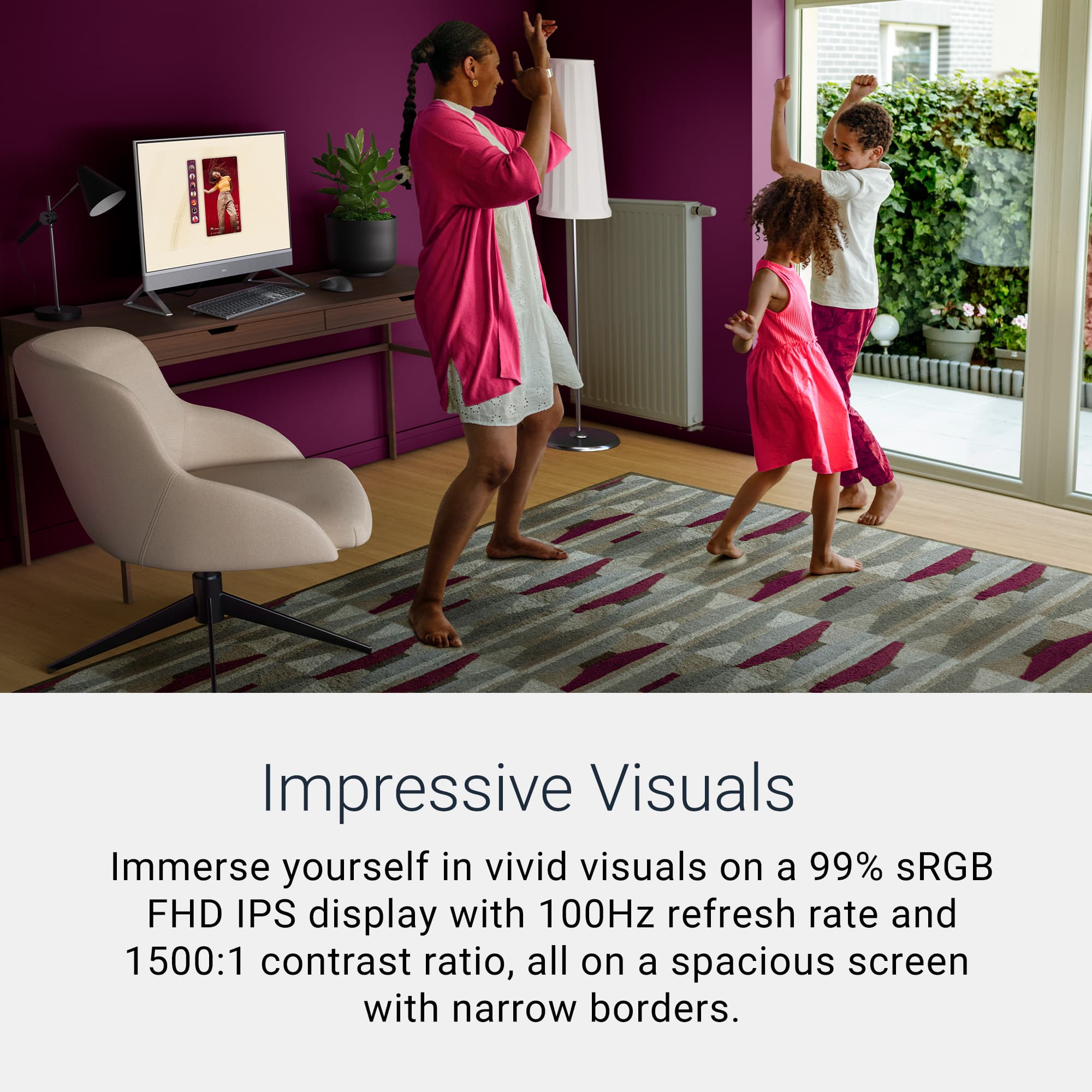
|Posted .This reviewer received promo considerations or sweepstakes entry for writing a review.I've been using the Dell 27" All in One touch screen computer for the past week, primarily for productivity tools, surfing, and 3d modeling. This review is based on first impressions of how it stacks up to my daily driver Dell laptop. TL:DR - This build offers a solid Intel 7 series 1 processor, expandable RAM up to 32GB (comes with 16GB), 1TB of storage, and a decent NVIDIA graphics card. The touchscreen is FHD, responsive, bright, and does well for streaming, content creation, and 3d modeling. Great all around productivity build, with the bonus of a small footprint, 27" touch screen, pop up 5MP+IR camera, and 'better than laptop' level speakers. Pros: Space saver with wireless keyboard and mouse that can be stored between the legs of the stand. Bright screen with minimal border Popup webcam camera is much better than the ones with privacy slider Webcam quality is better than most Responsive touch screen No lag on touch screen response, even under moderate processor load Cons: Based on desk and sitting height, I have to angle the screen down / towards me to get the camera field correct. Limited monitor tilt / screen adjustability In the box is the All in One, wireless keyboard, wireless mouse with USB dongle, power cord, and paperwork. To get started, you'll connect the stand feet to the monitor and plug in the power cord. Setup is the normal Windows 11 Home workflow, and you are off and running. The computer is well equipped for peripherals, which are on the back lower center of the monitor, these include: 4 x USB-A 3.2 (2 with power on / wake up support, 1 with powershare, 1 will be needed for the included mouse/keyboard dongle), 1 x USB-C Gen2 (port on side for access convenience), HDMI in, HDMI out, ethernet port, sd card reader, and headset jack. With these options you can connect a second monitor, or even tie into another PC if needed. The screen does pivot up and down for some minor adjustability, but that's it, no height adjustment, so may need risers depending on your desk / chair height. As far as first impressions: I was surprised that the dual speakers are ok, better than a laptop, with medium depth and range, Dolby Atmos compatible. The screen is the primary star of this design, as the side and top borders are minimal and the FHD touchscreen is high contrast and easy on the eyes for long periods of use. The 100Hz refresh rate is appropriate, and supports all applications I've tried, even some basic online gaming. The touchscreen is also multi-touch, so it will respond to two touch points at the same time, for example resize while also selecting a command. The included full sized keyboard and mouse are ok, perfect if you are using this for school aged students to use, but may want to upgrade if this is your long term daily driver. Performance is surprising in a good way, I am a fan of the Intel Core 7 for general use builds, and happy to see that they paired it with the NVIDIA GeForce graphics card. Yes, I'd have preferred the next level up GPU, but honestly, not sure a graphics upgrade is needed for work tasks. I have tried out some 3d printer modeling software, and found that the touchscreen doesn't bog down, even when performing processor intensive tasks. Generally, I'm not a heavy touch screen user, but I did find that the touchscreen improves my ability to manipulate 3d images easier than mouse / keyboard controls. Lastly, the webcam is good enough not to need an external one. Many built in webcams struggle with overhead lighting and wash out, however in both overhead lighting and low lighting, the camera performed well, no distortion or starbursts. Bottom line, if you want a touchscreen computer that will power through productivity tools, stream, and has a small footprint, this All in One nails it. If you're working with image or modeling software, and haven't tried a touch screen, you may be pleasantly surprised by the ease of software manipulation. If you want something that can do more than casual gaming, or are expecting tablet style touch functionality, this may not fit the bill. Even if you don't need a touch screen, which I don't 80% of the time, this is a really nice build that I can fit in small areas, it's not loud or puts off a ton of heat, and the processor easily handles what the average student or home office will throw at it.
I would recommend this to a friend - Pros mentioned:Overall performance
Beautiful Design, Excellent Quality
|Posted .This reviewer received promo considerations or sweepstakes entry for writing a review.The Dell AIO EC2750 is a sleek modern design that will fit in any office or home office setting. It has a 27" FHD (1920x1080) touch display with a built-in pop-up webcam with microphone, The webcam quality is excellent for video calls, Netflix, YouTube, etc. It works very quickly to unlock the computer with Windows Hello. The screen is big, bright and clear. Easy on the eyes when spending extended time on the computer. Stereo speakers are also built-in at the bottom of the screen. There are 2x 5W speakers which sound rich and clear, easily beating my expectations. The display stands on 2 legs which are adjustable. I much prefer this design to a center stand as this allows you to store the keyboard or other devices under the display. In the rear there are 4 USB-A ports, 2 HDMI ports, a gigabit Ethernet port and an SD card reader. On the right side of the display is 1 USB-C port. The AIO comes with Windows 11 Home with Co-Pilot installed. It has an Intel i7 10 core processor, 32gb Ram and 2 TB SSD. It has wireless AX 6E. You get a full-size wireless keyboard and a mouse with a Bluetooth dongle. The video card is a 2gb Nvidia GeForce MX570A. In the box you get the AIO display, keyboard, mouse. Bluetooth dongle and the power cord with brick. The legs for the display are very quick and easy to install by just sliding then on. The power switch is under the display on the right side. The computer turns on instantly. Set up, which used to be time consuming, is extremely quick. You enter your Microsoft account and Windows basically does the rest. After setup you can enter your Gmail account and you're ready to go. You will be prompted to install the latest Windows updates which takes a few minutes. Using this computer has been a joy. The screen is bright and clear. It handles multiple tasks quickly and without hesitation. The keyboard and mouse are comfortable and responsive. The only improvements I might make is to add more USB-C ports in lieu of the 4 USB-A ports. Also, the mouse I use on my laptops do not require a Bluetooth dongle. They connect directly via Bluetooth. I think the dongle for the mouse is outdated. But these are minor nit-picks. Overall, I enjoy using the Dell AIO and would recommend it to everyone.
I would recommend this to a friend - Pros mentioned:Overall performance
I love my Dell All In Ones. Seriously.
|Posted .This reviewer received promo considerations or sweepstakes entry for writing a review.Title says it all. I am a SI and have been building PCs since the 90s and of course been spoiled by DIY custom builds. Never would I have thought 5 years ago when I got my 1st Dell AIO I would be using it everyday for all kinds of uses (not AAA gaming). I found myself always using it for streaming consumption (majority use), online school classes, productivity, home business (labels and running my TCG store) and even as a gaming monitor I would hook my Xbox Series X to. Now with the new model 5 years later, I am still in love with it since it does everything better. In the box, there is going to be some assembly required but it is completely toolless. The feet click into the rear bottom of the screen and as long as you have space for a 27" screen, you are golden. The included keyboard and mouse can easily slide under in between the feet for storage. The USB dongle is in the mouse for easy storage and all batteries are included for the KB and mouse. There is also the power brick with plenty of length and the standard paperwork. I/O is plentiful albeit slightly outdated. I would have expected at least 1 USB C port but instead you are given 4 USB A 3.0, HDMI In and OUT, ethernet and an SD card reader. 1 USB port will be taken though for the KB/Mouse dongle so keep that in mind. The included KB and Mouse are not to be laughed at and performs well. I like the feel of the keys and the mouse fits perfectly in my big hand just fine. As you can see in my pic, I put both the Dell's side by side for me to compare. The right is the older model I have been using and the left is the new updated model. Setup is super straightforward after turning it on for the 1st time. You are greeted with Windows 11 and the whole sign-on and setup stuff. After that, like before I do give props to Dell for not wasting space with pointless and worthless bloatware. I do always recommend deleting McAfee and it is completely worthless. After setup, I ran into my 1st and only hiccup/issue. While I was setting up my apps/webpages I decided to stream music and found it sound beyond terrible. I was like, there is no way they downgraded the speakers to sound this bad. While listening, every time there was bass/vocals it sounded way too distorted and full of static. After about 30 minutes of settings changes and restarts, I found out the driver was the cause of the issue. Once I uninstalled it and redownloaded the drivers and restarted, the included soundbar blew away the performance of it's older sister. Performance is excellent for literally all daily uses, just not for heavy AAA gaming. This AIO just isn't equipped to handle heavy gaming. Other than that, as stated above, there are so many uses for it. It can be a substitute for a TV in a room or even an all in one entertainment center for a dorm room. Attached speakers are nice and loud and can handle most things expect super heavy bass. I personally use mine for business and content creation with streaming consumption. No issues or anything negative to report. Even though it is a FHD (1080p) screen, I also have been using it to play my Xbox Series X on it via the HDMI in. There is absolutely no lag while playing games like Oblivion Remaster, Expedition 33 and even FPS games like COD. I can't recommend Dell's AIO enough to anyone needing something simple for their daily lives as this checks off most if not all the boxes.
I would recommend this to a friend - Pros mentioned:Overall performance
Everything I expect from Dell
|Posted .This reviewer received promo considerations or sweepstakes entry for writing a review.When it comes to PC's and monitors, Dell has been the name I've trusted for years. Now I have the best of both worlds in one fantastic device. This Dell AIO is packed with all of the features and specs I would want from a new PC; i7, 16gb, plenty of storage, excellent graphics and multiple ports. Unboxing was easy; take off the plastic protection, attach the legs and install the batteries in the keyboard and mouse. It is somewhat peculiar that the keyboard and mouse has to work with a usb dongle, rather than bluetooth which takes away one of the ports. To be fair, I have my own keyboard and mouse and will stick with that. Setting up Windows is easy and I love that Dell does not load their PC's with bloatware (aside from the pesky McAfee) which I uninstall immediately. I use this for web browsing, email, some light office work and watching videos. It handles all of those tasks with ease, the screen is vibrant and the speakers are good enough for most tasks. The camera works great for video calls and I love that I can extend to a second monitor with the HDMI out port. This is a great device that does everything I need it to. I highly recommend it if you're in the market for a new All-in-One.
I would recommend this to a friend - Pros mentioned:Ease of use, Overall performance, Screen size
Wonderful computer
||Posted . Owned for 3 weeks when reviewed.This reviewer received promo considerations or sweepstakes entry for writing a review.I am so happy that I bought this computer. I always wanted an all-in-one computer. This model is the perfect one. Easy to use, great color and resolution, perfect size to work on different projects all at once, great design. It works fast. I love it - great purchase!!
I would recommend this to a friend - Pros mentioned:Speed, Touchscreen functionality
Jerry's New Computer
||Posted . Owned for 1 month when reviewed.This reviewer received promo considerations or sweepstakes entry for writing a review.I’m very impressed with my new Dell 27" 2K Touchscreen All-in-One. The display is crisp and vibrant, the Intel Core 7 processor and 16GB of memory make it fast and responsive, and the NVIDIA GeForce MX570A handles graphics smoothly. Having 1TB of storage is a big plus for keeping everything in one place. The sleek white design looks great in my workspace, and the touchscreen adds convenience. One small thing I’ve had to adjust to is that after shutting down at the end of the day, I need to press the power button to wake it up the next morning instead of just moving the mouse. It’s a minor change in routine, but overall, this system has exceeded my expectations and earns a solid 5-star rating.
I would recommend this to a friend - Pros mentioned:Overall performance, Screen size, Speed
so far so good
||Posted .This reviewer received promo considerations or sweepstakes entry for writing a review.working great, very fast! easy setup. love the size and touchscreen.
I would recommend this to a friend - Pros mentioned:Overall performance
All in one with a minimalistic design
|Posted .This reviewer received promo considerations or sweepstakes entry for writing a review.The Dell All in one is a perfect set up for those looking for a minimalistic approach for their day to day task. While most all in ones have their set backs in the way of performance this unit backs a solid punch with a dedicated Intel core 7 and a healthy 2 TB SSD for very quick start ups. Out of the box you get everything you need to get you started including a matching white keyboard and white wireless mouse. Something that stood out to me right away was the provided mouse and keyboard. Yes it looks nice at first glance simply because it matches the computer however this is a wireless set up that requires batteries for both the keyboard and mouse. There is no option to run a power cable to any of these devices. The keyboard is very basic and feels almost like the old heavy ones i used to use back in school. I recommend if you are planning on buying this all in one you also plan on either buying rechargeable batteries or a separate mouse and keyboard of your choosing. The one feature i really loved was the hide away webcam. When its time to jump in to your Zoom calls simply press down and the spring loaded webcam slides up. When the meeting is over push back down to hide and your monitor goes back to its straight lines. Picture quality is awesome when presented with Zoom calls and the built in mic did a great job at relaying my voice to the call. The built in speakers are a very nice feature to have and while sound quality is not jaw dropping, its definitely something that won't leave you disappointed either. Now as far as day to day task go this all in one can handle it with a breeze. Day to day presentations with Google Meets calls were not a problem for this unit to be able to handle. Switching between multiple windows all while live streaming a video call barely put cpu load at 20%. The graphics card is a little on the weak side in the way of gaming or video editing so i would advise to look elsewhere if that is your goal. At the end of the day this is a all in one that offers slightly more than your average unit out there. You get 2 TB of SSD memory with a solid 32gigs of ram. This makes this unit a beast when it comes to your day to day corporate, business or school tasks. This can handle Video conference meetings with live screen mirroring and not once miss a beat in the way of performance. Yes this unit can technically play video games and do video editing however you will struggle with triple A games and 3d video editing. This unit is the perfect set up for those lacking desk space or looking for a simplistic design all without sacrificing computing power.
I would recommend this to a friend - Pros mentioned:Speed
Great for a standing desk! Good Home Office PC.
|Posted .This reviewer received promo considerations or sweepstakes entry for writing a review.I was really looking forward to receiving this Dell 27 inch FHD Touch Screen All in One and I was happy to see it arrive safely in a well packed, perfectly sized box. Inside everything was neatly wrapped, and well packaged. I found a nice looking two-piece stand, the matching white keyboard and mouse, and the USB dongle that stores inside the mouse. There were a few small inserts, one of them with some images to get you started, but no setup guide or anything like that, which is okay, because it was super simple to get it set up. To set it up I just popped the batteries in the keyboard and mouse, grabbed the dongle from the mouse and set that aside. Then I pulled the computer out of the box and laid it onto a flat surface, on its front side, to attach the legs/stand, which just slide and click to lock into place, super easy. Then, after taking all the protective plastic off, I put it into place, plugged it in, attached the mouse/keyboard dongle and powered it on. Windows 11 walked me through setup in about 15 minutes with almost no extra software, just an offer for McAfee. A lot of people mentioned how easy the setup was, in reviews I’ve read, and I definitely agree. Once it was all together, the sleek white chassis with those thin bezels, that stood out to me in the advertisement, caught my eye right away. It looks so smart and modern without taking up too much desk space. The stand tilts smoothly, both forward and backward, and raises the display just enough from the surface, so you can slide the keyboard and mouse underneath when you're not using them. Things like that make me happy. Speaking of the keyboard and mouse, they don’t really match the feel of the computer. Honestly, they are a total throwback to oldschool peripherals from twenty years ago, IMO. The keys on the keyboard feel fine/good when typing, but overall they both feel a little cheap. That’s totally fine w/ me though, I’m sure most people buy specialty peripherals anyway. Performance is where this machine shines for me. The Core i7 150U chip, with its 10 cores, paired with 16GB of RAM and a fast 1TB NVMe SSD, keep everything quick and smooth while I’m using it. I juggled browser tabs, photo editing, video editing, AI video and photo generators, social media, a steaming windows app, and it never slowed down. It’s not a gaming powerhouse by any means, but casual games and photo editing ran much smoother than I was expecting. As somebody who works in a lot of different niches, this computer will come in handy and work for most projects I’m working on. The 27 inch touch screen is bright, glossy, sharp, and very responsive to touch. It has low blue light features, which I think all displays should have, and it handles touch gestures smoothly with no problems. Though it’s only 1080p, it looked clear for everything I did in everyday use. I’m not going to lie, I wish it were 4K. I do a lot of video editing and upscaling to 4K, so it would be nice if this display were capable of showing me the higher quality, but it's not a deal breaker, especially if I focus on using this computer for other tasks. The Dell AIO doubles as a secondary monitor, which I really appreciate. There’s a small “monitor mode” button tucked on the bottom edge next to the power button that lets you switch the display to HDMI-in only. You can plug a laptop, console, or another PC into the HDMI-in port, hit that button, and the AIO instantly becomes a standalone monitor. It works seamlessly and could be great for streaming or gaming setups. The webcam is a fun and innovative pop up design with 5 megapixels, HDR, and infrared for Windows Hello. You can push it down for privacy, or pop it up to use it. I’ve found it to be a sharp, clear picture even in lower light. It works better than a lot of other built-in computer cameras I’ve used. The audio comes from dual speakers and it has Dolby Atmos support. It gets plenty loud, and the audio works really well for meetings or video calls, but it did miss some bass for me and isn’t the sharpest or most clear audio I’ve heard. Overall it sounds good for daily home use or office use. The Dell 27 AIO includes a lot of ports: four USB-A, a handy USB-C on the side, which I really like, an HDMI in and a HDMI out, Ethernet, SD card reader, and a universal headphone jack. It supports Wi‑Fi 6E and Bluetooth, turning the display into a real docking station, although it could use more than 1 USB-C port, 2 should be the minimum nowadays, especially at this price point. This Dell all-in-one did everything I asked without any performance issues. Writing documents, editing photos, browsing, video chatting, even light gaming, all felt like a reliable, and fun experience. The touch screen is such a nice feature, the fans stay quiet, and I haven’t felt any lag while using it. It performs more like a desktop that’s hidden in a sleek monitor body, and the clean setup really looks nice on my standing desk. There are some areas for improvement here. If this had a 4K screen I’d be able to use it reliably for video editing and upscaling. The stand only tilts and doesn’t adjust in height or swivel at all, not an issue for me, but something to note before buying. The speakers are decent for everyday use, but audiophiles will have some complaints. The keyboard and mouse feel kind of cheap, use batteries and share one USB dongle that you better not lose. There really should be more than one USB-C port. All in all, this Dell 27 inch Touch Screen All in One hits a good balance for home or office use. It’s powerful enough, looks great, is super easy to set up and use, and its small footprint can free up a lot of space on your desk. If you're a student, working from home, a creative person doing light photo or light video work, or even just want a neat and functional desktop, this machine is a solid choice.
I would recommend this to a friend - Pros mentioned:Ease of use, Screen size
Great all in one desktop unit!
||Posted . Owned for 3 weeks when reviewed.This reviewer received promo considerations or sweepstakes entry for writing a review.I've only had this a few weeks but so far I really like it. The setup is very easy and user friendly. Love the size of the screen. I also use a second monitor with this. Great deal for the money!
I would recommend this to a friend - Pros mentioned:Ease of use, Screen size
Buy It You Will Not Be Disappointed!
||Posted .This reviewer received promo considerations or sweepstakes entry for writing a review.I very happy with my purchase of the Dell - 27" 2K Touchscreen All-in-One - Intel Core 7 150U 2024. Setup was very easy. The screen is gorgeous and the sound from the speakers are great!
I would recommend this to a friend - Pros mentioned:Overall performance, Speed
Worth it for AIO Desktop users
||Posted .This reviewer received promo considerations or sweepstakes entry for writing a review.I am beyond impressed with the computer. It is a night and day difference from my old HP Pavilion PC. The speed, performance, and overall user experience are phenomenal. Everything from booting up to running demanding applications is seamless and incredibly fast now. If you're looking for a significant leap in technology, especially coming from an older machine, this AIO PC is a fantastic investment. Highly recommend!
I would recommend this to a friend - Pros mentioned:Ease of use, Overall performance, Screen size
My new all in one!
||Posted . Owned for 1 month when reviewed.This reviewer received promo considerations or sweepstakes entry for writing a review.very easy to use, love the size of the screen as I don't see as well as I used to. Love the all in one idea. It works great. Cant beat the touchscreen!
I would recommend this to a friend