Customer Ratings & Reviews
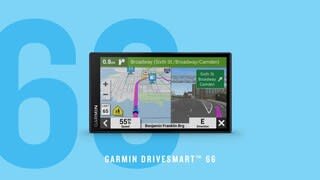
- Model:
- 010-02469-00
- |
- SKU:
- 10141914
Customer reviews
Rating 4.5 out of 5 stars with 493 reviews
(493 customer reviews)Rating by feature
- Value4.4
Rating 4.4 out of 5 stars
- Quality4.5
Rating 4.5 out of 5 stars
- Ease of Use4.4
Rating 4.4 out of 5 stars
Rated 4 out of 5 stars
Works
||Posted .This reviewer received promo considerations or sweepstakes entry for writing a review.No real issues except its not realy ready out of the box. There is a massive update that needs to be downloaded right away. Works great!
This review is from Garmin - DriveSmart 66 6" GPS with Built-In Bluetooth, Map Updates and Traffic Updates - Black
I would recommend this to a friendRated 5 out of 5 stars
Excellent Upgrade
||Posted .This reviewer received promo considerations or sweepstakes entry for writing a review.My last Garmin lasted 13 years and the only reason I got a new one was because the cord was fraying and they don't make that same charger anymore. Bought this one and love the updates, bigger screen, NP stops, traffic. Excellent choice for us.
This review is from Garmin - DriveSmart 66 6" GPS with Built-In Bluetooth, Map Updates and Traffic Updates - Black
I would recommend this to a friendRated 4 out of 5 stars
Good Purchase
||Posted . Owned for 2 weeks when reviewed.This reviewer received promo considerations or sweepstakes entry for writing a review.Garmin works quite well. It would have been nice if a bag to store it in was available.
This review is from Garmin - DriveSmart 66 6" GPS with Built-In Bluetooth, Map Updates and Traffic Updates - Black
I would recommend this to a friendRated 5 out of 5 stars
Great Buy
||Posted .This reviewer received promo considerations or sweepstakes entry for writing a review.Shipping was fast. Packed very well. Great GPS, very easy to use. USB-C connector should last longer than old mini-USB. Touchscreen is large, easy to read, and very responsive. Transferred old garmin gps saves using garmin express software. BestBuy had the best price.
This review is from Garmin - DriveSmart 66 6" GPS with Built-In Bluetooth, Map Updates and Traffic Updates - Black
I would recommend this to a friendRated 5 out of 5 stars
Techno Junkie
||Posted . Owned for 3 weeks when reviewed.This reviewer received promo considerations or sweepstakes entry for writing a review.The Garmin Drive 66 was purchased to replace a Nuvi 5o. The Drive 66 has many updated features. It has 8 apps included-traffic, weather, phone, owners manual, smart notifications, weather radar, Amazon Alexa, and Ok Garmin. You can also do voice commands. To use some of the features you need to download Drive app to your smart phone. You can play music and receive phone calls. I still am discovering more things that Drive 66 can do. I like it better than my smart phone-but if you connect the two, its even better.
This review is from Garmin - DriveSmart 66 6" GPS with Built-In Bluetooth, Map Updates and Traffic Updates - Black
I would recommend this to a friendRated 4 out of 5 stars
Drive 66
||Posted . Owned for 6 months when reviewed.This reviewer received promo considerations or sweepstakes entry for writing a review.The Garmin DriveSmart 66 is a strong U.S. navigation device with a bright 6″ display, clear guidance, and reliable routing even in areas without cell service. It includes hands-free calling, voice assist, and lifetime U.S. maps, plus live traffic, fuel prices, and weather when paired with a smartphone. The larger screen makes directions easy to read, and setup is simple. However, the voice command system can be inconsistent, and some rural or newly developed roads may lack detail compared to smartphone apps. Still, for drivers wanting a dependable, distraction-free GPS with modern conveniences, the DriveSmart 66 is an excellent choice.
This review is from Garmin - DriveSmart 66 6" GPS with Built-In Bluetooth, Map Updates and Traffic Updates - Black
I would recommend this to a friendRated 5 out of 5 stars
Good Garmin Product
||Posted . Owned for 1 month when reviewed.This reviewer received promo considerations or sweepstakes entry for writing a review.Great product, easy to set up and use, updates were easily done.My only negative is I wish it had more volume for verbal directions
This review is from Garmin - DriveSmart 66 6" GPS with Built-In Bluetooth, Map Updates and Traffic Updates - Black
I would recommend this to a friendRated 3 out of 5 stars
Not intuitive
||Posted . Owned for 3 weeks when reviewed.This reviewer received promo considerations or sweepstakes entry for writing a review.Garmin always assumes you want to take the interstate. I often prefer to travel state highways which are less congested. Since it include info on National Parks, etc I thought it would have more options for route selection. You can shape your route but it usually takes 3 tries for it to work. I have yet to get the voice commands to understand commands. The one exception is Alexa works but I don't use that much. The battery life is super short so you must keep it plugged in if you are traveling more than an hour. The charger connects in the back which precludes using some cell phone holders. I seriously considered returning this due to the difficulty in using it but figure it may come in handy when I am out in poor cell signal range and I don't have paper maps with me. On a positive note, the voice directions are pretty good, giving you landmarks to indicate where you are to turn.
This review is from Garmin - DriveSmart 66 6" GPS with Built-In Bluetooth, Map Updates and Traffic Updates - Black
No, I would not recommend this to a friendRated 5 out of 5 stars
Garmin 66 has superior Alexa voice recognition
||Posted . Owned for 1 month when reviewed.This reviewer received promo considerations or sweepstakes entry for writing a review.I bought the Garmin DriveSmart 66 after extensive review of the 52, 55 and 65. I also tested the 66 and 65 before purchasing. The Alexa voice recognition in the 66 was far superior to the other units. I tested voice recognition by comparing results in the 66 and 65. There was no comparison. The Alexa in the 66 is far more accurate in voice recognition and the number of site listings. This is helpful in inputing initial information and also adding stops while on route. The 66 was more expensive than the 65 but I thought the voice recognition and other features made the 66 a better choice. The 66 has a additional USB port for charging a phone and you can update maps via Wi-Fi. The 66 has Traffic and Parking that is available in some large cities. Both the 65 and 66 have Pinch and Spread (to zoom map), Lane Guidance, Up Ahead (you select 3 categories of information such as gas stations) and Trip Data (Distance, Turn in, and Trip Time) so you can select what options you want to view in the split-screen mode. I have not used the Garmin app that provides additional features.
This review is from Garmin - DriveSmart 66 6" GPS with Built-In Bluetooth, Map Updates and Traffic Updates - Black
I would recommend this to a friendRated 4 out of 5 stars
Garmin DriveSmart 66 is a step up from old Nuvi
||Posted . Owned for 3 weeks when reviewed.This reviewer received promo considerations or sweepstakes entry for writing a review.We bought this Garmin DriveSmart 66 to replace an old Nuvi 2455LMT in my wife's car. She is very happy with it -- a much bigger screen with better resolution, and more detailed directions. Setup was a bit confusing. I had some difficulty getting it to pair with my wife's phone. And at first, it wasn't giving us spoken directions. But I was able to troubleshoot those issues. But as I said above, this GPS was a big step up from my wife's previous Nuvi, and we're happy with the purchase. If your vehicle lacks Apple CarPlay or similar technology, this product is a great substitute.
This review is from Garmin - DriveSmart 66 6" GPS with Built-In Bluetooth, Map Updates and Traffic Updates - Black
I would recommend this to a friendRated 5 out of 5 stars
Garmin Drivesamart 66
||Posted . Owned for 5 months when reviewed.This reviewer received promo considerations or sweepstakes entry for writing a review.This replaced my Garmin Nuvi I had for several years. This has a larger screen which is nice feature. Connect this to the wifi and it will check for updates. Don't have to connect to a computer and check for updates.
This review is from Garmin - DriveSmart 66 6" GPS with Built-In Bluetooth, Map Updates and Traffic Updates - Black
I would recommend this to a friendRated 4 out of 5 stars
Nice GPS
||Posted . Owned for 1 month when reviewed.This reviewer received promo considerations or sweepstakes entry for writing a review.Really enjoy the GPS. The only complaint I would have is that it’s hard to sync with your car stereo. I had some difficulties with it. I called Garmin 4 to 5 different people who could not help me and just read from the instructions which I did myself. I finally figured it out.
This review is from Garmin - DriveSmart 66 6" GPS with Built-In Bluetooth, Map Updates and Traffic Updates - Black
I would recommend this to a friendRated 4 out of 5 stars
Overall, happy with it.
||Posted .This reviewer received promo considerations or sweepstakes entry for writing a review.Long time Garmin Nuvi user and didn't know what to expect from the new Drive series. I miss not being able to have it in portrait orientation and the lack of data fields displayed all of the time, but I really like how much easier it is to find gas stations, restaurants, etc. along the route. Overall happy with it.
This review is from Garmin - DriveSmart 66 6" GPS with Built-In Bluetooth, Map Updates and Traffic Updates - Black
I would recommend this to a friendRated 5 out of 5 stars
Love My Garmin DriveSmart 66
||Posted . Owned for 3 weeks when reviewed.This reviewer received promo considerations or sweepstakes entry for writing a review.Easy to see and hear. Gives great directions! Super easy to program!
This review is from Garmin - DriveSmart 66 6" GPS with Built-In Bluetooth, Map Updates and Traffic Updates - Black
I would recommend this to a friendRated 5 out of 5 stars
Love it
||Posted . Owned for 1 month when reviewed.This reviewer received promo considerations or sweepstakes entry for writing a review.I love the size and colorfulness of screen works great
This review is from Garmin - DriveSmart 66 6" GPS with Built-In Bluetooth, Map Updates and Traffic Updates - Black
I would recommend this to a friendRated 5 out of 5 stars
Awesome GPS
||Posted . Owned for 1 month when reviewed.This reviewer received promo considerations or sweepstakes entry for writing a review.Awesome, great size and easy to use. I find it more accurate than google.
This review is from Garmin - DriveSmart 66 6" GPS with Built-In Bluetooth, Map Updates and Traffic Updates - Black
I would recommend this to a friendRated 5 out of 5 stars
Wonderful, wonderful
||Posted . Owned for 1 month when reviewed.This reviewer received promo considerations or sweepstakes entry for writing a review.The GPS is just what we wanted. Easy to use, has great features, and gets me there every time.
This review is from Garmin - DriveSmart 66 6" GPS with Built-In Bluetooth, Map Updates and Traffic Updates - Black
I would recommend this to a friendRated 4 out of 5 stars
Good, not Great
||Posted . Owned for 3 weeks when reviewed.This reviewer received promo considerations or sweepstakes entry for writing a review.Purchased a month ago an took on a 4000 mile road trip. My observations are: (1) Key functionality is dependent on having a Bluetooth phone tethered to the DriveSmart. Without the phone, searching for Points of Interest (such as campgrounds and State Parks) fails regularly. With the tethered phone the searches succeed. This makes no sense - as in my case the Garmin is always connected to the Internet via my in-car hotspot, so presumably could search for POI's that are not preloaded itself, rather than having to type the POI into the Drive app to search for it. Without the phone, integration with existing automotive infotainment systems doesn't work at all. This dependence on phones is a major handicap, such that I ended up dedicating an old phone just for the purpose of tethering the Garmin. (2) The routing favors major routes (Interstates and US Highways) over more direct routes on secondary roads. This may be to your liking - or not. FWIW - Google Maps is the opposite. It'll send you down 'unnamed road' if thinks it'll save you a minute. (3) The 'Up Ahead' feature is nice, but missing important features for those who road-trip. For example, by default it'll show you gas stations, restaurants, ATM's and rest areas, but it's not configurable to include (for example) campgrounds, grocery stores, or other POI categories except by a Custom Search, which appears to be keyword based, rather than a configured category. So if you create a custom search for 'Grocery' it will not show 'Supermarket'. If you use 'Market' as a category, it will show any business with 'market' in its name, such as 'Bob's Digital Marketing'. FWIW - The Sygix mapping app has an equivalent feature, but permits one to select which POI categories show up on the map by any of about 50 curated POI categories, not simple keywords. (4) Minor nit - turning the device 'off' doesn't prevent it from automatically turning itself back on when it's plugged back in. (5) It'll try to update itself periodically. I drive with a hotspot that has limited data, so a Garmin update would run me out of my monthly data allowance - potentially when I'm far from home. (6) Mine hung (froze) twice towards then end of my 4000 mile trip. The first time it recovered on it's own, the second time I had to power cycle it by holding down the power button. Each time the body of the device was hot - presumably because it was in an infinite loop.
This review is from Garmin - DriveSmart 66 6" GPS with Built-In Bluetooth, Map Updates and Traffic Updates - Black
I would recommend this to a friendRated 5 out of 5 stars
Best Garmin yet.
||Posted . Owned for less than 1 week when reviewed.This reviewer received promo considerations or sweepstakes entry for writing a review.This is my third Garmin GPS, and I think it is the best. That is high praise, since I think Garmins are better than any navigation I have ever seen built into a car. I had to replace my NUVI which I have owned for years, and I was sad to have to replace it. However, I think this is a significant upgrade. First, the voice recognition is quite a bit better. Second, the live traffic seems to be more reliable. One note for anyone upgrading. To get traffic, you need to use the Garmin Drive app. I had previously used the Garmin Smart Phone app. I had to delete the old app from my phone to get the new one to work properly. It all works great now, but getting it to work was a little frustrating.
This review is from Garmin - DriveSmart 66 6" GPS with Built-In Bluetooth, Map Updates and Traffic Updates - Black
I would recommend this to a friendRated 5 out of 5 stars
Amazing GPS
||Posted . Owned for 1.5 years when reviewed.This reviewer received promo considerations or sweepstakes entry for writing a review.Garmin has the best GPS. Great product overall. It works well in US and Canada. We loved it..
This review is from Garmin - DriveSmart 66 6" GPS with Built-In Bluetooth, Map Updates and Traffic Updates - Black
I would recommend this to a friend
People also viewed
- Tech Fest Deal$99.99