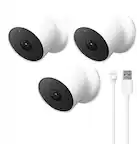
Customer Ratings & Reviews














- Model:
- GA01317-US
- SKU:
- 11098893
Rating by feature
- Value
Rating 4.0 out of 5 stars
- Quality
Rating 4.3 out of 5 stars
- Ease of Use
Rating 4.3 out of 5 stars
- Pros mentioned:Installation
Great camera
||Posted .This reviewer received promo considerations or sweepstakes entry for writing a review.Great product and easy to setup as well install both indoors and outdoors
I would recommend this to a friend - Pros mentioned:Camera quality
pricey but good
||Posted . Owned for 2 weeks when reviewed.This reviewer received promo considerations or sweepstakes entry for writing a review.the nest subscription only offers a yearly plan and its pricey, but the camera is good
I would recommend this to a friendBrand response from Nest Support
Posted .Hello there, Win2k. Thank you for posting your sentiments on your Nest Cam (battery). We're glad to hear that you're having a good experience with the device. We appreciate your feedback on the subscription offers and have taken note of it. If you're in need of any assistance, please feel free to contact us on our Google Help page here: https://support.google.com/googlenest/gethelp

- Pros mentioned:Camera quality
Nest cam
||Posted . Owned for 1 month when reviewed.This reviewer received promo considerations or sweepstakes entry for writing a review.Great camera so worth the price. Helps me feel safe at home
I would recommend this to a friend - Pros mentioned:Overall performance
Google nest
||Posted . Owned for 3 weeks when reviewed.This reviewer received promo considerations or sweepstakes entry for writing a review.Good product. Allows me to watch out for the house while I am working or running errands.
I would recommend this to a friend - Pros mentioned:Ease of use
Clear picture and easy setup
||Posted . Owned for 3 months when reviewed.This reviewer received promo considerations or sweepstakes entry for writing a review.I had ring for many years but Google took it a step further and they are easy to set up and use with my Google home app
I would recommend this to a friend - Pros mentioned:Ease of use
Google security products keep getting better
||Posted . Owned for 1 month when reviewed.This reviewer received promo considerations or sweepstakes entry for writing a review.The google nest cams are so easy to setup, have great features and adjustments that are so simple to navigate thru. Love google to the moon and back. Im especially happy I invested in google stock months ago because i knew as time mived on, the true value of the comoany would shine and it is doing exactly that.
I would recommend this to a friend - Pros mentioned:Camera quality
Clear view
||Posted . Owned for 3 weeks when reviewed.This reviewer received promo considerations or sweepstakes entry for writing a review.We use this to view outdoor life from our backyard patio when we are inside. Recently, we witnessed four baby birds being devoured by a snake from a nest that a bird had made in a metal bucket on our shelf. The video of it was very vivid, maybe too vivid. But as far as the camera, the clarity is precise.
I would recommend this to a friend - Pros mentioned:Camera qualityCons mentioned:App compatibility
Nice hardware let down by awful software
||Posted .This reviewer received promo considerations or sweepstakes entry for writing a review.After experimenting extensively with all the other major cam brands (Arlo, Ring) and some smaller ones too (Kasa), I really wanted this to be the one. Sadly though, it is some nice hardware let down by terrible software. You can read about all the nice features somewhere else - the camera captured high quality video, and has a nice robust feel about it, but there are a number of fatal flaws, at least for me: - these new cameras are managed through the Google Home app, not the Nest app. The Home app is horrible and cluttered to use, but more importantly, this means you cannot view your videos through a browser - only through the Home app - there is not way to set notification schedules - to get notifications when there is motion during the night, but not during the day, for example. every other product I've tried offers this feature. without it the product is mostly useless as you either get nonstop notifications, or none at all. - there is no easy way to share clips with people - you have to download them to your mobile device then either post them somewhere or share them in a message - super annoying.
No, I would not recommend this to a friendBrand response from Nest Support
Posted .Hi mtnkea, thanks for the feedback and for sharing your experience with us. It’s unfortunate to learn that your Nest Cam (Battery) has not been ideal for your needs.
Nest Cam (battery) can only be set up and managed using the Google Home app. While the new Nest cameras and doorbells are exclusive to the Home app, you can view both your old and new Nest Cams together in the Home app. We’re aware that longtime Nest users enjoy having the option to view their Nest camera feeds from the web, and we are working on adding this experience. However, our priority with this launch was building a complete experience for our new cameras and doorbell in the Google Home app. You’ll have the ability to download multiple video clips that event video history automatically captures. If you have event video history, your Nest camera will automatically generate a video clip of the activity that you can download. If you have 24/7 video history and want to create a video clip of a specific event you will need to download one of the automatically generated video clips and edit using your phone’s native video editor.
Also, you can choose to receive notifications for everything your camera detects, or choose notifications for only certain types of activity. If you’ve turned on critical alerts, you may receive some push notifications even when your phone is set to Do Not Disturb. You can create Activity Zones to cover areas in your camera’s view that you care about, and choose the type of motion you want to be notified of for each zone. This is helpful if you’re receiving too many alerts from motion throughout your camera’s view.
We appreciate your input as we continue to work on improving our products and services. And if you have any concerns about the performance and features of the Nest camera, let us know and we’d be happy to help: https://support.google.com/googlenest/gethelp
- Pros mentioned:Installation
Good battery. Features work as expected.
||Posted . Owned for 1 month when reviewed.This reviewer received promo considerations or sweepstakes entry for writing a review.Easy to install. Battery holds up well. Needs a $6 per month plan to utilise the full power of features available. But the free plan is good enough for basic monitoring. Paid plan is recommended though, since video footage retention on the free plan isn't long enough to make it useful
I would recommend this to a friend - Pros mentioned:Camera quality
Clear image. Short time to view video.
||Posted . Owned for 1 month when reviewed.This reviewer received promo considerations or sweepstakes entry for writing a review.Clear image. Short time to view video. Google must to review this on next software updates.
I would recommend this to a friendBrand response from Nest Support
Posted .Hi there, Russomarcelo. Thank you for sharing your insights and feedback on the Nest Cam (Battery). We appreciate your input, and we will definitely pass along your feedback to our product team.
We are constantly working to enhance the user experience and improve our products. Your Nest camera has a lot of amazing features that can help with the security of your home and we want to ensure you have the best possible experience. Our support team would be more than happy to assist you further, answer your questions, and guide you through these features. Please visit us at this link: https://support.google.com/googlenest/gethelp
- Cons mentioned:Battery life
Good upgrade from 1st version
||Posted . Owned for 1 week when reviewed.This reviewer received promo considerations or sweepstakes entry for writing a review.Needs to be plugged in for continuous recprding but it’s good.
I would recommend this to a friend - Pros mentioned:Camera quality, Ease of use
Glad I purchased these
||Posted . Owned for 1 month when reviewed.This reviewer received promo considerations or sweepstakes entry for writing a review.Easy to install. Price was good. Clear picture and sound. Long battery life.
I would recommend this to a friend - Pros mentioned:Overall performance
Works great
||Posted . Owned for 1 month when reviewed.This reviewer received promo considerations or sweepstakes entry for writing a review.Works great! Used for added security monitoring for home.
I would recommend this to a friend Nest Cam Cameras
||Posted . Owned for 3 weeks when reviewed.This reviewer received promo considerations or sweepstakes entry for writing a review.The cameras went up easy and working on my phone just fine. There were no instructions on how long to charge them. I had to go on line and look it up. Also the instructions in the package were printed in grey in 6/7 point type. VERY DIFFICULT TO READ. I had to take pictures and blow them up on my phone. Those marketing people think they are so clever, but they are not realistic.
I would recommend this to a friend- Pros mentioned:Ease of use
Excellent Cameras
||Posted . Owned for 3 weeks when reviewed.This reviewer received promo considerations or sweepstakes entry for writing a review.This makes my 4th nest camera……. I luv them and they’re easy to setup.
I would recommend this to a friend - Pros mentioned:Overall performance
PJ
||Posted . Owned for 1 month when reviewed.This reviewer received promo considerations or sweepstakes entry for writing a review.My cameras are working great, let’s me know when someone arrives, I like that feature
I would recommend this to a friend On sale good value.
||Posted .This reviewer received promo considerations or sweepstakes entry for writing a review.Would be nice to have 2k and not have to pay a monthly fee for services that could be done local, but overall these cameras are worth it. Even better when you can find an open box. Getting outta date and would be nice if they had used USB C instead of a proprietary charging connector.
I would recommend this to a friend- Cons mentioned:Battery life
Great Cameras
||Posted . Owned for 2 months when reviewed.This reviewer received promo considerations or sweepstakes entry for writing a review.Great cameras. Good for inside or outside. Outside ones last me about two weeks if not more. Inside ones about a weekd. I have mine recording all the time. These cameras will not consistently record unless they are connected to a wall outlet.
I would recommend this to a friend - Pros mentioned:Camera qualityCons mentioned:Battery life
Great camera
||Posted . Owned for 6 months when reviewed.This reviewer received promo considerations or sweepstakes entry for writing a review.Great camera for the price! Just be aware you’ll have to charge it every 2-3 months
I would recommend this to a friendBrand response from Nest Support
Posted .Hi Slimpig, we´re glad to hear that you liked Nest Cam (Battery). We´re sorry for any inconvenience you may be having with charging requirements.
Battery life will depend on factors including activity, temperature, and camera settings that you select. Users can extend the battery life of their camera by adjusting video quality, length of video clips, time between recorded events, and using activity zones to monitor specific areas. Here are some typical scenarios for your Nest Cam (Battery):
Busy: About 1.5 months battery life (about 20 - 25 recorded events per day)
Typical: About 3 months battery life (about 9 - 12 recorded events per day)
Quiet: About 7 months battery life (about 2 - 4 recorded events per day)
We recommend checking the frequency of events (per day) that you get with your Nest Cam (Battery). If the short battery life isn´t related to the frequency of events, then we may need to have a closer look at your device and understand what may be causing it. You may contact our support team for further assistance by visiting us here: https://support.google.com/googlenest/gethelp
- Cons mentioned:App compatibility
Not a fan really. Especially the Google Home app
||Posted . Owned for 5 months when reviewed.This reviewer received promo considerations or sweepstakes entry for writing a review.I'm not a fan of these new cameras which you cannot view through the Nest app. The Nest app has always been solid for me. The Google Home app, on the other hand is a nightmare. For one thing, if you have multiple cameras, only the 3 and a half will load up the feed instantly. Any cameras after that, when you scroll the screen down to view them, will sit there with a "connecting" message and a little loading animation, but they will never actually connect. You have to scroll your screen back up to the top and then back down to them and then finally their feed will show up. Or you might go through those motions and then one of the first cameras will go blank or say disconnected. Beyond frustrating. The other problem is, you will get an alert that it has detected whatever type of motion you've set it to alert you of, and you will click on the alert which will take you to either the event, or the live feed. Usually the live feed for me. But when you try to look back at the event, what it has considered to be the clip for the event stops before the event has ended. And it will not automatically allow you to just continue watching the footage that occurred immediately after what it considers to be the event clip. It is super clumsy. Whereas in the Nest app, you can watch your footage seamlessly.
No, I would not recommend this to a friendBrand response from Nest Support
Posted .Hi clookie, thanks for posting your feedback. We regret to hear that Nest Cam (Battery) didn’t meet your expectations, and have multiple issues with it.
Our long term plan is to use the Google Home app as the one place you can control all of your favorite Nest and other smart home devices, as well as Google Assistant. In the near future, we’ll allow users to set up previous Nest devices and have full control in the Home app. Users with older cameras can view their camera feeds in the Google Home app alongside the new Nest Cams. Our team is working on bringing full functionality to the Google Home app so all of your cameras can be set up and controlled in one place.
For connectivity issues, it’s important to make sure that this is not caused by a spotty or weak Wi-Fi signal. We suggest checking your Wi-Fi network for a strong and reliable connection. If you have too many devices connected on the same bandwidth or if your network package is not enough to handle the data traffic on the network, removing other connected devices to your Wi-Fi may relieve network congestion. You can also try doing a factory reset to improve its performance.
We value your feedback, and we’d like to help you the best way possible. If you need assistance, our support team is always available. Please feel free to contact us anytime through this link: https://support.google.com/googlenest/gethelp