Customer Ratings & Reviews
- Model:
- SlateHako2120i
- SKU:
- 6519300
Rating by feature
- Value
Rating 4.6 out of 5 stars
- Quality
Rating 4.6 out of 5 stars
- Ease of Use
Rating 4.7 out of 5 stars
Customers are saying
Customers highly value the SlateHako2120i's strong performance and quiet operation, praising its effective cooling system and attractive case. Many appreciate the included RAM and storage, though some users suggest potential power supply upgrades for future-proofing. The included keyboard and mouse are also frequently noted as a positive addition.
This summary was generated by AI based on customer reviews.

Powerhouse with some hiccups
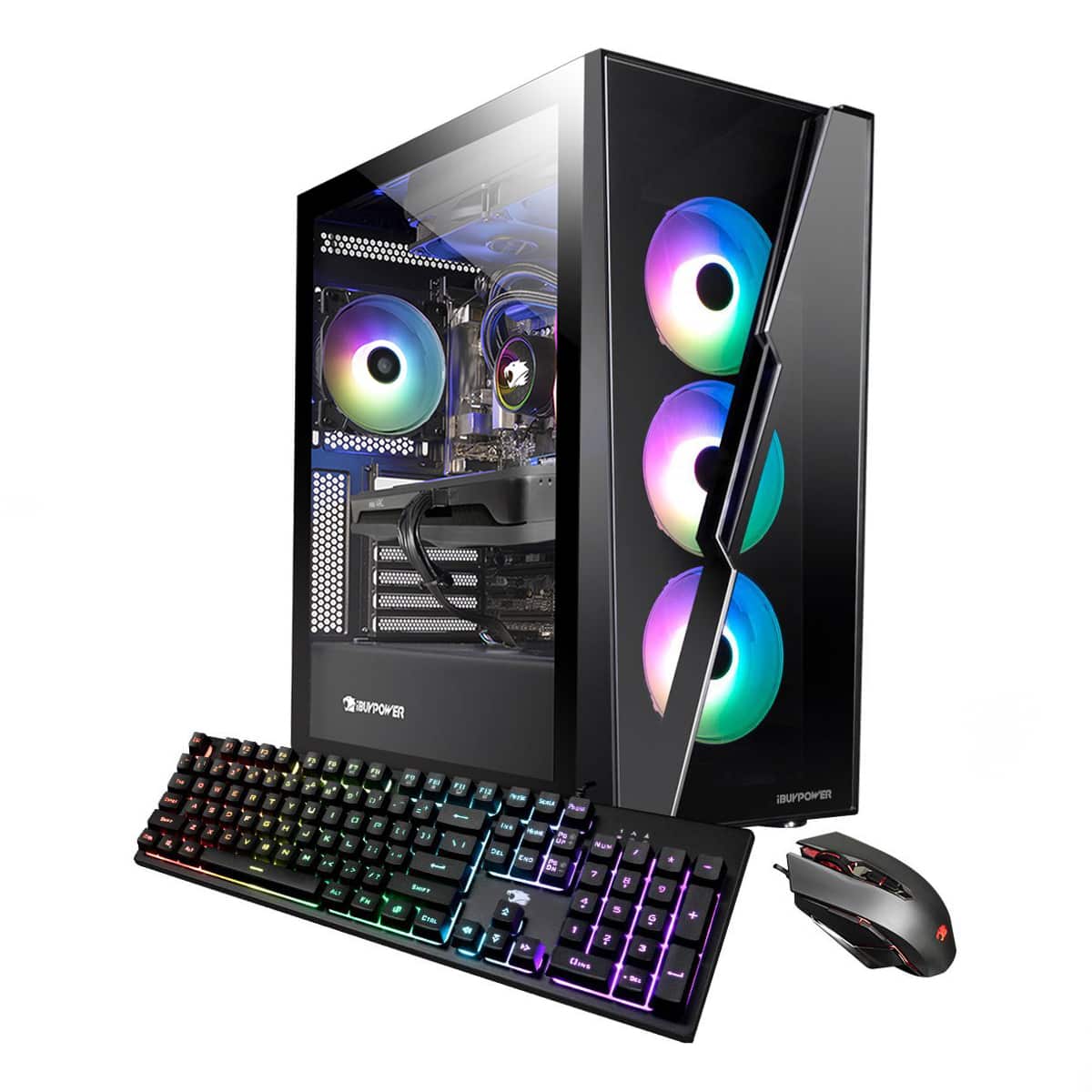
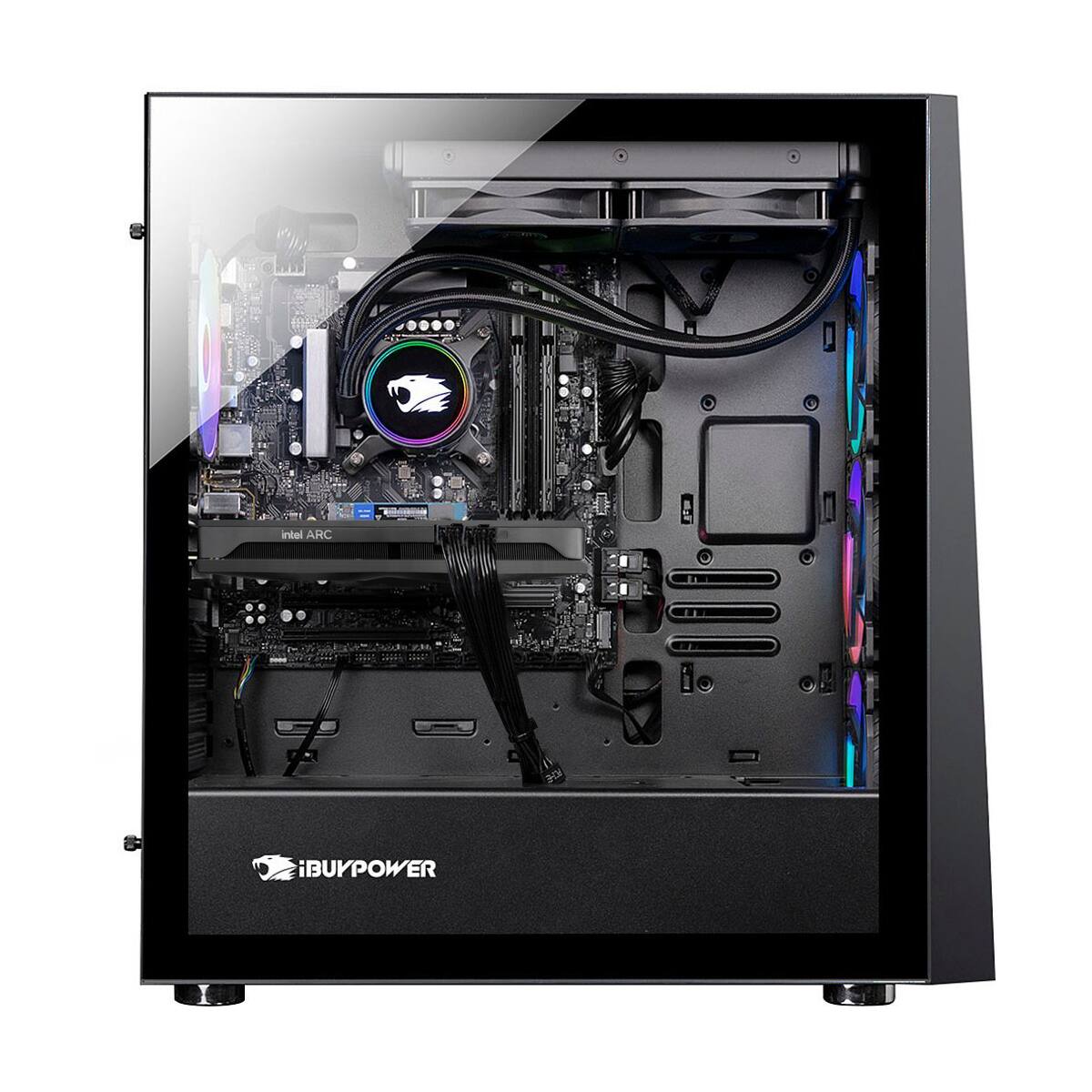
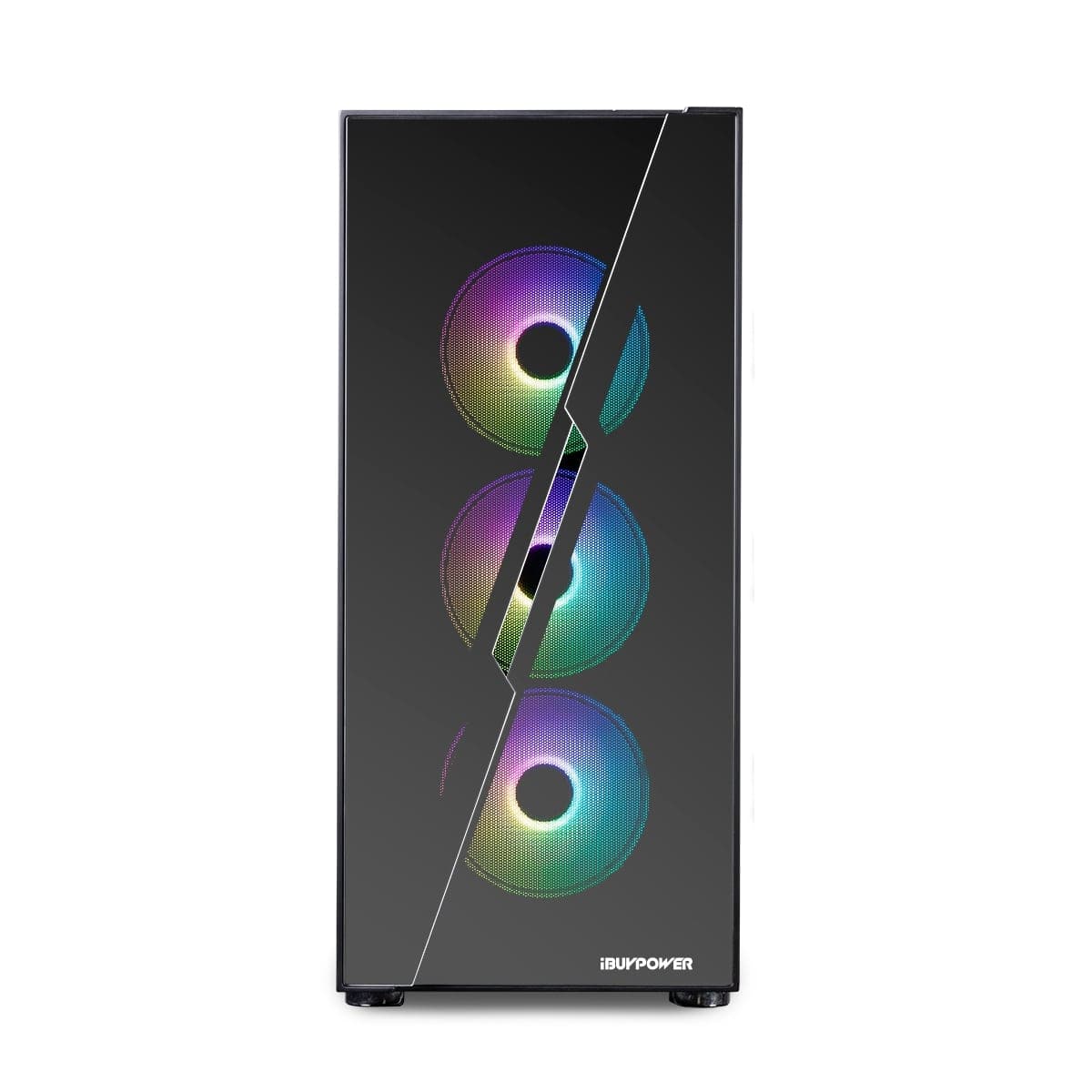
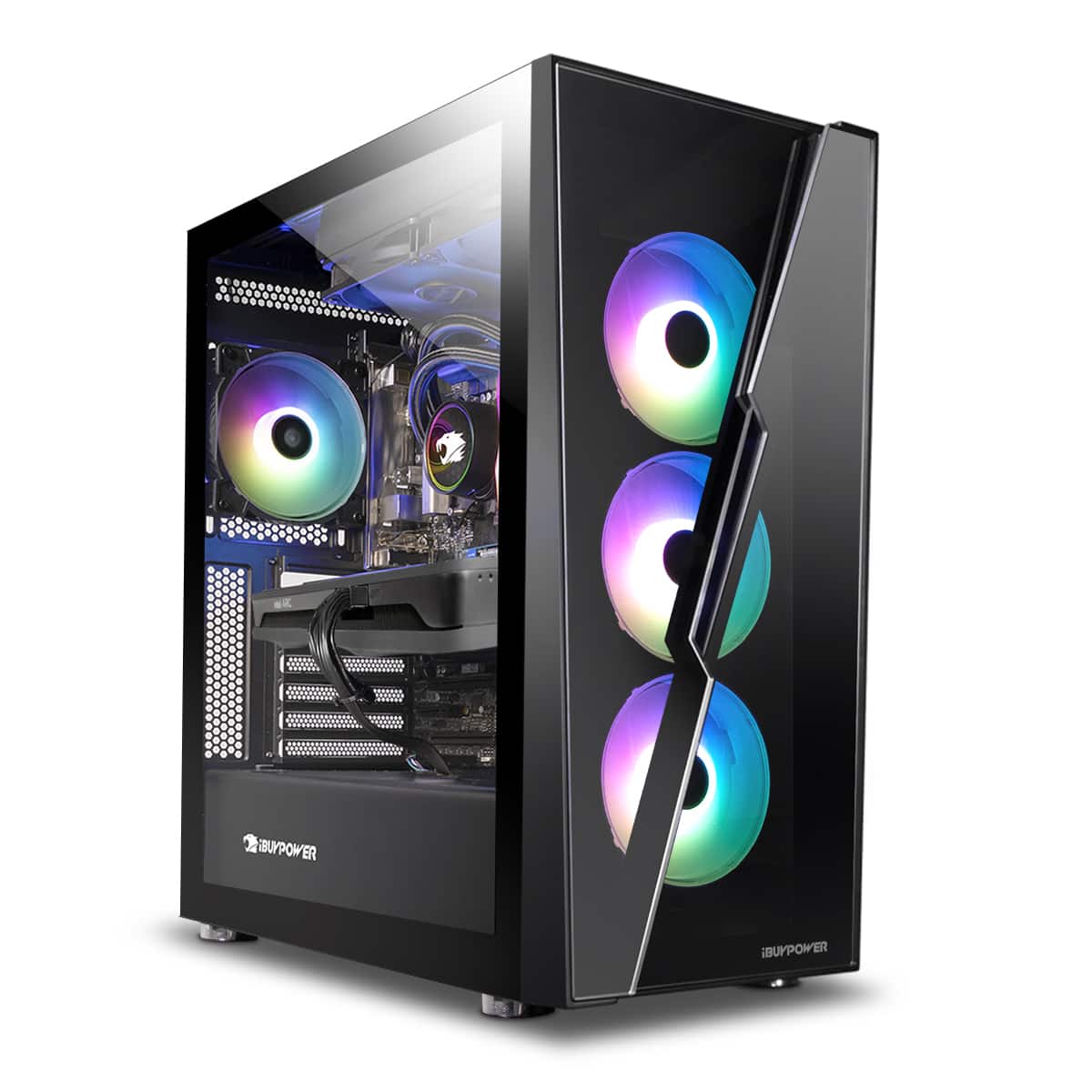
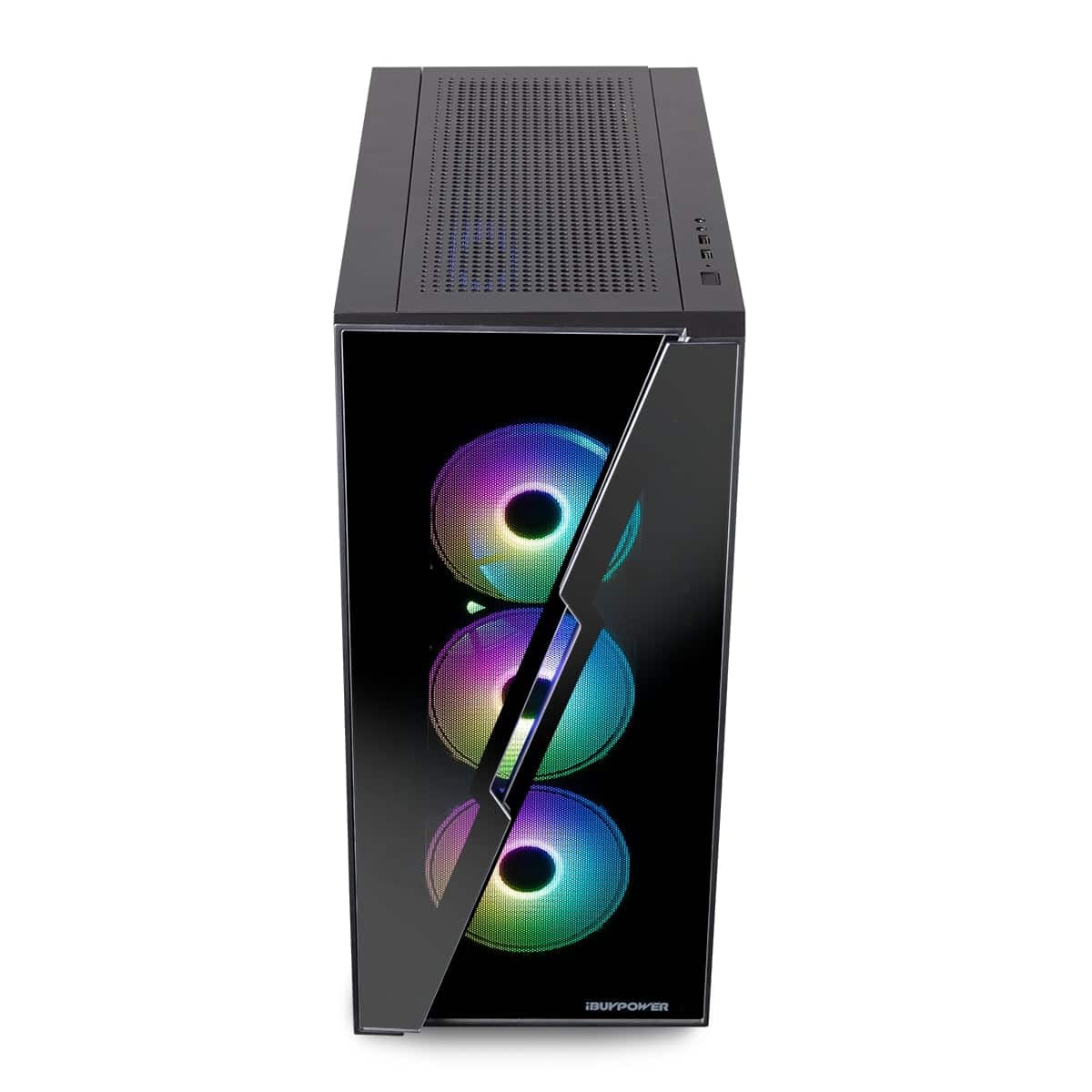
|Posted .This reviewer received promo considerations or sweepstakes entry for writing a review.The Ibuypower SlateHako2120i desktop is a potential powerhouse for gaming, but it is not with out some quirks. Out of the box, Ibuypower does a pretty good job packaging the case for shipping and handling. It is cushioned in 2 giant foam blocks on the top and bottom and the inside of the case has an expanded foam insert to protect the components from shifting during handling. After an inspection before setup, everything was in place and secure as it should. Pulling the side panels off, one side is made of a thick tempered glass, and the other side is just an aluminum cover. The paint and durability of the case is pretty good. The panel IO is on the top of the PC along with an activity light and power button. It has 2 USB 3.1 (blue) ports on the top panel IO along with mic and headphone jacks. The front of the case is also in tempered glass, but provides just a small inlet for fresh air to be pulled in. Would like to see more of an opening for air. The back of the case is normal pc stamped io grating. The side panels are held on by two thumbscrews on each side of the back the case. The bottom of the case has a vent with a filter screen. Overall the case is well built and put together, I would just like to see a larger opening in the front for air. Inside the case, is very well organized wiring. It is all tucked and organized nicely with no extra lengths of wiring hanging out anywhere. It is one of the cleanest wire tucks I have seen in a case. Attached to the cpu socket is what appears to be a 3rd party cpu cooler to a radiator that exhausts to the top of the case. The cooler and radiator fans have the ibuypower logo on them. The upper portion of the case houses 6 large fans, 4 of them RGB, the 2 radiator fans are not. Air flow through the case seems good as I never suffered poor temps during game play. The fans are also whisper quiet and only emit the slightest hum. The graphics card is an Intel Arc A750 GPU made by ASRock. It has 2 large cooling fans on the bottom of the card that works well keeping the GPU cooled. The GPU is DDR6 and has 8GB of video memory. I will get more into this card later. The ram included is just 16GB running at 3000mhz. There are 2 ram sticks at least, but appear to be a basic proprietary manufacturer. These are not RGB. The ram performance is good enough for a solid gaming experience and be good enough for a long while, but if you feel like upgrading, the motherboard has a total of 4 ram slots, upgradable to a whopping 128GB. The processor is an Intel I7 12700. It is Intels newest generation and boast 12 processing cores. It is mated to a B660 motherboard which is great for longevity and future upgrading. It also comes with a 1TB standard mechanical HDD and a 500GB m.2 solid state drive. The power supply is 600w which is plenty to power the Intel Arc GPU. Once you get the case setup and are hooking to a monitor, you will see that the graphics card has 2 hdmi ports, and 2 display port ports. The computer comes with warning not to plug your video feed into the integrated graphics. Inside the box you will see a cardboard box that contains the keyboard and mouse. The keyboard is a mechanical style with loads of RGB lights, and the mouse is styled like a Razer mouse. Both are wired with usb ends. For some reason though only the mouse has a no tangle jacketed wire and the keyboard has a regular smooth cable. Both keyboard and mouse are easy to use and definitely boosts the gaming experience. The RGb on the keyboard needs a controller though. It goes kinda crazy and was not able to see a way to change it. Inside the packing box is also a startup bag. It has several manuals and guides, the power cord, an extra pc cable (for upgrades or changes), and 2 antennas that need to be screwed onto the wifi card if you are using that feature. The power supply on this model has an on and off switch on the power supply itself that is independant of the actual power button. More like a switch to supply power to the power button. Now time for the fun stuff. Booting windows for the first time and setting up is quite taxing. After getting through the initial setup, you will have to do a large update to Windows 11 and all of the drivers. On my PC, the Intel Arc software failed to read and had corrupted files, so I had to go to intels site and download a driver update which resolved the errors. You will have to go to their site and update your card regardless if the software is working or not. The Intel Arc software is independant of the actual GPU and drivers so you can go to add/remove programs and get rid of it if you want. More on this to come. The Intel Arc software is a tuner for the GPU. You can view temps, voltages, etc, and also overclock from this software as well. For some reason it demands administrator access at every startup which gets quite annoying to have to approve its request every time before windows loads. I ended up uninstalling my arc software. The computer itself is fast and nimble. Its total boot time after a fresh boot of windows out of the box of less than 10 seconds. It handles well at any task that isn't gaming as well. While the cpu is not the "k" version, its 12 cores do a great job at processing and the temps stay very cool. Now onto the important part. Gaming performance. This is where the system sees the most quirks. Intel Arc is brand new technology. It does not play well yet with games and compatability. The GPU features are jaw dropping for what it can handle and should be able to run against an rtx 3070 or higher quite well. But since it is so new, not a lot of game designers have support for the Arc cards. I used Xbox for windows to play games with and the results were hit and miss. I found when launching each game, the game could not recognize the graphics card, and would automatically set all of the graphics to low settings. Make no mistake, this card can handle ultra settings on 1080p and acheive 60fps on games like Forza Horizon 5, Dead by Daylight, Doom Eternal, The Evil Within 2 and more, but for each game, every time you launch, you have to re apply all of your graphics settings. Hopefully Intel or the game designers will patch this issue so it can read the GPU but for now that is the biggest quirk and gripe I have. On all the games I listed, on Ultra settings, I experienced no graphical lagging, juttering, framerate drops, etc. The games ran perfectly smooth and was a great experience. Older titles are much worse off with compatability and have much worse graphical performance. Intel Arc is going to be a fantastic card, they just need some time to work all the bugs out with new tech and that is something you need to decide if you want to mess with when getting this PC. I'm hopeful it will smooth out, but if you don't want to risk it, just get an Ibuypower system with an RTX card instead. Overal this is an excellent gaming pc and has a lot of great qualities. I would definitely recommend buying an Ibuypower PC if you are in the market, I'm just not sure if it should be with an Intel Arc GPU. That is the reasoning for 4 stars.
I would recommend this to a friendGreat Gaming Option on a Budget!
|Posted .This reviewer received promo considerations or sweepstakes entry for writing a review.iBuyPower is a maker of "pre-built" gaming desktop computers. There are unlimited variations but this is one particular version offered by Best Buy. This package comes with the PC gaming tower, basic gaming keyboard, gaming mouse, 2 antennas, power cord, and paperwork.Manufacturer's warranty is 1 year. PROS: --------- * Packaged well during shipping * Nice look having a mirrored surface on the front and left side but also with the ability to see inside the unit when lit up. * Exceptional cooling having 3 input fans and 1 exit fan & liquid-cooled for internal components * 16GB is plenty for gaming purposes, but you may want more if you're doing other intensive-processor work like video editing. * DDR4 RAM is upgradable to 128GB * Plenty of HDD space at 1TB + the main 500GB SSD * Most people will have their own keyboard, but I will say that the keystroke feel of this keyboard is better than the one I already use. There is no "clacking" sound with these keys, so noise is muffled a bit. I really like the sound and feel of the keys. * Same with the mouse - people usually have one they like to use, but for a gaming default mouse, it has a good feel to it. * Plenty of USB ports (2 top, 8 back). CONS: --------- * Biggest CON are the absence of USB-C ports. Not even one. Plenty of USB-A, but no USB-C. * Would be good to have an SD card reader * I still like for my gaming PC to have an optical drive - this PC does NOT have one. * Though the keyboard looks good, it needs to have a wrist pad for ergonomics sake. PERFORMANCE: ------------------------ As user experience goes, I play various online games such as Fortnite, CoD Warzone and League of Legends. The biggest issue is fps and latency for most gamers. I have had extremely low latency (not noticeable), and easily have 60-120fps most of the time from the ARC A750 graphics. Temps are remaining check and only elevate slightly when video edit rendering takes place for long periods of time. Gaming is what this tower is all about, and it delivers performance. OTHER OBSERVATIONS: ------------------------------------ * Dimensions are quite large: Height 19.3" x Width 8.6" x Depth 18.3" * There is an ON/OFF switch on the back/bottom of the unit next to the power cord connection. * If you're unable to wire your desktop, the unit comes with 2 adjustable antennas that can be attached to the back of the desktop for wi-fi connections. I did not use these since I use a wired connection. CONCLUSION: ============ Make sure you have a good monitor that can handle high refresh rates and you're golden. The tower itself looks great and runs great. Performance-wise, for the price, you won't find a much better option for a pre-built gaming desktop. You can view the specs elsewhere so I won't spout them off here - but overall, this computer does the job well. This is my first iBuyPower desktop, and I'd recommend this specific build for most gaming applications. I'd really like to see an optical drive and at least one USB-C port though. That would complete the package.
I would recommend this to a friend- Pros mentioned:Performance
Incredible desktop, especially for the money!!!!!
Posted .This reviewer received promo considerations or sweepstakes entry for writing a review.This gaming machine is a powerhouse! I am able to utilize maximum graphics an all games except one without any lag what so ever. I paired it with an ROG Strix gaming Monitor and it is absolutely amazing in every way! couldn't be happier!!!!
I would recommend this to a friend Runs great and looks amazing
||Posted .This reviewer received promo considerations or sweepstakes entry for writing a review.This PC is the best PC I've ever owned! - Not to mention the super coolest! It loads fast, downloads fast, has tons of features and space. I just set it up so I'm still playing around with it - learning and discovering super cool new things I never knew existed is so much fun! Finally playing games that don't lag or take a decade to load. I love the changing colors inside the tower. I absolutely love how you can see everything inside! Mine came with a keyboard and mouse and they both light up and are fun for more "light shows" in the dark! 10/10! Would recommend! ( Tried to upload pictures and it wont let me. Best Buy website issues?)
I would recommend this to a friend- Pros mentioned:Noise level, Performance
Gift as a PC
||Posted . Owned for less than 1 week when reviewed.This reviewer received promo considerations or sweepstakes entry for writing a review.The Packaging was great, I absolutely loved this and so far it's going great as a gift. It's running smoothly and looks cool and is quiet. I would Definity recommend this to someone.
I would recommend this to a friend - Pros mentioned:Gpu
Decent gaming PC
||Posted . Owned for 5 months when reviewed.This reviewer received promo considerations or sweepstakes entry for writing a review.I bought this to replace an old computer that was showing it's age, and my intial experience with it was okay. It came with an intel gpu that worked fine, but it had some compatibility issues with some games. I've since upgraded the gpu, psu and added another ssd drive, and it's been working flawlessly ever since. While there are certainly better and cheaper options, if you're looking to just buy a prebuilt pc with decent specs to upgrade later on, than this one is definitely one to consider buying.
I would recommend this to a friend Great Computer
||Posted .This reviewer received promo considerations or sweepstakes entry for writing a review.Truly amazing computer can run any game without any trouble.
I would recommend this to a friend- Pros mentioned:Performance
Fantastic Advanced PC
||Posted . Owned for 1 year when reviewed.This reviewer received promo considerations or sweepstakes entry for writing a review.Well worth it! It handles anything from gaming to editing with zero hiccups right out of the box!
I would recommend this to a friend - Pros mentioned:Performance
Amazing PC
||Posted . Owned for 3 weeks when reviewed.This reviewer received promo considerations or sweepstakes entry for writing a review.Wow! That was exactly what o needed to upgrade my windows PC For my editing computer for my photography business
I would recommend this to a friend - Pros mentioned:Noise level
Great PC
||Posted . Owned for 1 week when reviewed.This reviewer received promo considerations or sweepstakes entry for writing a review.Great computer!! Really surprising graphics and is very quiet!
I would recommend this to a friend - Pros mentioned:Gpu
Power
||Posted . Owned for 2 weeks when reviewed.This reviewer received promo considerations or sweepstakes entry for writing a review.Lo mejor y potente CPU rápido y cómodo gráfico super comfortable
I would recommend this to a friend - Pros mentioned:Cooling, Gpu, Noise level
Nice machine with decent components.
|Posted .This reviewer received promo considerations or sweepstakes entry for writing a review.Unboxing The box is very big, even though the tower itself is pretty good size. There is a lot of padding, protecting the glass sides of the case. As soon as the box is opened, there is a large printed poster outlining generic startup and setup procedures. If you are a first-time owner, it will be helpful for getting things going. As soon as the machine is out of the box, I checked all of the connectors and pulled the big pad out from around the video card. Shipping can be disastrous on a computer, especially with a big, heavy video card and this one held in place perfectly with the added padding. The only casualty was the power connector on the SATA hard drive. Luckily, iBuyPower uses typical components and there are plenty of connectors I was able to swap in the broken connector’s place. The keyboard and mouse included are pretty decent for bundled items. Their lighting is configurable and can be adjusted while being used. I matched them to my case fans and turned the intensity way down so that they are more of an accent instead of the dominant feature in the room. Startup As with any modern computer, startup is dominated by the Windows setup process. Microsoft does a pretty good job of explaining everything on the very many screens you have to go through just to begin using your new computer. The drivers for each machine are sometimes unique, and this machine was no different. After getting through the Windows setup, much of the work is already done and mainly updates are in order. Unfortunately, the latest Windows update messed up one of the drivers for the RGB light controller. Despite Windows refusing to load one of the drivers, it didn’t seem to impact the computer’s lighting at all. Apps and gaming Between the i7 CPU, the RAM and the new Intel Arc A750, the games I played on my Dell G15 also ran well on the highest settings. It handles things very well and I didn’t have any problems with tearing or artifacts of any kind. I am running a 2K monitor, so I wasn’t able to test at 4K resolutions. There are many benchmark results available online to see how this card compares to other, more familiar ones available. Overall, I think Intel has a good start as long as they stick with it and keep up with the frantic pace of GPU development and evolution. They have a habit of either going all in or dropping the ball, so time will tell how this endeavor goes. Normal apps work very well with this setup, I can’t play games all the time! I installed a copy of Microsoft Office Professional 2021 and it runs without hiccups or any problems. Documents open quickly and websites flow well. I think just about any current setup can handle these tasks today, so this is completely expected. Expansion I was a little worried since there so little information on the case and motherboard available online. The case is really nicely arranged, allowing lots of room for cable management and drives are separated from other parts of the machine so the aesthetics are nice from the large glass side. The power supply is mounted on the bottom of the case, along with the 3.5” hard drives. On the back of the motherboard tray are four places to mount 2.5” drives, so there are a lot of places to add additional drives. The motherboard has one unused M.2 space, so there is room to add another fast drive instead of ditching the original one down the road. The motherboard is fairly small, so there is not much room for adding cards. If you plan to add special cards or another video card, you should opt for a larger motherboard with more slots. There are four RAM slots with only two in use by the stock RAM in case you want to add more in the future. Tech support I contacted iBuyPower about a couple of questions I had and was impressed by their very quick response and competent service. I was very happy with Michael as he researched a couple of issues (mainly the driver issues with the latest Windows Update. I appreciate his competent and timely help with my questions. Conclusion Since iBuyPower uses standard parts, any component can be replaced or upgraded easily. They tend to be pretty sparse on documentation available on their website, so you have to search the original manufacturers websites to find specifics. I was unable to find out the actual suppliers until my machine arrived, not something I would probably be too comfortable with in most cases. Overall, I am very happy with the machine, I miss having a DVD burner but I can plug my external unit in when I need it. It is nearly silent when running normally and isn’t very loud when under full load. I think the liquid cooling is part of that, as temps seem to be pretty controlled even under load. I will see how the cooler does over time, I just hope it is reliable as it is my first time using liquid, despite building hundreds of machines over the last 30 years. I am glad that they use standard parts as I am very comfortable messing with components and will be able to extend the life of the machine by upgrading individual parts over time. iBuyPower runs sales often and some good deals can be found. Speak to a sales consultant to get more information on the particular machine you are buying to make sure you are comfortable in your purchase.
I would recommend this to a friend - Pros mentioned:Cooling, Gpu, Performance
Amazing performance for the price
|Posted .This reviewer received promo considerations or sweepstakes entry for writing a review.The iBuyPower SlateHako2120i Gaming Desktop is an amazing gaming PC for the price. You get a phenomenal gaming experience for the money. The PC tower is one of the nicest I have seen from a pre-built system. You have plenty of room for upgrades, and it's very attractive. Not only does this come with an i7 12700, 16GB RAM, an 8GB Intel Arc A750 8GB GPU (which is very close to a RTX 3060), 1500GB of total storage (500GB SSD, 1TB standard HD), It also is water cooled. This dramatically helps keeping the PC cool, but also makes it much quieter. Even the RGB keyboard and mouse feel like much better quality than most prebuilt systems I have tried recently. On top of all that, there is next to no bloatware. Basically everything installed is either from Microsoft, or is needed for the equipment on board. It plays everything I throw at it effortlessly on High/Ultra settings, granted I am using a 1080p monitor. 4K may be different. I have built a lot of PC's in the past, and would have a hard time right now building a system at this level for this price. This is excellent bang for the buck. I did have a minor issue with the Intel Arc software not found when initially starting the PC, but updating all drives as anyone would starting this PC right out the box solved the issue. I have to admit, I'm very skeptical when getting pre-built gaming PC's, having built so many, this one has me very impressed. The only issues I can find with with this machine is that the CPU can not be overclocked, and the headphone jack on the top of the PC has a lot of static, Which hopefully a future driver update can fix. Thankfully the GPU can be overclocked and you get a nice boost in games when doing so. And this GPU is very easy to overclock via the Intel Arc software. Likes: 1.) Phenomenal performance for the price 2.) Very attractive PC tower with plenty or room to expand/upgrade 3.) Easily overclockable GPU (free performance upgrade) Dislikes: 1.) CPU is not overclockable 2.) Static in headphone jack 3.) Issue with missing files upon initial PC start
I would recommend this to a friend Impressed with this unit.
||Posted . Owned for 2 weeks when reviewed.This reviewer received promo considerations or sweepstakes entry for writing a review.Bought this as a replacement for older system. Very good value for the specs and the build is very good. Very happy with this system and I would recommend this company if you are looking for good quality bulds.
I would recommend this to a friend- Pros mentioned:Gpu, Performance, Ram
iBUYPOWER's Intel-powered gaming PC is a winner
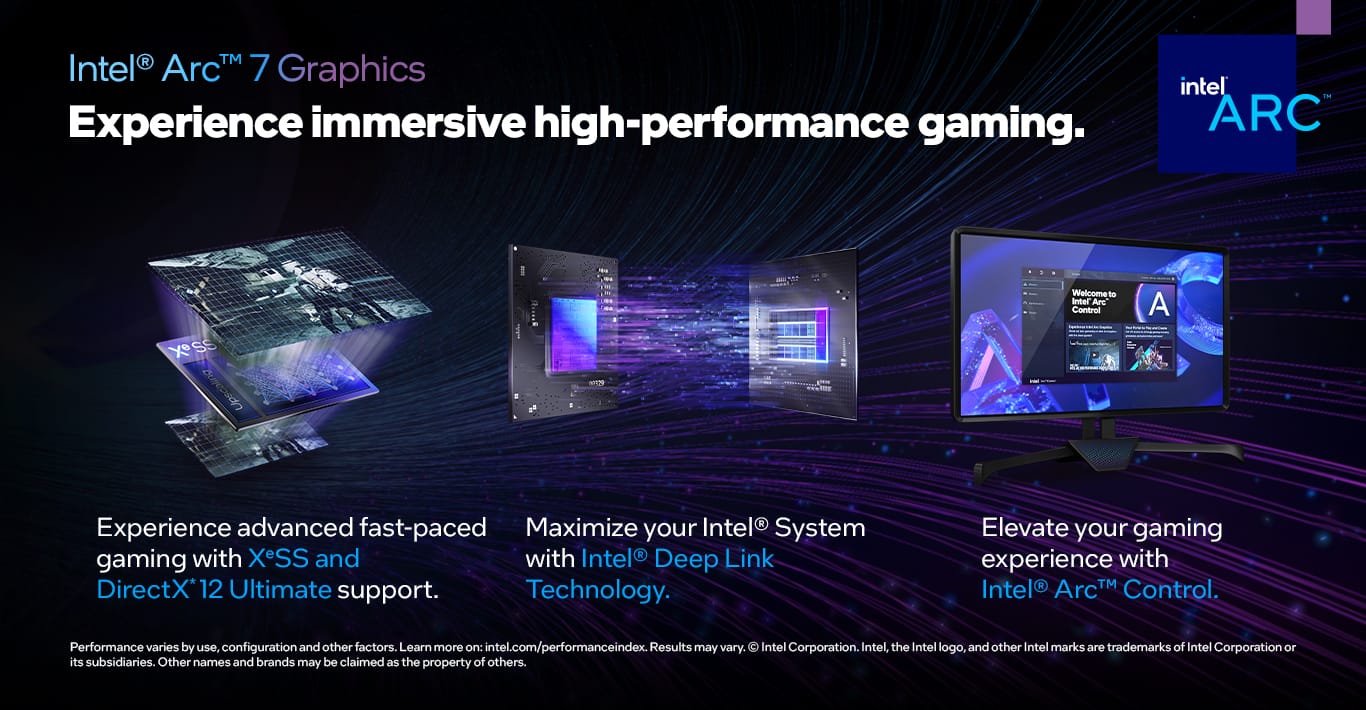
|Posted .This reviewer received promo considerations or sweepstakes entry for writing a review.The Slate Hako 2120i is an interesting machine to me, as I didn’t think I’d ever see an all-Intel (CPU+GPU) gaming PC, let alone one that was overall pretty impressive. I’m normally someone who builds his own PCs, but I will admit that this package by iBuypower would be tough to beat as a value proposition. And the nice thing is that unlike some other manufacturers whose machines are full of proprietary parts, the provenance of everything in this machine is easy to discern: ASRock motherboard, Team Group RAM and SSD, Intel CPU and GPU (graphics card built by ASRock), Seagate hard drive, standard form factor power supply. The included gaming keyboard and mouse, both LED lit, were surprisingly nice, especially for included peripherals. The first thing you notice is the striking case covered with lots of tempered glass. It gives an excellent first impression. The entire left panel is tempered glass, as is the front. Three vertically-arranged 120mm, LED-lit fans are visible through the front, serving to pull in air. A single 120mm LED fan exhausts at the rear, while the 240mm AIO CPU cooler adds more LED via its two fans and the cooling block. The 600W power supply unit is located in the bottom rear of the case. The heart of this gaming system is all Intel: a Core i7-12700 CPU and the ASRock-built Intel Arc A750 graphics card. The i7 is a 12-core, 20-thread part that sits at the upper end of the Intel 12th generation “Alder Lake” processor family. It has 8 performance cores capable of 2 threads up to a clock speed of 4.9GHz, along with 4 “efficiency” cores (1 thread/core) running up to 3.6Ghz. This is a non-K series chip, which means it is not unlocked for overclocking, and it’s rated as a 65W chip vs. the K-series version’s 125W. The CPU is seated in an ASRock B660M-C motherboard, which is in the microATX form factor. It’s a decent but fairly basic board, with modest but thankfully present heat sinks over the VRMs surrounding the CPU socket. The back I/O plate consists of audio ports, PS/2 port, antenna mounts for the included AC Wifi with Bluetooth (make sure to not overlook the antennas in the packaging), 4 USB 2.0 ports and 4 USB 3.2 Gen 1 ports (5Gbps), along with the gigabit ethernet port and a single HDMI port that won’t be used (because of the separate graphics card). The board supports two more USB 3.2 Gen 1 ports via a connector, which are made available on the top of the case. Expansion ports are fairly generous for a microATX board: 2 Hyper M.2 slots (PCIe 4.0 x4), one of which is taken by the Team Group 512GB SSD, along with 8 SATA ports (one of which is used for the 1TB mechanical hard drive). There are 4 DIMM slots, two of which are in use, thankfully, for dual channel RAM operation. Both sticks are from Team Group in 2x8GB arrangement running at 3200MHz CL16 (a bit faster than the listed specs, which say 3000Mhz). That RAM speed is the base spec for Alder Lake CPUs that use DDR4. A great thing about a system like this is that you have access to the full-featured ASRock UEFI BIOS, so there are a plethora of things to tinker with if you are so inclined. I did not change anything for nearly all testing, as I wanted to test the out of box experience, but you can do things like adjust the power limits (PL1 and PL2; if you don’t know what they are, you probably oughtn’t mess with them) on the CPU. The one thing I definitely wanted to check was to see if Resizable BAR was enabled, as Intel very strongly (they literally put the message in the driver package installation) encourages it to be enabled with their Arc graphics cards. ASRock labels it “Clever Access Memory” and I was pleased to see it already enabled. Kudos to iBuypower on that little but telling detail. The really interesting part of this is the GPU: Intel’s A750 card. Intel hasn’t been a player in the GPU space outside of integrated graphics, so this is new for them. The A750 is one step down from their top-line A770, and it features 8GB of GDDR6 on a 256-bit bus. The Arc-series GPUs have very nice hardware media acceleration abilities in addition to gaming, along with AI acceleration. Intel also launched XeSS, their competitor to Nvidia’s DLSS and AMD’s FSR. Like AMD’s solution, it’s open source and so theoretically any vendor’s card can use it,, but like Nvidia’s DLSS XeSS does leverage unique hardware on Intel cards that enhance its performance. Ray tracing is supported as well. As these cards are new, there’s been a fair amount of refinement happening with Intel’s drivers, fixing bugs and squeezing out more performance. Keeping drivers up to date will make the most of this card. Performance: The Team Group MP33 512GB SSD serves as the boot drive and fast storage, hosting Windows 11 Home edition. It’s a PCIe 3.0 drive, though the slot can handle a 4.0 drive, and even then it’s relatively middling for a NVMe, though still faster than any SATA SSD.. I was, however, pleasantly surprised to find it exceeded rated specs when testing it via CrystalDiskMark, with read speeds over 2300MB/s and write speeds over 1900. While thankfully iBuyPower didn’t load up the drive with bloatware, many modern games are now so large you won’t have storage for many on a 512GB drive. There is ample storage on the much slower 1TB hard drive, though I’ve become spoiled enough I wouldn’t run anything but a simple game straight from an HDD. For gaming, I’d probably recommend using the drive as an archive, and move games back and forth to the SSD, using it as the actual game drive. Still, overall, 1.5TB of total storage is pretty good, and there’s ample room for additional drives. In gaming, the general summary is this: this will play largely anything at very high to maximum settings at 1080p at 60+fps. There are probably a large number of games for which 1440p is entirely within reach. If your threshold for frame rates is lower, or the game you’re playing is older, maybe 4K, but this is really not a 4K gaming card. Using XeSS on games that support it, or AMD’s FidelityFX FSR that works on any card, can help frame rates at higher resolution at the expense of a potentially very small hit to image quality. I tested using the following games: Shadow of the Tomb Raider, Forza Horizon 5, Assassin’s Creed Odyssey, and Horizon Zero Dawn, using their built-in benchmarks. Windows was fully updated and I installed the latest Intel graphics drivers. My display doesn’t support 1440p input, so I largely stuck with 1080p, with a couple of 4K benches for curiosity’s sake. I also tested the CPU via a 10-minute loop of Cinebench R23, where it scored 15199 pts, which is right in line with expectations for a i7-12700 running at the 65W power spec. Shadow of the Tomb Raider: 1080p, TAA enabled, Highest preset, ray tracing off: 105fps 1080p, Intel XeSS Ultra Quality, ray tracing set to ultra, everything else set to maximum: 59fps Forza Horizon 5: 1080p Ultra preset, MSAA 4x: 83fps 1080p Extreme Preset, MSAA 4x: 64 fps I tested FH5 at 4K and ultra settings and while the average was okay, it was not smooth, even with FidelityFX FSR enabled. Horizon Zero Dawn: 1080p, ultimate quality preset: 75fps 2160p, ultimate quality preset, FidelityFX FSR Quality mode enabled: 66fps Assassin’s Creed Odyssey: 1080p, adaptive quality off, ultra high preset: 53fps 1080p, adaptive quality off, very high preset: 63fps Conclusion: The iBUYPOWER Slate Hako 2120i is a very good system, overall. In general I was quite pleased with the style, performance, and component choices. This PC is a great 1080p to 1440p gaming machine, and its 12-core/20-thread CPU gives plenty of horsepower for productivity as well. It's well worth your consideration.
I would recommend this to a friend great
||Posted . Owned for less than 1 week when reviewed.This reviewer received promo considerations or sweepstakes entry for writing a review.computer was shipped within the next day and arrived early. Packed very well, and works great.
I would recommend this to a friendgreat pc
||Posted . Owned for less than 1 week when reviewed.This reviewer received promo considerations or sweepstakes entry for writing a review.Very good pc and very much worth the money! recommend buying one yourself.
I would recommend this to a friendMy thoughts
||Posted . Owned for less than 1 week when reviewed.This reviewer received promo considerations or sweepstakes entry for writing a review.Its a great pc, I love it. I always wanted a gaming pc.
I would recommend this to a friendGreat purchase
||Posted . Owned for 2 weeks when reviewed.This reviewer received promo considerations or sweepstakes entry for writing a review.Works perfectly. Nice looking machine! Easy to upgrade as well!
I would recommend this to a friendLights
||Posted . Owned for 3 weeks when reviewed.This reviewer received promo considerations or sweepstakes entry for writing a review.A couple lights didn’t work. Bought it for my son and he very pleased with it.
I would recommend this to a friend