Customer Ratings & Reviews
- Model:
- NS-PU96203
- SKU:
- 4974300
Rating by feature
- Value
Rating 4.2 out of 5 stars
- Quality
Rating 4.6 out of 5 stars
- Ease of Use
Rating 4.4 out of 5 stars
Customers are saying
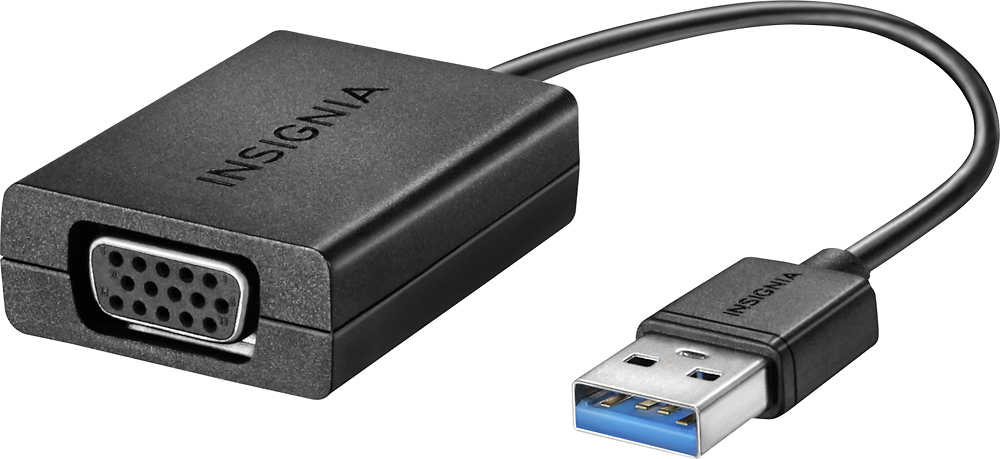
Customers admire the USB to VGA adapter's ease of use and compatibility with various systems. Many found it to be a practical and affordable solution for connecting their devices, praising its performance and straightforward setup. However, some users experienced issues with resolution and driver installation, suggesting potential software-related challenges.
This summary was generated by AI based on customer reviews.
- Pros mentioned:Ease of use
Solid picture
||Posted .This reviewer received promo considerations or sweepstakes entry for writing a review.I was easily able to produce an image into my presentation projector. My newer laptop does not have a VGA port and this was an simple and user-friendly accessory to help connect a projector or any external screen to your laptop.
I would recommend this to a friend Product works as intended
||Posted .This reviewer received promo considerations or sweepstakes entry for writing a review.This product is good to use as an additional monitor where ports are limited. It will mainly work on only Windows 7 operating systems. The screen flickers a lot if you are in Windows 8 or 10 which is the reason for one less star. Other than that everything works the way it should.
I would recommend this to a friend- Pros mentioned:Usb
Great to hook up projector
||Posted .This reviewer received promo considerations or sweepstakes entry for writing a review.If you need to hook up to a USB port for a computer, now is the time to buy. This item is being discontinued. It works perfectly. I’m not quite sure what I would do if this wasn’t still available. Get out and buy them now!
I would recommend this to a friend - Cons mentioned:Resolution
ok ..no issues
||Posted .This reviewer received promo considerations or sweepstakes entry for writing a review.No issues so far.Installation was straight forward.It can not work for high resolution so check specifications before you buy and make sure it is going to satisfy your requirement.
I would recommend this to a friend - Pros mentioned:Ease of use
Simple
||Posted .This reviewer received promo considerations or sweepstakes entry for writing a review.Simple device, did exactly what I wanted it to do. Plug and play, just remember to be sure to start the automatic download (driver software) when first plugged in. I haven't had s single problem with it since purchase.
I would recommend this to a friend Good Adapter, Could Be Easier to Setup
||Posted .This reviewer received promo considerations or sweepstakes entry for writing a review.I bought this adapter since my desktop did not have a VGA port, and only had USB. I thought it would be plug-and-go; however, I needed to download the drivers from 2 different sources and finally I was able to get it going. Wish they had a better manual included!
I would recommend this to a friend- Pros mentioned:Compatibility
Fixed my monitor issue
||Posted .This reviewer received promo considerations or sweepstakes entry for writing a review.Had issues with a Dell docking station that it wouldn't output from the DVI port. Tried multiple wires to make the DisplayPort work, but instead went with this USB solution and worked flawlessly with the VGA cord.
I would recommend this to a friend - Pros mentioned:Compatibility
Kind of outdated
||Posted .This reviewer received promo considerations or sweepstakes entry for writing a review.Works fine with older monitors. I purchased this for an older monitor to be used as a second screen on a back up computer. Works for this but not the newer units that use hdmi
No, I would not recommend this to a friendBrand response from InsigniaCustomerSupport
Posted .Hello! Thank you for reviewing this adapter. I am glad to know that it works for what you need. Also if you are interested in a newer version, you can check the NS-PG95503 which has an HDMI connection to convert to VGA. Regards, Sarah T. Insignia Products.

Easy to install
||Posted .This reviewer received promo considerations or sweepstakes entry for writing a review.This adaptor is easy to install. A bit pricey. My only concern that I have for some reason the slightest movement on any of the monitors, the monitor where this adaptor is connected turns off. I have to unplug and connect again. Other than that it works good.
I would recommend this to a friend- Pros mentioned:Usb
added a second monitor
||Posted .This reviewer received promo considerations or sweepstakes entry for writing a review.I needed to add an additional monitor to my hp all-in-one desktop which didn't have a VGA port. This product works great and allows me to streamline work using multiple monitors by plugging into a usb port.
I would recommend this to a friend Works great - pricey
||Posted .This reviewer received promo considerations or sweepstakes entry for writing a review.It's plug and play - connects laptop to monitor for those laptops that have a single HDMI port and want to connect a second monitor. Each monitor can have different displays. Issue is that many newer laptops are all HDMI, so few of them use VGA now.
I would recommend this to a friend- Pros mentioned:Compatibility
Does the job
||Posted .This reviewer received promo considerations or sweepstakes entry for writing a review.My son has a tiny laptop and wanted to be able to plug it into a larger monitor but it didn't have the appropriate thing to attach it...this did exactly what we needed it to do and gets the job done.
I would recommend this to a friend - Pros mentioned:Ease of use
Simple and easy
||Posted .This reviewer received promo considerations or sweepstakes entry for writing a review.The Cord is about flimsy but it works well. The device takes a few minutes to install but works great once it's setup. Make sure you use your 3.0 port when connecting the adaptive to your workstation
I would recommend this to a friend Ok, if you have no other option
||Posted .This reviewer received promo considerations or sweepstakes entry for writing a review.I bought this so I could connect my (work) laptop to my home monitor (which is actually a small HD tv) and to my work monitor (old VGA style), I figured it would be easier to use the same adapter for both. It works ok for the work monitor, but not very well for my home one (so I have switched to an hdmi cable for home). My biggest issue with it is that it requires a driver to be installed in order to work, as a result it's rather a clunky slow connection. I have been using it for a dual screen, and it constantly freezes on the second screen, and is very slow to respond to the mouse.
I would recommend this to a friend- Pros mentioned:Ease of use
Handy device
||Posted .This reviewer received promo considerations or sweepstakes entry for writing a review.After looking long and hard for this adapter, I was happy to find it at Best Buy -- it allows me to use my laptop for presentations at my college. Handy and easy to use.
I would recommend this to a friend VGA, pricey but worked
||Posted .This reviewer received promo considerations or sweepstakes entry for writing a review.This cable was needed in my wife's classroom projector, although I thought it was much to expensive for what it was, it was our only alternative. Some like this should cost a 1/3 of what it did, but we were over a barrel.
I would recommend this to a friendDidn't work between Acer laptop and external monit
||Posted .This reviewer received promo considerations or sweepstakes entry for writing a review.I believe the intended purpose of this adapter is to enable a video connection between a laptop or desktop and an external monitor but it did not work for my Acer 15 inch laptop, despite installing the proper software and restarting my laptop. I returned this item and ordered an HDMI to VGA video adapter; hopefully that will yield better results. I did not rate this adapter any higher or lower because it may work perfectly fine for other uses but certainly not as a video adapter between my laptop and an external monitor.
No, I would not recommend this to a friend- Pros mentioned:Compatibility
Worked great
||Posted .This reviewer received promo considerations or sweepstakes entry for writing a review.Needed to attach my projector to my new laptop. I have an older projector and new laptop. I asked the sales person what I needed and he helped me find the vga to USB cable.
I would recommend this to a friend Needed adapter
||Posted .This reviewer received promo considerations or sweepstakes entry for writing a review.Upgrade daughter's desktop with new graphics card and missed that it didn't have a VGA connection. Needed an adapter to connect her old VGA monitor to the new graphic card and this one does what it was supposed to.
I would recommend this to a friendUseful adapter
||Posted .This reviewer received promo considerations or sweepstakes entry for writing a review.This is a handy adapter for if your computer doesn't have an extra slot in your video card to support another monitor. The monitor you use this will might have a slight delay, but still very useful to add another monitor.
I would recommend this to a friend