Customer Ratings & Reviews
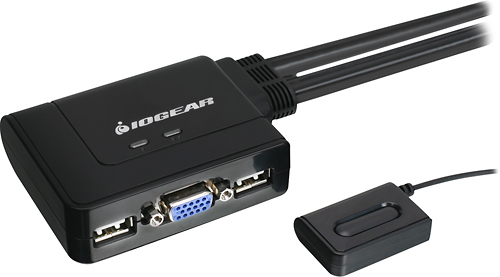
- Model:
- GCS22U
- |
- SKU:
- 9694463
Customer reviews
Rating 4.5 out of 5 stars with 498 reviews
(498 customer reviews)Rating by feature
- Ease of Use4.8
Rating 4.8 out of 5 stars
Customers are saying
Customers express satisfaction with the 2-Port USB KVM Switch for its ease of use, space-saving design, and ability to connect multiple computers. They appreciate the simple installation and user-friendly interface, which makes it a convenient solution for managing multiple devices. While some users have mentioned a slight delay and relatively shorter cable lengths, the overall sentiment is positive, highlighting the product's value for its price.
This summary was generated by AI based on customer reviews.
Rated 5 out of 5 stars
Works great
||Posted .This reviewer received promo considerations or sweepstakes entry for writing a review.Straight forward installation. Durable enough for office use.
I would recommend this to a friend- Pros mentioned:Ease of use
Rated 5 out of 5 stars
Two computers at once!
||Posted .This reviewer received promo considerations or sweepstakes entry for writing a review.I use two Asus computers, one for everyday stuff and the other for high def video editing and didn't want to clutter up the desk with 2 monitors, 2 keyboards and two mouses (mice, mices? A moose? Ha). Even a technically challenged guy like me found it super easy to set up and with one quick push of the button you're on the other computer. I won't say it's the greatest thing since sliced bread but it's pretty close! Works perfectly.
I would recommend this to a friend - Pros mentioned:Compatibility, Ease of use
Rated 5 out of 5 stars
Best Multi share cable for the money!
||Posted .This reviewer received promo considerations or sweepstakes entry for writing a review.I found this product to do EXACTLY as it was specified to do, with easy setup, and no problems after setup. I had researched other similar products that were more expensive, and had problems with using different OS on the two respective computers that would be sharing this cable. This product has been great for me, and I think anyone at home who wants to share two computers, with one monitor/keyboard, will be very satisfied! Note: This also worked using a Wacom tablet!
I would recommend this to a friend - Pros mentioned:Ease of use, Usb
Rated 5 out of 5 stars
Excellent 2 port KVM
||Posted .This reviewer received promo considerations or sweepstakes entry for writing a review.The Iogear 2 port KVM does exactly what you need it to. I have used other 2 port KVM switch with mixed results. Most of them use a comb button press to switch back and forth between the two computers. This comes in very handy when you have a user that is getting anew computer, but has to have their old one to fall back on till you are sure everything is moved. Sometimes those button presses quit working with the switch. I know it is something that you think would not occur, but it does...on multiple systems and especially on wireless devices. the button on this device always works
I would recommend this to a friend - Pros mentioned:Compatibility, Performance, Usb
Rated 5 out of 5 stars
A great switch for the price.
||Posted .This reviewer received promo considerations or sweepstakes entry for writing a review.I'm using it to share between two older PCs. One PC complains a bit and the other one doesn't seem to notice that it's sharing a mouse, keyboard and screen with another PC. Both PCs work just fine with this switch, and I'm even using a wireless mouse. The one that complains beeps a few times when I switch to the other PC. It still works without any problems, so I don't mind a few beeps. I also connect it to a modern 64 bit Windows 10 PC. That PC doesn't have any problems with the switch either. As far as I'm concerned, it's a wonderful product that does what it was made to do and does it well. There's always a chance that a PC won't be compatible with a product.. I had to change the BIOS in my oldest PC to boot with USB devices. Without that change, the switch wouldn't have worked on that PC. The moral of my tale is that you should make sure your machine will boot up with USB devices before buying this switch.
I would recommend this to a friend - Pros mentioned:Ease of use, Usb
Rated 5 out of 5 stars
Great little KVM switch
||Posted .This reviewer received promo considerations or sweepstakes entry for writing a review.Great KVM switch for the money. I especially like the integral cables. It does take a little while to switch back and forth, but I switch between my work laptop on a dock station and my home desktop all day, and it rarely takes more than a second. It's cool that it allows me to use the same monitor as the main monitor for my home PC and as an extended monitor for my work laptop - once I set it up, it works great every time.
I would recommend this to a friend - Pros mentioned:Ease of use, Price, Usb
Rated 5 out of 5 stars
Works exactly as expected
||Posted .This reviewer received promo considerations or sweepstakes entry for writing a review.I purchased this switch to connect one printer to two different computers. Even though it wasn't designed specifically for this purpose, it worked and enabled either computer to print with a simple push of the button to select the right computer to print from. I was very pleased with my purchase because this switch came with all the cables to connect everything together and it was very inexpensive especially considering that a simple USB cable can cost almost as much as this entire setup. It didn't come with the printer cable because it was designed to work with connecting two computers to the same mouse, keyboard, and monitor...I just used it to connect two computers to the same printer instead.
I would recommend this to a friend - Pros mentioned:Ease of use, Usb
Rated 5 out of 5 stars
A must have switch!
||Posted .This reviewer received promo considerations or sweepstakes entry for writing a review.If you have multiple computers/laptops, and want to use only one mouse and keyboard, then this is the way to go. Plug the wireless dongle into the switch box and then plug the corresponding USB cables into each computer/laptop. Then all you have to do is push a button to switch use back and forth. I have multiple laptops hooked to one monitor and just switch over whenever I need to. Brilliant!!
I would recommend this to a friend - Pros mentioned:PerformanceCons mentioned:Delay
Rated 5 out of 5 stars
Compact KVM does the trick!
||Posted .This reviewer received promo considerations or sweepstakes entry for writing a review.This KVM switch does exactly what you'd expect and does so without issue. When I bought this switch I read reviews about poor performance, especially when it came to delays in turnover or no response to switching. In 6+ months of moderate use I've seen no such issues and would recommend the switch.
I would recommend this to a friend - Cons mentioned:Resolution
Rated 5 out of 5 stars
Excellent Affordable 2 Port KVM
||Posted .This reviewer received promo considerations or sweepstakes entry for writing a review.My Belkin 2-port KVM (model: F1DK102U) began acting unreliably following an O/S and monitor replacement after a recent 2 computer upgrade. If anyone is familiar with the F1DK102U, it's not recommended for Linux or anything above WIndows XP. However it appears that resolutions above 2048x1536 also play a major role in it's operation. Nevertheless, since my newly replaced equipment exceeded all 3 factors, this also made my F1DK102U sporadic and often unresponsive when booting either computer, or swapping between Linux or Win10. The IOGear was an excellent, inexpensive replacement. And although it lacks a shared audio port (that came built into the Belkin), I can live with it. The IOGear is responsive, reliable, doesn't randomly begin swapping between computers (whether powered on or off). And the toggle switch button fits discretely under the side of my keyboard. I've recommended this product to others who have sought an inexpensive 2 port KVM as well.
I would recommend this to a friend - Pros mentioned:Ease of useCons mentioned:Cable length
Rated 4 out of 5 stars
Works great!
||Posted .This reviewer received promo considerations or sweepstakes entry for writing a review.The switch makes it easy to switch between my laptop and desktop. The only issue is that, because I have to use the USB ports on both sides of my laptop, the three ends of the KVM cable have to be stretched to the max to connect. It would be helpful if the split point could slide down to provide more length if needed.
I would recommend this to a friend - Pros mentioned:Ease of use, Usb
Rated 5 out of 5 stars
Excellent KVM Switch for the Money
||Posted .This reviewer received promo considerations or sweepstakes entry for writing a review.I highly recommend this KVM switch by iOmega. It took only a few minutes to hook up. Anyone can operate it and it takes seconds. It's so simple a 10 year old could handle it. What a great product at a great price from Bestbuy. I bought it for my sister and she was thrilled.
I would recommend this to a friend - Pros mentioned:Compatibility, Price
Rated 5 out of 5 stars
Great KVM switch
||Posted .This reviewer received promo considerations or sweepstakes entry for writing a review.My old KVM switch wasn't responding as well as it should. I went to the store to check out new ones and found the Iogear - 2-Port USB KVM Switch was the best one for price and my needs. Works really well between my two desktop computers.
I would recommend this to a friend - Pros mentioned:Compatibility, Ease of use, Price
Rated 4 out of 5 stars
Value buy - solves the purpose
||Posted .This reviewer received promo considerations or sweepstakes entry for writing a review.Good price Easy Setup Works with dock station Once in a while I see keyboard n mouse freezes when I try to use the laptop in dock station - but doesn't have any when I connect to my desktop. I had similar experiences with my previous KVM switch. So at this point I believe it's the dock station with KVM causes freeze.. but I found a work around - use laptop directly n switch to desktop n then switch to laptop when this scenario happens. I feel this is a great buy - cost effective - solves the purpose at ease - will recommend this.
I would recommend this to a friend - Pros mentioned:Ease of use, Price
Rated 5 out of 5 stars
Works as expected
||Posted .This reviewer received promo considerations or sweepstakes entry for writing a review.Using it to connect two test PC's to one monitor/keyboard/mouse. Fast and easy to switch between systems using the remote button which has a 6ft cable. I've had no lockup issues switching between systems. Reasonably priced.
I would recommend this to a friend - Pros mentioned:Ease of use
Rated 5 out of 5 stars
USB KVM
||Posted .This reviewer received promo considerations or sweepstakes entry for writing a review.This USB KVM is great for the modern day power user. Works great and easy to use and saves space with a small push button to change between computers.
I would recommend this to a friend - Pros mentioned:Ease of use, Price
Rated 4 out of 5 stars
Good value
||Posted .This reviewer received promo considerations or sweepstakes entry for writing a review.This works well for our office. We needed a easy way to add a separate computer that only needed to be accessed occasionally. For the price, we couldn't beat this switch.
I would recommend this to a friend - Pros mentioned:Ease of use
Rated 5 out of 5 stars
Works great
||Posted .This reviewer received promo considerations or sweepstakes entry for writing a review.It was easy to install and use. It is relatively small and not cumbersome in the computer area.
I would recommend this to a friend - Pros mentioned:Ease of use, Price
Rated 5 out of 5 stars
very easy setup
||Posted .This reviewer received promo considerations or sweepstakes entry for writing a review.this works exactly as expected , you can run two towers and only one monitor, easy to install and good price.
I would recommend this to a friend - Pros mentioned:Ease of use, Performance
Rated 5 out of 5 stars
Good product
||Posted .This reviewer received promo considerations or sweepstakes entry for writing a review.I use it to switch monitor between my computer and security system and it performs well. It is easy to use.
I would recommend this to a friend