Customer Ratings & Reviews
- Model:
- 910-004337
- |
- SKU:
- 4106015
Customer reviews
Rating 4.7 out of 5 stars with 1594 reviews
(1,594 customer reviews)to a friend
Customers are saying
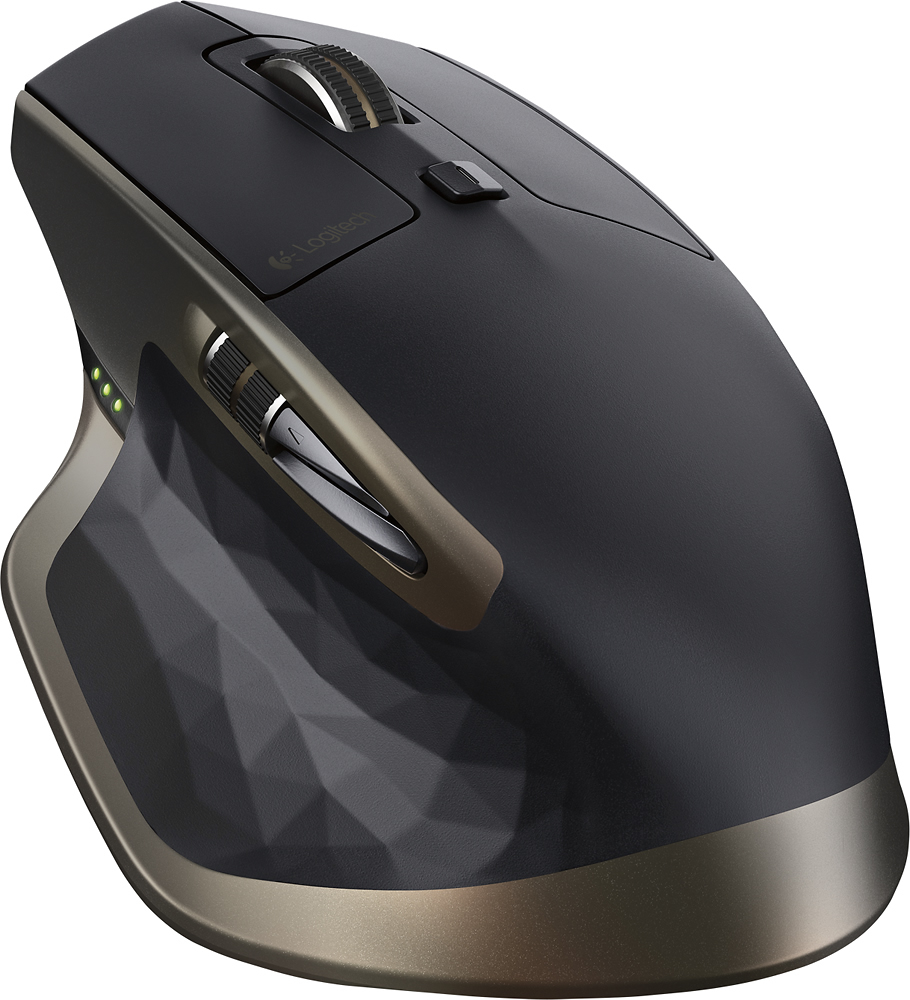
Customers value the MX Master Wireless Laser Mouse for its long battery life, comfortable design, and smooth scrolling wheel. Many appreciate its responsiveness, accuracy, and ability to work on various surfaces. While some find the price high and the weight substantial, the positive feedback on features like Bluetooth connectivity and precise tracking outweighs these concerns for most users.
This summary was generated by AI based on customer reviews.
- Pros mentioned:Battery life, Bluetooth, Scroll wheel
Rated 5 out of 5 stars
Best Current Productivity Mouse!
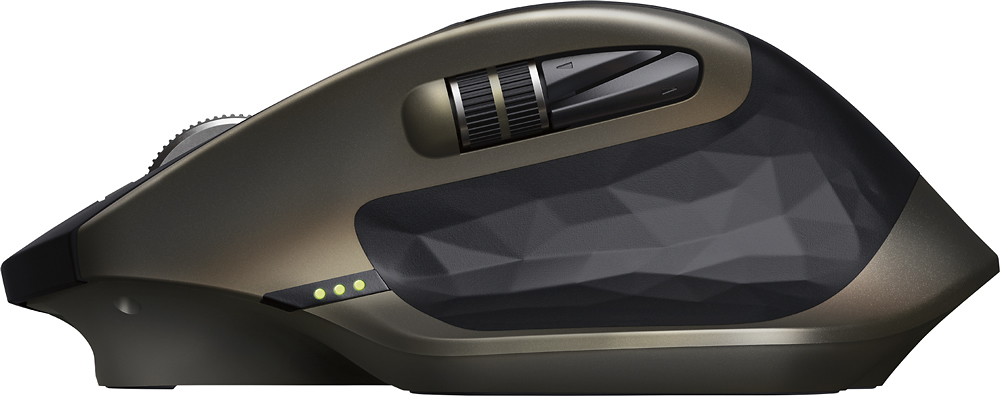
||Posted .This reviewer received promo considerations or sweepstakes entry for writing a review.You really don't know how much you use a mouse until you own your first quality mouse. This particular mouse is super ergonomic, and is practical for small and large hands. The shape of this mouse is good weather you use the claw method or palm method of using a mouse. The quality of this mouse can set a standard for all productivity mice. It's gripe and tactile. Logitech software, allows for easy customization. You have no idea how valuable side scrolling is until you have a dedicated scroll wheel to allow you to do such a thing. Personally I found that will the customization software I use the side scroll wheel for zooming in and out of my display. This mouse features a dark laser, capable of using it on glass. What also makes this more convent is that you can toggle this to three setup, allowing you to choose between these setups with just an easy click of a button. What also drives this further, is that this mouse also allows you the option to use bluetooth or a dongle connection. I'm currently using the dongle. One more added plus, I find myself only charging this mouse once a month. I could go on for days about this device. But here's what I do. I'm currently a college student and in addition to school work I perform alot of CAD (Computer Aided Designing). Every now and then I do some light gaming. This mouse has increased my productivity greatly. I recommend it to all my friends. After using this mouse for awhile I felt that Logitech could've charged me double and I would've still got this for a deal. *Note, If you are a heavy gammer, this mouse will work for you, however you may want to look into dedicated gaming mice as the target for this mouse is productivity* I you find this review helpful.
I would recommend this to a friend - Pros mentioned:Battery life, Comfort
Rated 5 out of 5 stars
Excellent
||Posted .This reviewer received promo considerations or sweepstakes entry for writing a review.I bought it looking for more comfort at work. I used to work about 8 hours with my computer and I am completely satisfied with it not only because it is really comfortable but also it has a great performance. The battery life last for ever!
I would recommend this to a friend - Pros mentioned:Battery life, Scroll wheel
Rated 5 out of 5 stars
Maybe the best mouse ever
||Posted .This reviewer received promo considerations or sweepstakes entry for writing a review.I'm a long time Logitech fan when it comes to mice and keyboards. I had been using an MX Performance mouse for the past couple of years. When I recently built a new computer I wanted to update the mouse. I chose the Logitech MX Master. At first I was not sure if I liked it as much as the older MX but after a week or so I am sold. The best feature of the new MX is the scroll wheel. It has a clutch on it that makes the wheel click or ratchet when the wheel is turned slowly (for precise scrolling) but when the wheel is spun quickly (for fast scrolling) the clutch releases and the wheel spins freely. When the wheel slows down, the clutch re-engages and the wheel clicks again. The older MX mouse had a button that would allow the user to select the wheel mode, but that is no longer necessary. Other than that, the mouse is comfortable to hold and the rechargeable battery is nice. One negative is that Logitech did not include a plug-in USB charger with this mouse as they did with the older MX. A USB cable is included and the mouse is intended to be charged by plugging into a computer's USB port. Overall, it is a great mouse and I would recommend it. Don't forget to use the Best Buy price match to get the best deal.
I would recommend this to a friend Rated 5 out of 5 stars
Great desig and awesome performance.!!!
||Posted .This reviewer received promo considerations or sweepstakes entry for writing a review.The MX Master laser mouse is one of the best options for a professional multitasking mouse. In my search for an upgrade for my Magic Mouse I had two options the Performance MX and the MX Mastet both from Logitech and well the MX Master was my choice for only few important reasons. The ergonomic is optimal for long periods of use, so since I find my self working long sessions I need it something that will deliver a comfortable experience. And the design of this mouse is just outstanding it definitely feels like a $100 mouse so after a month of use I am really happy with my investment.
I would recommend this to a friend- Pros mentioned:Battery life
Rated 5 out of 5 stars
Excellent Logitech MX Wireless
||Posted .This reviewer received promo considerations or sweepstakes entry for writing a review.This is by far the very best mouse i have ever used in my life. I LOVE the design, Ease of use, Multiple Button combinations like change the order of the buttons in a way you want. The feel of the mouse in your hands is flawless. The mouse lasts for about 40 days a month and a half, and it takes 3 or 4 hours to fully change. But there is only one small problem you need to turn off the mouse after use so you don't drain the battery quicker. So what i mean is say you don't use your computer for 3 weeks or a month, you then turn your computer on and you put your hand on the mouse it will be in the red low level. Which means charge it up but here is the great thing you can plug in the mouse, using the front USB port and charged it while you use it Apple magic mouse 2 can take a page from Logitech book on that one. Subscribe to THEPOWER99FM on YouTube i do Unboxing's Review's and Much More Peace and Stay Classy YO.
I would recommend this to a friend - Pros mentioned:Battery life, Comfort
Rated 5 out of 5 stars
Great Mouse
||Posted .This reviewer received promo considerations or sweepstakes entry for writing a review.This is the best mouse I've had and feels very nice in the hand. Battery is rechargeable and lasts approx. 4 to 5 days without recharge.
I would recommend this to a friend Rated 5 out of 5 stars
Awesome
||Posted .This reviewer received promo considerations or sweepstakes entry for writing a review.This mouse works great, easy to hook up and has a lot of features. Worth the price tag. This mouse also works on almost all surfaces, including my couch - connected it to my laptop and I can use the mouse on my couch hand rest. The mouse is quite large, especially for smaller hands like mine, but that's not a problem.
I would recommend this to a friend- Pros mentioned:Size
Rated 4 out of 5 stars
Female hand
||Posted .This reviewer received promo considerations or sweepstakes entry for writing a review.This mouse serves my life's long dreams of not having any more cramps in my fingers due to a small mouse.. this mouse exceeds my expectations. I have large hands for a female and this mouse is able to accommodate my hand from being cramped!!
I would recommend this to a friend Rated 5 out of 5 stars
Nice easy to use
||Posted .This reviewer received promo considerations or sweepstakes entry for writing a review.Very ergonomic design for hand holding and so stylish
I would recommend this to a friend- Pros mentioned:Battery life, SizeCons mentioned:Price, Software
Rated 5 out of 5 stars
Excellent Comfort & Function
||Posted .This reviewer received promo considerations or sweepstakes entry for writing a review.This is a great mouse. It modified some of the best features of previous versions and added the side scroll wheel. This is perfect for anyone who has to deal with giant spreadsheets. I have big hands so the size of it was perfect for me. My only complaint about the fit would be the location of the two buttons by the side wheel. They are behind the wheel so it makes it a lot more difficult to quickly hit them. Software is easy to configure, however I had a bit of an issue with the application specific button switching. When I had my browser running, even though it was minimized it was still using those functions (Back & Forward) rather than my usual (Copy & Paste). Probably going to be fixed soon, though I haven't tried it much lately. Battery life has been better than expected and charging time is very quick. Long story short, great for anyone who uses a mouse a lot. Probably too expensive for the common user.
I would recommend this to a friend - Pros mentioned:Battery life, Scroll wheel, Size
Rated 5 out of 5 stars
Love this mouse
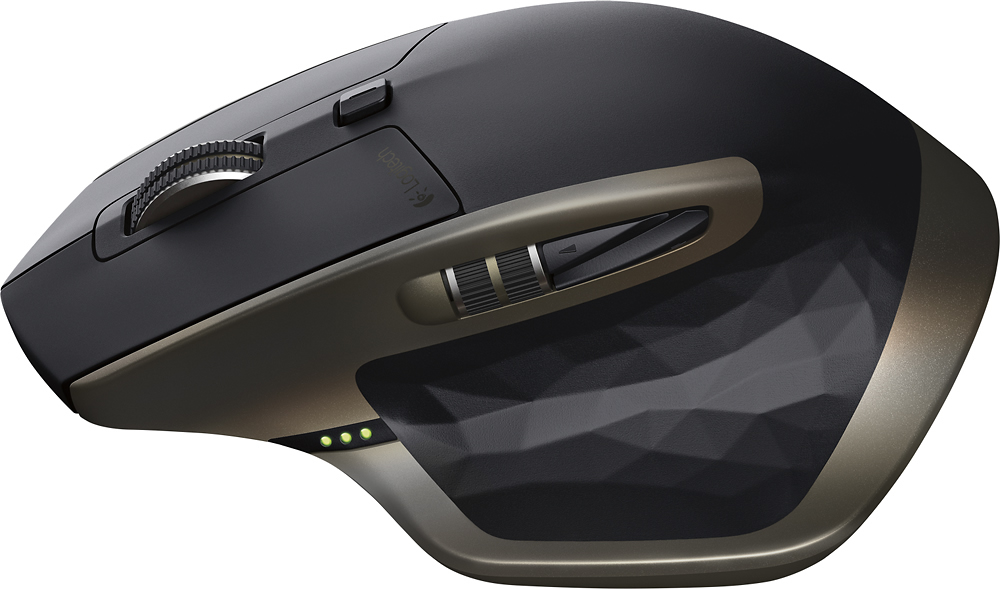
||Posted .This reviewer received promo considerations or sweepstakes entry for writing a review.I bought the logitech mx master mouse to replace my old logitech mx mouse. I love this mouse. It is bigger than mouse mice I have used in the past -- if you have small hands it may be too big for you. The size took some getting used to. I have one minor complaint, and it is minor, the back and forward buttons are very close to each other. I sometimes press forward when I mean to press back. The large thumb rest is actually a button that when pressed show all active applications and allows you to easily switch between apps. I love the speed sensitive rolling wheel on top. Slowly roll the wheel and it scrolls slowly; quickly roll the wheel and it scrolls increasingly faster. Another new touch is the side-to-side roller wheel which allows you to easily scroll from side to side in any document. Battery charge lasts a long time -- I bought this mouse on 1 Dec 15 (it is now 6 Jan 16) and I have only had to charge it twice. I use my computer and mouse daily for several hours. Overall I am well pleased with this mouse. My only complaint is that it wasn't free...but I guess you do get what you pay for. And, by the way, Best Buy was gracious enough to match price for this device from another vendor.
I would recommend this to a friend - Pros mentioned:Battery life
Rated 5 out of 5 stars
Video Editors Mouse!
Posted .This reviewer received promo considerations or sweepstakes entry for writing a review.My favorite editing tool for Final Cut Pro is the Apple Magic Trackpad but, with extended use I was getting horrible wrist and forearm pain. So I switched to the more ergonomically designed Logitech Performance mouse while using the Trackpad to scroll and zoom in the timeline. I absolutely love the addition back of the thumb wheel on the MX Master. It really gives me no reason to need the trackpad and is much more pleasant experience to long editing sessions. Posititves -the design is much updated from the performance mouse -4 minsuntes of charge will provide you with a day (6 hours) of use -a full charge will give you 40 days of use (Logitech's calculations) -customizable buttons --added gestures for Mac users Negatives -not a fan of the bronze, I know everyone has added gold but the bronze just clashes with all the aluminum and gold/champagne -battery is no longer removable like on Logitech Performance mouse Not going to count this as a con but, I am running Yosemite 10.10.3 and even after 2 calls to logitech I cannot use the buttons to program "screenshot" feature or "look up". Look up does nothing at all when I program it and click it and the screenshot makes the audible camera shutter sound like it has snapped a pic but the image never shows up n my desktop and I did manually use the command keys to verify and screenshot is working properly, just not when enabled with the mouse button. If you love the look I say buy this mouse you will be happy. If you need the added features I say buy this mouse. If you don't NEED the design or added features I say save $50 and pick up Logitech's Performance Mouse!
I would recommend this to a friend - Pros mentioned:Bluetooth
Rated 5 out of 5 stars
Superb performance on PC and Mac
||Posted .This reviewer received promo considerations or sweepstakes entry for writing a review.I have used the Performance Mouse MX for years and have been generally satisfied. However, due to occasional hiccups and lack of compatibility with Mac OSX Yosemite, I decided to give the MX Master a try. i am happy to report that it has performed flawlessly on both Windows 8.1 and Mac OSX Yosemite. The ability to use either the enclosed USB unifying receiver (or earlier one) or bluetooth is a big plus. Sharing among multiple computers of either platform is effortless thanks to the three channel operation (button on the bottom). Its form factor is similar to the Performance MX, but seems a tad more comfortable. I am left-handed, but the mouse is very natural to me with my right hand. The horizontal scroll wheel is nice for big spreadsheets. Plenty of custom settings to customize the mouse to any user. It tracks so smoothly on my desktop that I threw away my mousepad. If you plan on using the unifying receiver, be sure you install the Logitech Options software first and add the receiver. Otherwise, your computer will not see the mouse. In summary, the MX master is a keeper for me.
I would recommend this to a friend - Pros mentioned:Bluetooth, Scroll wheel
Rated 5 out of 5 stars
Great Upgrade From Performance MX
||Posted .This reviewer received promo considerations or sweepstakes entry for writing a review.The MX Master is a very nice upgrade from the Performance MX. Very comfortable, smooth tracking and includes extra functionality, such as the adaptive speed scrolling and new thumb wheel that you can program to do side scrolling, back/forwards, etc. Being a developer and designer, the MX Master is more Mac friendly and the multiple device feature allows me to use the same mouse to hop back and forth between my Mac and Windows machines as needed. The extra option of bluetooth allows me to free up a USB port space, but you still have the option of using the Unifying receiver if needed. Well worth the upgrade.
I would recommend this to a friend - Pros mentioned:Battery life, Bluetooth, Scroll wheel
Rated 5 out of 5 stars
A great overall daily use and gaming mouse
||Posted .This reviewer received promo considerations or sweepstakes entry for writing a review.As an owner of numerous Logitech mice over the years, this mouse is a nice incremental improvement in pretty much every dimension. Tracking is clean and precise on a variety of surfaces (glass-topped wood still seems to be an issue, though). The combo bluetooth/unity connection option is really nice as well -- the unity connection tends to be a little quicker on the mac (bluetooth often seems to need a second or two to reconnect after sleep, while the unity connection is immediate), but since the mouse can now have up to 3 connections, this means you can use both -- have the unity dongle connected to a desktop machine (or to your USB hub while the laptop is docked) and then push a button to switch over to BT when traveling w/o the dongle! Battery life is quite good, and when low the mouse can be charged via USB while still being useable, making the lack of replaceable battery a non-issue. Finally, the return of the dynamic ratchet/free-spinning scroll wheel is fantastic. This feature was replaced in some previous mice with a button to toggle between them, which was irritating. The MX Master brings back the option to have the wheel disable the ratcheting at user-definable spin speeds! Overall, I highly recommend this mouse.
I would recommend this to a friend - Pros mentioned:Comfort, Scroll wheel, Size
Rated 5 out of 5 stars
Great Update to the MX Series
||Posted .This reviewer received promo considerations or sweepstakes entry for writing a review.I've got large hands, and the Logitech MX Master is extremely comfortable to use even for long periods of time. The size and weight feel just right and the feel of the matte black surface is very nice. All of the buttons seem well placed and the addition of the horizontal scroll wheel is a plus. I had the MX Performance mouse before this one, and as much as I liked it, the MX Master definitely feels like a step up. I highly recommend it.
I would recommend this to a friend - Pros mentioned:Battery life, Scroll wheelCons mentioned:Software
Rated 4 out of 5 stars
Great Hardware; Software Needs Work
||Posted .This reviewer received promo considerations or sweepstakes entry for writing a review.The Logitech MX Master is a replacement for my tried and true Logitech MX705 mouse which finally was ready to be retired. The fit/form of this new MX Master is great, the battery life excellent and it has some wonderful features. The forward/back buttons on the mouse are a little odd and hard to find compared to previous versions, but the horizontal scroll wheel is terrific. The auto geared to weighted wheel function is great. The worst part is that the Logitech Options software overall seems less functional than its predecessor and needs work. It should also pair with Logitech keyboards, which it does not. They took a step back from SetPoint on this one.
I would recommend this to a friend - Pros mentioned:Battery life, Comfort, Scroll wheel
Rated 4 out of 5 stars
Comfortable for large hands
||Posted .This reviewer received promo considerations or sweepstakes entry for writing a review.Comfortable for large hands. The pinky side and heel rest on the desk with the wrist more vertical. Less wrist fatigue. The default thumb activated back button is very sensitive and easily pressed by mistake. I had to disable it. I like the thumb activated zoom wheel on the left side. Use it all the time. The "Gesture button" is very nice for seeing all the windows you have open and moving to a different one. I like the Logitech Unifying app but it seems like I have to go to it fairly regularly to reactivate the thumb zoom wheel functionality - I don't like this. I now can't live without the fast, smooth scroll wheel. I often have to click the scroll wheel mode button to lock it in to click mode as the smooth/fast scroll seems to easily move on it's own when I don't want to scroll. How long will this mode button work? Too early to tell. I hope a long time as this is an expensive mouse. Tracks even on clear glass, on clothing. Battery life is very good so far. Minus one star for the unwanted fast scrolling and the need to use the Logitech Unifying app to get the thumb zoom wheel working again. The next model lower MX mouse may server you just as well. I use both. It's a bit smaller and you may find it more comfortable. I like both.
I would recommend this to a friend - Pros mentioned:Battery life, Bluetooth, Size
Rated 5 out of 5 stars
great mouse
||Posted .This reviewer received promo considerations or sweepstakes entry for writing a review.I'm a moderate pc gamer and and video junkie! This mouse has it all enough buttons t get my game on and arge for my meat paws! With a rechargeable battery and bluetooth or logitechs unifyer tech you have options to connect and the usb charge cable is included. If you looking for a mid to high end mouse I would recommend this one ! I give it two meat paw thumbs up!!!
I would recommend this to a friend - Pros mentioned:Bluetooth, Scroll wheel
Rated 5 out of 5 stars
Most advanced and expensive mouse I ever had
||Posted .This reviewer received promo considerations or sweepstakes entry for writing a review.1st of all, for the price, since it is not a gaming mouse, about $100 means very expensive. Because it is new, it is OK for now, while I think about 20-40% off will be more reasonable for its usage. The functionality of this mouse is so rich, but lot of them are not been used that regularly as I thought. E.g. the side wheel, but it may useful for designer. And the gesture button as well. The main scroll wheel is cool, but still not perfect. The auto switch between clicky and smooth mode still not as good as expected. The shape is excellent, fit my big hand perfectly. 2.4G unifying + Bluetooth + 3 channels together is a big plus, and the bluetooth is very smooth and accurate on my mac, which is much better than the V470 I had before which is laggy and inaccurate. The built in battery is a big minus I thought, since it only has 500 mAh (compare with a rechargeable AA battery which usually has 2000 mAh) which only last for about 2 weeks for me under heavy use 5 days/week. Though charging is relative fast and painless. Overall, it is a excellent mouse, and I will recommend it to my friend if the price go down to a more reasonable range (e.g. $69.99-79.99).
I would recommend this to a friend