Customer Ratings & Reviews







- Model:
- GA00823-US
- SKU:
- 10535382
Rating by feature
- Setup
Rating 4.6 out of 5 stars
- Range
Rating 4.5 out of 5 stars
- Signal Strength
Rating 4.5 out of 5 stars
Weak signals at access points
||Posted . Owned for 2 weeks when reviewed.This reviewer received promo considerations or sweepstakes entry for writing a review.Could not get a strong signal between router and points, even if they were in the same room. Had to return and bough the Netgear Orbi - which has stellar performance
No, I would not recommend this to a friendBrand response from Nest Support
Posted .Hi HPUser, thanks for posting your review. We're sorry to hear that you're experiencing weak signals and that you had to return your Nest Wifi. Please know that your feedback here about the performance of the device will be relayed to the right team for improvements in the future. If you decide to give the Nest Wifi another go and need assistance with setting it up, please don't hesitate to contact us on our Google Help page here: https://support.google.com/googlenest/gethelp

The original google wifi is better
||Posted . Owned for 1 month when reviewed.This reviewer received promo considerations or sweepstakes entry for writing a review.Suffers from random device disconnects. Its very frequent. Might work one day on your phone and the next it simply disconnects until you restart the system which will only fix it temporarily
No, I would not recommend this to a friendBrand response from Nest Support
Posted .Hi Ibuystuffhere,
Thanks for letting us know of your experience with Nest Wifi. We understand how upsetting it can be when you keep experiencing connection issues and we’re here to help improve your experience.
There can be multiple reasons why intermittent connection occurs. To help you in the best way possible, we'd love to hear more details on what's going on. Also, we'd like you to know Nest Wifi comes with a 1-year limited manufacturer warranty starting from the date of original purchase.
We're available to help you further if you can reach out to us by visiting https://support.google.com/wifi/contactflow
Don't buy this crap
||Posted .This reviewer received promo considerations or sweepstakes entry for writing a review.Complete trash! Bought 3 systems trouble shooting the slow wifi with speeds of (50-110mbps). Finally went with a different router and problem was solved (speeds of 350-461mbps).
No, I would not recommend this to a friendBrand response from Nest Support
Posted .Hi possytem, thanks for taking the time to share your feedback. We're sorry for the inconvenience caused by the slow connection with your Nest Wifi.
If you change your mind, and if you´re using a modem/router combo, we recommend setting your combo in bridge mode and disable its Wi-Fi functionality. This will avoid any network issues caused by both your combo and Nest Wifi Router, broadcasting the same SSID and password. You may then connect your Nest Wifi Router to your modem using an Ethernet cable, and then connect your other Nest Wifi Points to your Nest Wifi Router wirelessly.
If you have any questions or need further assistance, you can always reach out to our team, and we'd be more than happy to help. Here's the link: https://support.google.com/wifi/gethelp
Grrrrr
||Posted . Owned for 2 months when reviewed.This reviewer received promo considerations or sweepstakes entry for writing a review.Not worth the $, has issues boosting signal through Plaster walls! A waste of $, had to buy repeaters & signal boosters! Sales associate not at all knowledgeable with this product!!!!!
No, I would not recommend this to a friendBrand response from Nest Support
Posted .Hi,
Thanks for reaching out. We're sorry to hear that Nest Wifi didn't quite meet your needs. We understand how important this is for you and we’d like to help improve your experience.
There are many reasons why your internet connection signal drops or might appear slow. We'd like to learn more about the network connection issue you’re experiencing. If you're willing, you can get in touch with our support team and we'll help you troubleshoot the issue further. Please feel free to reach out to us here: https://support.google.com/wifi/contactflow
worst router
||Posted . Owned for 4 months when reviewed.This reviewer received promo considerations or sweepstakes entry for writing a review.Google Nest Wifi router has firmware issues that cause the router to reset on its own. Lately it has been resetting every 5-10 minutes. I've only had this system for 4 months, and am not impressed.
No, I would not recommend this to a friendBrand response from Nest Support
Posted .Hi KG2020,
Thanks for letting us know of what's going on with your Nest Wifi system. We appreciate your feedback and apologize for the inconvenience.
We can help troubleshoot the issue if you can share more on how the issue occurs. If you're willing, please contact us to further help you by visiting https://support.google.com/wifi/contactflow
Missing Basic Security Feature
||Posted . Owned for 2 weeks when reviewed.This reviewer received promo considerations or sweepstakes entry for writing a review.Hidden SSID - a standard security feature on every single WiFi Router on the market except for the Google Nest Wifi! I was just shocked to learn it’s not included and I could not hide my network.
No, I would not recommend this to a friendMeh
||Posted . Owned for 1 month when reviewed.This reviewer received promo considerations or sweepstakes entry for writing a review.Wasn’t at all what we were looking for. Even with the router and point running, our WiFi range wasn’t as good as just a regular old router. We returned it and went a different route.
No, I would not recommend this to a friendFrustrating
||Posted . Owned for 3 weeks when reviewed.This reviewer received promo considerations or sweepstakes entry for writing a review.I spent over 4 hours trying to connect the mesh system and kept giving me error messages. Finally took it back to Best Buy to realize this has been a known issue lately. Very disappointed
No, I would not recommend this to a friendWay too expensive
||Posted . Owned for 1 month when reviewed.This reviewer received promo considerations or sweepstakes entry for writing a review.I had zero luck with these. Maybe if you're in a modern construction house and can keep these things close. For my 1950 SF older home, however, they were beyond worthless. They do look pretty though.
No, I would not recommend this to a friendNest mesh Wifi
||Posted . Owned for 2 weeks when reviewed.This reviewer received promo considerations or sweepstakes entry for writing a review.We tried this set, and the signal was terrible. We finally went with Orbi tri-band mesh wifi 6 system which handles up to 4.2 Gbps.
No, I would not recommend this to a friendBrand response from Nest Support
Posted .Hi EARL, thanks for sharing your experience with our support team. It's unfortunate to hear that you had a very poor signal performance when using Nest Wifi Mesh, and we're sorry to hear that you already replaced it. We're still hopeful that you will consider using Nest Wifi or any of our Google Nest devices again in the future. We can help answer any curious question or support concern you may be having with any of our products, by simply reaching out to us here: https://support.google.com/googlenest/gethelp

An Improvement on the Previous
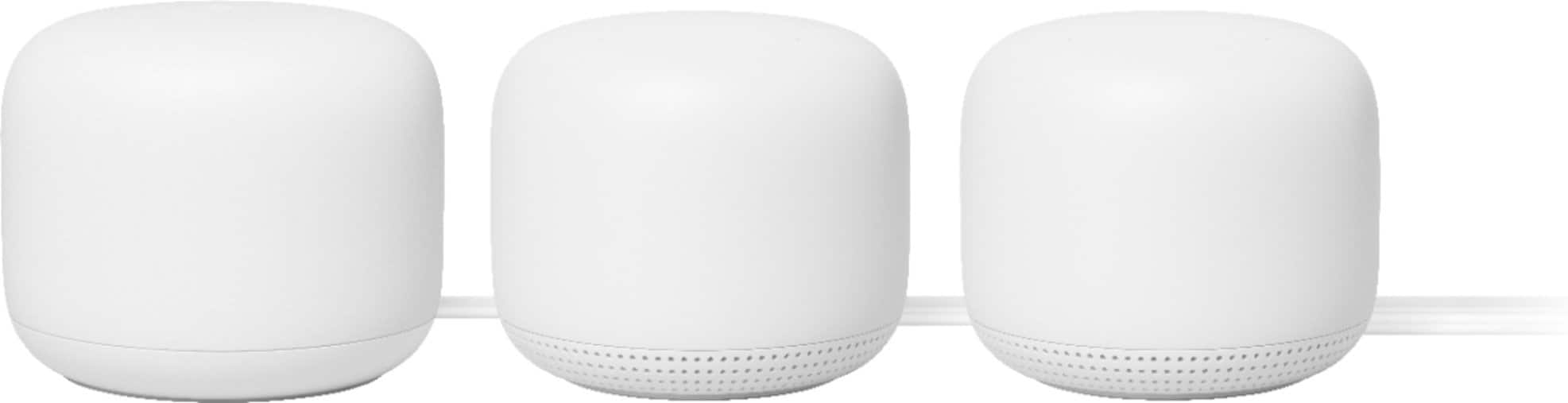
|Posted .This reviewer received promo considerations or sweepstakes entry for writing a review.I have been using Googfle WiFi for a few year. Never had any issues and very pleased. The new Google Nest Wifi is backward compatible with the older one. A little confusing with the different apps required, Google Wifi vs Google Home. But it all works and works very well. The app is super intuitive and walks you through all the stages of set up. The new Google Nest is more rounded and has under shadow lights which give a cool effect. Even the plug is like a bubble. You know a designer was at work ! Wifi coverage is an improvement over the older series, but speed seems about the same. That is not a bad thing. Connection is constant as excellent. Google assistant works well and seems faster than the stand alone. Also, its range of hearing is better. Definitely, Google Nest is an improvement over the Google Wifi. I just wish they had not removed the Ethernet port from the mesh module.
I would recommend this to a friendacts as wifi extender as signal not very strong
||Posted . Owned for 1 year when reviewed.This reviewer received promo considerations or sweepstakes entry for writing a review.Google's Nest Mesh System is basically Wifi extenders so each pod is dependent on the main router. I replaced this system with Netgear Nighthawk routers which I like much better.
No, I would not recommend this to a friendWorked Overtime
||Posted . Owned for 1 month when reviewed.This reviewer received promo considerations or sweepstakes entry for writing a review.The product seemed to greatly boost our internet signal. Unfortunately, it kept turning on randomly. It was quite a nuisance. Product returned.
No, I would not recommend this to a friendLook for a more reliable option
||Posted . Owned for 8 months when reviewed.This reviewer received promo considerations or sweepstakes entry for writing a review.Product started to fail within a year. It shot off and restarted frequently. A real pain when trying to work. Google sent me a replacement. Wonder how long that will last.
No, I would not recommend this to a friendDon’t buy
||Posted .This reviewer received promo considerations or sweepstakes entry for writing a review.Don’t buy this system. Had mine for a few months and not only is it slower than my old outdated router it keeps dropping internet. I have had to do full reboots and still happening.
No, I would not recommend this to a friendBrand response from Nest Support
Posted .Hi Flimnar,
We appreciate you for taking the time to share your feedback with us. We're sorry to hear you're encountering some issues with Nest WiFi router.
If you're using Nest WiFi router as your primary router and it's connected to the modem via Ethernet, the disconnection issue may be related to your modem or internet service provider. If the disconnection is only occurring with some connected devices, then the reason may be a congestion on your Wi-Fi network which may cause some devices to fall off the network as there is not enough bandwidth for them to use the internet. You may resolve such problem by prioritizing some more important devices in the Wi-Fi settings or upgrading your network package.
If you're using Nest WiFi router as a switch in an upstream connection to a router or a modem/router combo, there may be a Double NAT case in which your Wi-Fi is being broadcast by two private networks with the same SSID and password. This can cause your devices to attempt to switch between networks and it results in a disconnection. You can resolve this by disabling the other router's Wi-Fi functionality or by putting it in bridge mode.
For slow Wi-Fi, you can take a look at the following support article : https://support.google.com/wifi/answer/6246489?hl=en
We're always working to do our best to help our customers. If you need further assistance, please feel free to check out our support page to contact us.
Do not buy. Garbage.
||Posted . Owned for 5 months when reviewed.This reviewer received promo considerations or sweepstakes entry for writing a review.Garbage. Crashes once a week. Never gives me anywhere near my network capacity which uses 1 gig fiber. If I could still return, I would.
No, I would not recommend this to a friendBrand response from Nest Support
Posted .Hi ubermind, thanks for posting your review here. We're sorry to learn that your Nest Wifi is not providing you the speeds you'd expect from your ISP. This is not the experience we want you to have. We'd like to take a closer look at your setup so we can better identify the issue and help provide you with troubleshooting steps that may improve the performance of your device. Please contact us on our Google Help page and let our support team assist you with your concern. You can reach us on our help page here: https://support.google.com/googlenest/gethelp
IMPRESSIVE RANGE
|Posted .This reviewer received promo considerations or sweepstakes entry for writing a review.The Google Nest Wifi AC2200 is an affordable wifi mesh system that has many functional features with excellent aesthetics. The easy set-up was completed in minutes using the Nest Home APP. After the set-up, I conduced speed tests in various parts of the house. The Download Speed stayed steadily around 230 Mbps, and Upload Speed topped out at 12 Mbps. It is a significant speed upgrade compared to my previous system, especially in the rear bedrooms of the house. The Nest APP has features that can help me take control of my home's internet. I can now control my child's internet access. I can now set timers so that my child will not be able to access the internet after a set time. I can now prioritize bandwidth to whatever device I need. I can also set a timer for the specific device that has the prioritized bandwidth. I can set the bandwidth from 1 hour to 4 hours. The google microphone and speaker are adequate. I recommend the Nest Wifi AC2200 to anyone who wants to upgrade their bandwidth and take control of their family's internet use.
I would recommend this to a friendDon’t buy this. You’ll regret it.
||Posted . Owned for 9 months when reviewed.This reviewer received promo considerations or sweepstakes entry for writing a review.This is a garbage system. Currently writing this to you from my bedroom across the hall from my access point on my wireless carrier. AVOID AT ALL COSTS
No, I would not recommend this to a friendBrand response from Nest Support
Posted .Hi there, thanks for taking the time to share your feedback. We’re sorry to hear that you’re having issues with Nest Wifi. We value your feedback, and we want to help you the best way possible if you can share more details about the issue you’re having. This will give us a better understanding on what may be causing the issue and enable us to improve your experience. Please reach out to our support team here: https://support.google.com/wifi/gethelp
not very impressed
||Posted .This reviewer received promo considerations or sweepstakes entry for writing a review.not very good instructions and not as easy to get connected as said. tried to talk to it next day and it would not respond. like I said no good operating instructions.
No, I would not recommend this to a friendBrand response from Nest Support
Posted .Hi timbro,
We appreciate you for sharing your feedback with us. We're sorry to hear that you're having trouble setting up your Nest Wifi mesh system.
We can help you with the setup. You can find our setup guide in the following support article: https://support.google.com/wifi/answer/9548301
We also recommend to make sure you have all setup requirements ready by checking the following:
- Google Nest Wifi router
- Any additional Wifi devices you would like to add (Google Nest Wifi points, Google Wifi points, or Google Nest Wifi router). This is optional to expand coverage.
- A Google Account
- One of the following mobile devices:
- An Android phone running Android 5.0 and higher.
- An Android tablet running Android 6.0 and higher.
- An iPhone or iPad with iOS 12.0 or later
- The latest version of the Google Home app available on Android or iOS
- Internet service with a modem: Some ISPs use VLAN tagging. You may need additional equipment for Google Wifi to work. Learn how to set up your network with an ISP that uses VLAN tagging.
If you'd like further assistance with setting up your Nest Wifi system and speaker features, you can reach out to us here: https://support.google.com/wifi/contactflow
Worked great for awhile.
||Posted . Owned for 1 month when reviewed.This reviewer received promo considerations or sweepstakes entry for writing a review.Worked at first great went down once we shut it down and came back,now it lost internet again and tried the support suggestions and it will not work,not happy!
No, I would not recommend this to a friendBrand response from Nest Support
Posted .Hi Rooter,
Thanks for letting us know of the issue you're faced with. We sorry for the frustration this has has caused.
If you've already tried the troubleshooting steps at our support page and couldn't fix the issue, please get in touch with so we can work on it further to help you out by visiting https://support.google.com/wifi/contactflow