Customer Ratings & Reviews





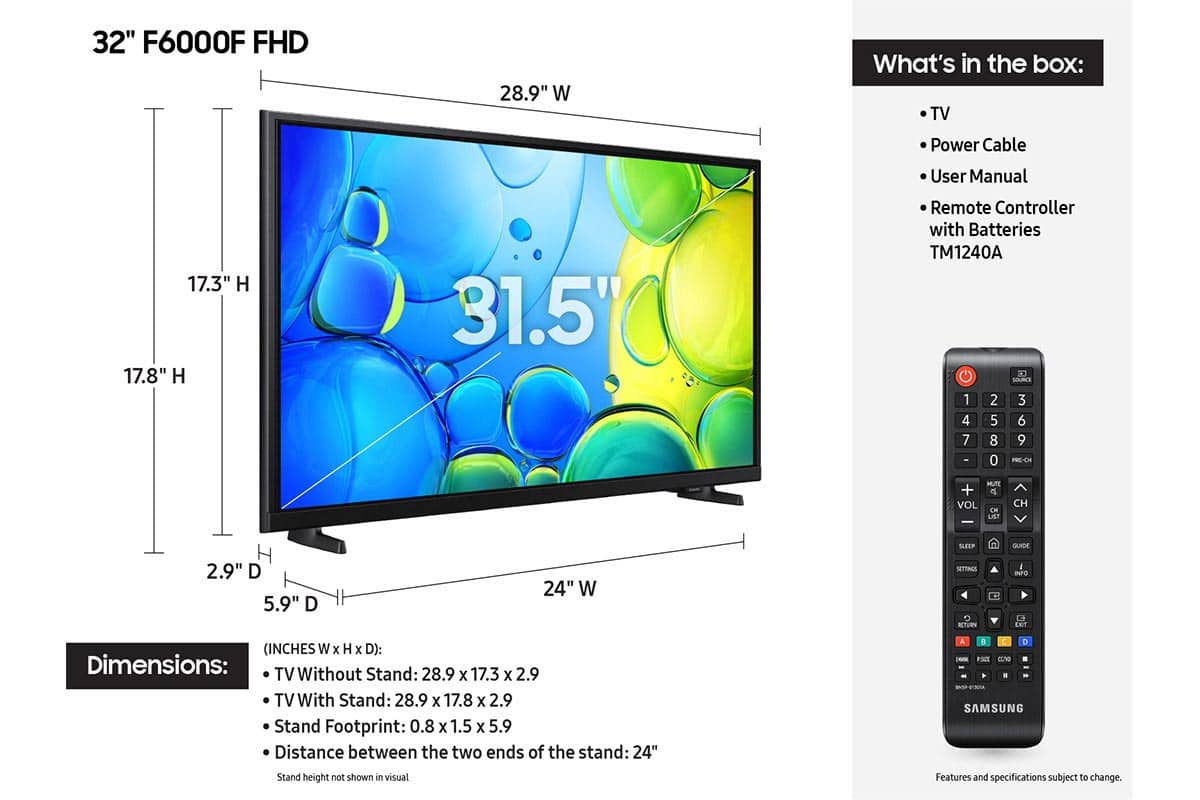






- Model:
- UN32F6000FFXZA
- SKU:
- 11997357
Rating by feature
- Picture Quality
Rating 4.8 out of 5 stars
- Sound Quality
Rating 4.5 out of 5 stars
- Brightness
Rating 4.8 out of 5 stars
Great Deal!
||Posted . Owned for 2 weeks when reviewed.This reviewer received promo considerations or sweepstakes entry for writing a review.Open box great deal for a Samsung! Only $60 for a "new" Samsung is a steal!
I would recommend this to a friendnice picture
||Posted .This reviewer received promo considerations or sweepstakes entry for writing a review.have been using this tv for the pasted few months and has been a good tv . the remote works great unlike the vizio i had before
I would recommend this to a friend- Pros mentioned:Picture quality
great tv
||Posted . Owned for 1 month when reviewed.This reviewer received promo considerations or sweepstakes entry for writing a review.Works wonderfully and set up was easy! The picture is really nice quality too
I would recommend this to a friend - Pros mentioned:Size
Smaller screen
||Posted . Owned for 3 weeks when reviewed.This reviewer received promo considerations or sweepstakes entry for writing a review.I needed a small tv for my shop perfect for this space
I would recommend this to a friend My Smart TV is smarter than I am
||Posted . Owned for 1 month when reviewed.This reviewer received promo considerations or sweepstakes entry for writing a review.Excellent product. Installing and using apps easier than most.
I would recommend this to a friendPicture good/sound bad
||Posted . Owned for 1 month when reviewed.This reviewer received promo considerations or sweepstakes entry for writing a review.The picture is great, but the sound is tinny. For its price one can afford to add a speaker…but….my last small Samsung sounded just fine.
I would recommend this to a friendBrand response from Samsung
Posted .Hi Margo,
Thank you for your feedback on the sound quality of your Samsung F6000F TV. First, ensure your TV is running the latest firmware: Home > Settings > Support > Software Update
To improve your sound, try different Sound Modes , or fine-tune your setup in Expert Settings under: Settings > All Settings > Sound
Samsung Q- and S-Series Soundbars with Q-Symphony can also pair with your TV for enhanced audio.
If you need additional support, Samsung is here to help. Please call us at 1-800-SAMSUNG, available daily 8AM – 9PM EST Mon – Fri, 8AM – 6PM Sat – Sun. You can also chat with a LiveChat agent by clicking the ‘Support’ link on our website.
~ Samsung Advisor
Perfect for a typical-sized bedroom or guestroom
||Posted .This reviewer received promo considerations or sweepstakes entry for writing a review.Great value for the money. Excellent picture, straightforward setup, very lightweight, and perfect for a typical-sized guestroom.
I would recommend this to a friend- Pros mentioned:Picture quality
Samsung tv
||Posted . Owned for 3 weeks when reviewed.This reviewer received promo considerations or sweepstakes entry for writing a review.Good Samsung tv. The program guide is not the best.
I would recommend this to a friend Camper tv
||Posted . Owned for 3 weeks when reviewed.This reviewer received promo considerations or sweepstakes entry for writing a review.Tv was good except it didn’t have hook up ability for our dvd player
I would recommend this to a friend- Cons mentioned:Responsiveness
Secondary TV
||Posted . Owned for 1 month when reviewed.This reviewer received promo considerations or sweepstakes entry for writing a review.I received this TV for free when buying a higher end TV. It is very slow at loading and the remote funtions are delayed. Works as a secondary TV though.
No, I would not recommend this to a friendBrand response from Samsung
Posted .Hi Coop74,
We appreciate your feedback regarding response time. For optimal performance, please ensure your F6000F TV is running the latest firmware. You can check this by going to: Home > left directional key > Settings > Support > Software Update
To further optimize performance, try running Device Care, which checks memory, clears unused cached data, and closes background apps: Home > left directional key > Settings > Support > Device Care > Start Device Care
If issues continue, please reach Samsung Support at 1-800-SAMSUNG, available 8AM – 12AM EST, 7 days a week.
LiveChat is also available via the ‘Support’ link on our website.
~ Samsung Advisor
Great for the price!
||Posted . Owned for 2 weeks when reviewed.This reviewer received promo considerations or sweepstakes entry for writing a review.Ease of set-up. Reliability of Samsung products gave us confidence we made the right choice.
I would recommend this to a friend- Pros mentioned:Picture quality
Great tv
||Posted . Owned for 1 week when reviewed.This reviewer received promo considerations or sweepstakes entry for writing a review.Great picture, great price but delivery sucked. Tv is great
I would recommend this to a friend - Pros mentioned:Picture quality
TV
||Posted . Owned for 3 weeks when reviewed.This reviewer received promo considerations or sweepstakes entry for writing a review.Great small TV. Excellent color and sound. Good for bed rooms.
I would recommend this to a friend - Pros mentioned:Picture quality
GREAT TV
||Posted .This reviewer received promo considerations or sweepstakes entry for writing a review.Great little Tv for the price, nice quality and great picture.
I would recommend this to a friend - Pros mentioned:Setup ease
Samsung 32” Smart TV
||Posted . Owned for 3 weeks when reviewed.This reviewer received promo considerations or sweepstakes entry for writing a review.This TV is very easy to navigate. Lots of preloaded apps.
I would recommend this to a friend - Pros mentioned:Picture quality
Excellent Samsung tv.
||Posted .This reviewer received promo considerations or sweepstakes entry for writing a review.Love my new tv! Delivered quickly and in perfect condition.
I would recommend this to a friend Christmas present
||Posted . Owned for 1 month when reviewed.This reviewer received promo considerations or sweepstakes entry for writing a review.My niece lives the tv !! I bought it for Christmas for her .
I would recommend this to a friendWell Worth The Price
||Posted . Owned for 2 weeks when reviewed.This reviewer received promo considerations or sweepstakes entry for writing a review.Solid TV for the price point. Would like higher quality and thinner unit, but didn’t want to pay the premium. Have used for streaming, gaming and additional work monitor.
I would recommend this to a friendWe’ll recommend
||Posted . Owned for 1 month when reviewed.This reviewer received promo considerations or sweepstakes entry for writing a review.TV is good. wish it was a cheaper. But you get what you pay for.
I would recommend this to a friend- Pros mentioned:Size
Functions as advertised
||Posted .This reviewer received promo considerations or sweepstakes entry for writing a review.Functions as advertised. Fits well in a small space.
I would recommend this to a friend