Customer Ratings & Reviews





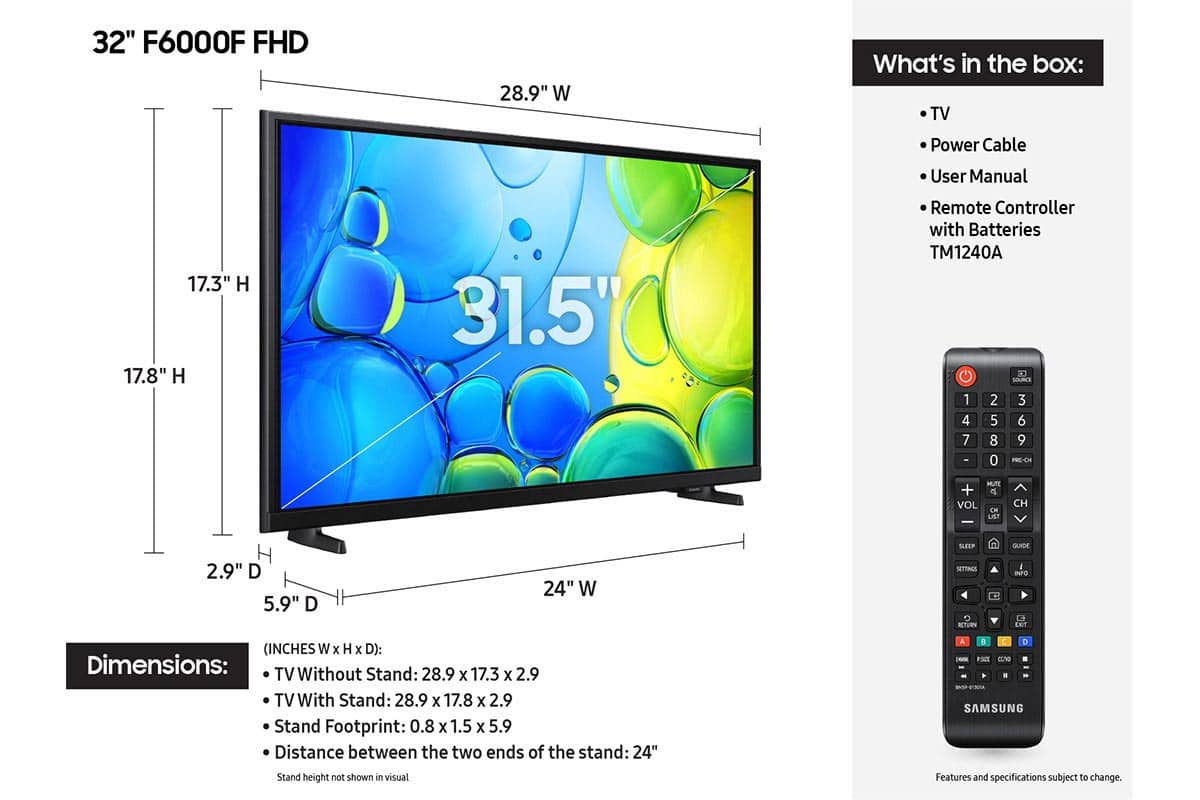






- Model:
- UN32F6000FFXZA
- SKU:
- 11997357
Rating by feature
- Picture Quality
Rating 4.8 out of 5 stars
- Sound Quality
Rating 4.5 out of 5 stars
- Brightness
Rating 4.8 out of 5 stars
- Pros mentioned:Picture quality
Crap
||Posted . Owned for 1 month when reviewed.This reviewer received promo considerations or sweepstakes entry for writing a review.The TV is great but when ordering and going to pick it up and it was given away to another customer and then had to wait until a new one made the experience suck
I would recommend this to a friendBrand response from Samsung
Posted .Hi Rangers,
I'm very sorry to hear about your purchase and pick-up experience at Best Buy. I hope they were able to resolve the issue without incident.
If you ever have questions or need support, we’re here to help. Call us at 1-800-SAMSUNG, available from 8AM - 12AM EST, seven days a week. You can also connect with a LiveChat agent by clicking the ‘Support’ link on our website.
~Samsung Advisor
Bad item
||Posted . Owned for 2 weeks when reviewed.This reviewer received promo considerations or sweepstakes entry for writing a review.The tv gets freezed all the time. It look good, but i cant wath a movie cause it freeze or gets me out of it. Does not work
No, I would not recommend this to a friendBrand response from Samsung
Posted .Hi RosarioL,
Thank you for your feedback. If your F6000F TV freezes or becomes unresponsive:
1. Cold boot – Hold the Power button on your remote for 5+ seconds until the TV restarts.
2. Update firmware – Home > left directional key > Settings > Support > Software Update > Update Now
3. Run Device Care – Home > left directional key > Settings > Support > Device Care > Start Device Care
If issues continue, contact Samsung Support at 1-800-SAMSUNG, 8AM – 12AM EST, 7 days a week. LiveChat is also available under the ‘Support’ link on our website.
~ Samsung Advisor
A complete ripoff
||Posted .This reviewer received promo considerations or sweepstakes entry for writing a review.I've been waiting for almost three weeks to get my television because FedEx can't find it and trying to reach a human to speak to at customer service is next to impossible, I'm sick of waiting for a stupid code to appear. Completely unhelpful in resolving any issues so I'm apparently going to be forced to initiate a complaints with PayPal.
No, I would not recommend this to a friendBrand response from Samsung
Posted .Hi KenK,
We're very sorry to hear about your delivery experience. If you have not already done so we recommend reaching out to Best Buy directly.
If there’s anything we can assist with, please don’t hesitate to call us at 1-800-SAMSUNG, available daily from 8AM - 12AM EST. You can also visit the Samsung website and click on ‘Support’ for:
• Live Chat
• Manuals, Software, & Warranty Info
~ Samsung Advisor
Missing items
||Posted . Owned for 2 weeks when reviewed.This reviewer received promo considerations or sweepstakes entry for writing a review.Didn’t come with a power cord was not in the box. Had to go buy one for the tv.
No, I would not recommend this to a friendBrand response from Samsung
Posted .Hi JaclynR,
We're sorry to hear that you received a TV with missing parts. Please know we are always available and would have been happy to assist you. If there’s anything we can assist with, please don’t hesitate to call us at 1-800-SAMSUNG, available daily from 8AM - 12AM EST. You can also visit the Samsung website and click on ‘Support’ for:
• Live Chat
• Manuals, Software, & Warranty Info
~ Samsung Advisor
No comment
||Posted . Owned for 1 month when reviewed.This reviewer received promo considerations or sweepstakes entry for writing a review.No comment volume sometimes does not work. Apparently, when you take a warranty, it does not have anything to do with that at Best Buy.
No, I would not recommend this to a friendBrand response from Samsung
Posted .Hi ElizabethK,
I'm very sorry you are experiencing issues with your TV sound. Please know we back this TV with a 1-year manufacturer's warranty. To troubleshoot your issue and possibly schedule a warranty appointment, please call us at 1-800-SAMSUNG, available from 8AM - 12AM EST, seven days a week. You can also chat with one of our agents by clicking the ‘Support’ link on our website.
~ Samsung Advisor
Cancelled Order, delivery 10 Hours Late
||Posted . Owned for 2 weeks when reviewed.This reviewer received promo considerations or sweepstakes entry for writing a review.Very bad. Delivery was 10 hours late. Cancelled order.
No, I would not recommend this to a friendBrand response from Samsung
Posted .Hi CorineE,
We're very sorry to hear that your order was not delivered on time, which resulted in a cancellation. We hope you’ll consider Samsung again in the future. If you do, we’re always here to help with setup and support. Reach us at 1-800-SAMSUNG (8AM – 12AM EST, 7 days a week), or visit our website to chat live and access manuals or software.
~Samsung Advisor
ummmmm
||Posted .This reviewer received promo considerations or sweepstakes entry for writing a review.I ordered this and it was lost in transit -- very minimal communication - I had to cancel and reorder for a much higher price
No, I would not recommend this to a friendBrand response from Samsung
Posted .Hi upset,
Thank you for your patience while dealing with an item lost in transit. If there’s anything we can assist with, please don’t hesitate to call us at 1-800-SAMSUNG, available daily from 8AM - 12AM EST. You can also visit the Samsung website and click on ‘Support’ for:
• Live Chat
• Manuals, Software, & Warranty Info
~ Samsung Advisor
Samsung tv
||Posted . Owned for 1 month when reviewed.This reviewer received promo considerations or sweepstakes entry for writing a review.Samsung tv is a piece of s—- the hand control is hard to work
No, I would not recommend this to a friendBrand response from Samsung
Posted .Hi JaneP,
We appreciate you sharing your user experience. To help you get the most from your TV, you can download the full e-Manual and more by visiting Samsung’s website then navigating to: Support > Manual & Software > TVs & Home Theater. From there, you can search for and select your F6000F TV model to view or download the available guides.
The e-Manual and Remote Control Guide are also conveniently built into your TV: Settings > Support > Tips and User Guides
If you need additional help, please contact Samsung Support at 1-800-SAMSUNG, 8AM – 12AM EST, 7 days a week. LiveChat agents are also available through the ‘Support’ link on our website.
~ Samsung Advisor
- Pros mentioned:Picture quality, Setup ease
Samsung tv
Posted .This reviewer received promo considerations or sweepstakes entry for writing a review.This tv has smsrt tv has a great picture, easy to set up.
I would recommend this to a friend - Pros mentioned:Picture quality
A sweet tv
Posted .This reviewer received promo considerations or sweepstakes entry for writing a review.A great tv with beautiful picture quality. Sharp bright colors and skin tones. Easy to access the streaming apps.
I would recommend this to a friend - Pros mentioned:Picture quality
Samsung - 32" class F6000F Series review
Posted .This reviewer received promo considerations or sweepstakes entry for writing a review.I totally love Samsung tv's period. However the only issue I have with this tv, the 32" class F6000F Series, is when you turn it on it's a display of apps instead of what's on from the last channel you watched. Everybody isn't a app person. Other than that, I love love love my Samsung tv. 3rd one I own, picture and sound quality is the best.
I would recommend this to a friend - Pros mentioned:Weight
Excellent
Posted .This reviewer received promo considerations or sweepstakes entry for writing a review.excellent pixels, light-weight - perfect for wall mount, which the Geek Squad installed
I would recommend this to a friend - Pros mentioned:Picture quality
My samsung tv!
Posted .This reviewer received promo considerations or sweepstakes entry for writing a review.Excellent quality! Love watching Korean drama on my samsung tv!
I would recommend this to a friend - Pros mentioned:Picture quality
Great deal
Posted .This reviewer received promo considerations or sweepstakes entry for writing a review.Great TV for been free with purchase of an OLED TV!
I would recommend this to a friend - Pros mentioned:Size
Extra Samsung for Bedroom
Posted .This reviewer received promo considerations or sweepstakes entry for writing a review.This was just the right size for late evening viewing in bed
I would recommend this to a friend 55 inch tv
Posted .This reviewer received promo considerations or sweepstakes entry for writing a review.very nive tv sale price open box like new got it at the Bridgeton outlet store sales person very nice and attentive
I would recommend this to a friend- Pros mentioned:Picture quality
Great TV
Posted .This reviewer received promo considerations or sweepstakes entry for writing a review.Love the television. It's the 3rd one I have purchased. It is easy to set up and the quality is excellent.
I would recommend this to a friend Best Buy is Best store!
Posted .This reviewer received promo considerations or sweepstakes entry for writing a review.Great customer service, easy purchase, delivery and set up for us! We love Best Buy!
I would recommend this to a friend32 inch TV
Posted .This reviewer received promo considerations or sweepstakes entry for writing a review.it works !!! The 2 legs / feet are difficult to install in the TV amd when installed it is a bit wobbly .
I would recommend this to a friendBrand response from Samsung
Posted .Hi Dennis,
Thank you for sharing your concerns. Please know that the TV stand was solidly designed and extensively tested for stability. If your stand seems wobbly or looks crooked, please ensure the legs are installed correctly: “R” on the right, “L” on the left. The legs should slant outward toward the edges of the TV, and you should hear a “click” once they’re fully inserted. Also, make sure the TV is placed on a flat, level surface to avoid tilt or instability.
For step-by-step setup, refer to the Installation Guide included in the box, or download it at: https://www.samsung.com/us/support/downloads/
If you need more help, please reach out to Samsung Support at 1-800-SAMSUNG, available daily from 8AM - 12AM EST. You can also visit the Samsung website and click on ‘Support’ for:
• Live Chat
• Manuals, Software, & Warranty Info
~ Samsung Advisor
Volume is horrible
Posted .This reviewer received promo considerations or sweepstakes entry for writing a review.Bought this tv today for my sons room and the volume is extremly LOW we put it up in the 60s and still struggle to hear it. We will probably have to buy a sound bar or some. So beware.
No, I would not recommend this to a friendBrand response from Samsung
Posted .Hi hello92,
Thank you for purchasing Samsung’s F6000F TV and for sharing your feedback regarding low volume. To start, we recommend making sure your TV is running the latest firmware, as updates can include improvements to sound performance: Home > left directional key > Settings > Support > Software Update.
If volume levels still seem too low, you can improve sound performance by adjusting a few key settings:
Sound Mode: Navigate to: Settings > All Settings > Sound > Sound Mode
Auto Volume: This feature helps maintain consistent volume levels across content and input sources. Turn it on under: Settings > All Settings > Sound > Expert Settings > Auto Volume = On
You can also explore Expert Settings to fine-tune sound output with adjustments for Balance, Equalizer, and more.
For personalized support with these settings or selecting a soundbar to complement your setup, contact Samsung Support at 1-800-SAMSUNG (8AM – 12AM EST, 7 days a week) or use LiveChat via the ‘Support’ link on our website.
~ Samsung Advisor