Customer Ratings & Reviews





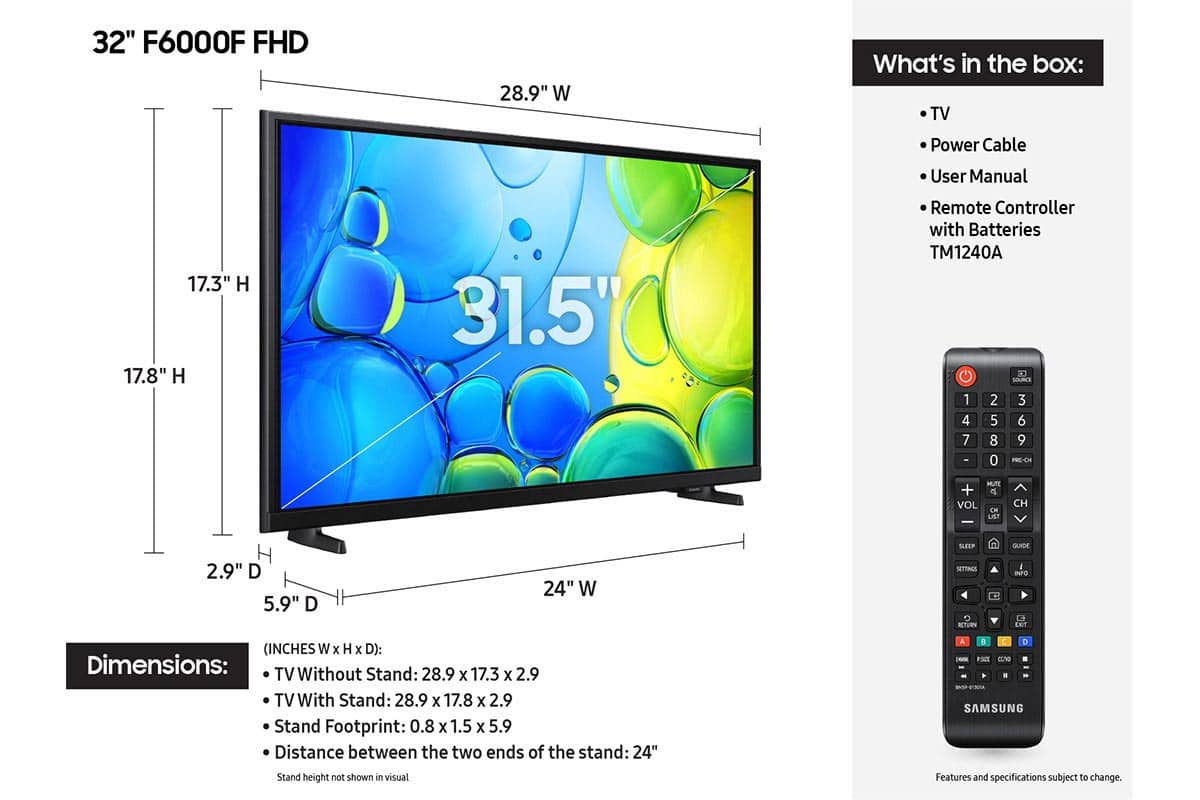






- Model:
- UN32F6000FFXZA
- SKU:
- 12172361
Rating by feature
- Picture Quality
Rating 4.8 out of 5 stars
- Sound Quality
Rating 4.5 out of 5 stars
- Brightness
Rating 4.8 out of 5 stars
- Pros mentioned:Picture quality
Samsung 32” TV
||Posted .This reviewer received promo considerations or sweepstakes entry for writing a review.TV is really clear and colors are vibrant. I would purchase again.
I would recommend this to a friend - Pros mentioned:Setup ease
Highly Recommend Samsung 32" Smart TV
||Posted .This reviewer received promo considerations or sweepstakes entry for writing a review.Perfect TV for guest room, sitting room and the ease of setup to connect with existing main TV is so simple!
I would recommend this to a friend - Pros mentioned:Picture quality
Excellent small TV
||Posted . Owned for 1 month when reviewed.This reviewer received promo considerations or sweepstakes entry for writing a review.Great quality and clarity for an amazing price. Great for a small room.
I would recommend this to a friend Nice TV, but.......
||Posted .This reviewer received promo considerations or sweepstakes entry for writing a review.Purchased as a bedroom TV. Shocked to find there is no sleep timer. Thought about returning it, but decided to keep it to see if I could live without the sleep function. May live to regret it.
I would recommend this to a friend- Pros mentioned:Picture quality
Good little tv
||Posted .This reviewer received promo considerations or sweepstakes entry for writing a review.Great little tv for the price. Good picture and sound.
I would recommend this to a friend - Pros mentioned:Picture quality
Good Buy
||Posted . Owned for 2 weeks when reviewed.This reviewer received promo considerations or sweepstakes entry for writing a review.Great quality in the picture and sound. Enjoy watching in our kitchen.
I would recommend this to a friend - Pros mentioned:Picture quality
Great for My Budget!
||Posted .This reviewer received promo considerations or sweepstakes entry for writing a review.This Open Box TV works so well! The picture is clear and it was very affordable for my budget.
I would recommend this to a friend - Pros mentioned:Picture quality
New 32” Samsung
||Posted . Owned for 3 weeks when reviewed.This reviewer received promo considerations or sweepstakes entry for writing a review.TV is great! They are getting increasingly more difficult to program. Also different Samsungs have different remotes. Goofy!
I would recommend this to a friend - Pros mentioned:Picture quality
Survey
||Posted . Owned for 3 weeks when reviewed.This reviewer received promo considerations or sweepstakes entry for writing a review.So far tv is the got a great picture, nice and sharp. Best buy is the only place buy my electronics, appliances, and computers from.
I would recommend this to a friend - Pros mentioned:Setup ease
Perfect for the job
||Posted . Owned for 3 weeks when reviewed.This reviewer received promo considerations or sweepstakes entry for writing a review.Perfect for it is need for simple set upand easy to navigate
I would recommend this to a friend - Pros mentioned:Picture quality
Good value
||Posted .This reviewer received promo considerations or sweepstakes entry for writing a review.Good quality TV at this screen size and good value for money. Would be nice to override the home screen on the Tizen OS and just drop right into the cable box's home screen experience.
I would recommend this to a friend - Pros mentioned:Picture quality
FZ's TV's
||Posted . Owned for 3 weeks when reviewed.This reviewer received promo considerations or sweepstakes entry for writing a review.I'm quite pleased with the Samsung line of TV's. We have a 55 inch Samsung in the family room and a 40 inch Samsung in the master. This 32 inch Samsung replaced a 32 inch LG that we had in the guest bedroom.
I would recommend this to a friend 32” samsung tv
||Posted . Owned for 2 weeks when reviewed.This reviewer received promo considerations or sweepstakes entry for writing a review.Nice and picture is very very clear! We sometimes watch black and white tv shows and the screen is incredible!
I would recommend this to a friend- Pros mentioned:Picture quality
Best that money can buy!
||Posted . Owned for 3 weeks when reviewed.This reviewer received promo considerations or sweepstakes entry for writing a review.This is my third purchase of a Samsung smart tv. They are the best that money can buy. Everything about it is wonderful.
I would recommend this to a friend - Pros mentioned:Size
Great television
||Posted .This reviewer received promo considerations or sweepstakes entry for writing a review.Nice little tv, great for my granddaughters bedroom at a great price
I would recommend this to a friend - Pros mentioned:Picture quality
Samsung TV ❤️
||Posted . Owned for 1 month when reviewed.This reviewer received promo considerations or sweepstakes entry for writing a review.Love this TV. Just what we wanted for bedroom. Great quality.
I would recommend this to a friend - Pros mentioned:Picture quality
Samsung tv
||Posted .This reviewer received promo considerations or sweepstakes entry for writing a review.Best purchase I've made in a while. Excellent picture
I would recommend this to a friend - Pros mentioned:Size
Kithcen TV
||Posted . Owned for 2 weeks when reviewed.This reviewer received promo considerations or sweepstakes entry for writing a review.Bought this TV for the kitchen to replace the old and very small one we had. What a difference!! Great find for an amazing price.
I would recommend this to a friend - Pros mentioned:Picture quality
SAMSUNG SMART TV
||Posted . Owned for 3 weeks when reviewed.This reviewer received promo considerations or sweepstakes entry for writing a review.GOOD PICTURE, POOR SPEAKER VOLUME. DOES NOT PICK UP ALL LOCAL CHANNELS SCANNED IN MY AREA. HARD FOR ME TO PROGRAM OTHER FEATURES ON THE TV (PROBALLY AGE RELATED) ;)
No, I would not recommend this to a friendBrand response from Samsung
Posted .Hi TOPDAWG,
Thank you for your review. If the volume on your Samsung F6000F TV seems too low, we recommend checking for firmware updates: Settings > Support > Software Update > Update Now
Then, go to: Settings > All Settings > Sound > Sound Mode and try Amplify to boost dialogue and upper tones.
To maintain consistent volume across channels and apps, enable Auto Volume under: Settings > All Settings > Sound > Expert Settings > Auto Volume = On
For further help, please contact Samsung Support at 1-800-SAMSUNG (8AM – 12AM EST, 7 days a week) or use LiveChat via the ‘Support’ link on our website.
~ Samsung Advisor
- Pros mentioned:Picture quality
Good tv
||Posted .This reviewer received promo considerations or sweepstakes entry for writing a review.Got it opened box and it works like brand new. Good picture and easy to navigate
I would recommend this to a friend