Customer Ratings & Reviews








- Model:
- QN55S90FAFXZA
- SKU:
- 10504727
Rating by feature
- Picture Quality
Rating 4.9 out of 5 stars
- Sound Quality
Rating 4.7 out of 5 stars
- Brightness
Rating 4.9 out of 5 stars
Superb!!!!!
||Posted . Owned for 1 week when reviewed.This reviewer received promo considerations or sweepstakes entry for writing a review.It was above my expectations. Nice size and a super nice quality. I will purchase another ine fir Christmas. Love Samsung brand.
I would recommend this to a friendSwitched to Samsung
||Posted . Owned for 2 weeks when reviewed.This reviewer received promo considerations or sweepstakes entry for writing a review.The samsung Oled S90F 55" I purchased has amazing color and fast gaming response I'm usually a Sony buyer but no longer!!
I would recommend this to a friendGreat TV
||Posted . Owned for 3 weeks when reviewed.This reviewer received promo considerations or sweepstakes entry for writing a review.I have waited a long time for a bigger TV and I’m very happy with this one. It’s easy to use and the color is so natural. I’m very happy with this purchase.
I would recommend this to a friendThis is a Buy!
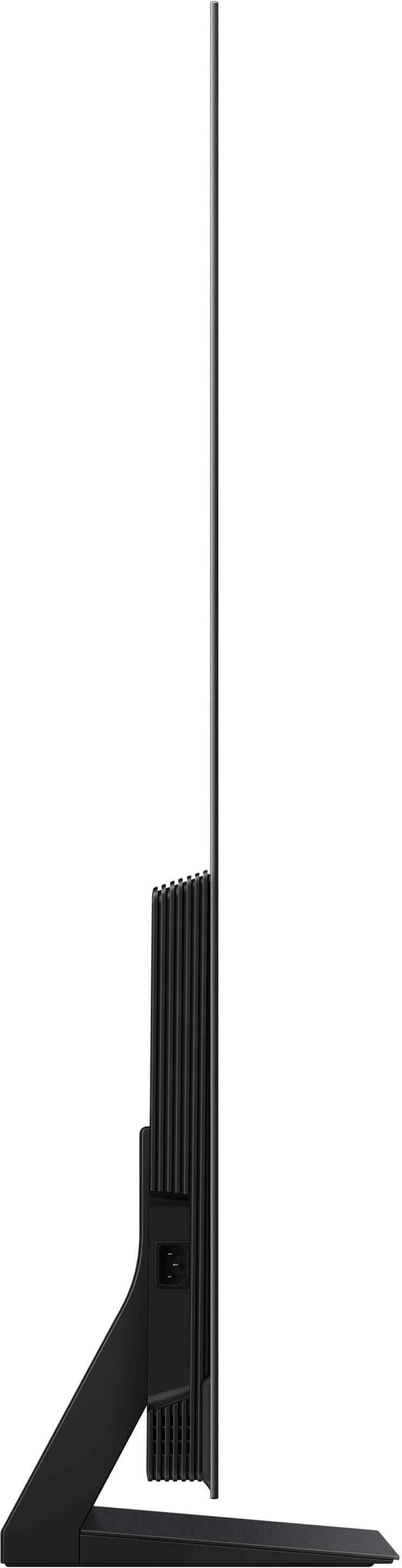
||Posted .This reviewer received promo considerations or sweepstakes entry for writing a review.Great picture and sound. The screen depth is so incredibly thin its like having a piece of glass for a screen. The only drawback to this is the perceived chance of bending or hurting the screen if not moving it carefully with two hands. Color mix is good, images are detailed and crisp. Syfy movies look exceptionally impressive on it.
I would recommend this to a friendSamsung
Posted .This reviewer received promo considerations or sweepstakes entry for writing a review.This Samsung is awesome. Can't go wrong with this one. Awesome buy.
I would recommend this to a friendgreat sports and movie tv
||Posted .This reviewer received promo considerations or sweepstakes entry for writing a review.just bought this samsung tv a couple of weeks ago after being with lg for several years because i just kept hearing great things about there tvs and so far the picture quality is really good and after watching a few marvel movies on disney plus in hdr i can tell that the picture quality looks just as good as dolby vision on lgs. the sound isn't bad but would recommend getting a matching samsung soundbar like i did for movie watching as you can turn on soundbar and get Q- Symphony witch blends tv speakers with samsung soundbar for an amazing true movie theater experience
I would recommend this to a friendQD Oled king
||Posted .This reviewer received promo considerations or sweepstakes entry for writing a review.Excellent TV and the best for gaming at the moment.
I would recommend this to a friendWOW!!!
||Posted . Owned for 2 weeks when reviewed.This reviewer received promo considerations or sweepstakes entry for writing a review.The picture quality is amazing! Even with sunlight shining directly on it! Next tv we get, as this was a gift, will be this one, just a larger size!
I would recommend this to a friendThe only TV you need powerful tv
||Posted . Owned for 3 weeks when reviewed.This reviewer received promo considerations or sweepstakes entry for writing a review.I love it best tv hands up Great for gaming Great for many other things such as movies Pc the color in this is next level go grab urs
I would recommend this to a friendAnother Samsung great!
||Posted . Owned for 2 weeks when reviewed.This reviewer received promo considerations or sweepstakes entry for writing a review.Best Samsung tv we have owned yet. The OLED really makes a difference. Picture is amazing and sharp
I would recommend this to a friendGreat OLED!
||Posted .This reviewer received promo considerations or sweepstakes entry for writing a review.Great TV! The colors really pop, blacks are inky black, and the interface is a smooth experience so far. Really happy with the purchase
I would recommend this to a friendExcellent Picture Quality
||Posted .This reviewer received promo considerations or sweepstakes entry for writing a review.Excellent overall picture quality with bright vibrant colors. Samsung Smart TV offers many free viewing options in high definition. Easy setup.
I would recommend this to a friendNot really worth the money.
||Posted . Owned for 1 month when reviewed.This reviewer received promo considerations or sweepstakes entry for writing a review.I’m fairly disappointed with this purchase. Not only was the price tag more than I wanted to pay anyway, but the additional protection plans, geek squad, Best Buy membership, and an unfortunate delivery fee pushed the price up $300 more. The visuals are fine, but nothing like what you see in store. The AI enhancements are unnoticeable, and the performance really doesn’t seem much different than my previous set, a Hisense 55” LED that I bought in 2018. The sound is the main problem I have with the set. It is very inconsistent, and frequently changes volume levels on its own, almost like it’s trying to tune a radio signal. I have to keep the remote in hand and change the volume several times during viewing. The surround sound feature sounds like a constant thunderstorm overhead, and makes dialogue audio and soundtrack harder to hear. Unfortunately due to the “automatic” nature of the TV’s settings, I can’t tweak the sound to lower just the bass. It’s also a pain to have to switch between game mode and regular mode for streaming. Something like that I would think would be automatic by now.
No, I would not recommend this to a friendBrand response from Samsung
Posted .ChrisN,
Thank you for sharing your experience with volume fluctuations on your TV. Here are a few steps that may help resolve the issue:
1. Turn off the Sound Sensor: Use the button located beneath the Samsung logo on the bottom of the TV. With the TV powered on, press the button to the left to turn the sensor on or to the right to turn it off.
2. Disable AI Sound Features: Some AI functions automatically analyze and adjust sound, which may cause volume to fluctuate. To disable these: Settings > All Settings > Advanced Features > AI Mode Settings > AI Mode. You can turn off all AI functions at once or toggle each setting individually.
3. Check for Firmware Updates: Keeping your TV up to date may improve audio performance: Settings > Support > Software Update > Update Now
If the issue continues after these steps, please contact Samsung Support for further assistance at 1-800-SAMSUNG, 8AM – 12AM EST, 7 days a week. LiveChat and additional support resources are also available through the Support link on our website.
~ Samsung Specialist
Great picture, but…
||Posted . Owned for 2 weeks when reviewed.This reviewer received promo considerations or sweepstakes entry for writing a review.HORRIBLY slow indexing video files on a hard drive. If you have videos on a large hard drive you want to watch you might as well forget it. Something that was instant on a 2017 q6 takes over 30 minutes if you’re lucky, and has to start from scratch every time the TV is powered on. My $50 insignia does a better job. Samsung customer service acts like it is not an issue, which is frustrating because a) it is something that has been a non-issue in the past and b) seems like such a simple fix in a software update, and c) it is unusably slow, something you wouldn’t expect from a top of the line TV at this price point. Another small negative is the Peacock native app doesn’t show in HDR for HDR programming. On the positive side, the picture is good and the screen is good at handling glare.
I would recommend this to a friendBrand response from Samsung
Posted .Buyer,
We appreciate your feedback regarding your S90F TV’s performance. If you're experiencing freezing or lag in general response time, please try the following steps:
1. Check for firmware updates – Keeping your TV up to date can resolve many performance issues: Home > left directional key > Settings > Support > Software Update > Update Now
2. Run Device Care – This tool checks system memory, frees up cached data, and closes background apps that could be slowing things down: Home > left directional key > Settings > Support > Device Care > Start Device Care
3. Cold boot your TV – With the TV powered on, press and hold the Power button on your remote for 5+ seconds until the TV restarts. This helps refresh the system.
If you're still noticing performance snags after these steps, please contact Samsung Support at 1-800-SAMSUNG, 8AM – 12AM EST, 7 days a week. You can also connect with a LiveChat agent via the ‘Support’ link on our website.
~ Samsung Specialist
Excellent
||Posted . Owned for 3 weeks when reviewed.This reviewer received promo considerations or sweepstakes entry for writing a review.Black blacks, very bright picture. Installed by BestBuy.
I would recommend this to a friendSquared Away
||Posted .This reviewer received promo considerations or sweepstakes entry for writing a review.The Samsung S90F is a solid television, everything is top notch. No complaints, This is my third Samsung television and this brand always deliverers a solid product. The picture quality is outstanding, just amazing. As for the sound, I use an AVR, Never use the television speakers. But l’ll say Average for this review. Happy customer.
I would recommend this to a friendAll I can say is WOW!!!
||Posted . Owned for less than 1 week when reviewed.This reviewer received promo considerations or sweepstakes entry for writing a review.Best TV I've ever owned. Samsung has hit it out of the park again. The color and clarity on this TV is beyond what I expected. Crisp sharp colors. All I can say is WOW!!! Buy this TV. You will not regret it.
I would recommend this to a friendGreat TV
||Posted . Owned for 2 weeks when reviewed.This reviewer received promo considerations or sweepstakes entry for writing a review.This TV is absolutely amazing. Not only is the picture amazing, but the functionality is exactly what I expect.
I would recommend this to a friendSatisfied
||Posted .This reviewer received promo considerations or sweepstakes entry for writing a review.So far so good though it appears slightly bent where there is no back paneling. (top half) If you do not have this mounted to a wall I fear this will always be an issue whether designed as such or not. Deciding to deal with it over the hassle of returning. Delivery guys said they didn't get my notes and ruined the surprise.. nothing to do with the product itself though. Again TV is performing fine so far 1 month after purchase
No, I would not recommend this to a friendJonesc
||Posted .This reviewer received promo considerations or sweepstakes entry for writing a review.Love it crisp picture, easy to set up and learn operating
I would recommend this to a friend