Customer Ratings & Reviews






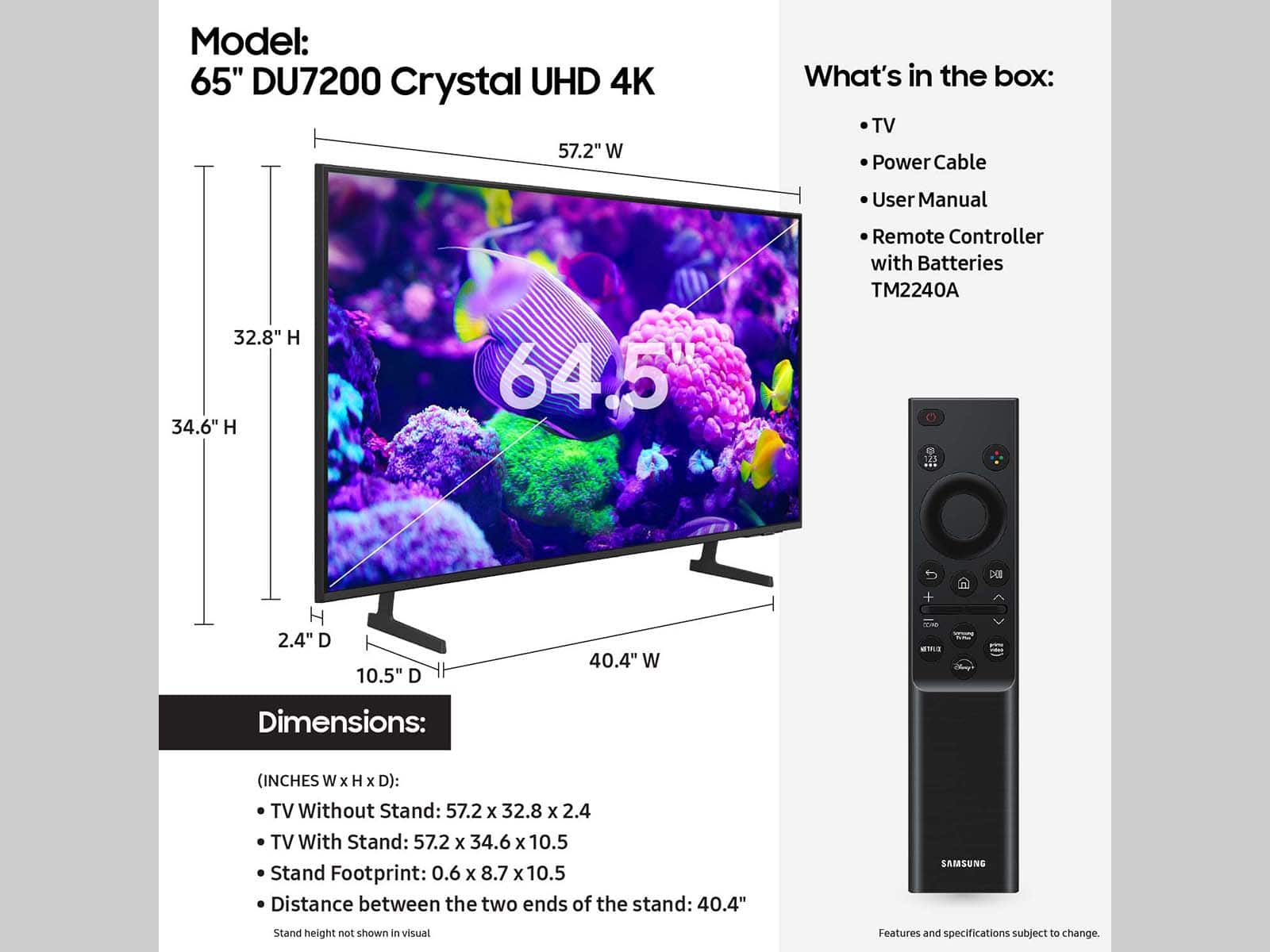





- Model:
- UN65DU7200FXZA
- SKU:
- 10362565
Rating by feature
- Picture Quality
Rating 4.8 out of 5 stars
- Sound Quality
Rating 4.6 out of 5 stars
- Brightness
Rating 4.8 out of 5 stars
Happy dude here
||Posted . Owned for 2 months when reviewed.This reviewer received promo considerations or sweepstakes entry for writing a review.Overall happy with this tv. Was on sale and i knew its what i wanted. Picture is nice, size is perfect for my living room
I would recommend this to a friendGood for what it is and would suggest if on a budg
||Posted . Owned for 11 months when reviewed.This reviewer received promo considerations or sweepstakes entry for writing a review.Good for what it is. Got this on sale for about 700. Its a step up from their base model. Only has 2 hdmi in slots. No headphone jack. Speakers are on the rear unfortunately. Colors are a little washed out as well. I can't speak about the app interface and such since i dont let this thing talk to the internet even though its always trying. One downside is that it doesnt like my jbl soundbar...or it doesnt like the tv and will cut off the signal and not turn back on without unplugging it first. (Handshaking issues)
I would recommend this to a friendBrand response from Samsung
Posted .MeMania:
We appreciate you sharing your experience when connecting your speakers to the DU7200 TV. You can connect Bluetooth audio devices to the TV. They must be paired using the TV's Bluetooth function. Go to: Settings> All Settings>> Sound > Sound Output > Bluetooth Speaker List
- If the TV fails to find a Bluetooth audio device, place the device closer to the TV and select Refresh.
- When you turn on a paired Bluetooth audio device, the TV detects it automatically and then displays a pop-up window. Use this pop-up window to activate or deactivate the Bluetooth audio device.
You can check the Connection Guide for detailed information regarding connecting your speakers. Go to Source > Connection Guide > Audio Device > Bluetooth.
Note: The sound quality may be affected by the condition of the Bluetooth connection.
If you need further assistance, please contact Samsung Customer Support, and a representative will gladly help you. 1-800-SAMSUNG, 8AM - 12AM EST, 7 days a week. Our LiveChat agents are also available by clicking on the ‘Support’ link on our website.
~ Samsung Ambassador
Great TV
||Posted . Owned for 2 weeks when reviewed.This reviewer received promo considerations or sweepstakes entry for writing a review.I really enjoy the size and the picture of this TV.
I would recommend this to a friendTheatre like.
||Posted . Owned for 9 months when reviewed.This reviewer received promo considerations or sweepstakes entry for writing a review.Very good and colourful pictures, no eye straining, outstanding.
I would recommend this to a friendSamsung TV
||Posted . Owned for 5 months when reviewed.This reviewer received promo considerations or sweepstakes entry for writing a review.Love it. Picture is perfect. It fits perfectly in my space.
I would recommend this to a friendSamsung TV and sound bar
||Posted . Owned for 1 month when reviewed.This reviewer received promo considerations or sweepstakes entry for writing a review.Great color looks good on wall. Easy to install. Love it
I would recommend this to a friendPurchased Again for all rooms
||Posted . Owned for 4 months when reviewed.This reviewer received promo considerations or sweepstakes entry for writing a review.Amazing TV love the color pixel and sound, got a soundbar and it just set off my entertainment set
I would recommend this to a friendThe right place for electronics !!
||Posted . Owned for 5 months when reviewed.This reviewer received promo considerations or sweepstakes entry for writing a review.Nice and convenient, we where so licky to find it !!
I would recommend this to a friendSamsung TV
||Posted . Owned for 3 weeks when reviewed.This reviewer received promo considerations or sweepstakes entry for writing a review.Fantastic TV, at a great price was delivered right to my door and brought inside for me!
I would recommend this to a friendCrystal Clear!
||Posted . Owned for 3 weeks when reviewed.This reviewer received promo considerations or sweepstakes entry for writing a review.Love the new TV. Great picture and great choice. You can never go wrong with a Samsung after your name!
I would recommend this to a friendGreat TV!
||Posted . Owned for 3 weeks when reviewed.This reviewer received promo considerations or sweepstakes entry for writing a review.Great picture and sound! I am very happy with this purchase!
I would recommend this to a friendSamsung TV 65”
||Posted . Owned for 1 week when reviewed.This reviewer received promo considerations or sweepstakes entry for writing a review.Very good quality!! Totally recommend. Nice image and hz. I have my ps5 and Apple TV connected to it and works like a charm!
I would recommend this to a friendGreat TV
||Posted . Owned for 1 month when reviewed.This reviewer received promo considerations or sweepstakes entry for writing a review.Great TV excellent picture love the size. The price was perfect.
I would recommend this to a friendGreat but!
||Posted . Owned for 3 weeks when reviewed.This reviewer received promo considerations or sweepstakes entry for writing a review.Very much love this tv.. Great price , nice, polite delivery people as well..
I would recommend this to a friendGood tv for the price
||Posted . Owned for 3 months when reviewed.This reviewer received promo considerations or sweepstakes entry for writing a review.Has good sound quality picture quality really good tv for the price no complaints so far
I would recommend this to a friendFills the room!
||Posted . Owned for 3 weeks when reviewed.This reviewer received promo considerations or sweepstakes entry for writing a review.This 65 “ tv has a beautiful picture and it fills the room with its awesome picture. Needs a sound bar but other than that it’s an awesome TV.
I would recommend this to a friendI love my new tv
||Posted . Owned for 3 weeks when reviewed.This reviewer received promo considerations or sweepstakes entry for writing a review.I love my new tv, the colors are amazing, it’s one of the best purchases I’ve ever made Thank you Samsung !
I would recommend this to a friendExcellent TV
||Posted . Owned for 1 month when reviewed.This reviewer received promo considerations or sweepstakes entry for writing a review.This is an amazing tv with great imagery and applications at a very accessible price range. The size is also near perfect for me because it doesn’t make my room feel overcrowded or empty. So far for me this has been an amazing purchase and I would buy it again.
I would recommend this to a friendTV
||Posted . Owned for 1 week when reviewed.This reviewer received promo considerations or sweepstakes entry for writing a review.Excellent picture, sound & love the tv I just need the bracket to put on the wall.
I would recommend this to a friendSamsung 65 inch 4k tv
||Posted . Owned for 3 weeks when reviewed.This reviewer received promo considerations or sweepstakes entry for writing a review.This tv has a great picture and the Roku stream sound bar connected smoothly and the remote is compatible
I would recommend this to a friend