Customer Ratings & Reviews


- Model:
- E7F-00001
- SKU:
- 6477102
Rating by feature
- Battery Life
Rating 4.6 out of 5 stars
- Durability
Rating 4.7 out of 5 stars
- Display
Rating 4.8 out of 5 stars
Customers are saying
Customers highly value the Surface Pro X's long battery life, excellent camera quality for clear video calls, and its lightweight and portable design. The comfortable keyboard, large and vibrant screen, and fast SSD storage are also frequently praised. While some users experienced challenges with application compatibility and performance limitations with demanding programs, the positive feedback on other features remains prominent.
This summary was generated by AI based on customer reviews.
- Pros mentioned:Battery life
Surface create for high school classroom use
||Posted . Owned for 3 weeks when reviewed.This reviewer received promo considerations or sweepstakes entry for writing a review.My son bought this for note taking and class room study. He uses the stylus for note taking. Battery life allows him to make it through a whole day without recharging.
I would recommend this to a friend - Pros mentioned:Battery life, Camera quality, Ssd

Excellent tablet, learning curve with Windows 11
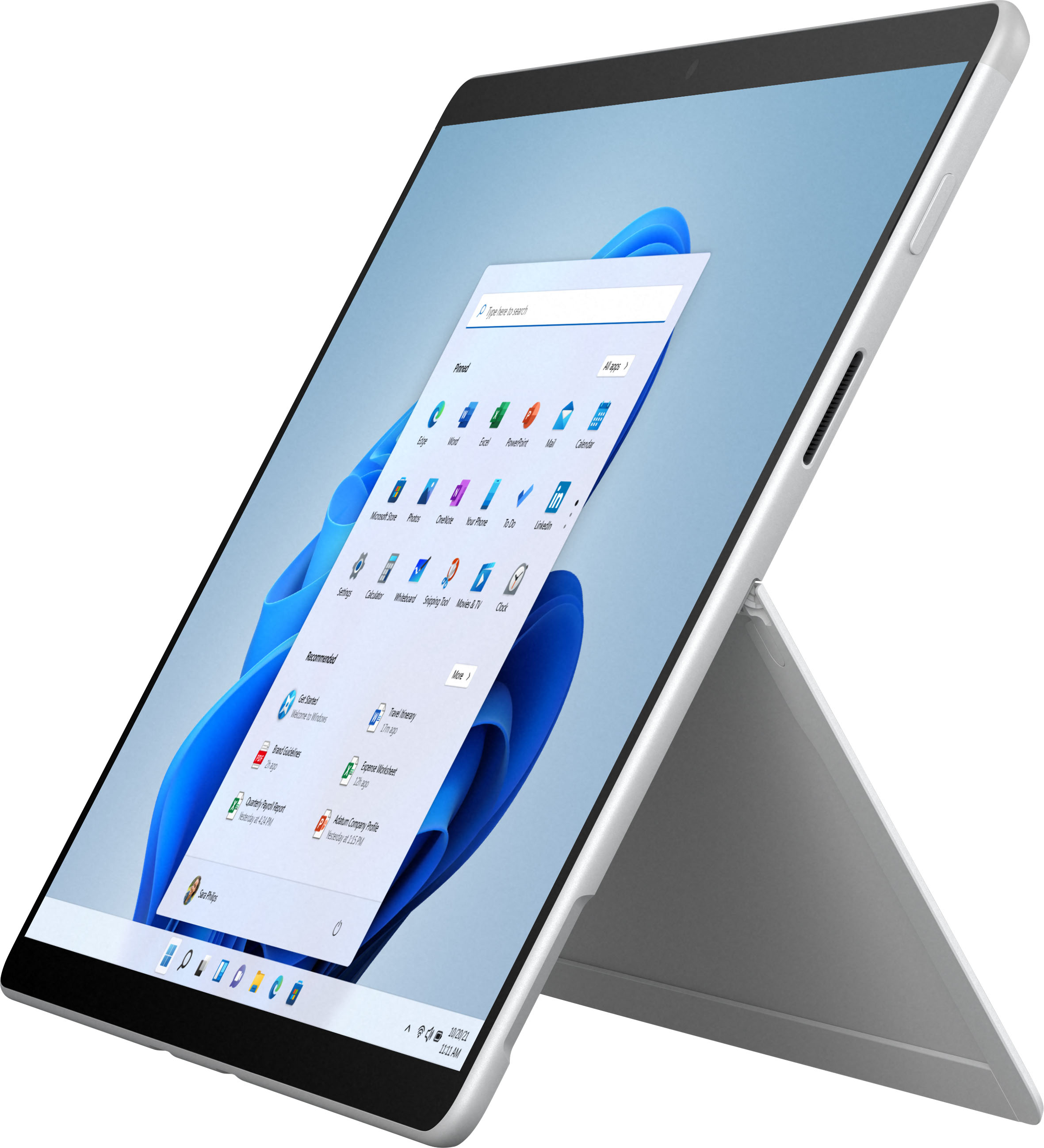
|Posted .This reviewer received promo considerations or sweepstakes entry for writing a review.First impressions of my first surface was the build. Right off the bat I was impressed with how solid and heavy it was. But still fairly thin. Its been awhile since I had a tablet and wow have they come a long way. In the box you of course get the tablet, power supply, a quick start guide and some more documents. As I mentioned the build is amazing. The kickstand is a great example of top notch engineering. Its very solid and just works like it should. Ive noticed that the new OLED Nintendo Switch seems to have used a similar design, mayne even taking inspiration from the Surface. I also like that it is sort of similar to my smart phone with the placement of the buttons. It makes it easier to get use to it. Overall the build really impressed me, so off to a good start. Setup was very easy with Windows 11 and just using your existing account to get up and running. I must admit I dont like change very much when it comes to operating systems whether its a new version of Windows or Android. Mainly because I get so use to everything, get it all set up the way I like, then usually have to start over. Windows 11 has a lot of similar and some different as well that is going to take some getting use to. Im sure in time as I learn and with future updates things will get easier. But for now Im learning. What I have noticed is that it is still very snappy and can do a lot at one time. So there isnt any delays or serious issues I ran into. Overall the set up was easy and ease of use and getting things the way I like them is going to take some time. Performance has been amazing. The 256gb SSD starts things up in a snap. And everything is fast and smooth. Im not a heavy user with tons of background processes and tabs running. But for what I use it for it worked perfect. The display is great. Its very bright, crisp, and can easily be used outdoors. The Pixelsense 2880x1920 display is 60Hz. But I didnt notice any studdering or choppiness despite the lower Hz. The scrolling was nice and smooth, no issues there. Very happy with the display quality. The battery life claims up to 15 hours of unplugged with battery life designed to last. And although it does beat my laptop by a mile it still isnt close to that 15 hours. Im sure that is under ideal conditions. I would say 5-6 hours is more realistic under normal use which is still plenty for me. The sound surprised me as well. I wasnt expecting much but they sound pretty good. Can get plenty loud without distortion and has a nice clean overall sound. Which I prefer over boom! The rest of what it has to offer such as the cameras are also great quality. Conference calls, or just video calls to family look good. And with the times we are in now this is even more important than ever to be able to see your family and friends while talking to them. The mic picked up voices very well also. Overall I am really impressed with my first Surface tablet. And with the keyboard I also received which I will review separately it comes very close to replacing my current laptop. Excellent build, solid battery life, great performance and features from Windows 11, and top notch display with solid sound its a great package.
I would recommend this to a friend surface pro x
||Posted . Owned for 1 week when reviewed.This reviewer received promo considerations or sweepstakes entry for writing a review.I've had this device for about three weeks now, and I love it. It has replaced my surface book 2 as my main teaching device; I use it everyday in the classroom to connect wirelessly to my classroom projector and to use the Microsoft Whiteboard app. The ARM apps for the device and Office 365 run very well, I've had no issues. I recently downloaded the Edge Canary (Chromium Based Edge) browser and it runs extremely well; all the sites load very fast and it has the feature to convert websites into app like programs. For instance, it converted the YouTube site into an app, and pinned to my start menu.
I would recommend this to a friend- Pros mentioned:Weight
Great tablet
||Posted . Owned for 1 month when reviewed.This reviewer received promo considerations or sweepstakes entry for writing a review.Love it. Light weight it does have a learning curve going from an iPad to this tablet but has all the features of my iPad and pc in one.
I would recommend this to a friend - Pros mentioned:Battery life, Camera quality, Ssd
Best tablet style computer I have ever used.
|Posted .This reviewer received promo considerations or sweepstakes entry for writing a review.I admit it has been a while since I used a tablet type device. A few years ago it was clear the technology was not where it needed to be for my use. Well, I think we may finally be there. So much power and versatility for such a small and lightweight device. I’m not saying this is some sort of replacement for a powerful gaming laptop…it’s not quite that. But it is the best tablet style computer I have ever used. Here is a list of just some of the aspects that I am Impressed with. • Beautiful display, bright and crisp. Gets bright enough to read outside in the sun. • Quick to wake up and pick up where I left off • Quick to boot up • Extremely quick SSD drive • Solid battery life • Fast processing of most everything I have asked of it. • Decent multi tasking abilities • Excellent response on touch screen • Connects and maintains connection to my notoriously unstable (mountain living lol) internet • Blue Tooth connects to everything I have tried • Bluestacks android emulator worked and ran every app I tried • Installed steam and ran some mid level graphic/processing intensive games quite well. Though I have read there is some compatibility issues and not all programs will run. I Also have a keyboard (MS Surface Pro Signature Keyboard w Surface Slim Pen) attached to it and the built in kick stand support works quite will together. The sturdiness and design of the kickstand are excellent. The slim pen that came with the keyboard works wonderfully as well. This is the first pen I have ever actually really enjoyed using on a touch screen ever. Be it laptop, tablet or phone. The charging port uses a magnetic connection. At first I was afraid this might pop out too easily when using it. I haven’t had this problem once yet. I’m now starting to really like this design as it should minimize wear and tear at the point of connection between the charging cable and the device. The camera on it looks great and I like how simple it was to set up the log in security of not needing a password to log in. It just looks at me and grants me access. The speakers on it are surprisingly decent for needing to be so small. Streaming to my TV or wireless monitor was both easy to set up and worked beautifully. This device has also introduced me to windows 11. I have been using Windows 10 for a few years now. The transition was pretty easy. There were a few….ok where is this is or that moments. But the transition was easy. So far there has been nothing new that I really love or dislike about 11. I think I’ll need to upgrade my PC before I really notice any major changes with performance. All in all I really love this device. Beautiful, powerful and very compact. If you are looking for a tablet style device with some solid processing power I would recommend this computer.
I would recommend this to a friendBrand response from MicrosoftOutreachTeam
Posted .Hi – Thank you for sharing your thoughts and feedback on your new Surface Pro X. We hope it continues to serve you well. Erica, Microsoft Outreach Team

- Pros mentioned:Battery life, WeightCons mentioned:Processor speed
Nice Tablet
|Posted .This reviewer received promo considerations or sweepstakes entry for writing a review.I’ve been wanting to upgrade to a Surface tablet from a Samsung tablet for a while now and finally made the jump. Pulling the tablet out of the box it had a nice, quality feel to it and was thin and lightweight. I love the 13” size of the screen and personally find it a little more usable than a 10” tablet, although at times I miss some of the compactness that comes with a smaller screen. During startup it had some updates for Windows 11 to install that took about 20 minutes and I was up and running. Windows 11 is a significant change from Windows 10 for those who have not used it yet and I’m still getting used to the different way of finding my way around the software. Some things seem easier and some things take a little getting used to. The change reminds me a little of the differences between Windows 7 and Windows 8. The screen is vibrant and easy to see in any environment with great viewing angles. The touch screen works great and I had no problems interacting with the screen. The tablet is light and easy to hold. I paired the tablet with a keyboard and pen and the items worked flawlessly together and essentially turned my tablet into a small laptop. Microsoft states the battery will last 15 hours under typical device usage. I averaged between 10 and 11 hours per charge, but I was using the tablet with a keyboard attached the entire time, which I’m sure affected the battery some. I had no issue getting my Office app subscription up and running on the tablet, but there are still some programs that won’t run on the ARM processor so make sure to research any software you might be using to make sure it will run on the device. I also found a few apps to be a little laggy. For me this was most notable in Microsoft Edge with animations as sometimes they just didn’t play smoothly. The tablet doesn’t come with a keyboard, but one can be purchased separately. My only real gripe came when I coupled the tablet with a keyboard and placed it on my lap. When I pulled the kickstand out to keep the tablet standing up on my lap the kickstand dug into my legs and got uncomfortable after just a few minutes. It would be nice if the edge of the kickstand had a thicker edge to help prevent that. Overall, I’m really enjoying the Surface. It’s slim, lightweight, decent battery life and when you get a keyboard you essentially turn the tablet into a small laptop. It worked great on a recent trip I took as it weighed next to nothing in my laptop case as I walked around the airport and it was a great size for use during the flight to watch some TV shows I downloaded.
I would recommend this to a friendBrand response from MicrosoftOutreachTeam
Posted .Hi – Thanks for giving Surface a try, welcome to the family! It’s great to hear that Surface Pro X is a good fit for your needs. We hope it continues to serve you well. Erica, Microsoft Outreach Team
- Pros mentioned:Battery life, Camera qualityCons mentioned:Performance, Processor speed
Great Surface If You Are Not a Professional
|Posted .This reviewer received promo considerations or sweepstakes entry for writing a review.This Surface Pro X is a premium feeling, quality inspiring device. This is much more than any tablet and much more functional than a tablet. This is an actual computer and it performs like one. The performance is very snappy and smooth. The screen is a thing of beauty. Watching movies such as Netflix and Disney+ looks amazing and clear. As an entertainment device, this Surface Pro X is a winner. From a productivity standpoint, doing your normal everyday things such as Office 365, surfing the internet, taking notes, and simple editing of photos, this X is perfect and fast. Windows 11 runs smooth on this and if you have used Windows 10 before, it wouldn't take you long to get used to Windows 11. The thin profile and the long lasting battery makes this device something you will not bat an eye at carrying around with you everywhere, all the time. The only issue I would think you would have with this Surface X is if you were a huge media professional or engineer of some sort. Since this is an ARM processor, certain applications will not run properly on this Surface Pro X. If your program's minimum requirements call for an Intel processor, it probably won't install on the X. Apps such as SketchUp, AutoCAD might be a no go for the X. Adobe Photoshop for ARM processors is in the works but might not run as smooth as if you were to own an Intel based Surface Pro. So if you wanted a laptop that is touch screen, portable, light, and just attractive and probably only do essential computing, this Surface Pro X is worth the savings over an Intel based Surface. If you plan on doing computationally intensive programs or gaming, I would go with the Intel based Surface. Otherwise, this Surface Pro X running Windows 11 will probably be in our rotation for a long time to come.
I would recommend this to a friend - Pros mentioned:Battery life, Camera quality, Keyboard
Awesome Tablet Better Than Ipad
|Posted .This reviewer received promo considerations or sweepstakes entry for writing a review.I received this tablet and the keyboard and pen Friday and i absolutely love it! Its like a tablet/laptop all in one. Ive been used to using apple products but rencently have switched to microsoft just because of the open os it has and was tired of being limited by what i could do on apples os. I love the Surface Pros flip out stand. It makes it easier for setting up the device for video interviews or even watching videos. The resolution is crystal clear and makes everything sharp and easy to view. The new windows 11 os is awesome and has cleaner look and is much like windows 10. I didnt really notice any significant changes between Windows 10 & 11. The surface pro seems to handle Xbox's cloud gaming and streaming really well but is not much for actual pc gaming. The surface pro x is more for work and school based on its productivity and ease of use much lime the surface laptop 4. The quality of the surface pro x is phenominal! It has a nice screen and also 2 usb-c ports if you want to charge your phone or other devices that use the usb-c ports. Its very lightweight and durable. The battery seems to last a long time. Received this product Friday and i havent even charged it up yet. The keboard and pen are very handy as well. The keyboard magnetically snaps into place on the bottom of the device and the top slot where the pen is located also has a magnetic lock to quickly snap to the bottom part of the screen to hide the pen compartment so it doesnt fall out. This makes it usefull so you dont acidentally lose the pen and have to shell out money to buy another one. The keyboard also acts as a cover for the screen so you don't have to keep detatching and re-attaching it. I love the fact that i can detach the keyboard if i want to use it as a tablet or keep it attached to use the surface pro lime a laptop. The surface pro x is a handy device with speed, comfortatability, and productivity. Its the perfect device for home, work or school. I would definitely recommend this to any consumer looking to upgrade their existing tablet or a new tablet overall as a first time purchase. You can't beat the price for a quality product. It may cost you a little more than an ipad but its definitey work it.
I would recommend this to a friend - Pros mentioned:Battery life
Update and Upgrade
||Posted . Owned for 1 week when reviewed.This reviewer received promo considerations or sweepstakes entry for writing a review.Hope to get the full six years of service out of this Surface to match the service of the Surface it replaces
I would recommend this to a friend - Pros mentioned:Weight
worth it
||Posted . Owned for 2 weeks when reviewed.This reviewer received promo considerations or sweepstakes entry for writing a review.It's a perfect size and weight. Don't need to spend the money for the Pro 8
I would recommend this to a friend - Cons mentioned:Performance
Lemon
||Posted . Owned for 1 month when reviewed.This reviewer received promo considerations or sweepstakes entry for writing a review.it repeatedly failed, best buy repair guys would get it working then basic programs like outlook and Edge would not load, clearly a lemon. Luckily Best buy allowed us to return and got an apple
No, I would not recommend this to a friend Great!
||Posted . Owned for 1 month when reviewed.This reviewer received promo considerations or sweepstakes entry for writing a review.Honestly I love this laptop/tablet. So easy to carry around anywhere. Only con I would have to say is that if you dont make frequent software updates and let them slid, it will freeze. But all you need to do it turn it off and start those downloads.
I would recommend this to a friendSurface - Great!
||Posted . Owned for 3 months when reviewed.This reviewer received promo considerations or sweepstakes entry for writing a review.I was skeptical of this surface since I am an apple fan boy but got to say I am impressed on how far microsoft has come with the surface products! High recommend for work related tasks and not so much for gaming.
I would recommend this to a friend- Pros mentioned:Camera qualityCons mentioned:Processor speed
Nice with limitations
|Posted .This reviewer received promo considerations or sweepstakes entry for writing a review.I have been using the Surface Pro 3 at work for quite a while and is nearing end of life and when this version of the Surface Pro Line came out, I was interested in giving it a go. It is definitely a niche product and not going to be for everyone. Build - Microsoft has certainly scored big here with the build quality as it feels like a high end tablet with just enough weight to feel substantial but not light enough to feel cheaply made. I love the rounded edges and the glass meets the metal perfectly. 5/5 here. Display - Simply gorgeous 2880 x 1920. Oddly though - small bezel on right and left, larger bezel top and bottom. It does not take away from the great resolution but the optics look off a bit. 4/5 here. Sound and Camera - No issues here. Music and video playback sounded great and zoom calls were crystal clear. 5/5 here. Battery Life - Microsoft boasts 15 hours - I was only able to get about 11.5 hours with simple normal day to day tasks - email, browsing web, etc. 4/5 here. Charging - In the year of 2021 I cannot understand for the life of me why there are proprietary chargers as this machine comes with. A large brick that attaches to another cord that then attaches to the Surface Pro X. In the era of simple USB-C charging capability, this is simply a big negative. This is the same charger that I had with my Surface Pro 3 and I had to buy 3 chargers over the 5 years of using it as the wire that connects to the 1-inch connector to the machine would bend over time and become nonfunctional. 2/5 here. Processor and ARM - I am mixed on this platform for this type of device - Windows 11 is a very welcome refresh from the 10 version - a more modern streamlined appearance. Having Windows 11 makes one feel that it can and should run just about anything but with ARM, this is simply not the case. For example - a very simply interface such as Sonicwall Netextender cannot be installed on this device to remote connect to my office. This program is not a processor hog and this machine could easily handle the task but unfortunately, it cannot be installed. I feel this machine is in a confused grey zone of wanting to be a tablet (with LTE capability available - not on this unit) and also wanting to be a full-fledged Windows 11 Laptop (with the keyboard/pen attached). 3.5/5 here. Price - Despite its beautiful build quality, I cannot justify the price - $1100 for the tablet plus another $280 for the Keyboard/Pen combo puts you at $1380 - simply too much. I could maybe justify $1100 for all combined - maybe. 3/5 here. All in all, this is an interesting device that is beautiful in design, does tablet computing well and tries to do laptop computing. Overall, I will give this a 4/5 while understanding it’s limitations as this is what the device was designed for. It is simply too expensive for what it does and equally importantly, what it cannot do. Would I recommend to a friend - likely not.
No, I would not recommend this to a friend Good but not the best
||Posted . Owned for 3 weeks when reviewed.This reviewer received promo considerations or sweepstakes entry for writing a review.I like my older version of the surface pro better. This unit works well but can be cantankerous at times. But at least I can use Wi-Fi.
I would recommend this to a friend- Pros mentioned:Battery life, SsdCons mentioned:Performance
Surface Pro X with an ARM chip
|Posted .This reviewer received promo considerations or sweepstakes entry for writing a review.The Surface Pro X with the SQ1 ARM64 makes for an okay portable tablet/PC laptop alternative. With 8GB of ram and a 256GB ssd hard drive, it feels fairly snappy but I can't help but feel that it just doesn't quite have that PC punch. The 13" 2880 X 1920 resolution screen is plenty bright and very clear. Don't expect to do much work with intensive programs and gaming. Microsoft Office runs fine and surfing the web is also fine. This is an okay substitute for a laptop where portability is at the forefront. It's light with a long lasting battery and is suitable for light duty and minor tasks.
I would recommend this to a friend - Pros mentioned:Camera quality, Keyboard
It's a Tablet, it's a Laptop...it's both!
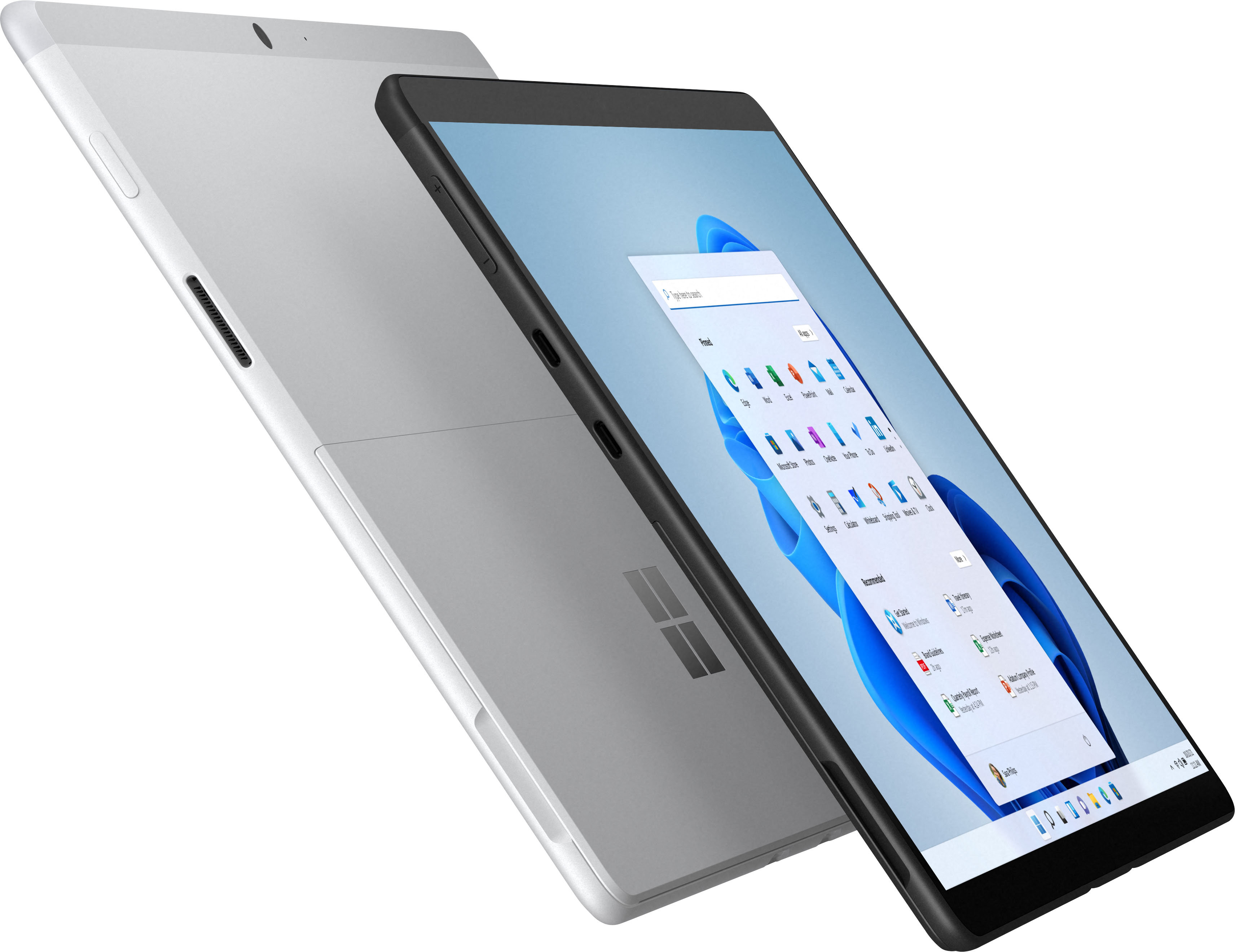
|Posted .This reviewer received promo considerations or sweepstakes entry for writing a review.As an on-the-go professional I’m always looking for technology that aligns with my lifestyle and needs on the road. The new Microsoft Surface Pro X 13” with Windows 11 is a welcome addition to my mobile office. After having an opportunity to use it for a week now, I’m still trying to decide if it’s going to be my go-to tablet, laptop….or both. This is a great problem to have! In the box: Surface Pro X 13”, power brick & cable and Quick Start guide. Additional equipment: Surface Pro Signature Keyboard with Surface Slim Pen 2 was used as part of the testing process. First Impressions: Out of the box the first thing you notice is the high-end build quality of the Surface. It’s substantial in hand, but not overly heavy. The edges of the unit are beveled so when using it as a tablet, it feels comfortable in hand. The built-in kickstand is a big plus when using it as a laptop…this is something my other devices don’t have. It’s tight and secure and easy to open and close. At 13” it’s a perfect size for watching a show or working on spreadsheets and it fits nicely into a slim bag/backpack. The power and volume switches are positioned on the right and left edges respectively. There are also 2 USB-C ports and the charging port. I do like the overall smaller size of the charging brick and cable. It connects magnetically to the Surface. User Experience: As mentioned earlier, this unit shipped with the new Windows 11 installed and a Surface Pro Signature keypad and pen 2. The keyboard connects magnetically to the bottom edge of the Surface and acts as a screen protector when closed. The pen sits in a magnetic tray on the keypad. The tray area folds up to cover the pen when not being used and also puts a nice angle on the keypad…it’s the little details Microsoft got right! Having used multiple versions of Windows over the years, I find 11 to be much cleaner with a more professional feel vs. Windows 10. Folders, Widgets, Apps, etc. are pinned to the center of the tray. It’s clean and easy to customize to any user’s liking. There’s also an option for creating multiple desktops. This is very useful when running Office apps and creativity apps simultaneously. Just create a desktop for each environment and then toggle between them. Having an existing Windows 365 license made for a smooth transition onto the Surface. There were a few updates that ran on set up which took about 10-15 minutes. Once completed, I simply had to log into my account and my “office” was up and running! Teams calls are very clear and crisp, both video and audio was spectacular. I even had clients comment on the better quality on my end of the video conference on multiple occasions. The 2880x1920 resolution is more than needed for work calls but is ideal when it’s time to edit video and watch a show. Pros: - Overall build quality and design is top-notch and feels like it will last for years to come - The 13” 2880 x 1920 display is crisp and clear and the speakers/mic receive high marks - Touch screen response is precise with finger or the Surface Slim Pen 2. - Ability to connect Surface Pro Signature Keyboard is perfect for turning tablet into laptop - USB-C ports for connecting to external devices (does not support charging) - Built in folding kickstand Cons: - Proprietary charging port is understandable but USB-C charging would be a bonus in a pinch - Non-support for some apps on ARM platform, nitpicking on this one Overall the Microsoft Surface Pro X 13” has checked all the boxes for my on-the-go usage and would certainly recommend it to anyone looking for a relatively affordable and powerful 2-in-1 system.
I would recommend this to a friend - Pros mentioned:Battery lifeCons mentioned:Processor speed
Great, Portable PC!
|Posted .This reviewer received promo considerations or sweepstakes entry for writing a review.The Surface Pro X is a great option for those who want a PC experience in a tablet form factor. The Surface Pro X comes with Windows 11 preinstalled. I haven't had any experience with Windows 11 prior to owning this Surface Pro X, and I can say that I have been pleased so far with this version of Windows. It is easy to use and compliments the Surface well. After the initial updates, you'll be up and running in about an hour. I have mainly been using the Surface Pro X for media consumption and word processing. So far, the Surface has performed well. It turns on instantly, has a beautiful picture and great sound, and has been fun to use so far. Aesthetically, the Surface Pro X is a very nice-looking computer. That goes for the packaging as well. Very well presented. Everything about the design is premium. In terms of battery life, I seem to be getting about 8+ hours of "real world" use. That mainly includes watching videos, playing games or using Word. When deciding which Surface is right for you it is important to take note of the processor. With the Surface Pro X having an ARM processor, there will be some limitations as far as which programs or games it will run. I found that most of the games I play are not compatible with the Surface Pro X. Honestly this is fine. If you need to run a graphic intense game or a processor-heavy program, you should certainly look into machine with a different processor. Another item of note, is the lack of a standard headphone jack. While this doesn’t bother me in the slightest, there are folks out there who still want to be wired in for sound. Additionally, there are 2 USB C ports so you’ll have to pick up some dongles if you want full versatility. Overall, I enjoy the experience the Surface Pro X has to offer. It’s fast, has great battery life and does what I need it to do. If you are looking for the Windows experience with the portability of a tablet, then the Surface Pro X would be a good choice.
I would recommend this to a friend Surface Pro
||Posted . Owned for less than 1 week when reviewed.This reviewer received promo considerations or sweepstakes entry for writing a review.Amazing device my wife was all smiles. She loves the big screen and how easy it was to set up
I would recommend this to a friendGreat Christmas gift .
||Posted .This reviewer received promo considerations or sweepstakes entry for writing a review.Got this surface x pro for my lovely wife for Christmas, she loves it!
I would recommend this to a friend
People also viewed
- Your price for this item is $299.00The comparable value for this item is $349.00