Customer Ratings & Reviews
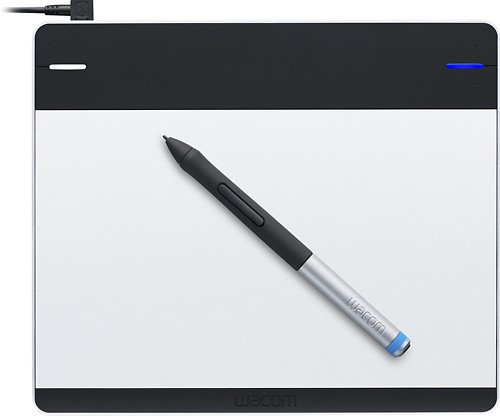
- Model:
- CTL480
- |
- SKU:
- 1680776
Customer reviews
Rating 4.4 out of 5 stars with 196 reviews
(196 customer reviews)to a friend
Customers are saying
Customers are delighted by the Intuos Creative Small Pen Tablet's ease of use, responsiveness, and small size, finding it well-suited for drawing and compatible with various programs. While some users experienced minor difficulties with software installation and pen button sensitivity, the overall experience was positive, with many praising its accuracy and affordability. The tablet's lightweight design also received positive feedback.
This summary was generated by AI based on customer reviews.
- Pros mentioned:Ease of use, Size
Rated 5 out of 5 stars
great drawing tablet value
||Posted .This reviewer received promo considerations or sweepstakes entry for writing a review.Purchased the wacom small tablet to replace and aging wacom tablet that is 8 years old. Altough larger tablet would have been even more pleasant, with the limited deskspace at college dorm desk and portability would have been an issue. Thus, i settled for the smaller tablet. Pleasantly, the smaller size is much bigger than my 8yr old wacom. The tablet is very accurate and works perfect with photoshop and illustrator. Although this particular model does not have the pressure sensitive touch, i hardly have found the need for it for my art work. Works perfectly fine with macbook. Highly recommend for entry to enthusiast users for graphic design. It is mich easiet to draw objects with te tablet than using a mouse!
I would recommend this to a friend - Pros mentioned:Ease of useCons mentioned:Setup
Rated 4 out of 5 stars
Practically required for Photoshop users
||Posted .This reviewer received promo considerations or sweepstakes entry for writing a review.I purchased the Wacom tablet due to the volume of photoshop projects that I have been working on and found it to be very nice. The set up can be frustrating, the Windows 8 set up doesn't use a disc to find the driver so it stalls on occasion during set up. It is more difficult to calibrate on a windows 8 than my windows 7 but it works fine once it is done. It is very simple to use but the fact that it has to be connected through the usb cable until I buy the extra wireless part, is kind of annoying. Over all a good product, just read the fine print.
I would recommend this to a friend - Pros mentioned:Ease of use, Responsiveness
Rated 5 out of 5 stars
Good Tablet For Budget-Minded
||Posted .This reviewer received promo considerations or sweepstakes entry for writing a review.I bought this for school and it works amazing. The pressure sensitivity is spectacular and makes drawing so much easier. Can also be used as a mouse if your lazy, or just want to get used to it. I definitely recommend this product for designers or just people who love to draw.
I would recommend this to a friend - Pros mentioned:Ease of use, Size
Rated 5 out of 5 stars
Absolutely Love
||Posted .This reviewer received promo considerations or sweepstakes entry for writing a review.If you are into illustrating, this is for you. it makes the process go by so much quicker and it is very easy to use and lightweight. The size is perfect.
I would recommend this to a friend - Pros mentioned:Ease of useCons mentioned:Pen buttons
Rated 4 out of 5 stars
great for beginners but..
||Posted .This reviewer received promo considerations or sweepstakes entry for writing a review.I have to say, I'm not a wiz at technology but this was really easy to use and set up. I recommend this for people who start off. The only down part of it is I had to constantly fix the sensitivity on my pen once I'd start to draw
I would recommend this to a friend - Pros mentioned:Ease of use, Responsiveness
Rated 4 out of 5 stars
Great graphics tablet for beginners or intermediat
||Posted .This reviewer received promo considerations or sweepstakes entry for writing a review.I really like this product it's really responsive and easy to use. It's also really light and great for comic drawing.
I would recommend this to a friend - Pros mentioned:Price
Rated 4 out of 5 stars
Perfect for Beginners
||Posted .This reviewer received promo considerations or sweepstakes entry for writing a review.Being new to the world of digital arts, this pen tablet was not bad once you get past the learning curve. It does have a learning curve and takes time to get used to, but overall it's decent for its price.
I would recommend this to a friend - Pros mentioned:Ease of use, Size
Rated 4 out of 5 stars
Great for newbies
||Posted .This reviewer received promo considerations or sweepstakes entry for writing a review.I like the tablet, its slim and fits in my laptop bag with ease. Its very simple to use and the install was fast and easy. Looking into getting a bigger one for my larger projects
I would recommend this to a friend - Pros mentioned:Ease of use
Rated 5 out of 5 stars
Great tablet for artist daughter
||Posted .This reviewer received promo considerations or sweepstakes entry for writing a review.I bought this for my 11 year old who is an artist and was doing animation with her mouse. This really sharpened up the detail and made it much easier to actually draw and animate pics. There is a larger version but this is very portable and once it is set up on all computers it just needs to be plugged in. The only issue for less tech savvy people would be that we did need to download drivers from the website to make it work. However, it also had an install disc that I didn't even bother opening so maybe this would have also updated the drivers.
I would recommend this to a friend - Pros mentioned:Ease of use
Rated 4 out of 5 stars
Great tool for photo editing
||Posted .This reviewer received promo considerations or sweepstakes entry for writing a review.I bought this for photo editing but now use it in place of my mouse. It does take practice to get used to looking at the screen while drawing on the pad but once you get the hang of it you zip right along. I find it much easier than trying to edit directly on a tablet screen. Downside is that it is an add on and takes up extra table space but I feel this is small drawback. I chose not to get the wireless version just because I did not want the hassle of having another device to charge.
No, I would not recommend this to a friend - Pros mentioned:Ease of use
Rated 5 out of 5 stars
Perfect For Starting Out
||Posted .This reviewer received promo considerations or sweepstakes entry for writing a review.Easy to setup & use! Works well with the programs that come with it as well as others that I have! It has basic options and, eventually, you'll want to upgrade to a much more expensive one. Until then, this is perfect for those artistically-inclined that want to try their hand at working on a computer instead of pen & paper. It takes some getting used to though, it's tough not looking at where your hand is instead of the screen - like when (if) you learned to type home-row. But 'practice makes perfect' and with about a week of working with it (a few hours a night) I'm doing pretty well! :)
I would recommend this to a friend - Pros mentioned:Ease of use
Rated 4 out of 5 stars
Yes
||Posted .This reviewer received promo considerations or sweepstakes entry for writing a review.It very good thing to use and I like it very good to draw and color
I would recommend this to a friend - Pros mentioned:Size
Rated 5 out of 5 stars
Wonderful Tablet
||Posted .This reviewer received promo considerations or sweepstakes entry for writing a review.Great small tablet. Only downside it that no mouse works with it, but since I have a MacBook with a track pad I can work the two together well.
I would recommend this to a friend - Pros mentioned:Ease of use, Price
Rated 4 out of 5 stars
Is good for beginners
||Posted .This reviewer received promo considerations or sweepstakes entry for writing a review.Reasonably priced. Is fairly easy to use. Good buy.
I would recommend this to a friend - Pros mentioned:Size
Rated 4 out of 5 stars
Dependable brand
||Posted .This reviewer received promo considerations or sweepstakes entry for writing a review.I purchased this item for my 15 year old daughter. She's a budding artist and graphic designer. Wacom is a dependable brand. The pen is responsive and the size is ideal.
I would recommend this to a friend - Pros mentioned:Ease of use
Rated 3 out of 5 stars
Not for me
||Posted .This reviewer received promo considerations or sweepstakes entry for writing a review.I expected this to blow me away, but it didn't. I'm not an artist in any sense of the word and I'm sure that makes a huge difference - a difference this tablet will not be able to change. I didn't expect it to, but I think some people might. I bought it for editing. It is packaged beautifully and it looks great, but it needs better instructions. The company website wasn't helpful. I got it set up - took much longer than I expected, but most of that time was spent trying to find out what to do rather than actually doing it. The power cord is too short - I and right handed and my cpu is to the left of my screen - the cord is not long enough to place the tablet to the right of my keyboard, so I have to rearrange everything on my desk to use it. So I packed it up after using it. Big mistake! Went to use it again and had to go through the whole set up and install process again!. When it is set up and my desk is cleared and I have it calibrated, it works nicely, but I can't remember where I found the information about calibrating it and I don't like it enough to spend much time looking again.
No, I would not recommend this to a friend - Pros mentioned:Responsiveness
Rated 5 out of 5 stars
Easy
||Posted .This reviewer received promo considerations or sweepstakes entry for writing a review.Very light weight, very responsive and accurate. Great value.
I would recommend this to a friend - Pros mentioned:Ease of use
Rated 4 out of 5 stars
Works well but nib wears quickly
||Posted .This reviewer received promo considerations or sweepstakes entry for writing a review.This is my 4th Wacom tablet. Very easy to set up and works well. Only problem is surface of tablet is supposed to simulate pencil on paper. It is actually more like fingernails on chalkboard. I have been using it less than a month and have had to replace the nib. If you buy this, buy lots of extra nibs.
I would recommend this to a friend - Pros mentioned:Compatibility, Ease of use
Rated 5 out of 5 stars
Good drawing tablet.
||Posted .This reviewer received promo considerations or sweepstakes entry for writing a review.My teen wanted a drawing tablet to hook up to the computer and this one fit the bill. Easy to set up and works great.
I would recommend this to a friend - Pros mentioned:Responsiveness
Rated 5 out of 5 stars
Really great tablet once you get used to it!
||Posted .This reviewer received promo considerations or sweepstakes entry for writing a review.I love the sensitivity it has, so that when I'm drawing I can be precise in my lines and when I'm coloring without having to change out size settings constantly. Though it kind of sucked when I would have to restart the driver I had installed so that I could have the sensitivity back, I think that might've just been my computer crapping out. Overall a good tablet for a good price!
I would recommend this to a friend