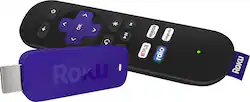
Roku - Streaming Stick - Purple/Black
- Key Specs
- Maximum Supported Resolution: 1080p
- Operating System Compatibility: Not Applicable
- General
- Product Name: Streaming Stick
- Brand: Roku
- TV Compatibility: Most HDTVs with an HDMI input
- Model Number: 3500R
- Features
- Smart Capable: true (Smart, or smart-capable devices are able to connect directly to your home network in order to stream content from the Internet, run Internet-based apps, or connect to other smart devices.)
- Compatibility
- Compatible Wireless Standard(s): Wireless N Dual Band (The wireless networking standard(s) the device is backwards compatible with. This includes networking protocols based on the IEEE 802.11 standard (alphabetically ascending) and the Wi-Fi Alliance standard (numerically ascending), both of which provide high-throughput wireless local area networks (WLANs). Devices designed to work with specific standard(s) will be backwards compatible with previous versions but may not run at optimal performance when using earlier iterations.)
- Interface(s): HDMI (Refers to the types of connections that devices use to interact and communicate with each other.)
- Other
- UPC: 829610000268
Roku Streaming Stick: Get a hub of entertainment in one convenient, compact device. Access more than 2,000 channels and cast from Netflix, YouTube and personal media directly from your smartphone or tablet to your TV.

- Wirelessly stream movies, TV shows, sports, news and more: With more than 2,000 entertainment channels at your fingertips, you can watch just about anything you want.
- Watch streaming movies and TV shows with stunning clarity: 1080p high-definition resolution* provides streaming video with lifelike detail.
- Access a world of entertainment: Log into your own subscription services, such as Netflix, Hulu, Hulu Plus, HBO GO, Amazon Video and more, rent or buy movies and TV shows on demand and more.
- Use your cell phone for simple operation: Download the Roku app on your Android or iOS device** to transform it into a Roku remote, browse and add new channels and send photos, video and music to your HDTV.
- Navigate menus and control the Roku from across the room: The remote features a point-anywhere design with channel shortcut buttons for simple operation without having to aim at your TV.
- Easily find what you want to watch: Roku Search*** allows you to view what's on across the top channels, shows you where to watch it for free and keeps you apprised of how much the different channels charge to rent or buy.
- Extended-range wireless provides smooth, fast streaming: Dual-band wireless connection streams video with ease and speed.
- Compatible with most TVs: Easily connects to HDTVs with an HDMI input. The compact stick ideally complements your flat-screen TV sleek design.
Whats Included
- Owner's manual
- Remote, 2 AA batteries
- Streaming Stick
- USB cable and power adapter
A: There is no monthly fee to use the Roku. However,there are monthly fees for subscriptions such as Netflix and Hulu.
A: Easy. I would recommend actually plugging it in to an extension cord rather then using a USB port for power as it affected the picture quality. Once its plugged into the HDMI port and has power to it, it gives you step by step instructions on set up.
Q: Which service is better Amazon or Netflix?
A: Personally Netflix, Amazon has great stuff too but it they charge for the newer movies eve when you have a prime account. So I stick with Netflix
Q: Does The Roku Streaming Stick have the same number of channels as the other Roku products?
A: I have this product, and have helped friends to set up their Roku 2's in their homes, and can tell you that both products offer access to the same channels on the channel store. The Roku stick is the cheapest of all the Roku devices, and the major difference is that this item connects to your TV by means of an HDMI wire. If your TV doesn't have an HDMI connection on it like many older TV's do not, then you would need to purchase one of the other Roku devices that allow connection to your TV using the red, white, and yellow wires. I don't remember what these are called but chances are that you've used these wires before to connect a VCR or DVD player to your TV. I hope this answers your question.
Q: How does the remote work with the stick behind the TV?
A: It works without a direct line. The remote can be pointed anywhere in the room and work.
Q: how far away from tv can the router be?
A: This actually depends on the strength of your router, but the ideal setup (as you probably know) is as close as possible. I use an extender for my 3-story home -- that way I can access the internet on the top floor or in the garage without the annoying buffering issue. Hope this helps.
Q: My son doesn't have Internet or wifi or cable but his TV has an HDMI can he use one of the RoKu's?
A: All newer TV's usually come with an HDMI port. However, ANY device used for "streaming" must have internet access for usage, either through a cable service or other internet provider.
Q: What apps or websites can you access with this?
A: With most of the channels available on Roku, not all of these are free. You have to purchase a membership to see these channels such as Netflix, Hulu, and Amazon. However, there are channels that you may be viewing already through your cable subscription such as Lifetime, HBO, and Fox. All of these channels are available on the Roku channel store, but the procedure for these channels is to provide Roku with your cable company and then prove your membership during set up. It's a little bit different to set these up, but it is fairly easy to do. Roku also has a lot of free channels such as YouTube, PBS, Food networks, and others. To find out more information about Roku channels go to the Roku website. Hope this helps.











