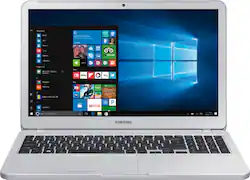
Samsung - Notebook 5 15.6" Laptop - AMD Ryzen 5 - 8GB Memory - 1TB Hard Drive - Light Titan
- Key Specs
- Screen Size: 15.6 inches (Size of the screen, measured diagonally from corner to corner.)
- Screen Resolution: 1920 x 1080 (Full HD) (Screens come in a range of resolutions (measured in pixels, horizontal x vertical). The higher the resolution, the greater the picture quality.)
- Touch Screen: false (Touch-screen devices make navigating more intuitive. Using a touch-screen display, you can do things such as tap to select, hold and drag to move items, swipe to scroll, and pinch to zoom.)
- Storage Type: HDD
- Total Storage Capacity: 1000 gigabytes
- System Memory (RAM): 8 gigabytes (Random-access memory (RAM) is a computing device's short-term data storage, which allows active information to be accessed quickly. The size and type of RAM determines how efficiently the device can handle large amounts of information at one time. For example, gaming or video editing requires more RAM for optimal performance.)
- Backlit Keyboard: false (Integrated lights allow for visibility of the keys in low-light conditions.)
- General
- Product Name: Notebook 5 15.6" Laptop - AMD Ryzen 5 - 8GB Memory - 1TB Hard Drive
- Brand: Samsung
- Model Number: NP550XTA-K01US
- Display
- Screen Size: 15.6 inches (Size of the screen, measured diagonally from corner to corner.)
- Screen Resolution: 1920 x 1080 (Full HD) (Screens come in a range of resolutions (measured in pixels, horizontal x vertical). The higher the resolution, the greater the picture quality.)
- Touch Screen: false (Touch-screen devices make navigating more intuitive. Using a touch-screen display, you can do things such as tap to select, hold and drag to move items, swipe to scroll, and pinch to zoom.)
- Processor
- Processor Brand: AMD
- Processor Model Number: 2500U
- Storage
- Storage Type: HDD
- Total Storage Capacity: 1000 gigabytes
- Hard Drive Capacity: 1000 gigabytes (The amount of data that can be stored on the device's mechanical hard drive. Hard disk drives (HDDs) typically have larger capacities than solid state drives (SSDs) but may have slower speeds.)
- Hard Drive Interface: SATA (Connects the hard drive to the host system for transferring data between the hard disk cache and system memory. IDE and SATA interfaces are primarily used for personal computing, while larger servers and workstations typically use SAS or SCSI.)
- Hard Drive RPM: 5400 revolutions per minute (A hard drive's data is stored on disks, or platters, that spin while transferring information to the host system. The higher the RPM, the faster the hard drive's performance.)
- Hard Drive Accelerator: None (A module integrated (or added) into a PC to improve performance speed. By acting as a high-speed cache, an accelerator speeds up access times to the hard drive, which results in faster web browsing, improved gaming experience, and overall more responsiveness.)
- Memory
- System Memory (RAM): 8 gigabytes (Random-access memory (RAM) is a computing device's short-term data storage, which allows active information to be accessed quickly. The size and type of RAM determines how efficiently the device can handle large amounts of information at one time. For example, gaming or video editing requires more RAM for optimal performance.)
- Type of Memory (RAM): DDR4 SDRAM (Each type of RAM delivers a different level of speed, bandwidth, energy efficiency and performance.)
- Connectivity
- Headphone Jack: true (The device features an interface that allows for the connection of headphones.)
- Ethernet Card: 10/100/1000 (Also known as an Ethernet adapter, this card plugs into a computer's motherboard and enables it to access an Ethernet network. Ethernet data transmission speeds are measured in Mbps (megabits per second) and Gbps (gigabits per second). For example, a 10/100 Ethernet port transmits 10 and 100 Mbps, while a 10/100/1000 Ethernet port transmits 10 and 100 Mbps and has a maximum speed of 1000 Mbps (1 Gbps).)
- Power
- Battery Cells: 3-cell
- Camera
- Front-Facing Camera: true
- Features
- Backlit Keyboard: false (Integrated lights allow for visibility of the keys in low-light conditions.)
- Speaker Type: Speakers
- Dimensions
- Product Height: 0.8 inches (The out of box height of the item. Height is measured as the vertical distance from the bottom of the item to the top as it would be primarily used or placed.)
- Product Width: 14.9 inches (The out of box width of the item. Width is measured as the horizontal distance from one side of the item to the other as it would be primarily used or placed.)
- Product Depth: 9.8 inches (The out of box depth of the item. Depth is measured as the distance from the front of the item to the back as it would be primarily used or placed.)
- Certifications Listings & Approvals
- ENERGY STAR Certified: true (Devices carrying the ENERGY STAR service mark, such as computer products and peripherals, kitchen appliances, and other products, generally use 20% to 30% less energy than required by federal standards.)
- EPEAT Qualified: false (The Electronic Product Environmental Assessment Tool (EPEAT) was designed to provide an environmental assessment tool for purchasers. In order to qualify for EPEAT, a product must meet all 23 required criteria.)
- Included
- Included Software: Samsung Update Plus, Samsung Recovery Solution, Message, Gallery, Samsung Settings and Wi-Fi Transfer
- Numeric Keypad: true
- Warranty
- Manufacturer's Warranty - Parts: 1 year
- Manufacturer's Warranty - Labor: 1 year
- Other
- UPC: 887276276656
Balance style and comfort with this Samsung 15.6-inch notebook. The slim design makes it easy to carry around, while an Intel Core i7 processor handles a huge range of tasks. An NVIDIA MX150 graphics card makes this Samsung 15.6-inch notebook ideal for heavy-duty working or simply streaming your favorite shows.
- 15.6" Full HD display: The 1920 x 1080 resolution boasts impressive color and clarity. Energy-efficient LED backlight.
- Ryzen 5: Enjoy high application performance and smoother gaming experiences with AMD Ryzen™ 5 processors, with machine intelligence, multitasking capabilities and efficient architecture with up to 4 cores and 8 processing.
- 8GB system memory for advanced multitasking: Substantial high-bandwidth RAM to smoothly run your games and photo- and video-editing applications, as well as multiple programs and browser tabs all at once.
- 1TB hard drive for ample file storage space: Holds a sizeable collection of digital photos, music, HD videos and DVD-quality movies. 5400 rpm spindle speed for standard read/write times.
- AMD Radeon Vega 8: Integrated graphics chipset with shared video memory provides solid image quality for Internet use, movies, basic photo editing and casual gaming.
- Built-in speakers: SoundAlive makes auto adjustments to the sound quality to optimize your audio experience.
- Weighs 4.3 lbs. and measures 0.8" thin: Thin and light design with DVD/CD drive omitted for improved portability. 3-cell lithium-ion battery.
- HDMI output expands your viewing options: Connect to an HDTV or high-def monitor to set up two screens side by side or just see more of the big picture.
- Next-generation wireless connectivity: Connects to your network or hotspots on all current Wi-Fi standards. Connect to a Wireless-AC router for speed nearly 3x faster than Wireless-N. The Fast Ethernet LAN port also plugs into wired networks.
- Additional port: Headphone/microphone combo jack.
Whats Included
- Samsung Notebook 5 550XTAI
- 3-cell battery
- Power adapter
Q: IS THE MEMORY UP GRADEABLE AND HOW MUCH.
A: No not really. See my review here: https://youtu.be/KW9jc_8-9fM as I show the internals. It has 8GB, of which 4GB appears to be integrated into the motherboard. There is only one SO-DIMM slot visible. In CPU-Z it only registers one memory slot as well. The only thing you can do in terms of an upgrade is add an M.2 SATA SSD. The stock HDD is fine for data, but it is pathetically slow for the OS. It appears the M.2 slot does not support NVMe. I can find no documentation on this, but I tried a 960 Pro in the M.2 slot and it was not recognized in the BIOS or in Windows.
A: yes
A: Press down on the lower portion of the port opening and it will bend far enough without damage while you insert the connector.
A: No, you can ONLY replace the 4GB stick with a 8GB stick for a total of 12GB of max possible ram. Confirmed with samsung support. I really wouldn't recommend this laptop, check out my review under reviews for the product.
Q: Does the keys or keyboard have the ability to light up?
A: Nope. Very unfortunate. That is a feature I missed seeing on this one. After many years of using a backlit keyboard it kind of sucks to not have that.
A: I chose an 860 Evo 1tb and have not looked back.
Q: Will this laptop be good enough to make music on Ableton Live 9 Suite?
A: Yes this laptop is able to run ableton live. It can run Adobe Premere Pro for a baseline
Q: Can you use stylus pen with this laptop?
A: Unfortunately no. The screen is just standard. Uhd however not touch screen.












