iPhone Wireless Keyboard
-
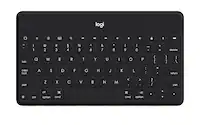
Logitech - Keys-To-Go 2 Slim Portable Bluetooth Keyboard for iPad, iPhone, Mac, and Apple TV With Built-in Cover - Graphite
SKU: J7H7ZYGTTZThis is the best user-friendly keyboard. Easy setup and it works great with my iPad....Best product!Highly recommended Best and quick service by best buy
See all Tablet KeyboardsProduct Description
A slim, wireless Bluetooth keyboard in graphite with a built-in cover, compatible with Apple devices.Your price for this item is $79.99 -
Logitech - Keys-To-Go 2 Slim Portable Bluetooth Keyboard for iPad, iPhone, Mac, and Apple TV With Built-in Cover - Pale Gray
SKU: J7H7ZYGTT6Great for iPads!...Great portable keyboard for use with an iPad when wanting to work on documents of length....It’s great and light and intuitive.
See all Tablet KeyboardsProduct Description
A slim, pale gray Bluetooth keyboard with built-in cover and scissor keys for comfortable, portable typing.Your price for this item is $79.99 -
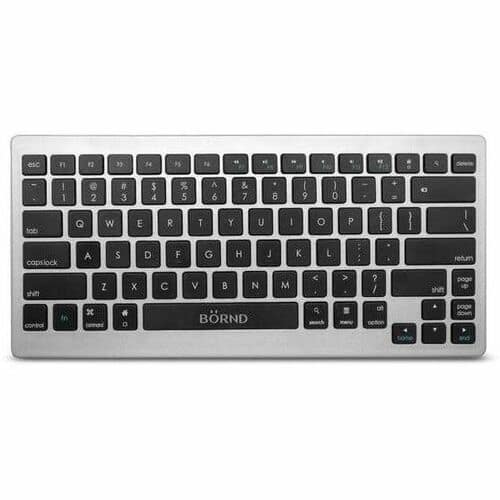
Bornd - B33 Wireless Connectivity Bluetooth 3 39 ft Keyboard, Scissors Keyswitch - Silver
SKU: J3ZPK8CQPYSee all Wireless & Bluetooth KeyboardsProduct Description
A compact silver wireless keyboard featuring Bluetooth connectivity and scissors keyswitches for smooth, quiet typing.Your price for this item is $34.99 -
Clicks - Keyboard for Apple iPhone 14 Pro Max - BumbleBee
SKU: J3R84S5HCTSecond, it would be great if the system could recognize when you swipe down on the screen to initiate...I really love the look and feel of the case and keyboard....I love it!
See all iPhone CasesProduct Description
A vibrant yellow physical keyboard case that adds real keys and iOS shortcuts to your iPhone 14 Pro Max.Your price for this item is $135.99Save $23The previous price was $159.00 -
Clicks - Keyboard for Apple iPhone 15 Pro Max - London Sky
SKU: J3G5T9PF2KBest Case Ever! Having The Keyboard Added To The Bottom Gives So Much More Room On The Screen!...Love this! I have missed phones having full, tactile keyboards.
See all iPhone CasesProduct Description
A blue physical keyboard case offering real keys and iOS shortcuts for your iPhone 15 Pro Max.Your price for this item is $95.99Save $63The previous price was $159.00 -
Clicks - Keyboard for Apple iPhone 14 Pro - BumbleBee
SKU: J3G5T9PFJVlove it...and it does make my phone huge but it’s always in my hand or my purse so it doesnt bother me much. love...I love CLICKS KEYBOARD!!...I love the tactile feedback of a physical keyboard....A few...
See all iPhone CasesProduct Description
A yellow physical keyboard case that adds real keys and iOS shortcuts to your iPhone 14 Pro.Your price for this item is $111.99Save $27The previous price was $139.00 -
Clicks - Keyboard for Apple iPhone 16 Pro - Spice
SKU: J3R84S5Q4VSee all iPhone CasesProduct Description
An ergonomic orange keyboard case with aluminum and faux leather, offering shortcut keys and MagSafe compatibility.Your price for this item is $104.99Save $34The previous price was $139.00 -
Clicks - Keyboard for Apple iPhone 15 Pro Max - BumbleBee
SKU: J3G5T9PF29Great...I love it, its a great case if you can get over the size of it, it fits in most of my pockets aside from...Great Keyboard...Keyboard is great. Very satisfying. Helps with accuracy. Large phone...
See all iPhone CasesProduct Description
A vibrant yellow physical keyboard case offering real keys and iOS shortcuts for enhanced iPhone productivity.Your price for this item is $79.99Save $79The previous price was $159.00 -
Clicks - Keyboard for Apple iPhone 15 Pro - Miami Beach
SKU: J3R84S5QPLCan honestly say this keyboard case is GREAT!...Love my Clicks!!...I love how the keyboard makes my phone look.
See all iPhone CasesProduct Description
A vibrant Miami Beach-colored physical keyboard case offering real keys and iOS shortcuts for iPhone 15 Pro.Your price for this item is $76.99Save $62The previous price was $139.00 -
Clicks - Keyboard for Apple iPhone 15 Plus - Miami Beach
SKU: J3R84S5QQ6Best productivity hack of my 2024...I love my new phone case and I received so many compliments on it and even demonstrated how it works
See all iPhone CasesProduct Description
A vibrant Miami Beach blue physical keyboard case that adds real keys and iOS shortcuts to your iPhone.Your price for this item is $135.99Save $23The previous price was $159.00




Best Sellers




Related Pages



FAQ
Most iPhone wireless keyboards use Bluetooth technology, making them compatible with a wide range of iPhone models running iOS 9.0 or later. Always check the product specifications for exact compatibility.
To connect, turn on your wireless keyboard and enable Bluetooth on your iPhone. In your iPhone’s Bluetooth settings, select the keyboard from the list of available devices and follow the on-screen pairing instructions.
Yes, a wireless keyboard can be used with most apps that support text input, such as Notes, Messages, Mail, and many productivity apps.
Most wireless keyboards are either powered by replaceable batteries or have a built-in rechargeable battery. Refer to the product details to see which power option your chosen keyboard uses.
Yes, many wireless keyboards support keyboard shortcuts for iOS, such as copy, paste, and switching between apps. Some keyboards also offer dedicated function keys for media controls and brightness adjustment.