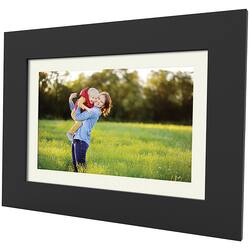
SimplySmart Home - PhotoShare Friends and Family Smart Frame 8" - Black
- General
- Product Name: PhotoShare Friends and Family Smart Frame 8"
- Brand: SimplySmart Home
- Model Number: FSM08BL
- Color: Black
- Dimensions
- Product Width: 9.4 inches (The out of box width of the item. Width is measured as the horizontal distance from one side of the item to the other as it would be primarily used or placed.)
- Product Height: 7 inches (The out of box height of the item. Height is measured as the vertical distance from the bottom of the item to the top as it would be primarily used or placed.)
- Product Depth: 0.98 inches (The out of box depth of the item. Depth is measured as the distance from the front of the item to the back as it would be primarily used or placed.)
- Imaging
- Image Resolution (Display): 1920 x 1080 (Refers to the number of pixels, both horizontally and vertically, used to either capture an image or display it. The higher the resolution the finer the image details.)
- Compatibility
- Memory Card Compatibility: Secure Digital High Capacity (SDHC) (The type of memory card(s) recommended for use with the product.)
- Interface(s): Micro-USB Type A (Refers to the types of connections that devices use to interact and communicate with each other.)
- Minimum System Requirements: Android 1.5 Cupcake, Windows 10, Apple iOS, Not Applicable
- Operating System Compatibility: Apple iOS, Android
- Features
- Screen Size: 8 inches (Size of the screen, measured diagonally from corner to corner.)
- Built-in Storage: 8 gigabytes
- Other
- UPC: 858299008340
The Simply Smart Home PhotoShare Friends and Family Smart Digital Picture Frame is simply the best way to share and enjoy your favorite memories with all your loved ones. Using the free PhotoShare Frame app (iOS and Android), up to 50 photos can be sent to up to 10 different frames at once, making is a snap to share your memories with your entire network of family and friends. For added flexibility, photos may also be sent through email, a link to Facebook or other photo sharing accounts. Instantly share moments that connect your loved ones together anytime, from anywhere in the world - so you'll never feel apart. This smart digital photo frame has an internal memory that will hold over 5,000 high resolution photos, plus it accepts both SD Cards and USB sticks for extended memory. Share life as it happens and get your photos out of your phone and into your daily life.
- Instantly and securely send photos: Instantly and securely send photos from phone to frames with the free PhotoShare Frame App. Select a frame, choose the photos you love, and Send!
- High-definition touchscreen: WiFi smart frame with high-definition touchscreen display brings photos to life with striking color and brilliance.
- Share your frame ID: Share your frame ID with all your friends and family so they can send you photos anytime, from anywhere.
- Easy Setup: Set-up so easy, anyone can do it! Simply plug in your frame, connect to WiFi, and download the app to begin sharing and enjoying your favorite memories.
- PhotoShare Frame App: Send photos to friends and family in two taps with the free PhotoShare Frame App (available for both iOS and Android).
- Beautiful Wood Frame: Beautiful wood frame fits perfectly with your home décor. Customizable with included mattes to match your personal style.
- Many ways to share: Many ways to share! App, Email, from your PC, Facebook link, Google Photos and more.
- Built-in light sensor: Built-in light sensor automatically adjusts screen brightness to match lighting in room.
- Auto-rotate: Auto-rotate feature allows frame to be displayed in landscape or portrait mode.
- Internal memory: Internal memory will hold over 5,000 high-resolution photos.
A: There is an extra white matte border for the frame that you can swap out. It's included in the bottom of the box & can be easily overlooked.
A: I don't see why not... In fact, it's a good idea and I can't believe I didn't think of it!
A: Yes, it does a slideshow.
A: Hi! The frame has an automatic slideshow that will shuffle through all photos or it can be set to show just a subset or even a single photo if you like.
Q: Does this have the motion sensor feature so that it saves energy when no one is in the room?
A: Hello! The frame has a light sensor and will automatically adjust the screen brightness to match the ambiance of the room. This is especially nice in a bedroom or living room so when it is dark and you are sleeping or watching a movie, it will display a dim clock so the screen won't distract or disrupt you. It is not motion sensitive.
A: Yes, this frame comes with a QuickStart Guide, a black matte, a white matte, an AC plug adapter, a USB cable, and a stand. I believe you can download a more detailed user manual from the SimplySmart Home website. This is a pretty easy frame to operate though. No, it is not battery operated. To open the back panel, just flip the frame over and you'll see four wide flat screws that hold the housing to the frame. You can easily loosen each one with a coin to remove the panel. You need to remove the back panel in order to swap out the matte frames (if you want to do that). Hope this helps!



















